
三、计算机网络:数据如何在网络中传输
3.1 OSI 七层模型 vs TCP/IP 四层模型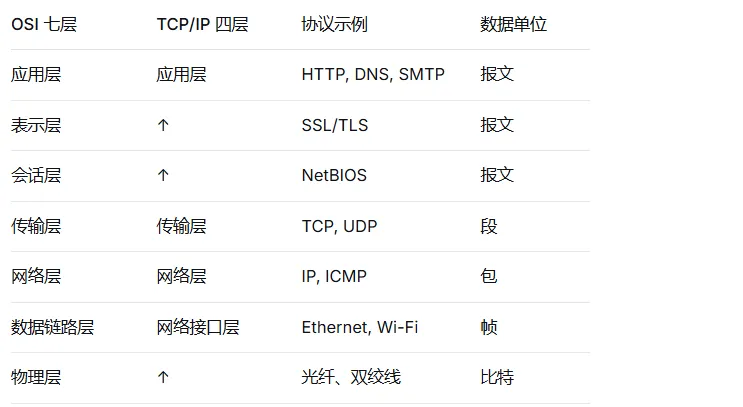
3.2 HTTP 协议深度解析
HTTP 请求结构
POST /api/users HTTP/1.1                    ← 请求行
Host: example.com                           ← 请求头
User-Agent: Mozilla/5.0
Content-Type: application/json
Content-Length: 27
                                            ← 空行
{ "name": "张三", "age": 25 }               ← 请求体
HTTP 响应结构
HTTP/1.1 200 OK                            ← 状态行
Content-Type: application/json
Content-Length: 52
Cache-Control: max-age=3600
                                            ← 空行
{ "id": 1, "name": "张三", "age": 25 }      ← 响应体
HTTP 状态码分类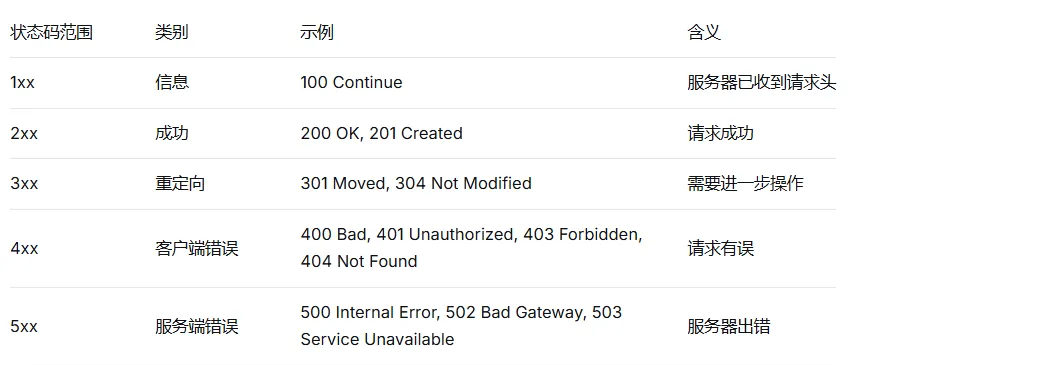
// 在实际代码中正确处理 HTTP 状态码
async function fetchUser(id) {
    const response = await fetch(`/api/users/${id}`);

    switch (response.status) {
        case 200:
            return await response.json();
        case 404:
            throw new Error("用户不存在");
        case 401:
            // 跳转到登录页
            window.location.href = '/login';
            throw new Error("未授权");
        case 500:
            throw new Error("服务器错误,请稍后重试");
        default:
            throw new Error(`未知错误:${response.status}`);
    }
}
HTTP 方法语义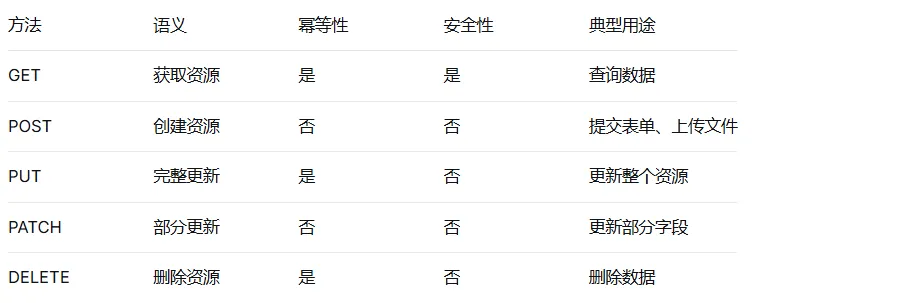
3.3 HTTPS:HTTP + 加密
HTTPS 通过 TLS/SSL 协议在 HTTP 和 TCP 之间增加加密层。
// HTTPS 握手过程简化版
// 1. 客户端发送 "Client Hello"(支持的加密算法、随机数)
// 2. 服务器返回 "Server Hello"(选择算法、服务器随机数 + 证书)
// 3. 客户端验证证书 → 生成预主密钥 → 用服务器公钥加密发送
// 4. 双方使用预主密钥生成会话密钥
// 5. 后续通信使用会话密钥对称加密

// 在 Node.js 中创建 HTTPS 服务器
const https = require('https');
const fs = require('fs');

const options = {
    key: fs.readFileSync('private-key.pem'),
    cert: fs.readFileSync('certificate.pem')
};

https.createServer(options, (req, res) => {
    res.writeHead(200);
    res.end('Hello HTTPS!');
}).listen(443);
3.4 TCP 三次握手与四次挥手
三次握手(建立连接)
客户端                                    服务器
   |                                        |
   |-------- SYN (seq=x) -------->          |  1. 客户端发送 SYN
   |                                        |
   |<----- SYN+ACK (seq=y, ack=x+1) ---|  2. 服务器回复 SYN+ACK
   |                                        |
   |-------- ACK (ack=y+1) -------->       |  3. 客户端回复 ACK
   |                                        |
// 用伪代码模拟三次握手
function threeWayHandshake() {
    // 1. 客户端:我想连接你,这是我的初始序号 100
    const clientSeq = 100;
    send("SYN", clientSeq);

    // 2. 服务器:好的,这是我的初始序号 500,并确认收到你的 100
    const serverSeq = 500;
    send("SYN+ACK", serverSeq, clientSeq + 1);

    // 3. 客户端:确认收到你的 500
    send("ACK", serverSeq + 1);

    // 连接建立,可以发送数据了
}
四次挥手(断开连接)
客户端                                    服务器
   |                                        |
   |-------- FIN (seq=u) --------->        |  1. 客户端发送 FIN
   |                                        |
   |<-------- ACK (ack=u+1) ---------|    2. 服务器回复 ACK
   |                                        |
   |<-------- FIN (seq=v) ----------|     3. 服务器发送 FIN
   |                                        |
   |-------- ACK (ack=v+1) -------->       |  4. 客户端回复 ACK
   |                                        |
3.5 输入 URL 到页面显示的完整过程
这是面试中最高频的问题,理解这个过程就能串联起大部分网络知识:
1. 用户在浏览器输入 URL:https://www.example.com/index.html

2. 浏览器解析 URL
   - 协议: https
   - 域名: www.example.com
   - 路径: /index.html

3. DNS 解析(域名 → IP 地址)
   - 浏览器缓存 → 操作系统缓存 → hosts 文件 → 本地 DNS 服务器
   - 本地 DNS 递归查询根域名服务器 → 顶级域名服务器 → 权威域名服务器
   - 获取 IP 地址,例如 93.184.216.34

4. 浏览器与服务器建立 TCP 连接(三次握手)

5. TLS 握手(如果是 HTTPS)

6. 浏览器发送 HTTP 请求
   GET /index.html HTTP/1.1
   Host: www.example.com
   User-Agent: Mozilla/5.0
   ...

7. 服务器处理请求并返回响应
   HTTP/1.1 200 OK
   Content-Type: text/html
   ...

8. 浏览器接收响应,解析 HTML

9. 解析过程中遇到外部资源(CSS、JS、图片),重复步骤 2-7

10. 浏览器构建 DOM 树和 CSSOM 树

11. 合并生成渲染树

12. 布局(计算每个节点的位置和大小)

13. 绘制(将像素绘制到屏幕上)
3.6 网络开发实用技巧
// 1. 请求重试(处理网络波动)
async function fetchWithRetry(url, maxRetries = 3) {
    for (let i = 0; i < maxRetries; i++) {
        try {
            const response = await fetch(url);
            if (response.ok) return response;
        } catch (error) {
            console.log(`第 ${i + 1} 次尝试失败`);
            if (i === maxRetries - 1) throw error;
            // 指数退避:1s, 2s, 4s...
            await new Promise(r => setTimeout(r, 1000 * Math.pow(2, i)));
        }
    }
}

// 2. 请求超时控制
function fetchWithTimeout(url, timeout = 5000) {
    return Promise.race([
        fetch(url),
        new Promise((_, reject) =>
            setTimeout(() => reject(new Error('请求超时')), timeout)
        )
    ]);
}

// 3. 请求去重(防止重复请求)
const pendingRequests = new Map();

async function dedupFetch(url) {
    if (pendingRequests.has(url)) {
        return pendingRequests.get(url);
    }

    const promise = fetch(url).finally(() => {
        pendingRequests.delete(url);
    });

    pendingRequests.set(url, promise);
    return promise;
}
