第七部分:完整代码整合
现在把所有部分整合成完整的游戏代码,文件命名为plane_game.py:
import pygame
import sys
import random

# ========== 初始化 ==========
pygame.init()
pygame.font.init()

# ========== 常量定义 ==========
SCREEN_WIDTH = 480
SCREEN_HEIGHT = 700
FPS = 60

# 颜色常量(RGB)
BLACK = (0, 0, 0)
WHITE = (255, 255, 255)
RED = (255, 0, 0)
GREEN = (0, 255, 0)
BLUE = (0, 0, 255)
YELLOW = (255, 255, 0)

# ========== 创建窗口 ==========
screen = pygame.display.set_mode((SCREEN_WIDTH, SCREEN_HEIGHT))
pygame.display.set_caption("飞机大战")
clock = pygame.time.Clock()

# ========== 字体 ==========
font = pygame.font.Font(None, 36)


# ========== 玩家类 ==========
class Player(pygame.sprite.Sprite):
    def __init__(self):
        super().__init__()
        self.image = pygame.Surface((50, 50))
        self.image.fill(BLUE)
        self.rect = self.image.get_rect()
        self.rect.centerx = SCREEN_WIDTH // 2
        self.rect.bottom = SCREEN_HEIGHT - 10

        # 移动速度
        self.speed = 5
        # 移动方向标记
        self.moving_left = False
        self.moving_right = False
        self.moving_up = False
        self.moving_down = False

        # 射击冷却
        self.shoot_delay = 10
        self.shoot_timer = 0

    def update(self):
        # 更新射击冷却
        if self.shoot_timer > 0:
            self.shoot_timer -= 1

        # 移动
        if self.moving_left:
            self.rect.x -= self.speed
        if self.moving_right:
            self.rect.x += self.speed
        if self.moving_up:
            self.rect.y -= self.speed
        if self.moving_down:
            self.rect.y += self.speed

        # 边界限制
        if self.rect.left < 0:
            self.rect.left = 0
        if self.rect.right > SCREEN_WIDTH:
            self.rect.right = SCREEN_WIDTH
        if self.rect.top < 0:
            self.rect.top = 0
        if self.rect.bottom > SCREEN_HEIGHT:
            self.rect.bottom = SCREEN_HEIGHT

    def can_shoot(self):
        return self.shoot_timer <= 0

    def shoot(self):
        if self.can_shoot():
            self.shoot_timer = self.shoot_delay
            return Bullet(self.rect.centerx, self.rect.top)
        return None


# ========== 子弹类 ==========
class Bullet(pygame.sprite.Sprite):
    def __init__(self, x, y):
        super().__init__()
        self.image = pygame.Surface((5, 10))
        self.image.fill(YELLOW)
        self.rect = self.image.get_rect()
        self.rect.centerx = x
        self.rect.bottom = y
        self.speed_y = -8

    def update(self):
        self.rect.y += self.speed_y
        if self.rect.bottom < 0:
            self.kill()


# ========== 敌机类 ==========
class Enemy(pygame.sprite.Sprite):
    def __init__(self):
        super().__init__()
        self.image = pygame.Surface((40, 40))
        self.image.fill(RED)
        self.rect = self.image.get_rect()
        self.rect.x = random.randint(0, SCREEN_WIDTH - self.rect.width)
        self.rect.y = random.randint(-100, -40)
        self.speed_y = random.randint(3, 8)

    def update(self):
        self.rect.y += self.speed_y
        if self.rect.top > SCREEN_HEIGHT:
            self.kill()


# ========== 游戏初始状态 ==========
def init_game():
    """初始化游戏状态"""
    global all_sprites, bullets, enemies, player, score, game_over, enemy_spawn_timer

    # 精灵组
    all_sprites = pygame.sprite.Group()
    bullets = pygame.sprite.Group()
    enemies = pygame.sprite.Group()

    # 创建玩家
    player = Player()
    all_sprites.add(player)

    # 游戏变量
    score = 0
    game_over = False
    enemy_spawn_timer = 0


# ========== 主函数 ==========
def main():
    global all_sprites, bullets, enemies, player, score, game_over, enemy_spawn_timer

    init_game()
    running = True

    while running:
        # ---------- 1. 事件处理 ----------
        for event in pygame.event.get():
            if event.type == pygame.QUIT:
                running = False

            # 键盘按下
            if event.type == pygame.KEYDOWN:
                if event.key == pygame.K_LEFT:
                    player.moving_left = True
                if event.key == pygame.K_RIGHT:
                    player.moving_right = True
                if event.key == pygame.K_UP:
                    player.moving_up = True
                if event.key == pygame.K_DOWN:
                    player.moving_down = True

                # 发射子弹
                if event.key == pygame.K_SPACE and not game_over:
                    bullet = player.shoot()
                    if bullet:
                        all_sprites.add(bullet)
                        bullets.add(bullet)

                # 重新开始
                if event.key == pygame.K_r and game_over:
                    init_game()

            # 键盘释放
            if event.type == pygame.KEYUP:
                if event.key == pygame.K_LEFT:
                    player.moving_left = False
                if event.key == pygame.K_RIGHT:
                    player.moving_right = False
                if event.key == pygame.K_UP:
                    player.moving_up = False
                if event.key == pygame.K_DOWN:
                    player.moving_down = False

        # ---------- 2. 游戏逻辑更新(仅在未结束时) ----------
        if not game_over:
            # 生成敌机
            enemy_spawn_timer += 1
            if enemy_spawn_timer >= 40:
                enemy_spawn_timer = 0
                enemy = Enemy()
                all_sprites.add(enemy)
                enemies.add(enemy)

            # 更新所有精灵
            all_sprites.update()

            # 子弹击中敌机
            hits = pygame.sprite.groupcollide(bullets, enemies, True, True)
            score += len(hits) * 10

            # 玩家与敌机碰撞
            if pygame.sprite.spritecollide(player, enemies, False):
                game_over = True

        # ---------- 3. 绘制 ----------
        # 清屏
        screen.fill(BLACK)

        # 绘制所有精灵
        all_sprites.draw(screen)

        # 绘制分数
        score_text = font.render(f"Score: {score}", True, WHITE)
        screen.blit(score_text, (10, 10))

        # 游戏结束显示
        if game_over:
            text = font.render("GAME OVER - Press R to restart", True, RED)
            text_rect = text.get_rect(center=(SCREEN_WIDTH//2, SCREEN_HEIGHT//2))
            screen.blit(text, text_rect)

        # 刷新屏幕
        pygame.display.flip()

        # 控制帧率
        clock.tick(FPS)

    pygame.quit()
    sys.exit()


if __name__ == "__main__":
    main()
第八部分:游戏测试与调试
8.1 运行游戏
在终端中执行:
python plane_game.py
控制方式:
方向键:移动飞机
http://yvyus.cn
空格键:发射子弹
R键:游戏结束后重新开始
8.2 常见问题与解决方法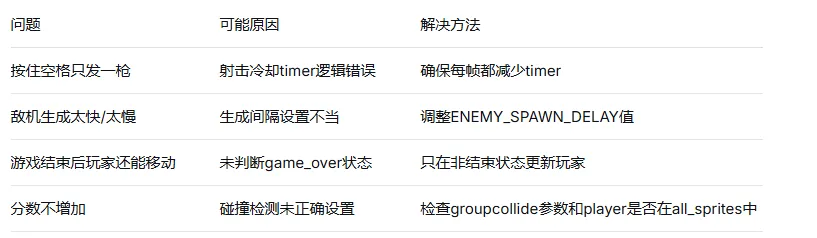
第九部分:扩展功能
9.1 添加图像(替换矩形)
准备三张图片:player.png(玩家飞机)、enemy.png(敌机)、bullet.png(子弹),放到项目同目录下。
修改精灵类的init方法:
class Player(pygame.sprite.Sprite):
    def __init__(self):
        super().__init__()
        # 加载图片,convert_alpha()可提高绘制速度并保留透明背景
        self.image = pygame.image.load("player.png").convert_alpha()
        self.rect = self.image.get_rect()
        # ...其他代码
9.2 添加爆炸效果
class Explosion(pygame.sprite.Sprite):
    def __init__(self, center):
        super().__init__()
        self.images = []  # 动画帧列表
        # 创建多个爆炸图形模拟动画
        for size in range(1, 6):
            surf = pygame.Surface((size * 8, size * 8))
            surf.fill((255, 100, 0))
            self.images.append(surf)
        self.index = 0
        self.image = self.images[self.index]
        self.rect = self.image.get_rect(center=center)

    def update(self):
        self.index += 1
        if self.index >= len(self.images):
            self.kill()
        else:
            self.image = self.images[self.index]
9.3 添加背景滚动效果
class Background:
    def __init__(self):
        self.bg_image = pygame.Surface((SCREEN_WIDTH, SCREEN_HEIGHT))
        # 在背景上画星星
        for _ in range(100):
            x = random.randint(0, SCREEN_WIDTH)
            y = random.randint(0, SCREEN_HEIGHT)
            pygame.draw.circle(self.bg_image, WHITE, (x, y), 1)
        self.bg_y1 = 0
        self.bg_y2 = -SCREEN_HEIGHT

    def update(self):
        self.bg_y1 += 2
        self.bg_y2 += 2
        if self.bg_y1 >= SCREEN_HEIGHT:
            self.bg_y1 = -SCREEN_HEIGHT
        if self.bg_y2 >= SCREEN_HEIGHT:
            self.bg_y2 = -SCREEN_HEIGHT

    def draw(self, screen):
        screen.blit(self.bg_image, (0, self.bg_y1))
        screen.blit(self.bg_image, (0, self.bg_y2))
9.4 添加难度梯度
随着分数增加,敌人生成速度加快、敌机速度增加:
# 计算当前难度系数
difficulty = min(score // 500, 3)  # 最大难度系数3
enemy_spawn_delay = max(20, 40 - difficulty * 5)  # 40 → 35 → 30 → 25
enemy_speed = random.randint(3, 8 + difficulty)    # 敌机更快
游戏开发是一个迭代的过程,可以先实现基础功能,再逐步添加特效。希望你能通过这个项目掌握Pygame开发的核心技能,并创造出属于自己的游戏作品!