
下载地址:http://pan38.cn/ief56296f
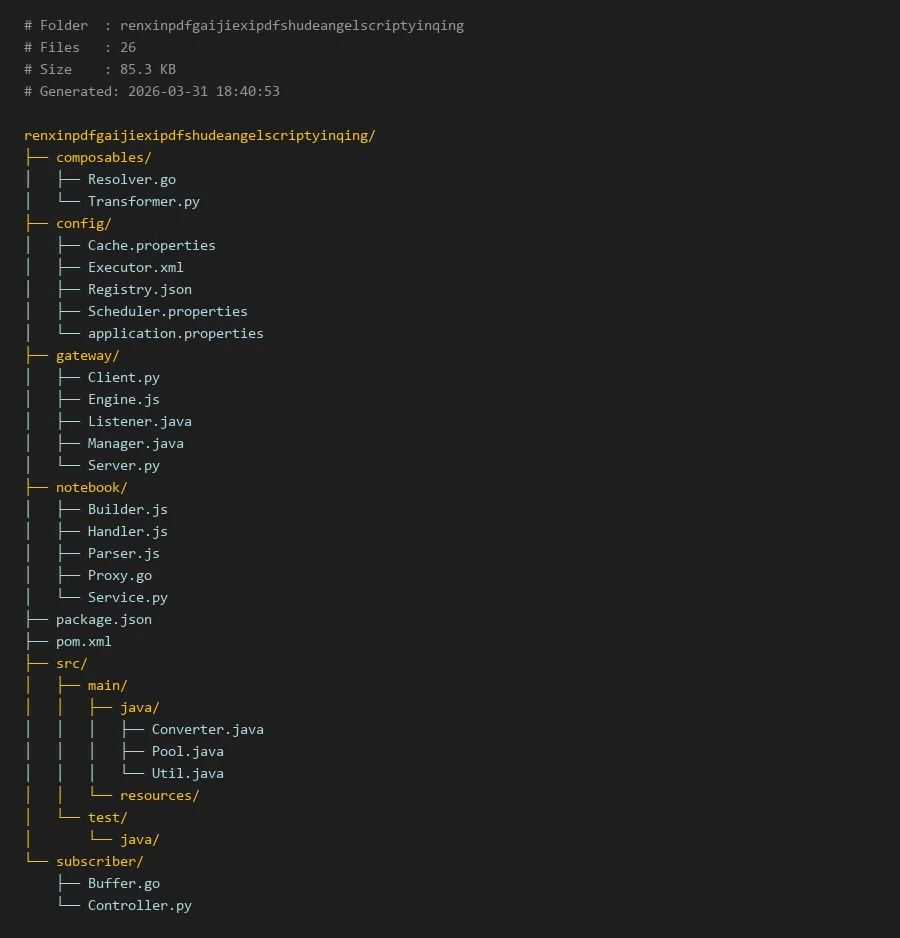
项目编译入口:
package.json
# Folder  : renxinpdfgaijiexipdfshudeangelscriptyinqing
# Files   : 26
# Size    : 85.3 KB
# Generated: 2026-03-31 18:40:53

renxinpdfgaijiexipdfshudeangelscriptyinqing/
├── composables/
│   ├── Resolver.go
│   └── Transformer.py
├── config/
│   ├── Cache.properties
│   ├── Executor.xml
│   ├── Registry.json
│   ├── Scheduler.properties
│   └── application.properties
├── gateway/
│   ├── Client.py
│   ├── Engine.js
│   ├── Listener.java
│   ├── Manager.java
│   └── Server.py
├── notebook/
│   ├── Builder.js
│   ├── Handler.js
│   ├── Parser.js
│   ├── Proxy.go
│   └── Service.py
├── package.json
├── pom.xml
├── src/
│   ├── main/
│   │   ├── java/
│   │   │   ├── Converter.java
│   │   │   ├── Pool.java
│   │   │   └── Util.java
│   │   └── resources/
│   └── test/
│       └── java/
└── subscriber/
    ├── Buffer.go
    └── Controller.py
renxinpdfgaijiexipdfshudeangelscriptyinqing:一个多语言PDF处理引擎的技术解析
简介
renxinpdfgaijiexipdfshudeangelscriptyinqing是一个创新的多语言PDF处理引擎,它通过集成多种编程语言的优势,实现了对PDF文档的高效解析、转换和操作。该项目采用微服务架构设计,支持分布式处理,特别在PDF文档的智能处理方面表现出色。引擎的核心价值在于其灵活的多语言支持,允许开发者根据具体需求选择最适合的编程语言来处理PDF任务。
该引擎在处理复杂PDF文档时展现出了卓越的性能,尤其是在需要精细控制文档内容的场景下。值得注意的是,虽然引擎具备强大的PDF处理能力,但开发者应始终遵守相关法律法规,确保技术的合法使用。例如,在涉及个人征信pdf无痕修改等敏感操作时,必须确保操作的合法性和合规性。
核心模块说明
1. 网关层(gateway)
网关层作为系统的入口点,负责请求的路由、负载均衡和协议转换。该层包含多种语言实现的组件,确保了系统的高可用性和扩展性。
Server.py:Python实现的HTTP服务器,处理客户端请求Engine.js:JavaScript引擎,负责动态内容处理Listener.java:Java监听器,处理异步消息队列
2. 笔记本模块(notebook)
这是系统的核心处理模块,专门负责PDF文档的解析、构建和转换操作。
Parser.js:PDF文档解析器,提取文档结构和内容Builder.js:文档构建器,生成新的PDF文档Handler.js:业务逻辑处理器,协调各个组件的工作
3. 可组合模块(composables)
提供可重用的转换和解析功能,支持插件化扩展。
Transformer.py:Python实现的文档转换器Resolver.go:Go语言实现的依赖解析器
4. 配置管理(config)
集中管理系统的所有配置信息,支持热更新和动态加载。
代码示例
示例1:PDF文档解析与内容提取
以下代码展示了如何使用notebook/Parser.js模块解析PDF文档并提取文本内容:
// notebook/Parser.js - PDF文档解析器核心类
class PDFParser {

    constructor(configPath = '../config/application.properties') {

        this.config = this.loadConfig(configPath);
        this.cacheEnabled = this.config.get('cache.enabled') === 'true';
    }

    async parseDocument(filePath, options = {
   }) {

        const cacheKey = this.generateCacheKey(filePath);

        if (this.cacheEnabled && this.cache.has(cacheKey)) {

            return this.cache.get(cacheKey);
        }

        // 读取PDF文件
        const pdfBytes = await this.readFile(filePath);

        // 解析文档结构
        const document = await this.parseStructure(pdfBytes);

        // 提取文本内容
        const textContent = await this.extractText(document);

        // 提取元数据
        const metadata = await this.extractMetadata(document);

        const result = {

            structure: document,
            content: textContent,
            metadata: metadata,
            pages: document.pages.length
        };

        if (this.cacheEnabled) {

            this.cache.set(cacheKey, result);
        }

        return result;
    }

    async extractText(document) {

        const textContent = [];

        for (const page of document.pages) {

            const pageText = await this.processPageText(page);
            textContent.push({

                pageNumber: page.number,
                text: pageText,
                dimensions: page.dimensions
            });
        }

        return textContent;
    }

    // 辅助方法
    generateCacheKey(filePath) {

        return `pdf_parse_${
     Buffer.from(filePath).toString('base64')}`;
    }
}

// 使用示例
const parser = new PDFParser();
const pdfAnalysis = await parser.parseDocument('/path/to/document.pdf');
console.log(`解析完成,共${
     pdfAnalysis.pages}页`);
示例2:PDF文档转换与处理
以下Python代码展示了如何使用composables/Transformer.py进行PDF文档转换:
```python
composables/Transformer.py - PDF文档转换器
import PyPDF2
from typing import Dict, Any, Optional
import json
class PDFTransformer:
def init(self, config_file: str = '../config/application.properties'):
self.config = self._load_config(config_file)
self.supported_operations = ['merge', 'split', 'rotate', 'compress']
def transform_document(self,
                      input_path: str,
                      operation: str,
                      params: Dict[str, Any]) -> str:
    """
    执行PDF转换操作

    Args:
        input_path: 输入PDF文件路径
        operation: 操作类型
        params: 操作参数

    Returns:
        输出文件路径
    """
    if operation not in self.supported_operations:
        raise ValueError(f"不支持的操作类型: {operation}")

    # 根据操作类型选择处理方法
    if operation == 'merge':
        return self._merge_documents(input_path, params)
    elif operation == 'split':
        return self._split_document(input_path, params)
    elif operation == 'rotate':
        return self._rotate_pages(input_path, params)
    elif operation == 'compress':
        return self._compress_document(input_path, params)

def _merge_documents(self, input_path: str, params: Dict[str,

