
下载地址:http://pan38.cn/ifac85806
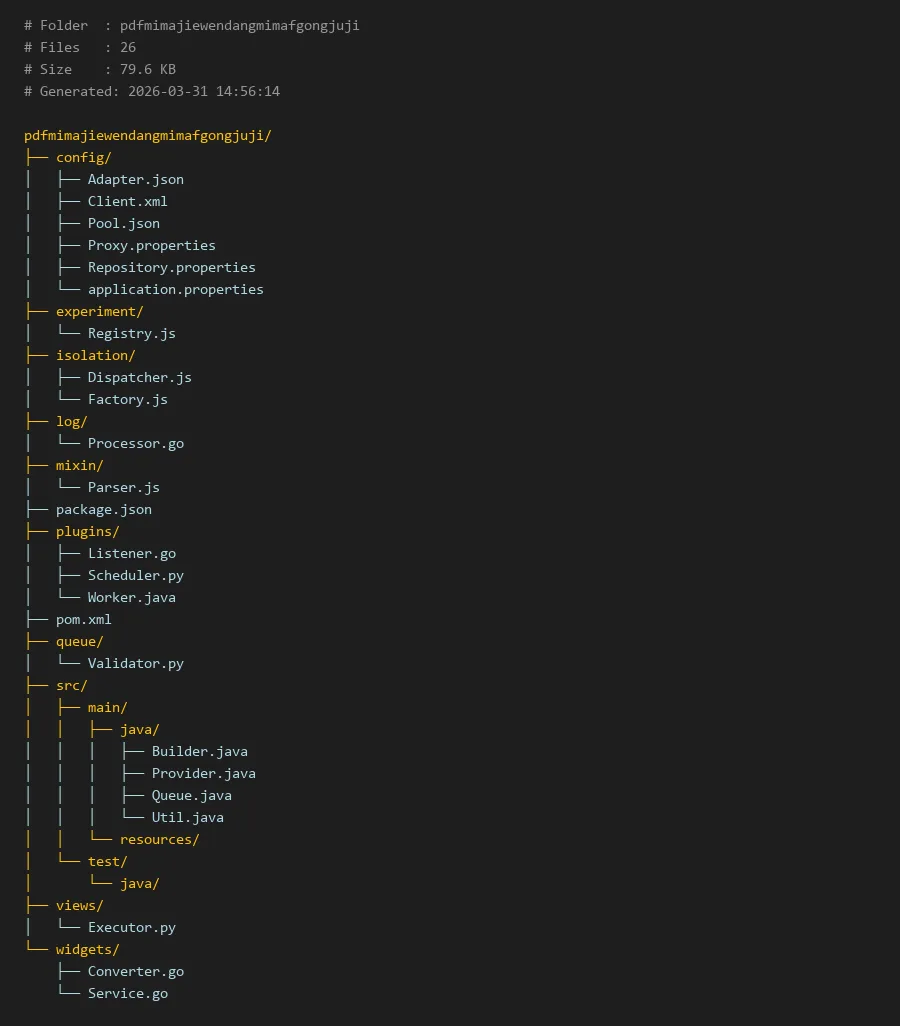
项目编译入口:
package.json
# Folder  : pdfmimajiewendangmimafgongjuji
# Files   : 26
# Size    : 79.6 KB
# Generated: 2026-03-31 14:56:14

pdfmimajiewendangmimafgongjuji/
├── config/
│   ├── Adapter.json
│   ├── Client.xml
│   ├── Pool.json
│   ├── Proxy.properties
│   ├── Repository.properties
│   └── application.properties
├── experiment/
│   └── Registry.js
├── isolation/
│   ├── Dispatcher.js
│   └── Factory.js
├── log/
│   └── Processor.go
├── mixin/
│   └── Parser.js
├── package.json
├── plugins/
│   ├── Listener.go
│   ├── Scheduler.py
│   └── Worker.java
├── pom.xml
├── queue/
│   └── Validator.py
├── src/
│   ├── main/
│   │   ├── java/
│   │   │   ├── Builder.java
│   │   │   ├── Provider.java
│   │   │   ├── Queue.java
│   │   │   └── Util.java
│   │   └── resources/
│   └── test/
│       └── java/
├── views/
│   └── Executor.py
└── widgets/
    ├── Converter.go
    └── Service.go
pdfmimajiewendangmimafgongjuji:一个高效的PDF密码处理工具集
简介
在数字化办公和文档处理中,加密的PDF文件常常成为数据流转的障碍。手动输入密码不仅效率低下,在批量处理时更是几乎不可行。pdfmimajiewendangmimafgongjuji 项目应运而生,它是一个专注于PDF文档密码处理的工具集,旨在通过自动化的方式解决这一痛点。该项目采用模块化设计,融合了多种编程语言的优势,提供了从密码尝试、队列管理到结果验证的完整流水线。其核心目标之一,就是实现一键强制去掉pdf密码,让用户能够高效地处理受保护的PDF文档,无论是单个文件还是批量任务。
项目结构清晰,将配置、业务逻辑、插件和资源进行有效隔离,确保了系统的可扩展性和可维护性。通过整合不同的处理器和调度器,它能够适应从简单字典攻击到更复杂策略的各种场景。
核心模块说明
项目的功能分散在几个核心目录中,每个目录承担着特定的职责:
- config/: 存放所有配置文件,包括适配器设置、客户端参数、连接池、代理以及应用主配置。这使得工具的行为可以高度定制,而无需修改代码。
- isolation/: 包含核心的工厂和调度器。
Factory.js负责根据配置实例化不同的处理器,而Dispatcher.js则负责将PDF解密任务分发给可用的工作单元。 - plugins/: 这是项目的“肌肉”,包含了实际执行密码尝试和文件处理的插件。
Worker.java可能是一个核心的密码破解工作器,Scheduler.py负责任务调度,Listener.go则可能监听任务队列或文件系统的变化。 - queue/: 存放任务队列相关的逻辑,
Validator.py很可能用于验证解密后的PDF文件是否有效、完整。 - src/: 项目的主要源代码目录,虽然当前列表未展开,但应包含项目入口和核心业务逻辑的集成代码。
- mixin/, experiment/, log/: 分别提供工具函数、实验性功能和日志处理能力。
这种结构允许开发者轻松替换或增强特定环节。例如,要更换密码生成策略,只需修改 plugins/ 下的对应组件或调整 config/ 中的相关配置。
代码示例
以下示例将展示如何利用项目中的几个关键模块,组装一个简单的一键强制去掉pdf密码的流程。我们假设已经有一个基础的密码字典文件。
首先,查看并修改核心配置文件,定义工作参数:
# config/application.properties
# 定义目标PDF路径和输出目录
target.pdf.dir=/input/pdfs
decrypted.output.dir=/output/pdfs
# 定义使用的密码字典路径
dictionary.file=/config/passwords.txt
# 启用批量处理模式
batch.mode.enabled=true
# 设置最大并发工作线程数
worker.thread.max=4
接下来,我们看一个简化的任务分发器,它来自 isolation/Dispatcher.js,负责读取配置并创建任务:
// isolation/Dispatcher.js (摘要)
const fs = require('fs');
const path = require('path');
const factory = require('./Factory.js');

class Dispatcher {

    constructor(configPath) {

        const config = JSON.parse(fs.readFileSync(configPath, 'utf8'));
        this.inputDir = config.targetPdfDir;
        this.workerPool = factory.createWorkerPool(config.workerThreadMax);
    }

    async dispatch() {

        const files = fs.readdirSync(this.inputDir)
                       .filter(f => f.toLowerCase().endsWith('.pdf'));
        console.log(`发现 ${
     files.length} 个PDF文件待处理。`);

        for (const file of files) {

            const filePath = path.join(this.inputDir, file);
            // 将每个文件作为一个任务提交给工作池
            this.workerPool.submitTask({

                type: 'DECRYPT_PDF',
                filePath: filePath,
                outputDir: this.outputDir
            });
        }
        console.log('所有解密任务已分发完毕,开始执行。');
    }
}

module.exports = Dispatcher;
然后,一个用Java编写的插件 plugins/Worker.java 可能包含核心的解密逻辑。这里使用一个库(如Apache PDFBox)进行演示:
```java
// plugins/Worker.java (摘要)
import org.apache.pdfbox.pdmodel.PDDocument;
import org.apache.pdfbox.pdmodel.encryption.AccessPermission;
import java.io.File;
import java.util.List;
public class Worker {
private List passwordDictionary;
public Worker(List<String> dictionary) {
    this.passwordDictionary = dictionary;
}

public boolean decryptPdf(String encryptedPath, String outputPath) {
    File file = new File(encryptedPath);
    try (PDDocument document = PDDocument.load(file, "")) { // 先尝试无密码
        // 如果没异常,说明文件本来就没密码
        System.out.println("文件未加密: " + encryptedPath);
        return true;
    } catch (Exception e) {
        // 文件已加密,开始尝试字典中的密码
        for (String password : passwordDictionary) {
            try {
                PDDocument doc = PDDocument.load(file, password);
                AccessPermission ap = doc.getCurrentAccessPermission();
                if (ap.canExtractContent()) { // 检查密码是否有效且权限足够
                    doc.setAllSecurityToBeRemoved(true

