
随着企业数据量和数据架构的日益复杂,企业急需寻找更快、更高效、更节省成本的数据管理和分析方法。近年来,现代化数据栈(Modern Data Stack,简称MDS)不断创新发展,受到了广泛的关注。
MDS是什么?
MDS是一系列基于云的数据工具和技术的总称,它们以云数据仓库、数据湖或Lakehouse为核心,实现了数据的存储、处理、分析和可视化。在过去十年里,以Snowflake、AWS Redshift、GCP BigQuery、MaxCompute为代表的云数据仓库迅速发展壮大,并逐渐演变为集数据仓库和数据湖于一体的Lakehouse架构,它们利用大规模并行处理和SQL支持,使得大数据的处理变得更快、更便宜。在此基础上,涌现了许多低代码、易集成、可扩展且经济的云原生数据工具,如Fivetran、Airbyte、dbt、dagster、Looker等。MDS改变了企业数据管理和分析的方式,让数据变得更加有价值。
云器Lakehouse就是在这样的背景下诞生的,它是一个专注于数据的平台,它帮助企业管理数据并充分利用数据,为企业构建现代化数栈MDS提供全新的方案。
现代数据堆栈有哪些关键特征?
- 云优先。MDS基于云,具有更强的可扩展性和弹性,而且可以轻松地与现有的云基础设施集成。
- 以云数据仓库/数据湖/Lakehouse为中心。MDS旨在与Redshift、BigQuery、Snowflake、Databricks、MaxCompute、云器Lakehouse等云数据仓库,以及数据湖和Lakehouse无缝集成。
- 模块化设计。MDS可以防止供应商锁定,为企业提供更大的灵活性和对数据栈的控制权。
- 以SaaS或开源为主。虽然开源是一件好事,但它需要较高的专业水平,因此SaaS的全托管模式更受欢迎。
- 降低门槛。借助MDS,企业内的每个人都可以获取和使用他们需要的数据,而不是将数据局限在某些特定的团队或部门。这有助于实现数据的民主化,并培养企业的数据文化。
传统数据栈与现代化数据堆栈的差别
传统数据栈:
- 需要高技术水平
- 依赖大量基础设施
- 耗费时间
现代化数据栈:
- 打破云和数据的束缚
- 简便易用
- 工具套件适合非技术人员和业务部门使用
- 节约时间
为什么数据堆栈很重要?
“时间就是金钱。”这句老话虽然陈旧,但却是事实,尤其对于数据驱动的公司。数据栈处理原始数据的效率决定了数据分析和数据科学团队获取数据价值的速度。拥有合适的工具是现代化数据栈的关键,也是公司成功的关键。
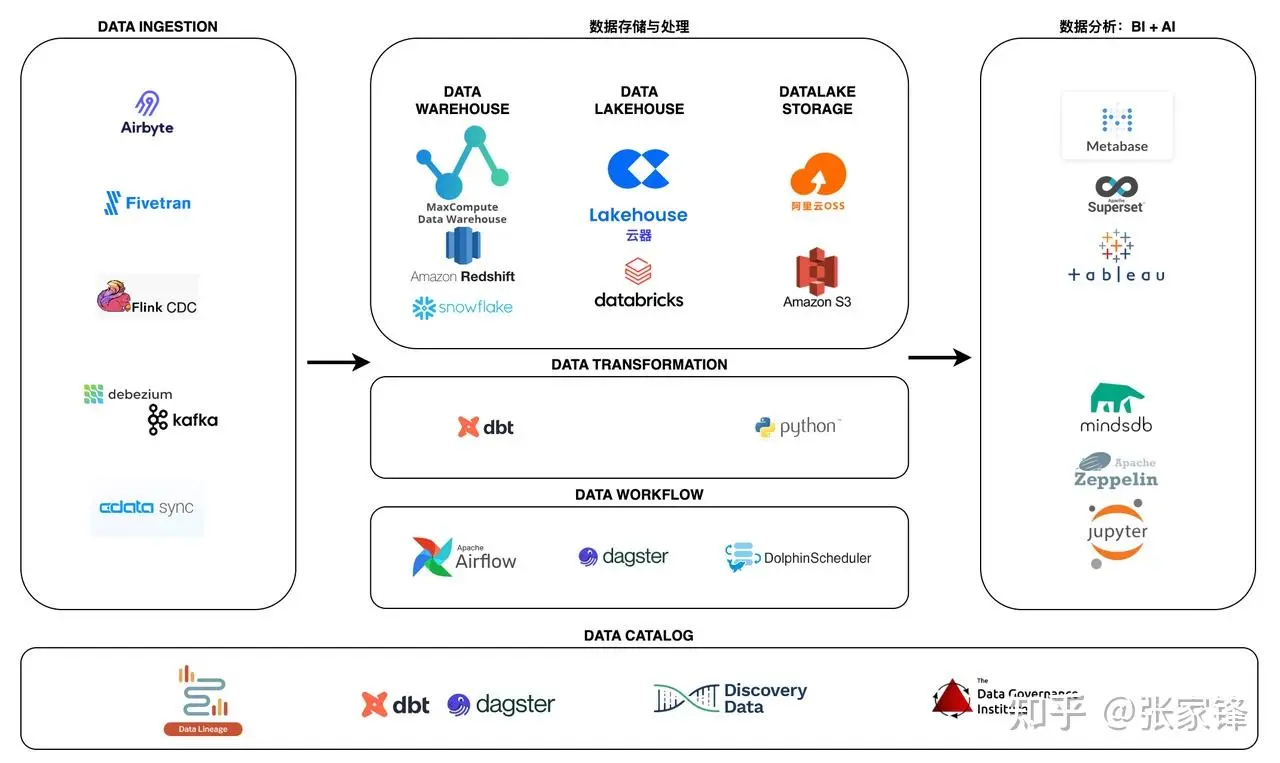
MDS的基本组成部分
要了解 MDS 工具的优势并做出恰当的工具选择,首先需要了解数据平台的各个组件以及为每个组件提供服务的工具的通用功能。
数据平台的基本组件(按照数据流方向)包括:
- 数据摄取(E)
- 数据存储与处理(L,数据仓库/数据湖/Lakehouse)
- 数据转换(T)
- 指标层(Headless BI)
- 商业智能工具
- 逆向ETL
- 编排(工作流引擎)
- 数据管理、质量和治理
从ETL到ELT
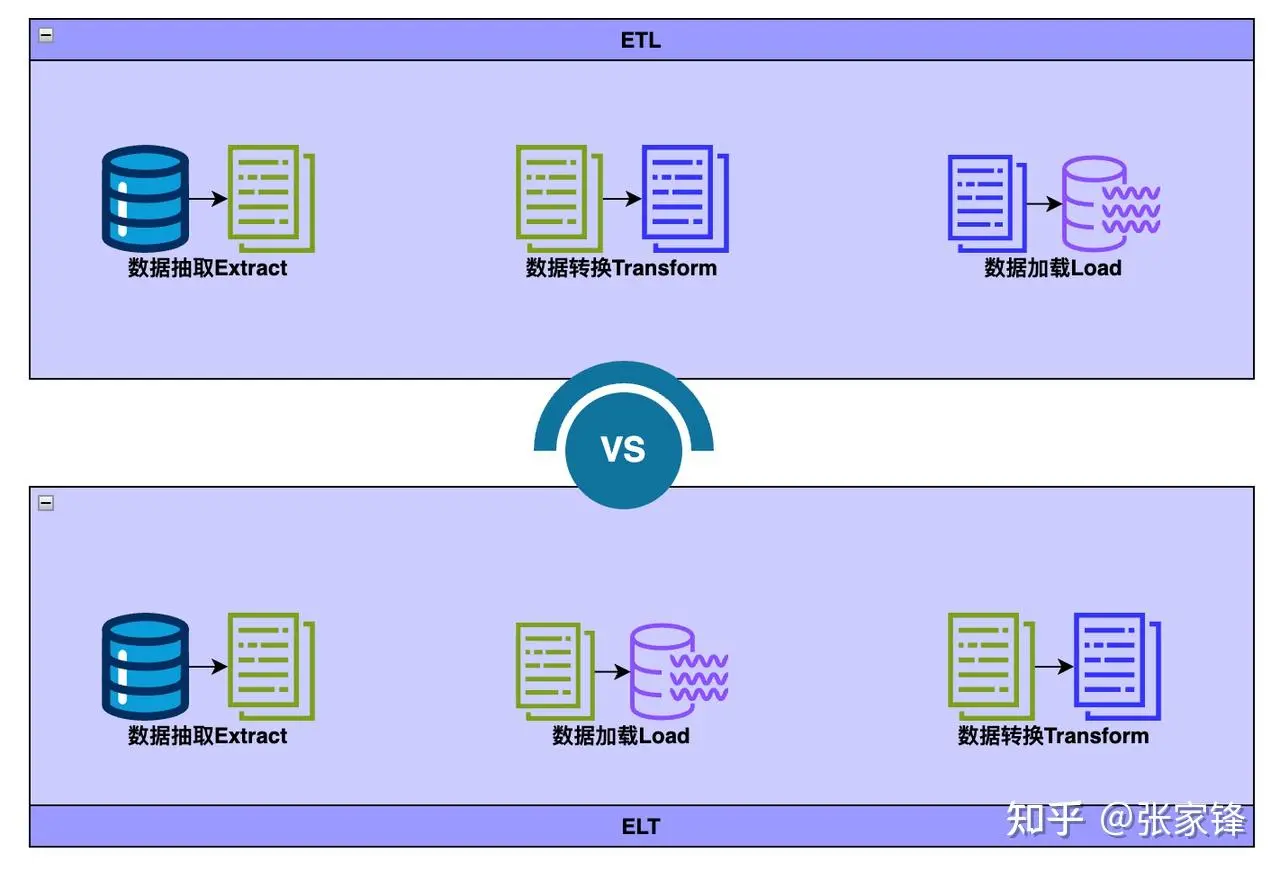
ETL 和 ELT 都描述了将数据集成用于在数据仓库、Lakehouse中进行数据分析、商业智能和数据科学之前清理、丰富和转换来自各种来源的数据的过程。
- Extract抽取是指从 SQL 或 NoSQL 数据库、XML 文件或云平台等源提取数据的过程。
- Transform转换是指转换数据集的格式或结构以匹配目标系统的过程。
- Load加载是指将数据集放入目标系统(数据仓库、Lakehouse)的过程。
ETL
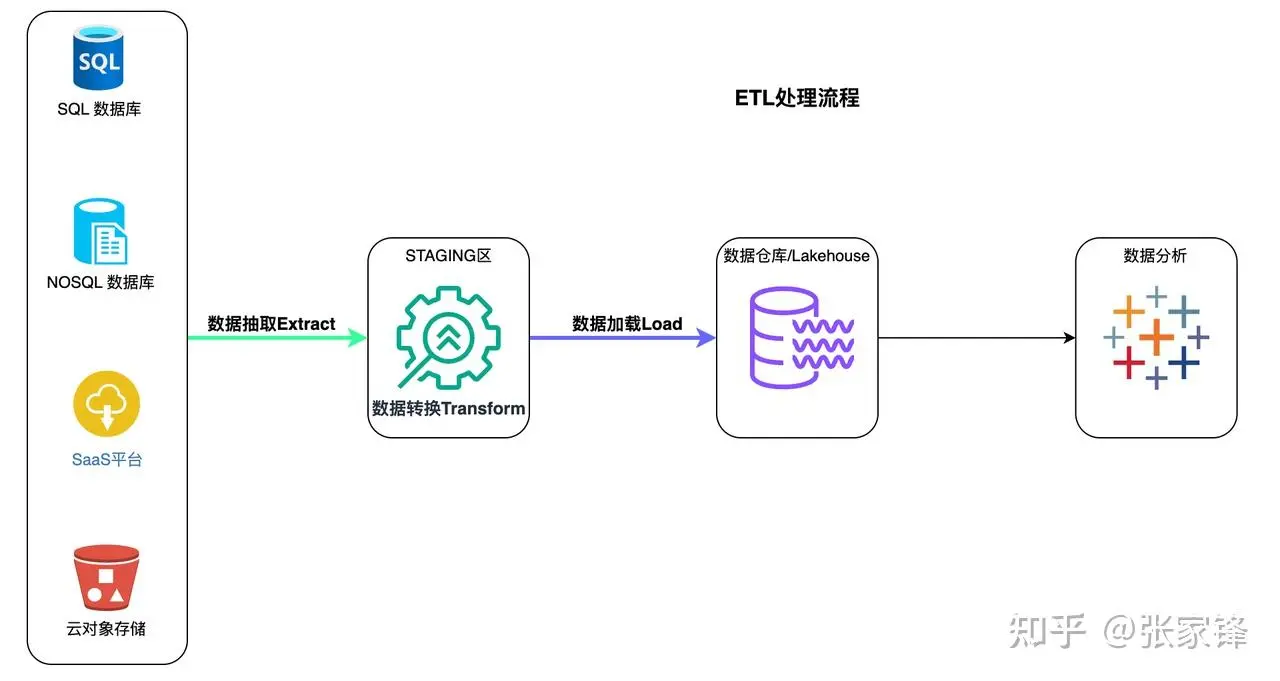
ETL 代表 Extract > Transform > Load
在 ETL 过程中,数据转换是在数据仓库外部的暂存区域中执行的,并且在加载之前必须转换整个数据。因此,转换较大的数据集可能需要很长时间,但一旦 ETL 过程完成,就可以立即进行分析。
ETL流程
- 从源中提取预定的数据子集。
- 数据在暂存区域中以某种方式进行转换,例如数据映射、应用串联或计算。为了应对传统数据仓库的限制,有必要在加载数据之前对其进行转换。
- 数据被加载到目标数据仓库系统中,并准备好由BI 工具或数据分析工具进行分析。
ETL
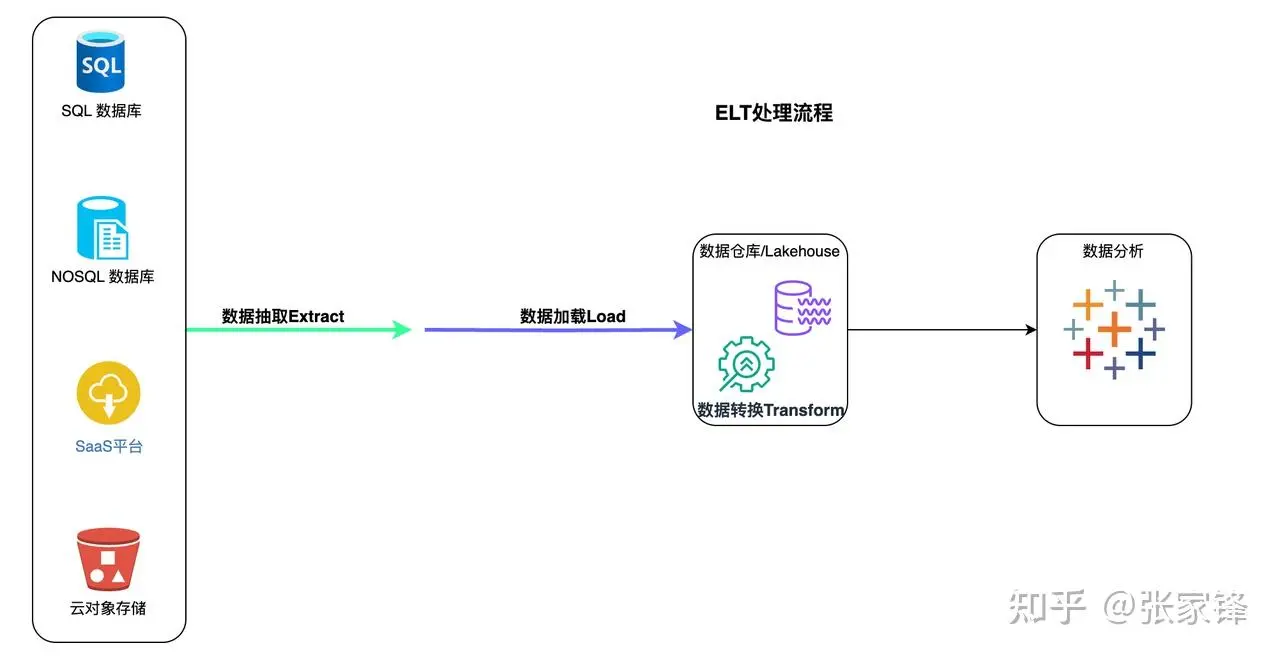
ELT 代表 Extract > Load > Transform
在 ELT 过程中,数据转换是在目标系统本身中根据需要执行的。因此,转换步骤花费的时间很少,但如果云解决方案中没有足够的处理能力,则可能会减慢查询和分析过程。
ELT流程
- 所有数据均从源中提取。
- 所有数据都会立即加载到目标系统( 数据仓库、 Lakehouse)中。这可以包括原始数据、非结构化、半结构化和结构化数据类型。
- 数据在目标系统中进行转换,并准备好由 BI 工具或数据分析工具进行分析
通常,ELT 的目标系统是基于云的数据仓库或 Lakehouse。Amazon Redshift、Snowflake、Databricks 和 云器Lakehouse 等基于云的平台提供近乎无限的存储和强大的处理能力。这允许用户近乎实时地提取和加载他们可能需要的任何和所有数据。云平台可以随时转换任何 BI、分析或预测建模需要的数据。
为什么选择ELT?
- 实时、灵活的数据分析。 用户可以灵活地从任何方向探索完整的数据集,包括实时数据,而无需等待 数据工程师提取、转换和加载更多数据。
- 更低的成本和更少的维护。 ELT 受益于基于云的平台的强大生态系统,该生态系统提供更低的成本和各种存储和处理数据的计划选项。而且,鉴于所有数据始终可用且转换过程通常是自动化且基于云的,ELT 过程通常需要很少的维护。
基于云器Lakehouse构建面向ELT的Modern Data Stack
ELT在MDS中的位置
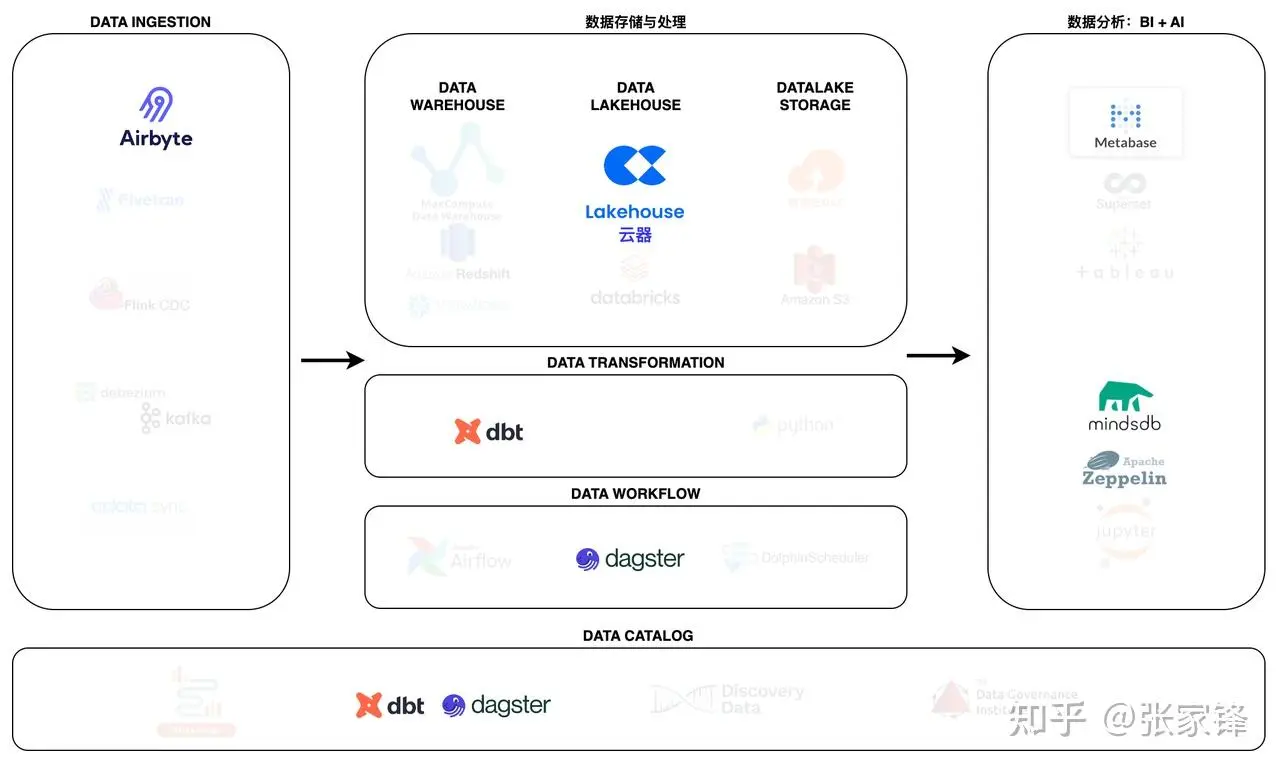
数据摄取-Airbyte
Airbyte是领先的数据集成平台,适用于从 API、数据库和文件到数据仓库、数据湖和Lakehouse的 ETL/ELT 数据管道。
Airbyte 已经为 API、数据库、数据仓库和Lakehouse提供了包含 300 多个连接器,同时开发新的连接器也非常方便,以支持多源著称,特别适合长尾数据源的场景。
数据存储与处理-云器Lakehouse
云器 Lakehouse是一种湖仓架构的全托管数据管理及分析服务。云器 Lakehouse以单一引擎满足数仓构建、数据湖探查分析、离线和实时数据处理与分析、业务报表等场景需求,通过存算分离、Serverless弹性算力、智能优化特性满足企业不同阶段对扩展性、成本和性能需要。内置数据集成、开发与运维、数据资产管理等开通即用服务,极大简化数据开发与管理工作、加速企业数据洞察及价值实现。
数据转换-dbt
dbt 使数据分析师和工程师能够使用与软件工程师构建应用程序相同的实践来转换数据。使用 dbt 的分析师只需编写 select 语句即可转换数据,而 dbt 则负责将这些语句转换为数据仓库中的表和视图。
这些select语句或“模型”形成一个 dbt 项目。模型经常相互构建 - dbt 可以轻松管理模型之间的关系、可视化这些关系,并通过测试确保转换的质量。
dbt通过管理事务、删除表和管理架构更改来避免编写样板DML和*DDL** 。*只需使用 SQL select 语句或返回所需数据集的 Python DataFrame编写业务逻辑,然后 dbt 负责物化。
dbt 生成有价值的元数据来查找长时间运行的查询,并具有对标准转换模型(例如完整或增量加载)的内置支持。
数据工作流-dagster
Dagster 是一个编排器,旨在开发和维护数据资产,例如表、数据集、机器学习模型和报告。
您可以声明要运行的函数以及这些函数生成或更新的数据资产。然后,Dagster 可以帮助您在正确的时间运行您的功能并使您的资产保持最新状态。
Dagster 旨在用于数据开发生命周期的每个阶段 - 本地开发、单元测试、集成测试、暂存环境,一直到生产。
与 dbt 一样,它强制执行最佳实践,例如编写声明性、抽象、幂等和类型检查函数以尽早捕获错误。Dagster 还包括简单的单元测试和方便的功能,使管道可靠、可测试和可维护。它还与 Airbyte 深度集成,允许将数据集成为代码。
ELT处理流程
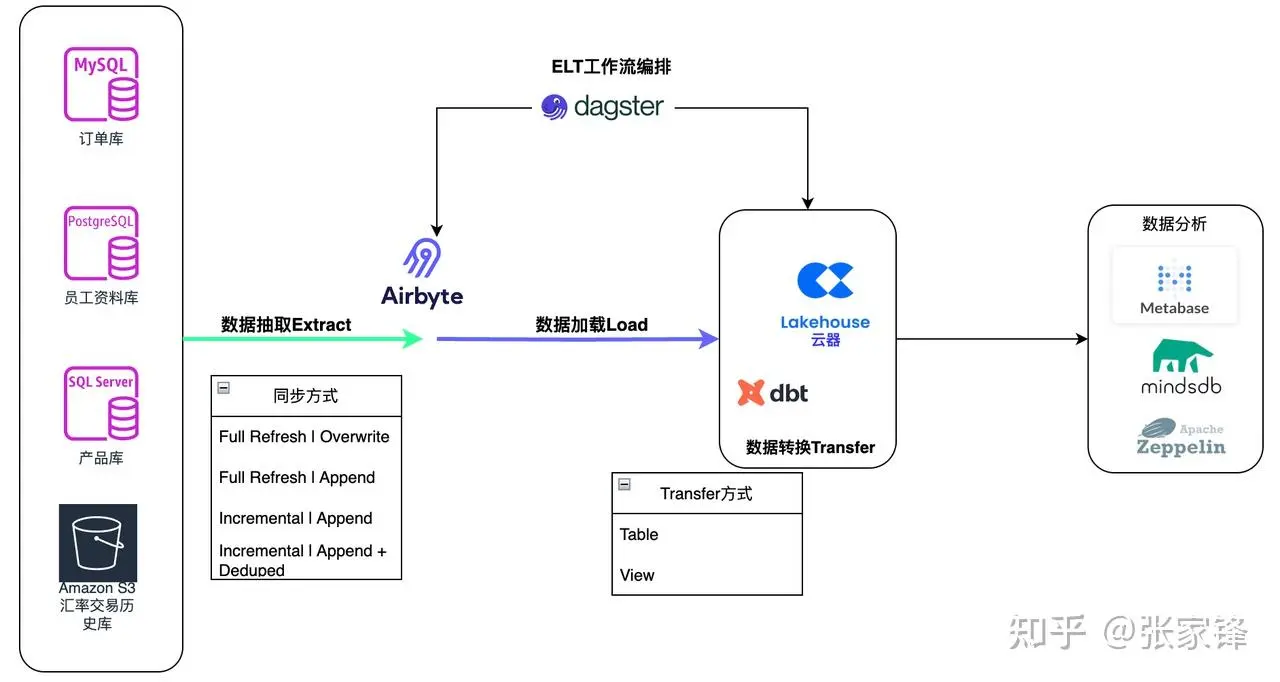
数据抽取与加载(Airbyte)
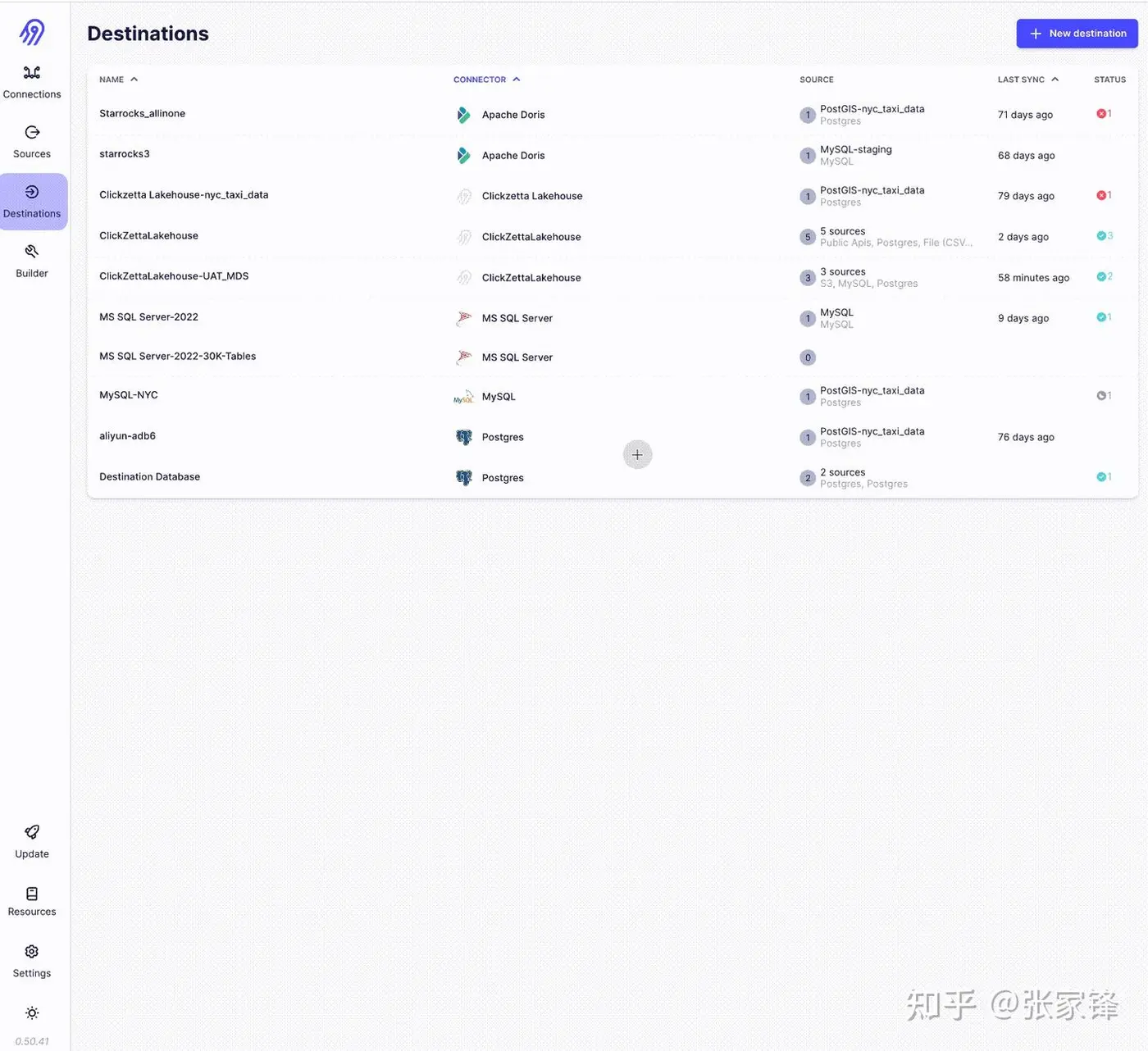
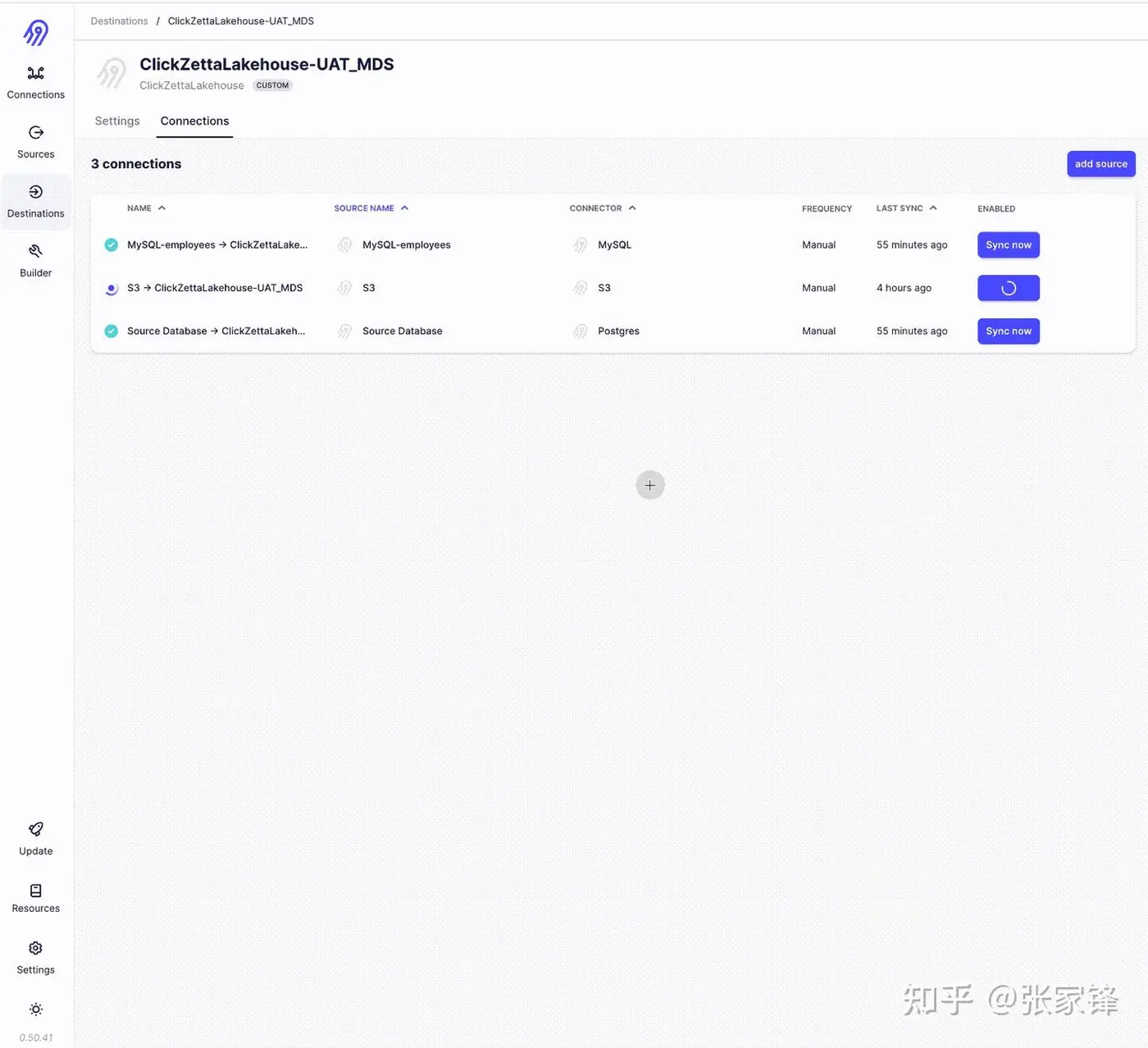
将云器Lakehouse作为Airbyte的Destination Connector
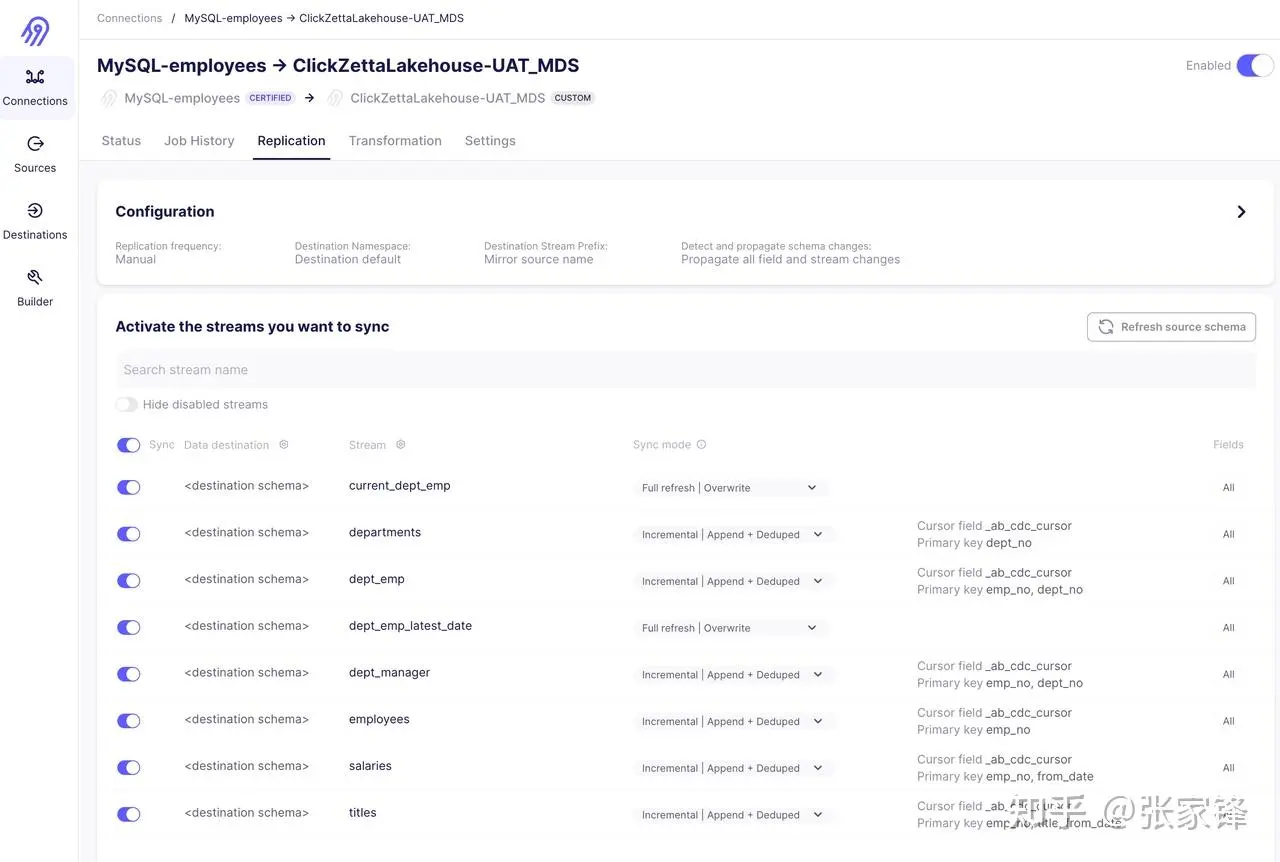
通过Incremental | Append + Deduped方式同步员工资料库
同步S3上Parquert格式的外汇交易历史数据
数据转换(dbt)
配置DBT的profile.yml
这里的target:指向clickzetta_uat,也就是说该项目里的数据转换都是运行在clickzetta_uat上。目标表将会输出到云器Lakehouse的名为ql_ws的workspace下的modern_data_stack schema里。计算资源会使用名为default的vcluster。
mds_dbt:
  target: clickzetta_uat
  outputs:
    mds_source:
      type: postgres
      host: 172.17.1.220
      port: 5432
      user: metabase
      pass: metasample123
      dbname: mds_source
      schema: public
      threads: 2
      keepalives_idle: 0
    clickzetta_uat:
      type: clickzetta
      service: https://uat-api.clickzetta.com
      workspace: ql_ws
      instance: ***
      vcluster: default
      username: ***
      password: ***
      database: ql_ws
      schema: modern_data_stack
      threads: 8
      keepalives_idle: 0
    mysql_employees:
      type: mysql
      server: 172.17.1.220
      port: 3306
      database: employees
      schema: employees
      username: root
      password: metasample123
      driver: MySQL ODBC 8.0 ANSI Driver
      threads: 2
      keepalives_idle: 0
定义DBT的source.yml
version: 2
sources:
  - name: ql_ws
    database: ql_ws
    schema: modern_data_stack
    tables:
      - name: orders
        identifier: _airbyte_raw_orders
        description: "订单表,包含所有订单数据。"
      - name: users
        identifier: _airbyte_raw_users
        description: "用户表,包含用户信息。"
      - name: departments
        identifier: departments
        description: "员工信息,departments table"
      - name: dept_emp
        identifier: dept_emp
        description: "员工信息,dept_emp table"
      - name: dept_manager
        identifier: dept_manager
        description: "员工信息,dept_manager table"
      - name: employees
        identifier: employees
        description: "员工信息,employees table"
      - name: salaries
        identifier: salaries
        description: "员工信息,salaries table"
      - name: titles
        identifier: titles
        description: "员工信息,titles table"
开发DBT的转换模型
DBT会根据SELECT语句生成和文件名一样的目标表或者视图,这个由dbt_prohject
.yml里额配置确认。比如:
models:
mds_dbt:
+materialized: "table"
表示数据转换目标类型为table,而不是view。如果需要生成的是view,需要设置成:
models:
mds_dbt:
+materialized: "view"
以下是数据转换模型:
user_augmented.sql
select
        cast(from_json(_airbyte_data,'struct<index:bigint,user_id:bigint,is_bot:boolean>').index as int) as index,
        cast(from_json(_airbyte_data,'struct<index:bigint,user_id:bigint,is_bot:boolean>').user_id as string) as user_id,
        cast(from_json(_airbyte_data,'struct<index:bigint,user_id:bigint,is_bot:boolean>').is_bot as boolean) as is_bot
from {{ source('ql_ws', 'users') }}
orders_cleaned.sql
select
        cast(from_json(_airbyte_data,'struct<index:bigint,user_id:bigint,order_time:string,order_value:double>').index as int) as index,
        cast(from_json(_airbyte_data,'struct<index:bigint,user_id:bigint,order_time:string,order_value:double>').user_id as string) as user_id,
        cast(from_json(_airbyte_data,'struct<index:bigint,user_id:bigint,order_time:string,order_value:double>').order_time as timestamp) as order_time,
        cast(from_json(_airbyte_data,'struct<index:bigint,user_id:bigint,order_time:string,order_value:double>').order_value as double) as order_value,
from {{ source('ql_ws', 'orders') }}
daily_order_summary.sql
select
        date_trunc('DAY', oc.order_time::timestamp) as order_date,
        sum(oc.order_value) as total_value,
        count(*) as num_orders
from
        {{ ref("orders_cleaned") }} oc
        join
        {{ ref("users_augmented") }} ua
        on oc.user_id = ua.user_id
where not ua.is_bot
group by 1 order by 1
employees_detail_single_view.sql
SELECT  e.emp_no,
        e.birth_date,
        e.first_name,
        e.last_name,
        e.gender,
        e.hire_date,
        d.dept_no,
        d.dept_name,
        m.from_date as dept_manager_from_date,
        m.to_date as dept_manager_to_date,
        de.from_date as dept_emp_from_date,
        de.to_date as dept_emp_to_date,
        t.title,
        t.from_date as title_from_date,
        t.to_date as title_to_date,
        s.salary,
        s.from_date as salary_from_date,
        s.to_date as salary_to_date
FROM {{ source('ql_ws', 'employees') }} e
FULL JOIN {{ source('ql_ws', 'dept_emp') }} de ON e.emp_no = de.emp_no
FULL JOIN {{ source('ql_ws', 'departments') }} d ON de.dept_no = d.dept_no
FULL JOIN {{ source('ql_ws', 'titles') }} t ON e.emp_no = t.emp_no
FULL JOIN {{ source('ql_ws', 'salaries') }} s ON e.emp_no = s.emp_no
FULL JOIN {{ source('ql_ws', 'dept_manager') }} m ON e.emp_no = m.emp_no
order by e.emp_no,d.dept_no,m.from_date desc
定义DBT的schema.yml
version: 2
models:
  - name: daily_order_summary
    description: "Daily metrics for orders placed on this platform."
    columns:
      - name: order_date
        description: "The UTC day for which these orders were aggregated."
        data_type: "date"
      - name: total_value
        description: "The total value of all orders placed on this day."
        data_type: "float"
      - name: num_orders
        description: "The total number of orders placed on this day."
        data_type: "int"
  - name: orders_cleaned
    description: "Filtered version of the raw orders data."
    columns:
      - name: "user_id"
        description: "Platform id of the user that placed this order."
        data_type: "int"
      - name: "order_time"
        description: "The timestamp (in UTC) that this order was placed."
        data_type: "timestamp"
      - name: "order_value"
        description: "The dollar amount that this order was placed for."
        data_type: "float"
  - name: users_augmented
    description: "Raw users data augmented with backend data."
    columns:
      - name: "user_id"
        description: "Platform id for this user."
        data_type: "int"
      - name: "is_spam"
        description: "True if this user has been marked as a fraudulent account."
        data_type: "bool"
  - name: employees_detail_single_view
    description: "将departments, dept_emp,dept_manager,employees,salaries,titles等6张表的数据合并到一张表,形成员工数据统一视图"
    columns:
      - name: "emp_no"
        description: "Unique employee number identifier."
        data_type: "bigint"
        tests:
          - not_null
      - name: "birth_date"
        description: "The birth date of the employee."
        data_type: "date"
        tests:
          - not_null
      - name: "first_name"
        description: "First name of the employee."
        data_type: "string"
        tests:
          - not_null
      - name: "last_name"
        description: "Last name of the employee."
        data_type: "string"
        tests:
          - not_null
      - name: "gender"
        description: "Gender of the employee."
        data_type: "string"
        tests:
          - not_null
      - name: "hire_date"
        description: "The date when the employee was hired."
        data_type: "date"
        tests:
          - not_null
      - name: "dept_no"
        description: "Department number that the employee belongs to."
        data_type: "string"
      - name: "dept_name"
        description: "Name of the department."
        data_type: "string"
      - name: "dept_manager_from_date"
        description: "Start date of the employee's tenure as a department manager."
        data_type: "date"
      - name: "dept_manager_to_date"
        description: "End date of the employee's tenure as a department manager."
        data_type: "date"
      - name: "dept_emp_from_date"
        description: "Start date of the employee's membership in a department."
        data_type: "date"
      - name: "dept_emp_to_date"
        description: "End date of the employee's membership in a department."
        data_type: "date"
      - name: "title"
        description: "Title of the employee's position."
        data_type: "string"
      - name: "title_from_date"
        description: "Start date of the employee's tenure in their current title."
        data_type: "date"
      - name: "title_to_date"
        description: "End date of the employee's tenure in their current title."
        data_type: "date"
      - name: "salary"
        description: "The salary of the employee."
        data_type: "bigint"
        tests:
          - not_null
          - dbt_utils.accepted_range:
              min_value: 0
              max_value: 9999999
      - name: "salary_from_date"
        description: "Start date of the employee's current salary."
        data_type: "date"
      - name: "salary_to_date"
        description: "End date of the employee's current salary period."
        data_type: "date"
DBT debug、compile
dbt debug
dbt compile
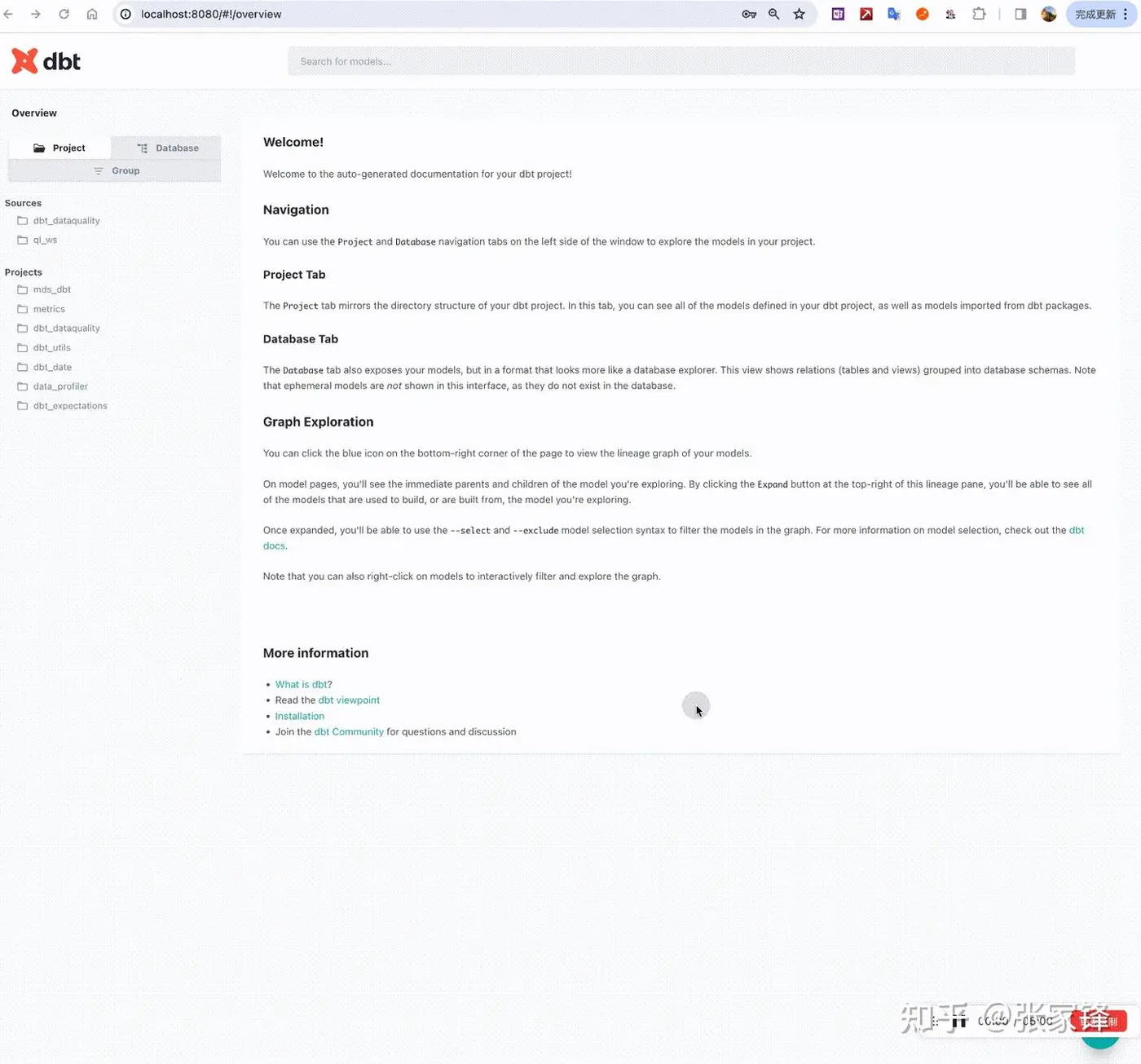
查看数据血缘是否正确
dbt docs generate
dbt docs serve
自动弹开:http://localhost:8080/#!/overview
工作流编排(dagster)
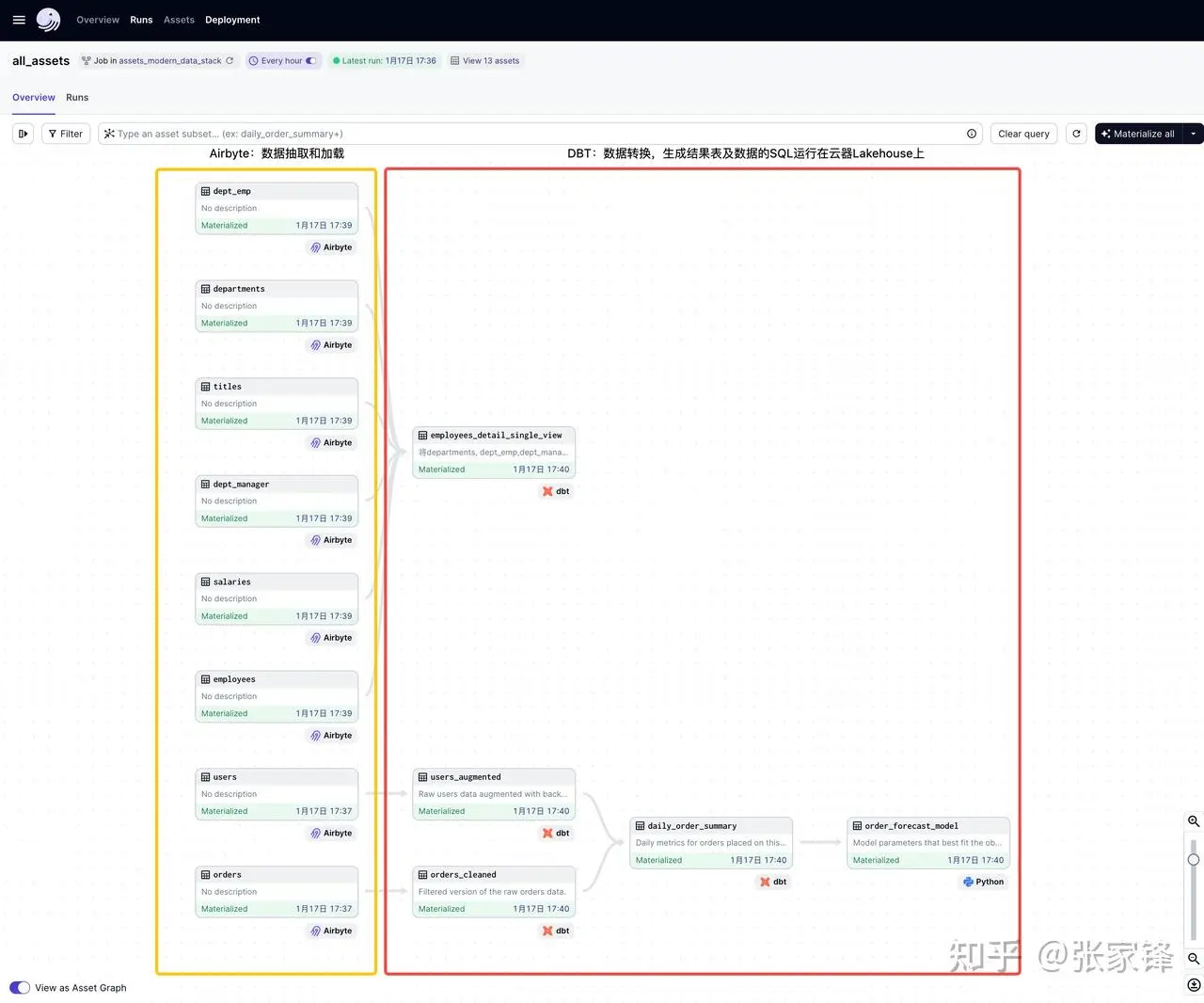
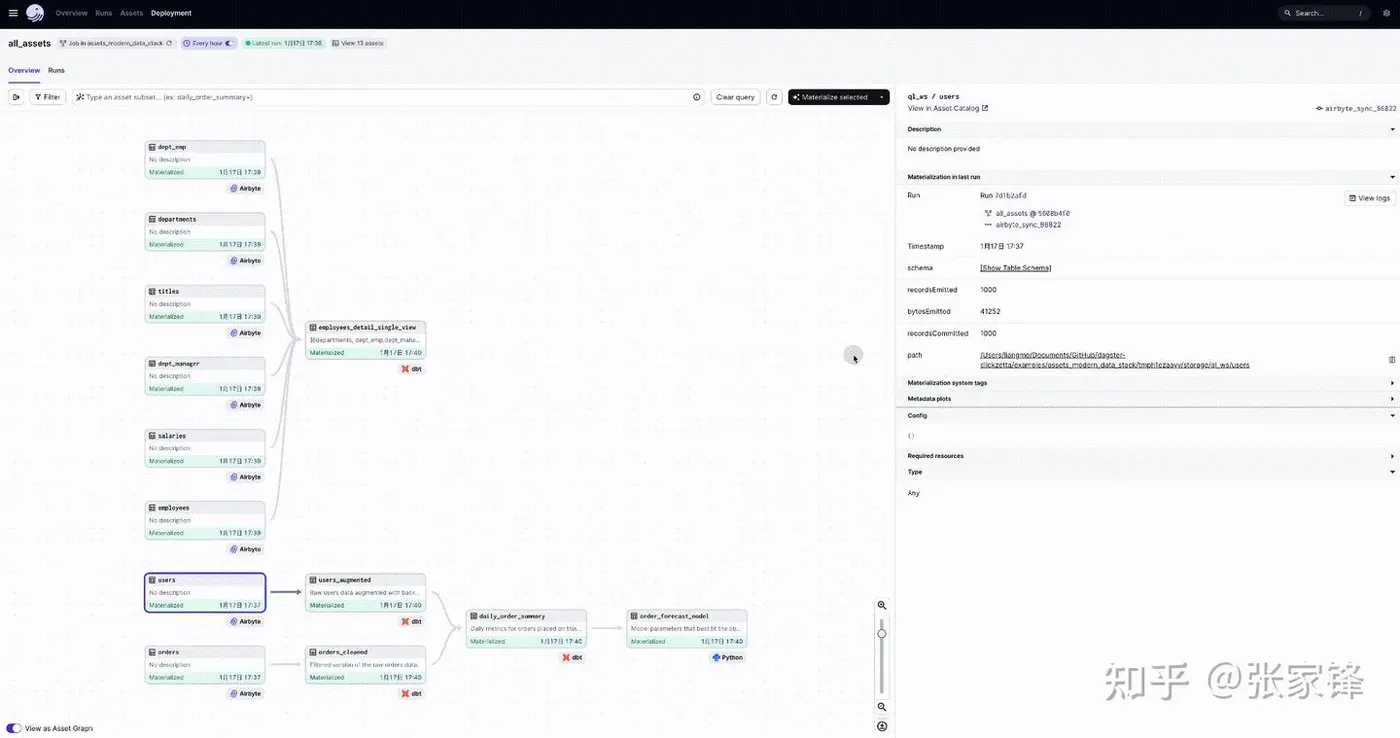
dagster实现了软件定义的、ETL pipeline完整的数据工作流dag图,非常清晰易读:
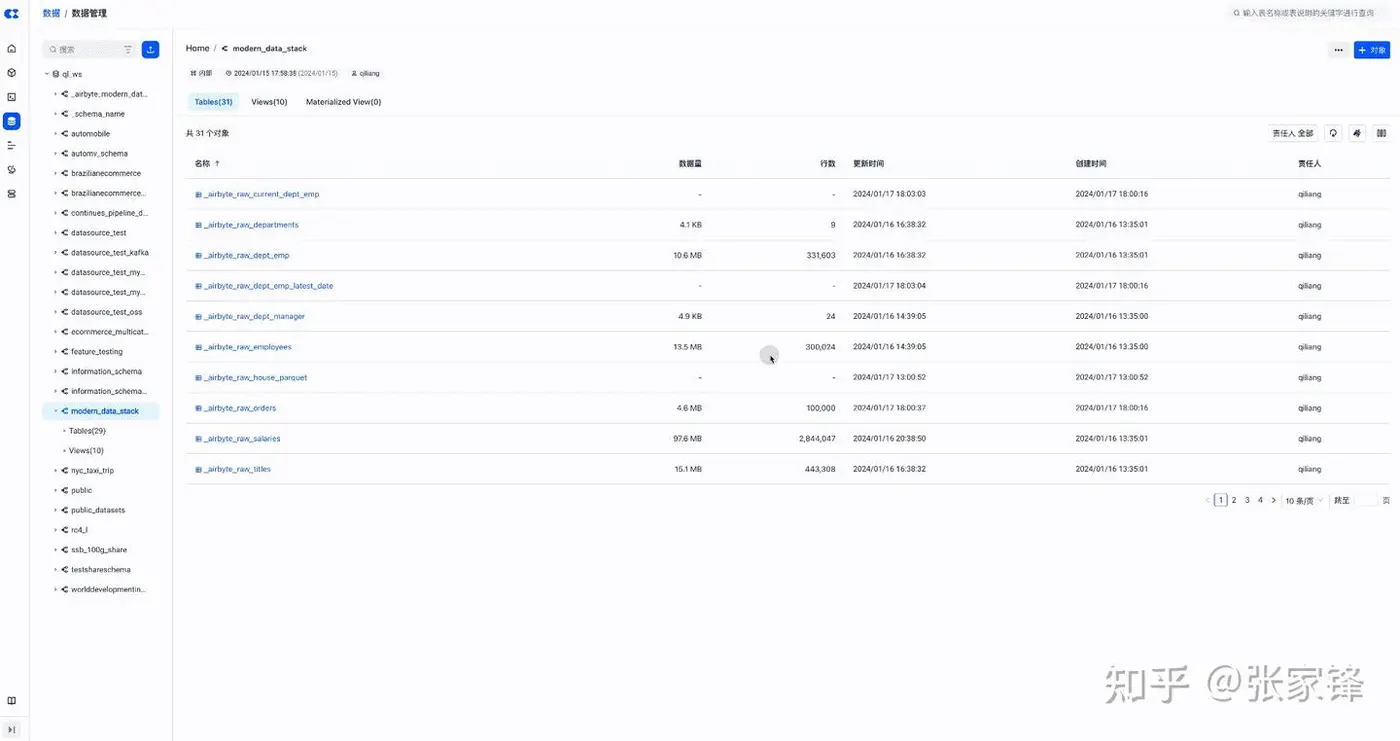
在云器Lakehouse上查看数据转换的目标表
下一步
到目前为止,我们已经回顾了现代化数据栈和传统数据栈之间的区别,并讨论了ETL和ELT的区别,以及如何基于云器Lakehouse、Airbyte、DBT和Dagster构建完整的面向ELT的现代化数据栈。
当数据进入到云器Lakehouse后,下一步就是如何分析数据了

