
OpenClaw的Gateway网关是整个系统的通信核心、会话中枢、任务调度中心与安全入口,一旦网关异常,所有聊天渠道、技能调用、模型交互都会中断。本文以稳定运行为目标,完整说明Gateway工作机制、全平台部署流程、阿里云百炼Coding Plan免费大模型API配置、网关守护与日志监控方案、常见故障一站式排查,所有内容均为实操可落地命令,无复杂术语,适合零基础用户长期稳定使用。
一、Gateway 网关核心作用
Gateway相当于OpenClaw的总控中心,承担四项关键工作:
- 统一接收飞书、Telegram等渠道消息并分发
- 管理会话隔离,确保不同场景上下文不混乱
- 调度Skill执行、文件读写、网络请求等能力
- 记录日志、维护状态、提供Web控制台入口
默认端口:18789
默认绑定:127.0.0.1(本地安全访问)
默认会话重置:每日凌晨4点
二、2026 全平台 OpenClaw 完整部署
2.1 阿里云服务器部署(长期稳定推荐)
阿里云用户零基础部署 OpenClaw 喂饭级步骤流程
第一步:点击打开访问阿里云OpenClaw一键部署专题页面。
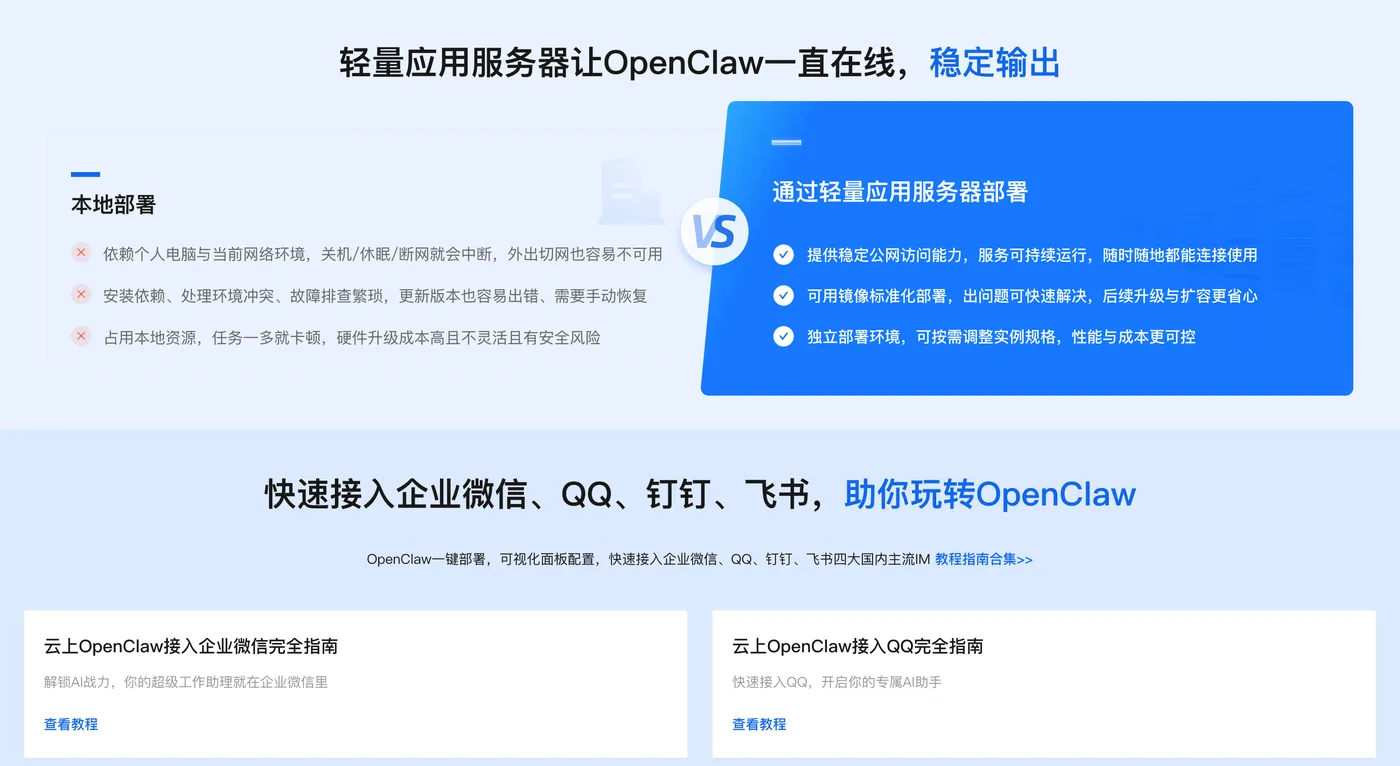

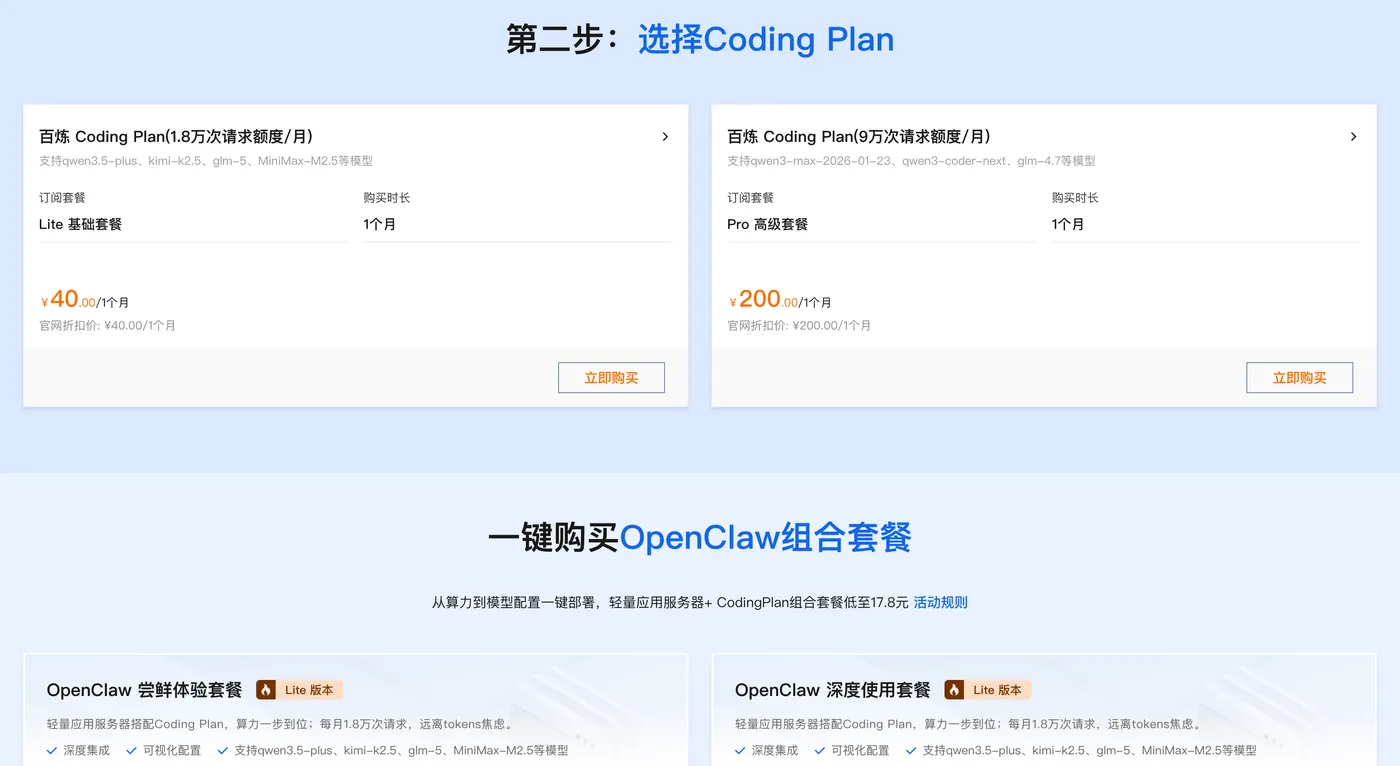
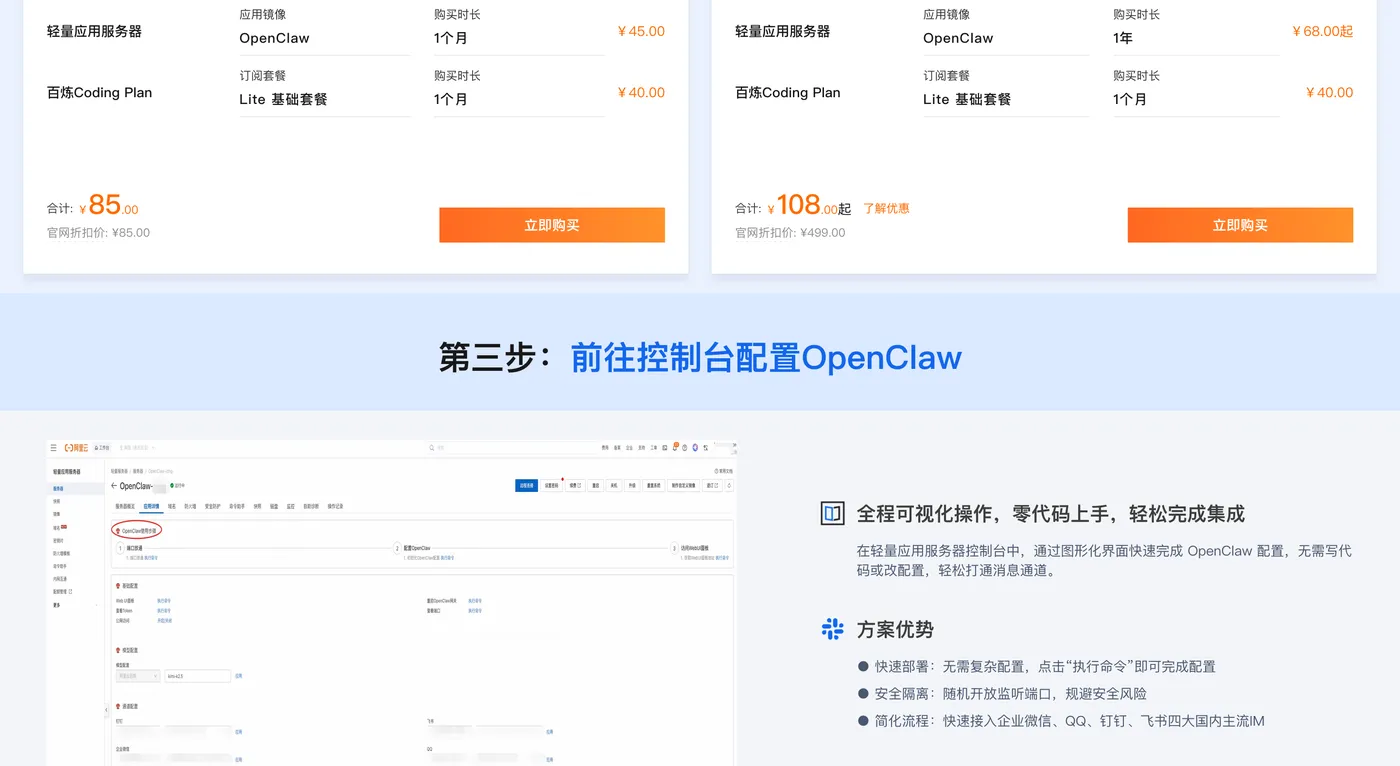
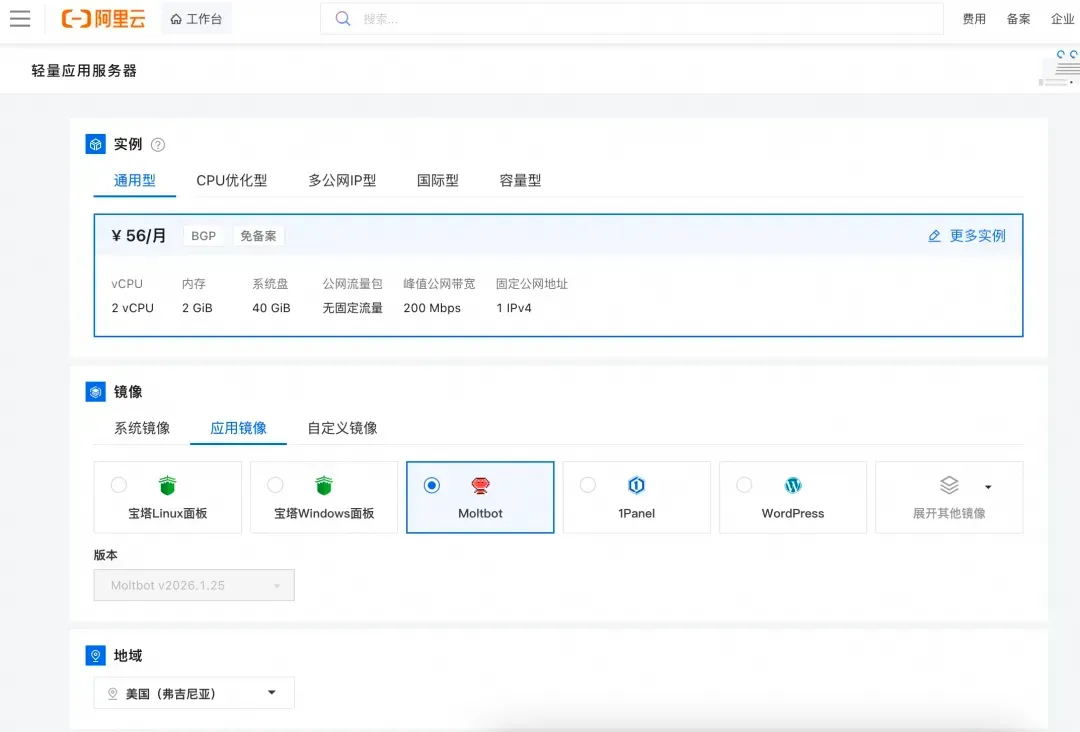
第二步:打开选择阿里云轻量应用服务器,配置参考如下:
- 镜像:OpenClaw(Moltbot)镜像(已经购买服务器的用户可以重置系统重新选择镜像)
- 实例:内存必须2GiB及以上。
- 地域:默认美国(弗吉尼亚),目前中国内地域(除香港)的轻量应用服务器,联网搜索功能受限。
- 时长:根据自己的需求及预算选择。


第三步:打开访问阿里云百炼大模型控制台,找到密钥管理,单击创建API-Key。

前往轻量应用服务器控制台,找到安装好OpenClaw的实例,进入「应用详情」放行18789端口、配置百炼API-Key、执行命令,生成访问OpenClaw的Token。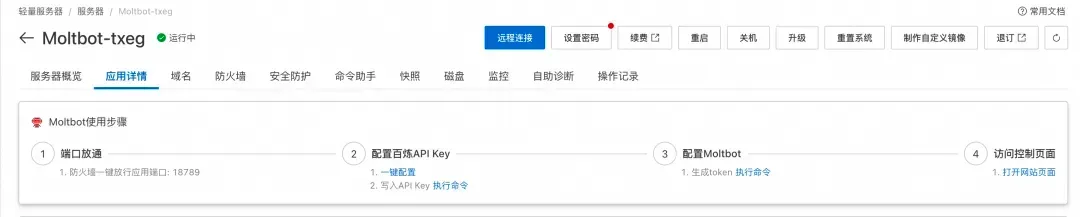
- 端口放通:需要放通对应端口的防火墙,单击一键放通即可。
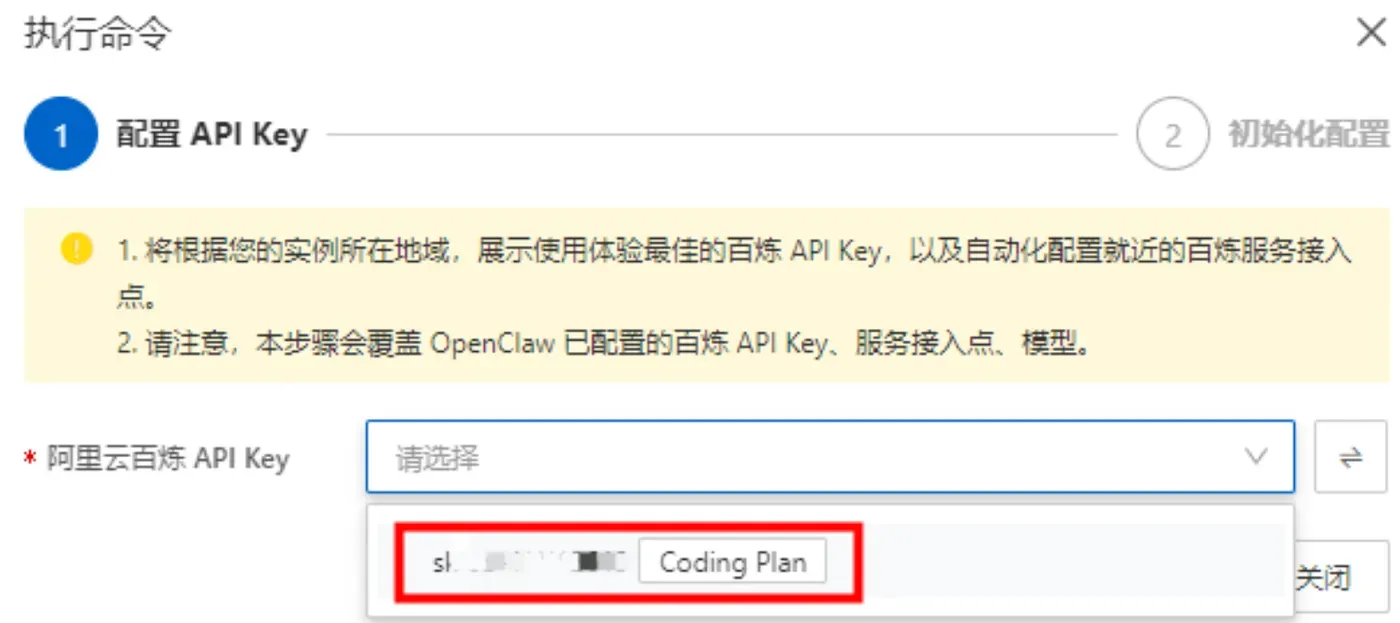
- 配置百炼API-Key,单击一键配置,输入百炼的API-Key。单击执行命令,写入API-Key。
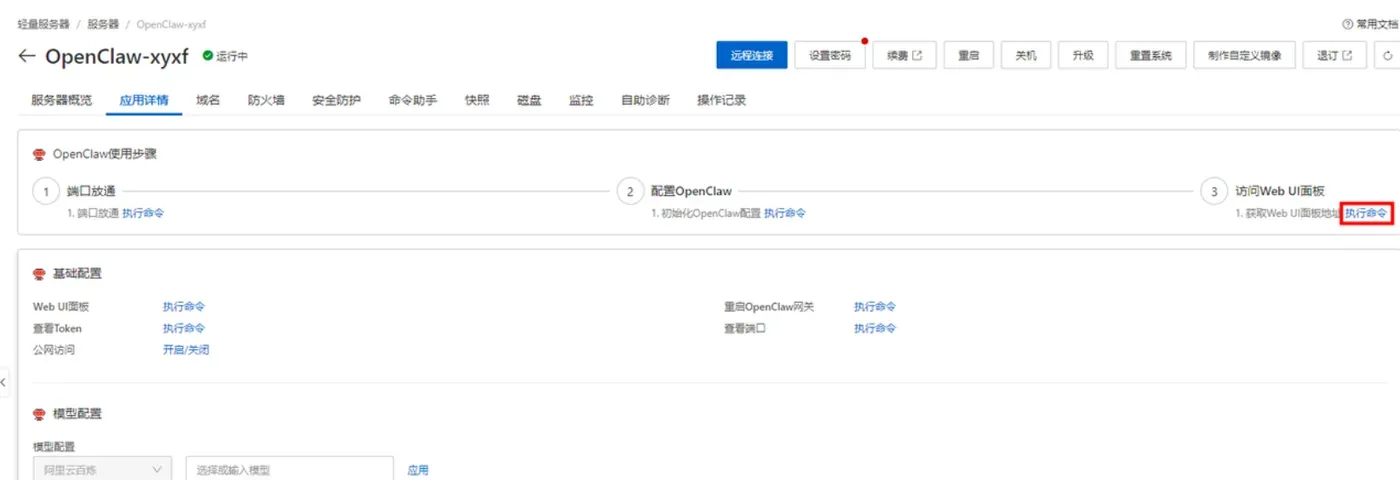
- 配置OpenClaw:单击执行命令,生成访问OpenClaw的Token。
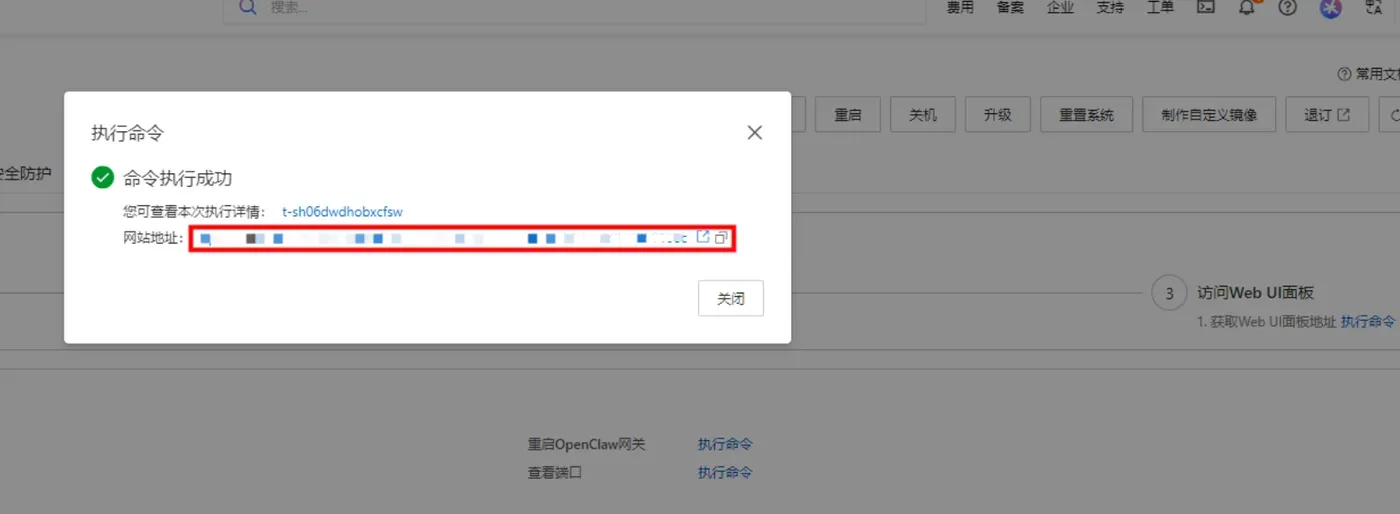
- 访问控制页面:单击打开网站页面可进入OpenClaw对话页面。
阿里云百炼Coding Plan API-Key 获取、配置保姆级教程:
创建API-Key,推荐访问订阅阿里云百炼Coding Plan,阿里云百炼Coding Plan每天两场抢购活动,从按tokens计费升级为按次收费,可以进一步节省费用!
- 购买后,在控制台生成API Key。注:这里复制并保存好你的API Key,后面要用。
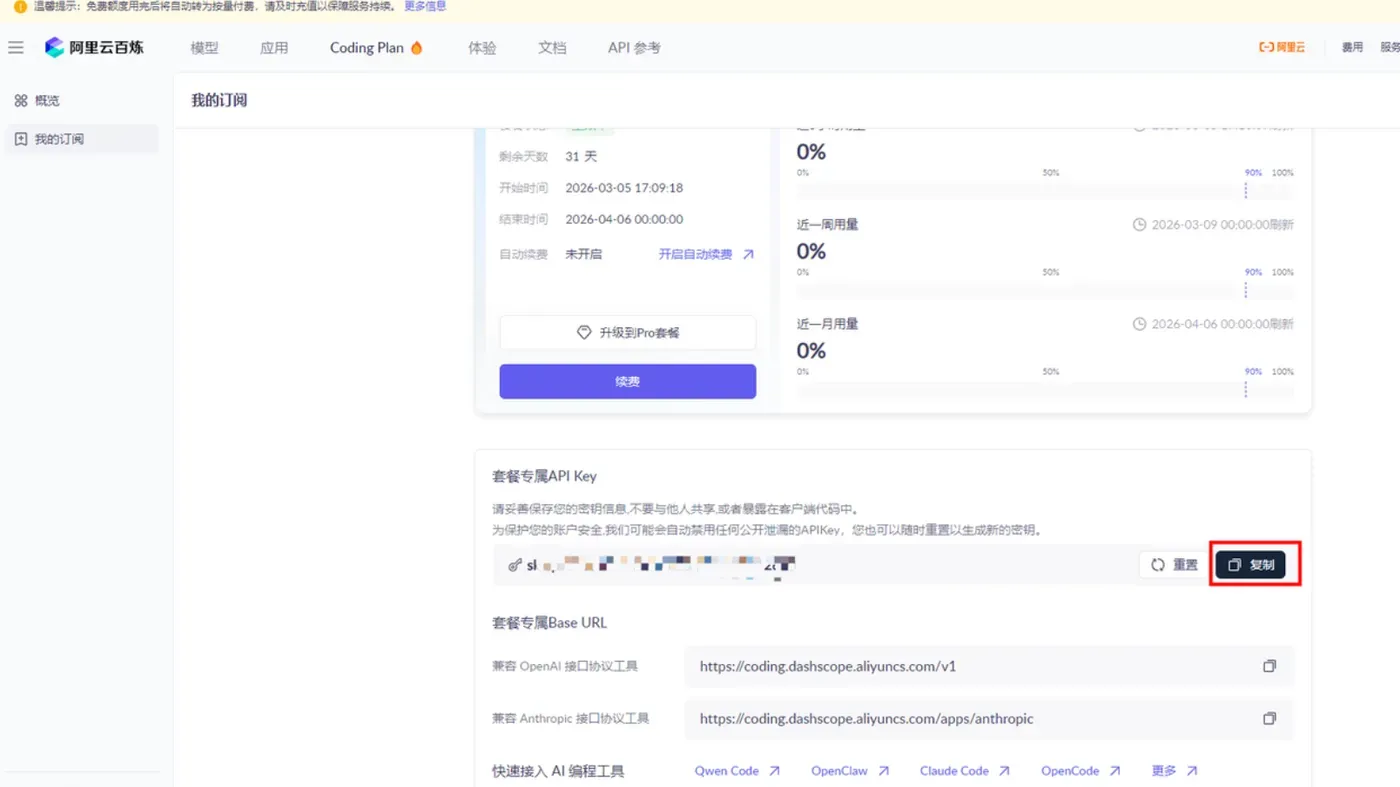
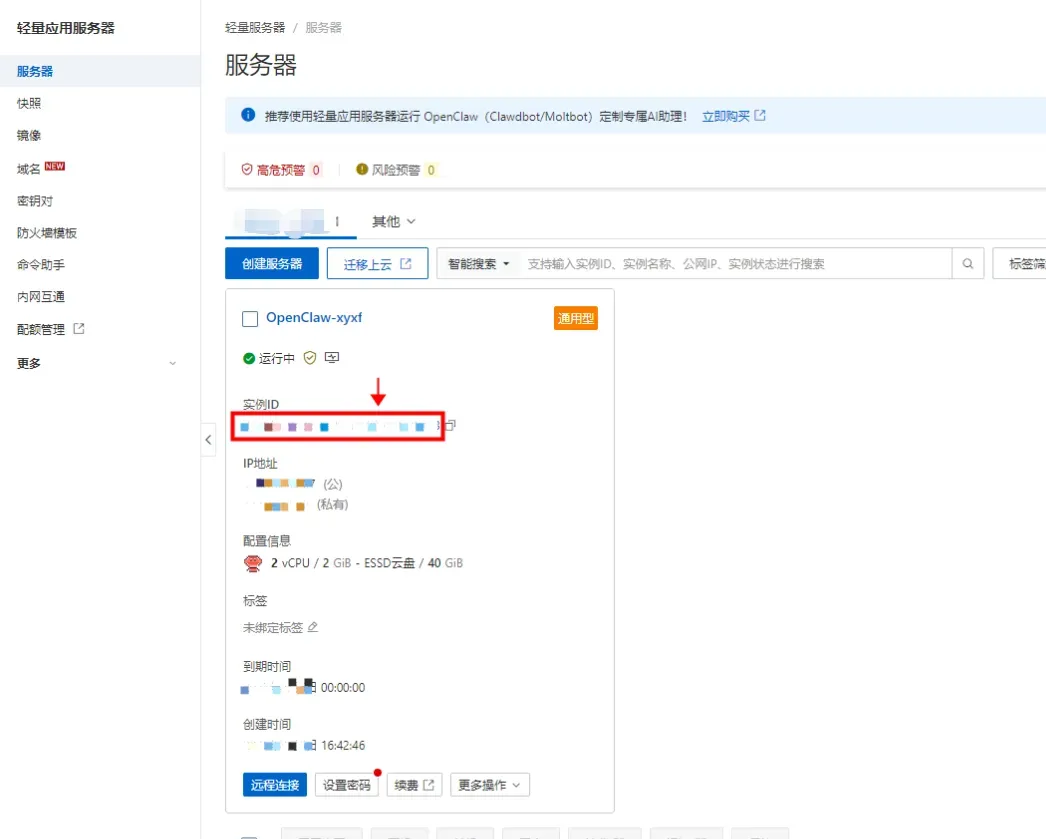
- 回到轻量应用服务器-控制台,单击服务器卡片中的实例 ID,进入服务器概览页。
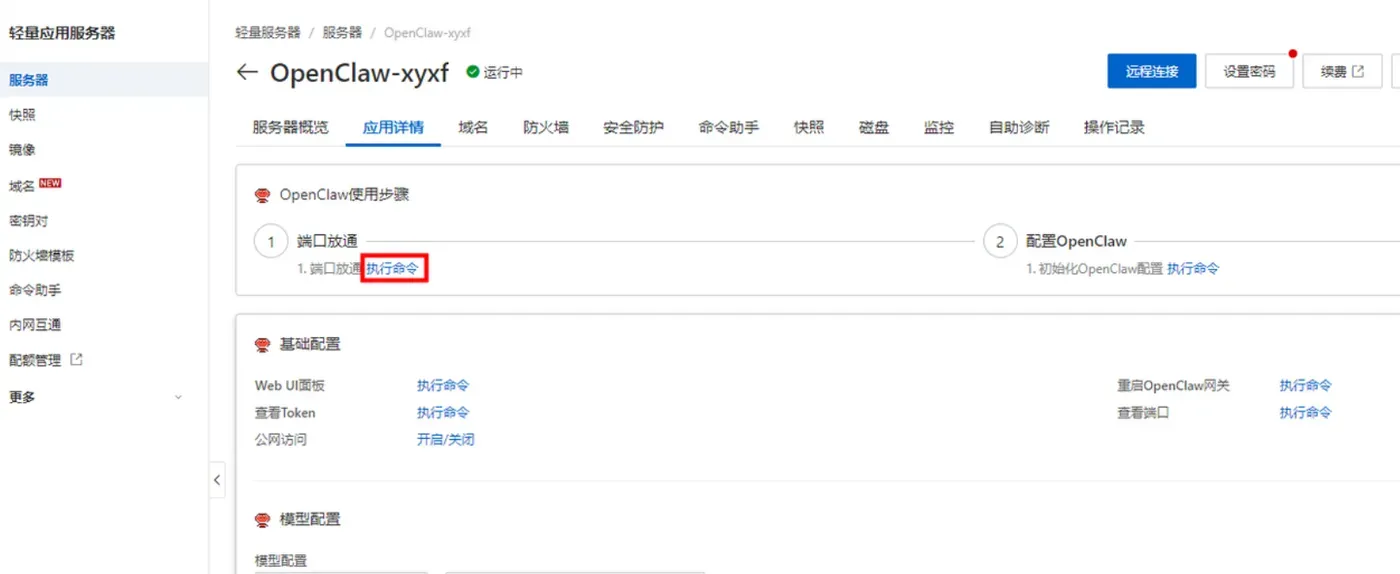
- 在服务器概览页面单击应用详情页签,进入服务器详情页面。

- 端口放通在OpenClaw使用步骤区域中,单击端口放通下的执行命令,可开放获取OpenClaw 服务运行端口的防火墙。
- 这里系统会列出我们第一步中创建的阿里云百炼 Coding Plan的API Key,直接选择就可以。
- 获取访问地址单击访问 Web UI 面板下的执行命令,获取 OpenClaw WebUI 的地址。
sudo apt update && sudo apt upgrade -y
sudo apt install nodejs npm git python3 python3-pip docker.io -y
sudo systemctl enable docker && sudo systemctl start docker
sudo usermod -aG docker $USER
newgrp docker

npm install -g openclaw@latest
openclaw init --mode cloud --port 18789 --sandbox enable
openclaw config set gateway.bind 0.0.0.0
openclaw config set gateway.allowIps 127.0.0.1
openclaw gateway start
openclaw config set gateway.autoStart true
开放安全组端口:18789
2.2 MacOS 本地部署
/bin/bash -c "$(curl -fsSL https://raw.githubusercontent.com/Homebrew/install/HEAD/install.sh)"
brew install node@22 git python3
open -a Docker
npm install -g openclaw@latest
openclaw init --sandbox enable --workdir ~/.openclaw
openclaw config set gateway.bind loopback
openclaw gateway start
2.3 Linux 部署
curl -fsSL https://deb.nodesource.com/setup_22.x | sudo -E bash -
sudo apt install -y nodejs git python3 docker.io
sudo systemctl enable docker && sudo systemctl start docker
sudo usermod -aG docker $USER
npm install -g openclaw@latest
openclaw init --sandbox enable
openclaw gateway start
2.4 Windows11 部署(管理员PowerShell)
winget install OpenJS.NodeJS
winget install Git.Git
winget install Python.Python.3.11
npm install -g openclaw@latest
openclaw init --sandbox enable --workdir C:\Users\你的用户名\.openclaw
openclaw config set gateway.bind loopback
openclaw gateway start
三、阿里云百炼 Coding Plan 免费大模型 API 配置
3.1 获取API Key
- 登录阿里云百炼平台
- 进入 Coding Plan 套餐页面
- 生成专属 API Key(格式:sk-sp-xxxx)
3.2 配置文件写入
编辑 ~/.openclaw/openclaw.json
{

  "models": {

    "mode": "merge",
    "providers": {

      "bailian": {

        "baseUrl": "https://coding.dashscope.aliyuncs.com/v1",
        "apiKey": "你的sk-sp-xxx",
        "api": "openai-completions",
        "models": [
          {

            "id": "qwen3.5-plus",
            "name": "Qwen 3.5 Plus",
            "contextWindow": 1000000,
            "maxTokens": 65536
          }
        ]
      }
    }
  },
  "agents": {

    "defaults": {

      "model": {

        "primary": "bailian/qwen3.5-plus"
      }
    }
  }
}
3.3 重启生效
openclaw gateway restart
3.4 测试调用
openclaw chat --prompt "你好,请简单介绍一下自己"
四、Gateway 日常管理命令
# 启动网关
openclaw gateway start

# 停止网关
openclaw gateway stop

# 重启网关
openclaw gateway restart

# 查看状态
openclaw gateway status

# 查看最近日志
openclaw logs --limit 50

# 实时跟踪日志
openclaw logs --follow

# 系统诊断
openclaw doctor

# 重置网关
openclaw gateway reset
五、Windows 网关高可用守护方案
5.1 网关守护脚本(自动重启)
创建文件:~/.openclaw/gateway-watchdog.ps1
$gatewayPort = 18789
$logFile = "$env:USERPROFILE\.openclaw\gateway-watchdog.log"

function Write-Log {

    param($message)
    $timestamp = Get-Date -Format "yyyy-MM-dd HH:mm:ss"
    "$timestamp | $message" | Out-File -Append $logFile -Encoding UTF8
}

$conn = Test-NetConnection -Port $gatewayPort -ComputerName 127.0.0.1 -InformationLevel Quiet
if ($conn) {

    Write-Log "✅ Gateway 运行正常"
} else {

    Write-Log "⚠️ Gateway 异常,尝试重启"
    Get-Process -Name "node" -ErrorAction SilentlyContinue |
        Where-Object {
    $_.CommandLine -match "openclaw.*gateway" } |
        Stop-Process -Force
    Start-Process powershell -ArgumentList "-NoExit","openclaw gateway start"
    Write-Log "🔄 Gateway 已启动"
}
5.2 日志监控脚本
创建文件:~/.openclaw/log-monitor.ps1
$logFile = "$env:LOCALAPPDATA\Temp\openclaw\openclaw-$(Get-Date -Format 'yyyy-MM-dd').log"
$alertFile = "$env:USERPROFILE\.openclaw\alerts.log"

Get-Content $logFile -Tail 10 | ForEach-Object {

    if ($_ -match "ERROR|FATAL|crashed|failed|timeout") {

        "$(Get-Date -Format 'yyyy-MM-dd HH:mm:ss') | 异常:$_" | Out-File -Append $alertFile -Encoding UTF8
    }
}
5.3 设置定时检查(10分钟一次)
# 创建定时任务
schtasks /Create /TN "OpenClaw-Gateway-Watchdog" /TR "powershell -ExecutionPolicy Bypass ~/.openclaw/gateway-watchdog.ps1" /SC MINUTE /MO 10 /F

schtasks /Create /TN "OpenClaw-Log-Monitor" /TR "powershell -ExecutionPolicy Bypass ~/.openclaw/log-monitor.ps1" /SC MINUTE /MO 10 /F

# 查看任务状态
schtasks /Query /TN "OpenClaw-Gateway-Watchdog"

# 手动运行
schtasks /Run /TN "OpenClaw-Gateway-Watchdog"
六、Linux / 阿里云 网关守护(systemd)
sudo tee /etc/systemd/system/openclaw-gateway.service <<EOF
[Unit]
Description=OpenClaw Gateway Service
After=network.target

[Service]
User=$USER
WorkingDirectory=$HOME
ExecStart=$(which openclaw) gateway start
Restart=always
RestartSec=5
Environment=PATH=/usr/bin:/usr/local/bin

[Install]
WantedBy=multi-user.target
EOF

sudo systemctl daemon-reload
sudo systemctl enable openclaw-gateway
sudo systemctl start openclaw-gateway
sudo systemctl status openclaw-gateway
七、MacOS 网关守护(launchd)
tee ~/Library/LaunchAgents/com.openclaw.gateway.plist <<EOF
<?xml version="1.0" encoding="UTF-8"?>
<!DOCTYPE plist PUBLIC "-//Apple//DTD PLIST 1.0//EN" "http://www.apple.com/DTDs/PropertyList-1.0.dtd">
<plist version="1.0">
<dict>
  <key>Label</key>
  <string>com.openclaw.gateway</string>
  <key>ProgramArguments</key>
  <array>
    <string>/usr/local/bin/openclaw</string>
    <string>gateway</string>
    <string>start</string>
  </array>
  <key>KeepAlive</key>
  <true/>
  <key>StandardOutPath</key>
  <string>$HOME/.openclaw/gateway.log</string>
</dict>
</plist>
EOF

launchctl load ~/Library/LaunchAgents/com.openclaw.gateway.plist
八、高频故障一站式解决方案
8.1 网关无法启动
# 检查端口占用
sudo lsof -i :18789  # Mac/Linux
netstat -ano | findstr 18789  # Windows

# 结束占用进程
taskkill /F /PID 进程ID  # Windows
kill -9 进程ID  # Mac/Linux

# 重置网关
openclaw gateway reset
8.2 网关启动但无法访问控制台
openclaw gateway restart
openclaw config set gateway.bind 0.0.0.0
openclaw status
8.3 频繁失联、自动退出
- 关闭系统睡眠/休眠
- 启动守护脚本或systemd服务
- 检查内存是否足够
- 执行
openclaw doctor修复异常
8.4 模型调用失败、返回空内容
# 检查API Key配置
openclaw models status

# 检查网络连通性
curl https://coding.dashscope.aliyuncs.com/v1/models

# 重启网关
openclaw gateway restart
8.5 技能无法执行、响应超时
openclaw plugin list
openclaw gateway restart
openclaw logs --limit 100
九、稳定运行最佳实践
- 始终开启沙箱:
openclaw config set sandbox true - 不暴露公网端口,仅允许本地访问
- 定期更新:
npm install -g openclaw@latest - 定期重启:每周至少重启一次网关
- 开启守护与日志,实现无人值守稳定运行
- 模型API Key使用环境变量,不硬编码
十、总结
Gateway是OpenClaw稳定运行的基石,只要掌握启动、重启、日志、守护四项核心能力,就能彻底告别失联、崩溃、无响应等问题。配合阿里云百炼Coding Plan免费大模型,以及全平台一键部署与自动重启机制,可构建7×24小时高可用AI智能体环境,实现长期稳定、低成本、安全可靠的自动化能力。

