前言
如何让 LLM(大语言模型)生成高质量、可维护的代码成为了一个关键挑战。传统的代码生成方式往往缺乏确定性,生成的代码质量参差不齐,难以满足企业级应用的需求。
本文将深入介绍 ooderA2UI 框架中的 Skills分级脚本实现,这是一个基于四层架构设计的代码生成体系,通过明确的分层、场景导向的快速路径、渐进式代码生成流程,为 LLM 提供确定性支持,大幅提高代码生成的效率和准确性。
一、背景与挑战
1.1 传统代码生成的问题
在传统的 LLM 代码生成中,我们经常面临以下挑战:
- 不确定性:同样的需求描述,不同时间生成的代码可能完全不同
- 缺乏规范:生成的代码风格、命名规范不一致
- 难以维护:生成的代码缺乏清晰的架构和注释
- 边界模糊:LLM 不知道应该生成什么,不应该生成什么
- 效率低下:每次生成都需要重新生成所有代码,无法增量更新
1.2 ooderA2UI 的解决方案
ooderA2UI 框架通过 Skills分级脚本实现,提供了一套完整的解决方案:
- 确定性架构:四层清晰的分层架构,每层职责明确
- 场景导向:基于实际使用场景设计的快速路径
- 渐进式流程:分阶段的代码生成流程,支持增量更新
- 术语体系:完整的术语定义和检查工具
- 最佳实践:丰富的示例代码和错误处理机制
二、四层架构设计
2.1 架构概览
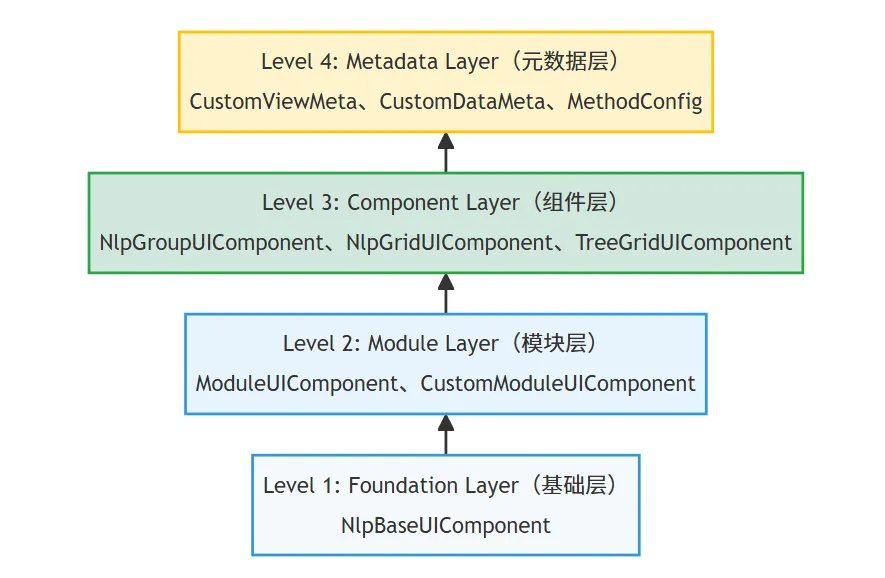
2.2 Level 1: Foundation Layer(基础层)
核心类:NlpBaseUIComponent
职责:
- 提供所有组件的抽象基类
- 定义组件的基本行为和接口
- 管理组件类型和初始化状态
关键特性:
from abc import ABC, abstractmethod
from typing import Optional, Dict, Any, List
class NlpBaseUIComponent(ABC):
    def __init__(self):
        self.component_type: Optional[str] = None
        self.initialized: bool = False
        self.properties: Dict[str, Any] = {}
        self.events: Dict[str, Any] = {}
        self.children: list = []
        self.parent: Optional['NlpBaseUIComponent'] = None

    @abstractmethod
    def initialize_from_natural_language(self, natural_language: str) -> None:
        pass

    @abstractmethod
    def initialize_from_config(self, config: Dict[str, Any]) -> None:
        pass
复制
设计亮点:
- 使用抽象基类(ABC)确保所有子类实现必要的方法
- 提供统一的组件生命周期管理
- 支持组件树形结构(父子关系)
- 提供属性和事件的统一管理
2.3 Level 2: Module Layer(模块层)
核心类:ModuleUIComponent、CustomModuleUIComponent
职责:
- 管理模块组件的生命周期
- 处理组件的依赖、参数、公式等
- 提供组件查找和管理方法
- 填充菜单、工具栏、上下文栏
关键特性:
from typing import Optional, Dict, Any, List
class ModuleUIComponent(NlpBaseUIComponent):
    def __init__(self):
        super().__init__()
        self.method_api_bean: Optional[Any] = None
        self.ui_module: Optional[Any] = None
        self.value_map: Dict[str, Any] = {}
class CustomModuleUIComponent(ModuleUIComponent):
    def __init__(self, ui_module: Optional[Any] = None,
                 method_api_bean: Optional[Any] = None,
                 value_map: Optional[Dict[str, Any]] = None):
        super().__init__()
        self.bridge_class: Optional[Any] = None
        self.parent_class: Optional[Any] = None
        self.field_list: List[Any] = []
        self.data_url: Optional[str] = None

        if method_api_bean is not None:
            self.method_api_bean = method_api_bean
            self.ui_module = ui_module
            self.value_map = value_map if value_map is not None else {}
            self.data_url = method_api_bean.get_property("url")
            self.bridge_class = method_api_bean.get_property("viewClass")
            self.parent_class = method_api_bean.get_property("sourceClass")
复制
设计亮点:
- 继承基础层的所有功能
- 提供模块级别的生命周期管理
- 支持动态配置和依赖注入
- 提供组件查找和管理方法
2.4 Level 3: Component Layer(组件层)
核心类:NlpGroupUIComponent、NlpGridUIComponent、TreeGridUIComponent
职责:
- 提供具体组件的实现和配置机制
- 实现具体的业务逻辑和交互
- 处理组件的数据展示和交互
关键特性:
from typing import Optional, Dict, Any
class GridProperties:
    def __init__(self):
        self.alias: Optional[str] = None
        self.page_size: int = 20
        self.sortable: bool = True
        self.filterable: bool = True
class NlpGridUIComponent(CustomModuleUIComponent):
    def __init__(self, method_config: Optional[Any] = None):
        super().__init__()
        self.properties: GridProperties = GridProperties()

        if method_config is not None:
            view_bean = method_config.get_property("view")
            self.init(view_bean)

    def init(self, view_bean: Any) -> None:
        self.properties = GridProperties()
        self.set_property("alias", view_bean.get_property("name"))

    def set_property(self, key: str, value: Any) -> None:
        if hasattr(self.properties, key):
            setattr(self.properties, key, value)
        self.properties[key] = value
复制
设计亮点:
- 提供具体组件的完整实现
- 支持网格、树网格、分组表单等多种组件类型
- 提供丰富的属性配置选项
- 支持事件驱动的交互模式
2.5 Level 4: Metadata Layer(元数据层)
核心类:CustomViewMeta、CustomDataMeta、MethodConfig
职责:
- 提供元数据类的定义和配置机制
- 存储视图和数据配置信息
- 支持视图的动态更新和构建
关键特性:
from abc import ABC, abstractmethod
from typing import Optional, List, Any
class CustomFieldMeta:
    def __init__(self):
        self.fieldname: Optional[str] = None
        self.caption: Optional[str] = None
        self.type: Optional[str] = None
        self.editable: bool = False
class Event:
    def __init__(self):
        self.eventEnum: Optional[str] = None
        self.description: Optional[str] = None
        self.actions: List[Dict[str, Any]] = []
class MenuItem:
    def __init__(self):
        self.id: Optional[str] = None
        self.name: Optional[str] = None
        self.imageClass: Optional[str] = None
class CustomViewMeta(ABC):
    def __init__(self):
        self.name: Optional[str] = None
        self.caption: Optional[str] = None
        self.desc: Optional[str] = None
        self.module_view_type: Optional[str] = None
        self.all_fields: List[CustomFieldMeta] = []
        self.fields: List[CustomFieldMeta] = []
        self.events: List[Event] = []
        self.menus: List[MenuItem] = []

    @abstractmethod
    def create_field_config(self) -> CustomFieldMeta:
        pass

    @abstractmethod
    def create_ui_item(self) -> Any:
        pass

    @abstractmethod
    def create_ui_component(self) -> Any:
        pass
复制
设计亮点:
- 提供元数据的统一管理
- 支持字段、事件、菜单的完整配置
- 提供抽象方法确保子类实现必要功能
- 支持元数据的动态更新和构建
三、场景导向的快速路径
3.1 快速路径设计理念
传统的代码生成往往是"一刀切"的方式,所有场景都使用相同的流程。而 Trae Solo 分级脚本采用了场景导向的设计,为不同的使用场景提供优化的快速路径。
3.2 场景分类
Trae Solo 分级脚本定义了 8 个核心场景:
场景类型 |
使用层级 |
快速路径 |
创建基础组件 |
Level 1: Foundation Layer |
继承 NlpBaseUIComponent,实现抽象方法 |
创建模块组件 |
Level 2: Module Layer |
继承 CustomModuleUIComponent,初始化 MethodConfig |
创建分组字段组件 |
Level 3: Component Layer |
继承 NlpGroupUIComponent,使用 CustomGroupDataMeta |
创建网格组件 |
Level 3: Component Layer |
继承 NlpGridUIComponent,使用 CustomGridViewMeta |
创建树网格组件 |
Level 3: Component Layer |
继承 TreeGridUIComponent,实现 DataComponent |
创建视图元数据 |
Level 4: Metadata Layer |
继承 CustomViewMeta,定义字段配置 |
创建数据元数据 |
Level 4: Metadata Layer |
继承 CustomDataMeta,定义数据URL |
创建方法配置 |
Level 4: Metadata Layer |
创建 MethodConfig 实例,设置方法元数据 |
3.3 快速路径工厂
from enum import Enum
from typing import Optional, Dict, Any
class ScenarioType(Enum):
    CREATE_BASE_COMPONENT = "create_base_component"
    CREATE_MODULE_COMPONENT = "create_module_component"
    CREATE_GRID_COMPONENT = "create_grid_component"
    CREATE_VIEW_METADATA = "create_view_metadata"
    # 其他场景枚举...
class QuickPathFactory:
    @staticmethod
    def create_component(scenario: str, config: Optional[Dict[str, Any]] = None) -> Any:
        scenario_map = {
            ScenarioType.CREATE_BASE_COMPONENT.value: QuickPathFactory._create_base_component,
            ScenarioType.CREATE_MODULE_COMPONENT.value: QuickPathFactory._create_module_component,
            ScenarioType.CREATE_GRID_COMPONENT.value: QuickPathFactory._create_grid_component,
            ScenarioType.CREATE_VIEW_METADATA.value: QuickPathFactory._create_view_metadata,
            # ... 更多场景
        }

        create_func = scenario_map.get(scenario)
        if create_func is None:
            raise ValueError(f"Unknown scenario: {scenario}")

        return create_func(config)

    @staticmethod
    def _create_base_component(config: Optional[Dict[str, Any]] = None) -> Any:
        # 实现基础组件创建逻辑
        from foundation_layer import NlpBaseUIComponent
        return NlpBaseUIComponent()

    @staticmethod
    def _create_module_component(config: Optional[Dict[str, Any]] = None) -> Any:
        # 实现模块组件创建逻辑
        from module_layer import CustomModuleUIComponent
        return CustomModuleUIComponent()

    @staticmethod
    def _create_grid_component(config: Optional[Dict[str, Any]] = None) -> Any:
        # 实现网格组件创建逻辑
        from component_layer import NlpGridUIComponent
        return NlpGridUIComponent(config)

    @staticmethod
    def _create_view_metadata(config: Optional[Dict[str, Any]] = None) -> Any:
        # 实现视图元数据创建逻辑
        from metadata_layer import CustomViewMeta
        view_meta = CustomViewMeta()
        if config:
            view_meta.name = config.get("name")
            view_meta.caption = config.get("caption")
            view_meta.module_view_type = config.get("moduleViewType")
        return view_meta
复制
3.4 场景优化器
from typing import Dict, Any
class ScenarioOptimizer:
    @staticmethod
    def optimize_for_scenario(scenario: str, config: Dict[str, Any]) -> Dict[str, Any]:
        optimized_config = config.copy()

        if scenario == ScenarioType.CREATE_GRID_COMPONENT.value:
            optimized_config = ScenarioOptimizer._optimize_grid_config(optimized_config)
        elif scenario == ScenarioType.CREATE_TREE_GRID_COMPONENT.value:
            optimized_config = ScenarioOptimizer._optimize_tree_grid_config(optimized_config)

        return optimized_config

    @staticmethod
    def _optimize_grid_config(config: Dict[str, Any]) -> Dict[str, Any]:
        # 网格组件自动添加默认分页大小(20)
        if "pageSize" not in config:
            config["pageSize"] = 20
        # 自动开启排序功能
        if "sortable" not in config:
            config["sortable"] = True
        # 自动开启筛选功能
        if "filterable" not in config:
            config["filterable"] = True
        return config

    @staticmethod
    def _optimize_tree_grid_config(config: Dict[str, Any]) -> Dict[str, Any]:
        # 树网格组件自动设置默认树字段(parentId)
        if "treeField" not in config:
            config["treeField"] = "parentId"
        # 继承网格组件的优化配置
        config = ScenarioOptimizer._optimize_grid_config(config)
        return config
复制
优化示例:
- 网格组件自动添加默认分页大小(20)
- 树网格组件自动设置默认树字段(parentId)
- 分组组件自动设置默认分组字段(group)
四、渐进式 CodeGen 流程
4.1 流程设计理念
传统的代码生成往往是"一次性"的方式,生成所有代码然后编译部署。这种方式效率低下,特别是在大型项目中。
Trae Solo 分级脚本采用了渐进式代码生成流程,将代码生成分为 4 个阶段,每个阶段都可以独立执行和验证。
4.2 四阶段流程
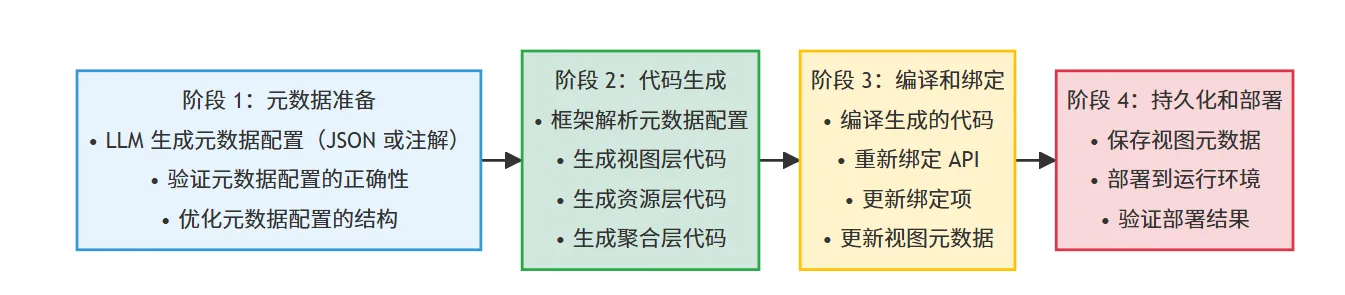 阶段 1:元数据准备阶段 2:代码生成 阶段 3:编译和绑定 阶段 4:持久化和部署
4.3 元数据验证
from typing import List, Optional
from metadata_layer import CustomViewMeta, CustomFieldMeta
class MetadataValidator:
    @staticmethod
    def validate_view_metadata(view_meta: CustomViewMeta) -> List[str]:
        errors = []

        if view_meta.name is None or view_meta.name.strip() == "":
            errors.append("视图名称不能为空")

        if view_meta.caption is None or view_meta.caption.strip() == "":
            errors.append("视图标题不能为空")

        if view_meta.module_view_type is None or view_meta.module_view_type.strip() == "":
            errors.append("模块视图类型不能为空")

        if len(view_meta.fields) == 0:
            errors.append("字段列表不能为空")
        else:
            # 验证每个字段的合法性
            for field in view_meta.fields:
                if field.fieldname is None or field.fieldname.strip() == "":
                    errors.append("字段名称不能为空")
                if field.caption is None or field.caption.strip() == "":
                    errors.append(f"字段 {field.fieldname} 的标题不能为空")

        return errors
复制
4.4 代码生成
from typing import List
from metadata_layer import CustomViewMeta, CustomFieldMeta, Event
class CodeGenerator:
    @staticmethod
    def generate_view_code(view_meta: CustomViewMeta) -> str:
        field_code = CodeGenerator._generate_field_code(view_meta.fields)
        event_code = CodeGenerator._generate_event_code(view_meta.events)

        code = f"""
public class {view_meta.name} extends CustomModuleUIComponent {{

    public {view_meta.name}() {{
        super();
        this.initialize();
    }}

    private void initialize() {{
        this.caption = "{view_meta.caption}";
        this.moduleViewType = "{view_meta.module_view_type}";

        // 初始化字段
        {field_code}

        // 初始化事件
        {event_code}
    }}
}}
"""
        return code.strip()

    @staticmethod
    def _generate_field_code(fields: List[CustomFieldMeta]) -> str:
        field_lines = []
        for field in fields:
            field_line = f"this.addField(\"{field.fieldname}\", \"{field.caption}\", \"{field.type}\", {field.editable});"
            field_lines.append(field_line)
        return "\n        ".join(field_lines)

    @staticmethod
    def _generate_event_code(events: List[Event]) -> str:
        event_lines = []
        for event in events:
            event_line = f"this.addEvent(\"{event.eventEnum}\", \"{event.description}\");"
            event_lines.append(event_line)
        return "\n        ".join(event_lines)
复制
4.5 渐进式执行
from typing import List, Optional
from metadata_layer import CustomViewMeta
from dataclasses import dataclass
@dataclass
class CodeGenResult:
    phase: str
    success: bool
    message: str
    errors: List[str] = None
    warnings: List[str] = None
    generated_code: Optional[str] = None
    compiled_code: Optional[Any] = None
class ProgressiveCodeGen:
    def __init__(self):
        self.results: List[CodeGenResult] = []

    def execute_full_process(self, view_meta: CustomViewMeta) -> List[CodeGenResult]:
        self.results = []

        # 阶段 1:元数据准备
        result1 = self.execute_phase_1_metadata_preparation(view_meta)
        if not result1.success:
            return self.results

        # 阶段 2:代码生成
        result2 = self.execute_phase_2_code_generation(view_meta)
        if not result2.success:
            return self.results

        # 阶段 3:编译和绑定
        result3 = self.execute_phase_3_compilation_and_binding(result2.generated_code)
        if not result3.success:
            return self.results

        # 阶段 4:持久化和部署
        result4 = self.execute_phase_4_persistence_and_deployment(view_meta, result3.compiled_code)

        return self.results

    def execute_phase_1_metadata_preparation(self, view_meta: CustomViewMeta) -> CodeGenResult:
        try:
            errors = MetadataValidator.validate_view_metadata(view_meta)
            if errors:
                return CodeGenResult(
                    phase="元数据准备",
                    success=False,
                    message="元数据验证失败",
                    errors=errors
                )

            return CodeGenResult(
                phase="元数据准备",
                success=True,
                message="元数据验证通过",
                warnings=[]
            )
        except Exception as e:
            return CodeGenResult(
                phase="元数据准备",
                success=False,
                message=f"元数据处理异常:{str(e)}",
                errors=[str(e)]
            )

    def execute_phase_2_code_generation(self, view_meta: CustomViewMeta) -> CodeGenResult:
        try:
            generated_code = CodeGenerator.generate_view_code(view_meta)
            return CodeGenResult(
                phase="代码生成",
                success=True,
                message="代码生成成功",
                generated_code=generated_code
            )
        except Exception as e:
            return CodeGenResult(
                phase="代码生成",
                success=False,
                message=f"代码生成异常:{str(e)}",
                errors=[str(e)]
            )

    def execute_phase_3_compilation_and_binding(self, generated_code: str) -> CodeGenResult:
        try:
            # 模拟编译和绑定逻辑
            compiled_code = f"Compiled: {generated_code[:100]}..."
            return CodeGenResult(
                phase="编译和绑定",
                success=True,
                message="编译和绑定成功",
                compiled_code=compiled_code
            )
        except Exception as e:
            return CodeGenResult(
                phase="编译和绑定",
                success=False,
                message=f"编译和绑定异常:{str(e)}",
                errors=[str(e)]
            )

    def execute_phase_4_persistence_and_deployment(self, view_meta: CustomViewMeta, compiled_code: Any) -> CodeGenResult:
        try:
            # 模拟持久化和部署逻辑
            return CodeGenResult(
                phase="持久化和部署",
                success=True,
                message="持久化和部署成功"
            )
        except Exception as e:
            return CodeGenResult(
                phase="持久化和部署",
                success=False,
                message=f"持久化和部署异常:{str(e)}",
                errors=[str(e)]
            )
复制
五、术语体系与检查工具
5.1 术语分类
Skills分级脚本建立了一套完整的术语体系,分为 3 大类:
核心术语(9 个)
术语 |
英文 |
定义 |
基础层 |
Foundation Layer |
NlpBaseUIComponent,所有NLP组件的抽象基类 |
模块层 |
Module Layer |
ModuleUIComponent 和 CustomModuleUIComponent,管理模块生命周期 |
组件层 |
Component Layer |
NlpGroupUIComponent、NlpGridUIComponent、TreeGridUIComponent等具体组件 |
元数据层 |
Metadata Layer |
CustomViewMeta、CustomDataMeta、MethodConfig等元数据类 |
视图元数据 |
View Metadata |
CustomViewMeta及其子类,存储视图配置信息 |
数据元数据 |
Data Metadata |
CustomDataMeta及其子类,存储数据配置信息 |
方法配置 |
Method Configuration |
MethodConfig,连接业务方法和UI组件的桥梁 |
桥接代码 |
Bridge Code |
框架自动生成的桥接代码,不是LLM生成边界 |
元数据配置 |
Metadata Config |
LLM生成的配置信息(JSON或注解) |
流程术语(5 个)
术语 |
英文 |
定义 |
完整构建 |
Full Build |
生成所有层次的代码并编译 |
增量构建 |
Incremental Build |
只生成变更的部分并重新绑定 |
重新绑定 |
Rebind |
更新API绑定关系 |
模板驱动 |
Template Driven |
使用模板引擎生成代码 |
动态编译 |
Dynamic Compile |
运行时编译生成的代码 |
术语使用规范(3 个)
术语 |
英文 |
定义 |
术语一致性 |
Term Consistency |
在整个项目中保持术语的一致性 |
术语本地化 |
Term Localization |
支持多语言的术语翻译 |
术语演进 |
Term Evolution |
支持术语的逐步演进和版本管理 |
5.2 术语检查器
from typing import List, Dict, Any
from dataclasses import dataclass
@dataclass
class TermDefinition:
    term: str
    english: str
    category: str
    definition: str
    version: Optional[str] = None
@dataclass
class TermSeverity:
    INFO = "INFO"
    WARNING = "WARNING"
    ERROR = "ERROR"
@dataclass
class TermCheckResult:
    term: str
    category: str
    severity: str
    message: str
    suggestion: str
    line_number: int
    column_number: int
class TermChecker:
    def __init__(self):
        self.terms: Dict[str, TermDefinition] = {}
        self._initialize_core_terms()
        self._initialize_flow_terms()
        self._initialize_usage_terms()

    def _initialize_core_terms(self):
        # 初始化核心术语
        core_terms = [
            TermDefinition("基础层", "Foundation Layer", "核心术语", "NlpBaseUIComponent,所有NLP组件的抽象基类"),
            TermDefinition("模块层", "Module Layer", "核心术语", "ModuleUIComponent 和 CustomModuleUIComponent,管理模块生命周期"),
            # 其他核心术语...
        ]
        for term in core_terms:
            self.terms[term.term] = term

    def _initialize_flow_terms(self):
        # 初始化流程术语
        flow_terms = [
            TermDefinition("完整构建", "Full Build", "流程术语", "生成所有层次的代码并编译"),
            TermDefinition("增量构建", "Incremental Build", "流程术语", "只生成变更的部分并重新绑定"),
            # 其他流程术语...
        ]
        for term in flow_terms:
            self.terms[term.term] = term

    def _initialize_usage_terms(self):
        # 初始化使用规范术语
        usage_terms = [
            TermDefinition("术语一致性", "Term Consistency", "使用规范", "在整个项目中保持术语的一致性"),
            # 其他使用规范术语...
        ]
        for term in usage_terms:
            self.terms[term.term] = term

    def check_term_usage(self, text: str) -> List[TermCheckResult]:
        results = []
        lines = text.split('\n')

        for line_num, line in enumerate(lines, 1):
            for term, definition in self.terms.items():
                if term in line:
                    result = TermCheckResult(
                        term=term,
                        category=definition.category,
                        severity=TermSeverity.INFO,
                        message=f"发现术语: {term}",
                        suggestion=f"建议使用标准术语: {term} ({definition.english})",
                        line_number=line_num,
                        column_number=line.find(term) + 1
                    )
                    results.append(result)

        return results
复制
5.3 术语版本管理
from typing import List, Dict, Optional
from dataclasses import dataclass
class TermVersionManager:
    def __init__(self):
        self.versions: Dict[str, List[TermDefinition]] = {}
        self.current_version: str = "1.0"

    def add_term_version(self, term: str, definition: TermDefinition, version: str) -> None:
        if term not in self.versions:
            self.versions[term] = []

        definition.version = version
        self.versions[term].append(definition)

    def get_term_version(self, term: str, version: Optional[str] = None) -> Optional[TermDefinition]:
        if term not in self.versions:
            return None

        if version is None:
            return self.versions[term][-1]

        for definition in self.versions[term]:
            if definition.version == version:
                return definition

        return None

    def list_term_versions(self, term: str) -> List[TermDefinition]:
        return self.versions.get(term, [])
复制
六、最佳实践与示例
6.1 创建用户表格视图
from typing import Dict, Any, List
class ScenarioType:
    CREATE_VIEW_METADATA = "create_view_metadata"
class QuickPathFactory:
    @staticmethod
    def create_component(scenario: str, config: Optional[Dict[str, Any]] = None) -> Any:
        if scenario == ScenarioType.CREATE_VIEW_METADATA:
            return QuickPathFactory._create_view_metadata(config)
        raise ValueError(f"Unknown scenario: {scenario}")

    @staticmethod
    def _create_view_metadata(config: Optional[Dict[str, Any]] = None) -> Any:
        class ViewMeta:
            def __init__(self, config: Dict[str, Any]):
                self.name = config.get("name")
                self.caption = config.get("caption")
                self.module_view_type = config.get("moduleViewType")
                self.fields = config.get("fields", [])
                self.events = config.get("events", [])
                self.menus = config.get("menus", [])

        return ViewMeta(config or {})
view_config = {
    "name": "UserTableView",
    "caption": "用户表格视图",
    "moduleViewType": "GRIDCONFIG",
    "fields": [
        {"fieldname": "id", "caption": "ID", "type": "input", "editable": False},
        {"fieldname": "name", "caption": "姓名", "type": "input", "editable": True},
        {"fieldname": "email", "caption": "邮箱", "type": "input", "editable": True},
        {"fieldname": "phone", "caption": "电话", "type": "input", "editable": True}
    ],
    "events": [
        {"eventEnum": "RELOAD", "description": "刷新数据", "actions": [{"target": "reloadAPI", "eventKey": "onclick"}]},
        {"eventEnum": "SAVE", "description": "保存数据", "actions": [{"target": "saveAPI", "eventKey": "onclick"}]}
    ],
    "menus": [
        {"id": "ADD", "name": "添加", "imageClass": "ri-add-line"},
        {"id": "EDIT", "name": "编辑", "imageClass": "ri-edit-line"},
        {"id": "DELETE", "name": "删除", "imageClass": "ri-delete-line"}
    ]
}
view_meta = QuickPathFactory.create_component(
    ScenarioType.CREATE_VIEW_METADATA,
    view_config
)
复制
6.2 执行渐进式代码生成
# 假设已导入 ProgressiveCodeGen 类
code_gen = ProgressiveCodeGen()
results = code_gen.execute_full_process(view_meta)
for i, result in enumerate(results, 1):
    print(f"阶段 {i}: {result.phase}")
    print(f"状态: {'成功' if result.success else '失败'}")
    print(f"消息: {result.message}")
    if result.errors:
        print(f"错误: {result.errors}")
    if result.warnings:
        print(f"警告: {result.warnings}")
    print("-" * 50)
复制
6.3 错误处理机制
try:
    # 创建视图元数据
    view_meta = QuickPathFactory.create_component(
        ScenarioType.CREATE_VIEW_METADATA,
        view_config
    )

    # 基础验证
    if not hasattr(view_meta, 'name') or view_meta.name is None:
        raise ValueError("视图名称不能为空")

    # 执行渐进式代码生成
    code_gen = ProgressiveCodeGen()
    results = code_gen.execute_full_process(view_meta)

    # 处理执行结果
    for result in results:
        if not result.success:
            print(f"阶段 {result.phase} 失败: {result.message}")
            if result.errors:
                print(f"错误详情: {', '.join(result.errors)}")

except ValueError as e:
    print(f"验证错误: {e}")
    print("建议:检查视图元数据配置,确保必填字段完整")
except Exception as e:
    print(f"未知错误: {e}")
    print("建议:联系技术支持,提供完整的错误日志")
复制
七、LLM 生成边界
7.1 应该生成
LLM 应该生成以下内容:
- 元数据配置(JSON)
{
  "name": "UserTableView",
  "caption": "用户表格视图",
  "moduleViewType": "GRIDCONFIG",
  "fields": [
    {"fieldname": "id", "caption": "ID", "type": "input", "editable": false},
    {"fieldname": "name", "caption": "姓名", "type": "input", "editable": true}
  ],
  "events": [
    {"eventEnum": "RELOAD", "description": "刷新数据"}
  ]
}
复制
- 元数据配置(注解)
@CustomClass
public class UserBridge {
    @CustomMenuItem(name = "用户列表", imageClass = "ri-user-line")
    public UserTableView userListView() {
        return new UserTableView();
    }
}
复制
7.2 不应该生成
LLM 不应该生成以下内容:
- 核心组件类
- NlpBaseUIComponent 基类
- ModuleUIComponent 基类
- Component Layer 组件基类
- 核心配置类
- MethodConfig 基类
- CustomViewMeta 基类
- CustomDataMeta 基类
- 业务逻辑代码
- 具体的业务实现
- 数据库操作代码
- API 调用代码
7.3 BridgeCode 的角色
BridgeCode 是框架的内置能力,由 AggRootBuild 自动生成。LLM 只需要提供元数据配置,框架会自动生成 BridgeCode。
// 框架自动生成的 BridgeCode
public class UserTableView extends CustomModuleUIComponent {
    public UserTableView() {
        super();
        this.initialize();
    }

    private void initialize() {
        // 框架自动生成的初始化代码
        // 包含字段、事件、菜单的初始化
        this.caption = "用户表格视图";
        this.moduleViewType = "GRIDCONFIG";
    }
}
复制
八、性能优化建议
8.1 元数据配置优化
- 使用场景导向的快速路径
- 根据场景动态加载必要的知识模块
- 避免生成不必要的代码
8.2 代码生成优化
- 使用模板引擎生成代码
- 支持增量构建,只生成变更的部分
- 提供明确的输入输出规范
8.3 性能优化
- 使用懒加载技术
- 实现分页功能
- 缓存常用数据
8.4 可维护性优化
- 提供清晰的术语定义
- 保持命名规范一致
- 添加详细的注释和文档
9 结语
Trae Solo 分级脚本实现为 ooderA2UI 框架提供了一个完整的、确定性的 LLM 代码生成体系。通过四层清晰的架构、场景导向的快速路径、渐进式代码生成流程,我们为 LLM 提供了强有力的支持,大幅提高了代码生成的效率和准确性。
这个实现不仅解决了传统代码生成中的不确定性问题,还提供了丰富的工具和最佳实践,使得开发者能够快速上手并高效使用。未来,我们将继续优化和完善这个体系,为 AI 驱动的开发提供更好的支持。
作者: ooderA2UI 团队
日期: 2026-02-05