昨儿晚上老金我刷GitHub的时候,无意间看到jarrodwatts的配置仓库。
他是一位活跃在开发者社区的黑客松参与者。
老金我抱着试试看的心态装了一下,卧槽,这玩意儿真的香!
今天把这个配置完整拆解给你,看完你就知道为什么要装。
这个配置是啥?
简单说,这是社区最佳实践的合包。
作者Jarrod Watts把自己用着顺手的各种配置、规则、工具,整理成一个包,让你一键安装。
没装之前:Claude Code像新实习生,每次干活你都要从头交代规矩。
装了之后:Claude Code像老员工,知道规矩,自己按规范干活。
老金我去翻了翻GitHub,这仓库星数虽然不是特别夸张,但配置确实挺全的。
包含Rules、Hooks、Agents、Skills、Commands、Plugins,六大件齐活了。
Rules:打开什么文件,用什么规矩
这个是自动的,什么也不用管。
什么是Rules?
想象你打开Word,电脑自动用Word打开。
你打开图片,电脑自动用看图软件打开。
Rules就是这个道理——你打开什么类型的代码文件,AI自动用对应的规范。
这个配置有4个Rules:
TypeScript规则:写 .ts/.tsx文件时生效,自动遵循TypeScript最佳实践
测试规则:写测试文件时生效,自动用AAA模式写测试
注释规则:所有文件生效,禁止写废话注释
智能合约规则:写 .sol文件时生效,Foundry/ZKsync规范
效果:以前你要说"请遵循TypeScript规范",现在不用说了,AI自动遵循。
老金我装完之后,最大的感受就是这个。
以前写TypeScript,总得提醒Claude注意类型定义、接口规范之类的。
现在好了,只要是.ts或.tsx文件,Claude自动就按规范来了。
代码风格统一,质量也高了不少。
Agents:4个专门干活的小助手
这个是关键词触发的,需要点名。
这个配置给你配了4个专门干活的小助手。
代码搜索:说"找到登录代码在哪",5分钟给你答案,效果是30分钟 → 5分钟
文档阅读:PDF拖进去,AI自动提取重点,效果是60分钟 → 10分钟
开源库研究:说"研究一下Zustand",20分钟给你答案,效果是2小时 → 20分钟
文档写作:说"给组件写文档",自动生成标准格式,效果是45分钟 → 15分钟
老金我上周查一个项目里的旧代码,以前得翻半天,现在几秒钟就找到了。
这4个助手不用全装,老金我只装了3个:代码搜索、文档阅读、文档写作。
Hooks:写完自动检查,省半小时
这个也是全自动的,什么也不用管!
Hook就是"钩子",当特定事件发生时,自动执行某个操作。
关键词检测:提交prompt时检测关键词,检测到"写个测试",提醒不要激活测试配置
注释检查:写完代码自动检查,生成代码后自动检查有没有废话注释
任务追踪:关闭前自动提醒,结束前确认todo都跟踪了
写完代码自动检查格式,改完测试文件自动跑测试,省了好多重复劳动。
老金我算了一下,每天至少能省半小时。
半小时啊,都能多写不少代码了。
Commands:自定义命令
只有这个是手动的!
你在仓库里看到那个 interview 命令了吗?你可以像这样在终端调用它:
输入 /interview
这会启动一个交互式的规划流程,Claude 会问你一系列问题来细化你的需求,而不是直接盲目写代码。

如果对你有帮助,记得关注一波~
怎么装?
老金我最怕那种安装文档写一堆的,看半天都搞不懂。
这个配置的安装,老金我给满分。
复制到这。
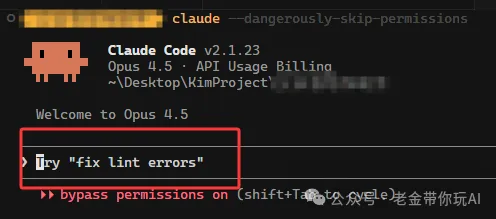
复制命令:
Install Claude Code configuration from https://github.com/jarrodwatts/claude-code-config
Fetch and install these files to ~/.claude/:
**Rules** (path-scoped instructions):
- https://raw.githubusercontent.com/jarrodwatts/claude-code-config/master/rules/typescript.md → ~/.claude/rules/typescript.md
- https://raw.githubusercontent.com/jarrodwatts/claude-code-config/master/rules/testing.md → ~/.claude/rules/testing.md
- https://raw.githubusercontent.com/jarrodwatts/claude-code-config/master/rules/comments.md → ~/.claude/rules/comments.md
- https://raw.githubusercontent.com/jarrodwatts/claude-code-config/master/rules/forge.md → ~/.claude/rules/forge.md
**Skills** (model-invoked capabilities):
- https://raw.githubusercontent.com/jarrodwatts/claude-code-config/master/skills/planning-with-files/SKILL.md → ~/.claude/skills/planning-with-files/SKILL.md
- https://raw.githubusercontent.com/jarrodwatts/claude-code-config/master/skills/planning-with-files/examples.md → ~/.claude/skills/planning-with-files/examples.md
- https://raw.githubusercontent.com/jarrodwatts/claude-code-config/master/skills/planning-with-files/reference.md → ~/.claude/skills/planning-with-files/reference.md
- https://raw.githubusercontent.com/jarrodwatts/claude-code-config/master/skills/react-useeffect/SKILL.md → ~/.claude/skills/react-useeffect/SKILL.md
- https://raw.githubusercontent.com/jarrodwatts/claude-code-config/master/skills/react-useeffect/alternatives.md → ~/.claude/skills/react-useeffect/alternatives.md
- https://raw.githubusercontent.com/jarrodwatts/claude-code-config/master/skills/react-useeffect/anti-patterns.md → ~/.claude/skills/react-useeffect/anti-patterns.md
**Agents** (custom subagents):
- https://raw.githubusercontent.com/jarrodwatts/claude-code-config/master/agents/codebase-search.md → ~/.claude/agents/codebase-search.md
- https://raw.githubusercontent.com/jarrodwatts/claude-code-config/master/agents/media-interpreter.md → ~/.claude/agents/media-interpreter.md
- https://raw.githubusercontent.com/jarrodwatts/claude-code-config/master/agents/open-source-librarian.md → ~/.claude/agents/open-source-librarian.md
- https://raw.githubusercontent.com/jarrodwatts/claude-code-config/master/agents/tech-docs-writer.md → ~/.claude/agents/tech-docs-writer.md
**Commands** (slash commands):
- https://raw.githubusercontent.com/jarrodwatts/claude-code-config/master/commands/interview.md → ~/.claude/commands/interview.md
**Hooks** (event-triggered scripts):
- https://raw.githubusercontent.com/jarrodwatts/claude-code-config/master/hooks/keyword-detector.py → ~/.claude/hooks/keyword-detector.py
- https://raw.githubusercontent.com/jarrodwatts/claude-code-config/master/hooks/check-comments.py → ~/.claude/hooks/check-comments.py
- https://raw.githubusercontent.com/jarrodwatts/claude-code-config/master/hooks/todo-enforcer.sh → ~/.claude/hooks/todo-enforcer.sh
**Global Instructions**:
- https://raw.githubusercontent.com/jarrodwatts/claude-code-config/master/CLAUDE.md → ~/.claude/CLAUDE.md
**CRITICAL: Do NOT overwrite existing files.**
Before installing each file:
1. Check if the destination file already exists
2. If it does NOT exist → install it
3. If it DOES exist → ask the user what to do:
   - **Skip**: Keep their existing file unchanged
   - **Overwrite**: Replace with the new version
   - **Merge**: Intelligently combine both versions, preserving user customizations while adding new content
This is especially important for ~/.claude/CLAUDE.md which contains personal workflow preferences. Never overwrite without explicit user consent.
Create directories as needed, fetch files with curl, and make hook scripts executable.
或者直接在终端里用命令行:
git clone https://github.com/jarrodwatts/claude-code-config.git ~/.claude
老金我用的是第一种方式,1分钟就装完了。
老金的建议
第一:别一次性全装,容易冲突。
先装Rules,熟悉了再加Command、Agents和Hooks。
第二:这个配置针对TypeScript。
你用Python?参考它的格式自己创建一个Python规则。
第三:对于刚开始用Claude Code的朋友,老金我强烈推荐你试试。
这配置相当于把社区里好多人的经验都整合进来了,你装完就能享受。
对于老手来说,这个配置也可以参考一下,挑自己需要的用。
老金我是全装了,用着挺顺手的。
写在最后
这个893星的配置,老金我研究了一下午。
你可能觉得"又要学新东西,好累"。
但老金告诉你:不是你累,是你一直在做机器该做的事。
什么是聪明的选择?
不是每天工作12小时,而是用工具把12小时的工作压缩到4小时。
你们用上了吗?有什么发现评论区聊聊,老金我很好奇你们都玩出了什么花样。
往期推荐:
每次我都想提醒一下,这不是凡尔赛,是希望有想法的人勇敢冲。
我不会代码,我英语也不好,但是我做出来了很多东西,在文末的开源知识库可见。
我真心希望能影响更多的人来尝试新的技巧,迎接新的时代。
谢谢你读我的文章。
如果觉得不错,随手点个赞、在看、转发三连吧🙂
如果想第一时间收到推送,也可以给我个星标⭐~谢谢你看我的文章。
开源知识库地址:
https://tffyvtlai4.feishu.cn/wiki/OhQ8wqntFihcI1kWVDlcNdpznFf