问题描述
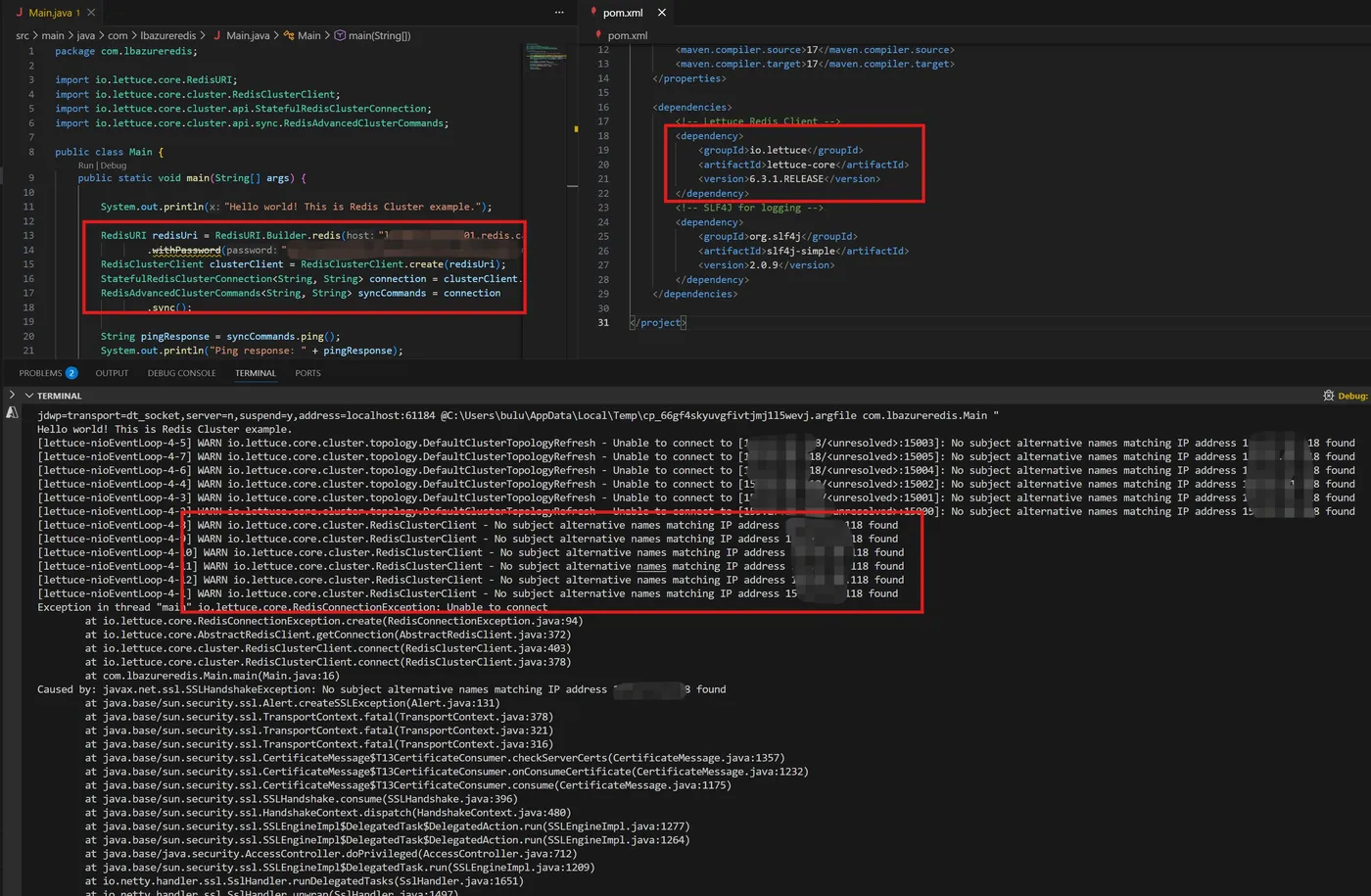
使用Azure Cache for Redis的集群模式。应用客户端为Java代码,使用Lettuce 作为Redis 客户端SDK。启动项目报错:Caused by: java.security.cert.CertificateException: No subject alternative names matching IP address 159.27.xxx.xxx found。
运行时的错误截图
示例代码
package com.lbazureredis;
import io.lettuce.core.RedisURI;
import io.lettuce.core.cluster.RedisClusterClient;
import io.lettuce.core.cluster.api.StatefulRedisClusterConnection;
import io.lettuce.core.cluster.api.sync.RedisAdvancedClusterCommands;
public class Main {
    public static void main(String[] args) {

        System.out.println("Hello world! This is Redis Cluster example.");

        RedisURI redisUri = RedisURI.Builder.redis("<yourredisname>.redis.cache.chinacloudapi.cn", 6380)
                .withPassword("<your redis access key>").withSsl(true).build();
        RedisClusterClient clusterClient = RedisClusterClient.create(redisUri);
        StatefulRedisClusterConnection<String, String> connection = clusterClient.connect();
        RedisAdvancedClusterCommands<String, String> syncCommands = connection
                .sync();
        String pingResponse = syncCommands.ping();
        System.out.println("Ping response: " + pingResponse);
        syncCommands.set("mykey", "Hello, Redis Cluster!");
        String value = syncCommands.get("mykey");
        System.out.println("Retrieved value: " + value);

        connection.close();
        clusterClient.shutdown();
    }
}
项目POM.xml
<project xmlns="http://maven.apache.org/POM/4.0.0" xmlns:xsi="http://www.w3.org/2001/XMLSchema-instance" xsi:schemaLocation="http://maven.apache.org/POM/4.0.0 http://maven.apache.org/xsd/maven-4.0.0.xsd"> <modelVersion>4.0.0</modelVersion> <groupId>com.lbazureredis</groupId> <artifactId>test</artifactId> <version>1.0-SNAPSHOT</version> <properties> <maven.compiler.source>17</maven.compiler.source> <maven.compiler.target>17</maven.compiler.target> </properties> <dependencies> <!-- Lettuce Redis Client --> <dependency> <groupId>io.lettuce</groupId> <artifactId>lettuce-core</artifactId> <version>6.3.1.RELEASE</version> </dependency> <!-- SLF4J for logging --> <dependency> <groupId>org.slf4j</groupId> <artifactId>slf4j-simple</artifactId> <version>2.0.9</version> </dependency> </dependencies> </project>
针对以上问题,如何解决呢?
问题解答
根据错误信息搜索后,得到Azure官方最佳实践文档中的解答:https://github.com/Azure/AzureCacheForRedis/blob/main/Lettuce%20Best%20Practices.md
The reason this is required is because SSL certification validates the address of the Redis Nodes with the SAN (Subject Alternative Names) in the SSL certificate. Redis protocol requires that these node addresses should be IP addresses. However, the SANs in the Azure Redis SSL certificates contains only the Hostname since Public IP addresses can change and as a result not completely secure.
在Redis Protocol验证中,必须验证证书中包含IP地址,但由于Azure Redis部署在云环境中,IP地址是不固定的。所以默认情况下,Redis SSL证书中包含的是域名。为了解决这个问题,需要建立一个Host与IP地址的映射关系,使得Lettuce客户端在验证Redis证书时通过域名验证而非IP地址,用于解决No subject alternative names matching IP address 159.27.xxx.xxx found 问题
参考文档中的方法,自定义MappingSocketAddressResolver
Function<HostAndPort, HostAndPort> mappingFunction = new Function<HostAndPort, HostAndPort>() { public HostAndPort apply(HostAndPort hostAndPort) { String cacheIP = ""; try { InetAddress[] addresses = DnsResolvers.JVM_DEFAULT.resolve(host); cacheIP = addresses[0].getHostAddress(); } catch (UnknownHostException e) { e.printStackTrace(); } HostAndPort finalAddress = hostAndPort; if (hostAndPort.hostText.equals(cacheIP)) finalAddress = HostAndPort.of(host, hostAndPort.getPort()); return finalAddress; } }; MappingSocketAddressResolver resolver = MappingSocketAddressResolver.create(DnsResolvers.JVM_DEFAULT, mappingFunction); ClientResources res = DefaultClientResources.builder() .socketAddressResolver(resolver).build(); RedisURI redisURI = RedisURI.Builder.redis(host).withSsl(true) .withPassword(password) .withClientName("LettuceClient") .withPort(6380) .build(); RedisClusterClient redisClient = RedisClusterClient.create(res, redisURI);
代码解读
mappingFunction
- 它是一个自定义的地址映射逻辑,用于处理 Lettuce 在连接 Redis 集群时的主机名与 IP 地址问题。
- 它通过 DnsResolvers.JVM_DEFAULT 对指定的域名进行 DNS 解析,获取对应的 IP 地址。如果当前 HostAndPort 的 hostText 与解析出的 IP 相同,则将其替换为原始域名 host,保持端口不变。
- 这一逻辑的核心目的是解决 SSL 证书校验问题,因为证书通常绑定域名而非 IP,确保连接时使用域名进行验证,避免因 IP 导致的握手失败。
MappingSocketAddressResolver
- 它是 Lettuce 提供的一个工具类,用于在连接 Redis 时插入自定义的地址解析逻辑。
- 它结合默认的 DNS 解析器和 mappingFunction,在每次解析 Socket 地址时执行映射操作。
- 通过这种方式,客户端可以在 DNS 解析后对结果进行二次处理,例如将 IP 地址重新映射为域名。
- 这对于云服务场景(如 Azure Redis)非常重要,因为这些服务的 SSL 证书通常只对域名有效,而不是 IP 地址。
DefaultClientResources
- 作为 Lettuce 的核心资源管理器,用于配置客户端的底层行为,包括线程池、DNS 解析器、事件循环等。在这里,它的作用是将自定义的 MappingSocketAddressResolver 注入到客户端资源中,使所有连接请求都遵循自定义的地址解析逻辑。
- 通过这种方式,整个 Lettuce 客户端在连接 Redis 集群时都会使用域名而非 IP,确保 SSL 校验通过,同时保持连接的稳定性和安全性。
执行结果
再次运行,成功连接到Azure Redis Cluster 及执行Ping, Set, Get指令!
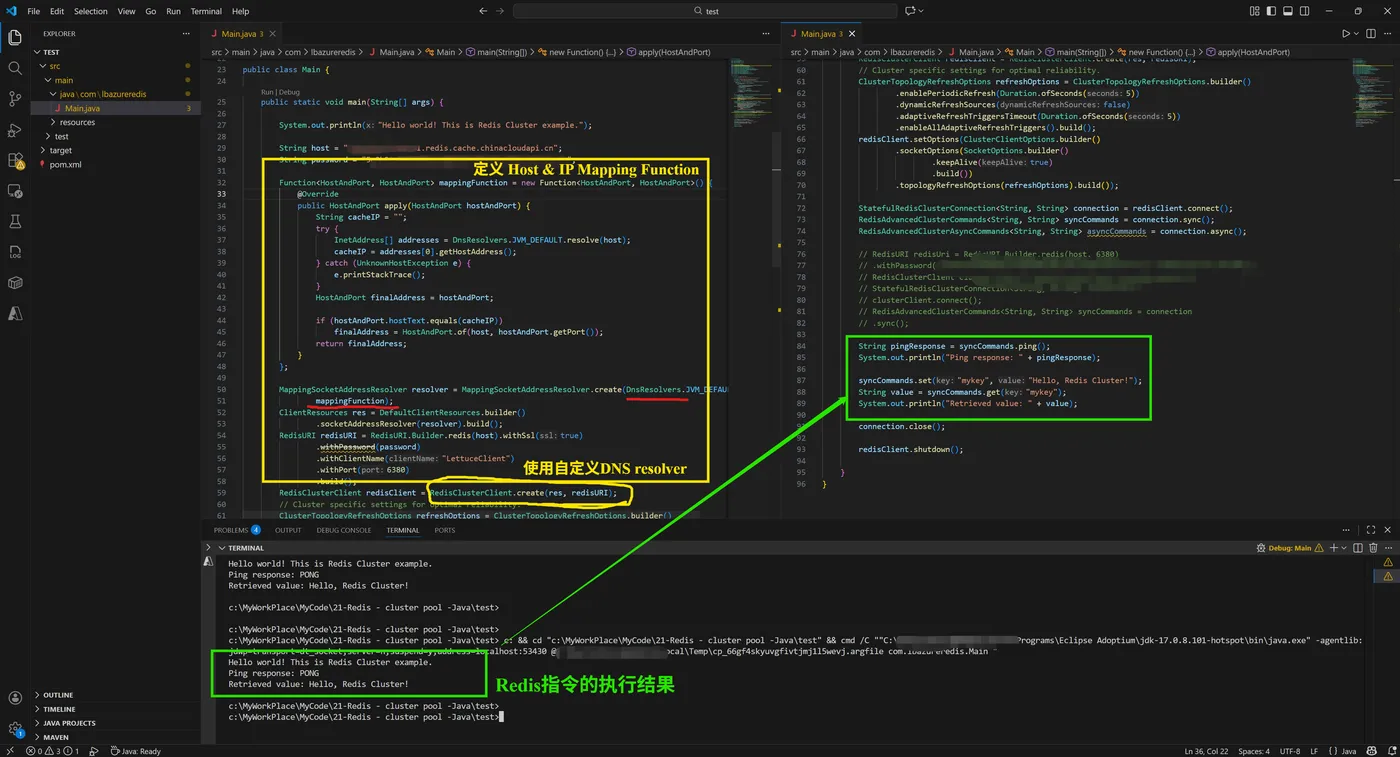
修改后完整的Java示例代码如下:
package com.lbazureredis; import java.net.InetAddress; import java.net.UnknownHostException; import java.time.Duration; import java.util.function.Function; import io.lettuce.core.RedisURI; import io.lettuce.core.SocketOptions; import io.lettuce.core.api.StatefulRedisConnection; import io.lettuce.core.cluster.ClusterClientOptions; import io.lettuce.core.cluster.ClusterTopologyRefreshOptions; import io.lettuce.core.cluster.RedisClusterClient; import io.lettuce.core.cluster.api.StatefulRedisClusterConnection; import io.lettuce.core.cluster.api.async.RedisAdvancedClusterAsyncCommands; import io.lettuce.core.cluster.api.sync.RedisAdvancedClusterCommands; import io.lettuce.core.internal.HostAndPort; import io.lettuce.core.resource.ClientResources; import io.lettuce.core.resource.DefaultClientResources; import io.lettuce.core.resource.DnsResolvers; import io.lettuce.core.resource.MappingSocketAddressResolver; public class Main { public static void main(String[] args) { System.out.println("Hello world! This is Redis Cluster example."); String host = "<yourredisname>.redis.cache.chinacloudapi.cn"; String password = "<your redis access key>"; Function<HostAndPort, HostAndPort> mappingFunction = new Function<HostAndPort, HostAndPort>() { public HostAndPort apply(HostAndPort hostAndPort) { String cacheIP = ""; try { InetAddress[] addresses = DnsResolvers.JVM_DEFAULT.resolve(host); cacheIP = addresses[0].getHostAddress(); } catch (UnknownHostException e) { e.printStackTrace(); } HostAndPort finalAddress = hostAndPort; if (hostAndPort.hostText.equals(cacheIP)) finalAddress = HostAndPort.of(host, hostAndPort.getPort()); return finalAddress; } }; MappingSocketAddressResolver resolver = MappingSocketAddressResolver.create(DnsResolvers.JVM_DEFAULT, mappingFunction); ClientResources res = DefaultClientResources.builder() .socketAddressResolver(resolver).build(); RedisURI redisURI = RedisURI.Builder.redis(host).withSsl(true) .withPassword(password) .withClientName("LettuceClient") .withPort(6380) .build(); RedisClusterClient redisClient = RedisClusterClient.create(res, redisURI); // Cluster specific settings for optimal reliability. ClusterTopologyRefreshOptions refreshOptions = ClusterTopologyRefreshOptions.builder() .enablePeriodicRefresh(Duration.ofSeconds(5)) .dynamicRefreshSources(false) .adaptiveRefreshTriggersTimeout(Duration.ofSeconds(5)) .enableAllAdaptiveRefreshTriggers().build(); redisClient.setOptions(ClusterClientOptions.builder() .socketOptions(SocketOptions.builder() .keepAlive(true) .build()) .topologyRefreshOptions(refreshOptions).build()); StatefulRedisClusterConnection<String, String> connection = redisClient.connect(); RedisAdvancedClusterCommands<String, String> syncCommands = connection.sync(); RedisAdvancedClusterAsyncCommands<String, String> asyncCommands = connection.async(); String pingResponse = syncCommands.ping(); System.out.println("Ping response: " + pingResponse); syncCommands.set("mykey", "Hello, Redis Cluster!"); String value = syncCommands.get("mykey"); System.out.println("Retrieved value: " + value); connection.close(); redisClient.shutdown(); } }
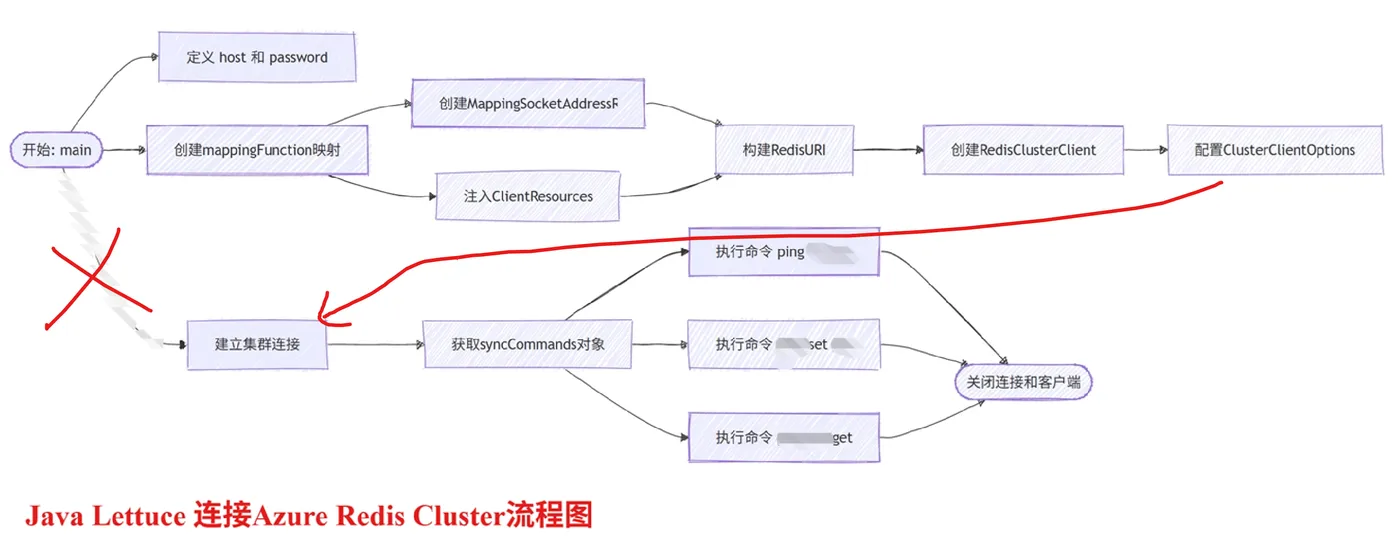
代码流程图
基于AI模型解读以上代码后,分析出来的代码流程图
参考资料
Best Practices for using Azure Cache for Redis with Lettuce :https://github.com/Azure/AzureCacheForRedis/blob/main/Lettuce%20Best%20Practices.md
当在复杂的环境中面临问题,格物之道需:浊而静之徐清,安以动之徐生。 云中,恰是如此!