目录

前言
你好,我是喵喵侠。在现代Web布局中,flex和grid布局用到的会比较多,但我们仍然会遇到一些老旧项目,里面的前端UI框架,采用的还是float布局。在这种情况下,如果你对float布局不了解,就会在开发的过程中踩到坑。下面我来为你讲解,float元素高度变化后,是如何影响相邻元素的,以及如何解决这样的问题。
问题描述
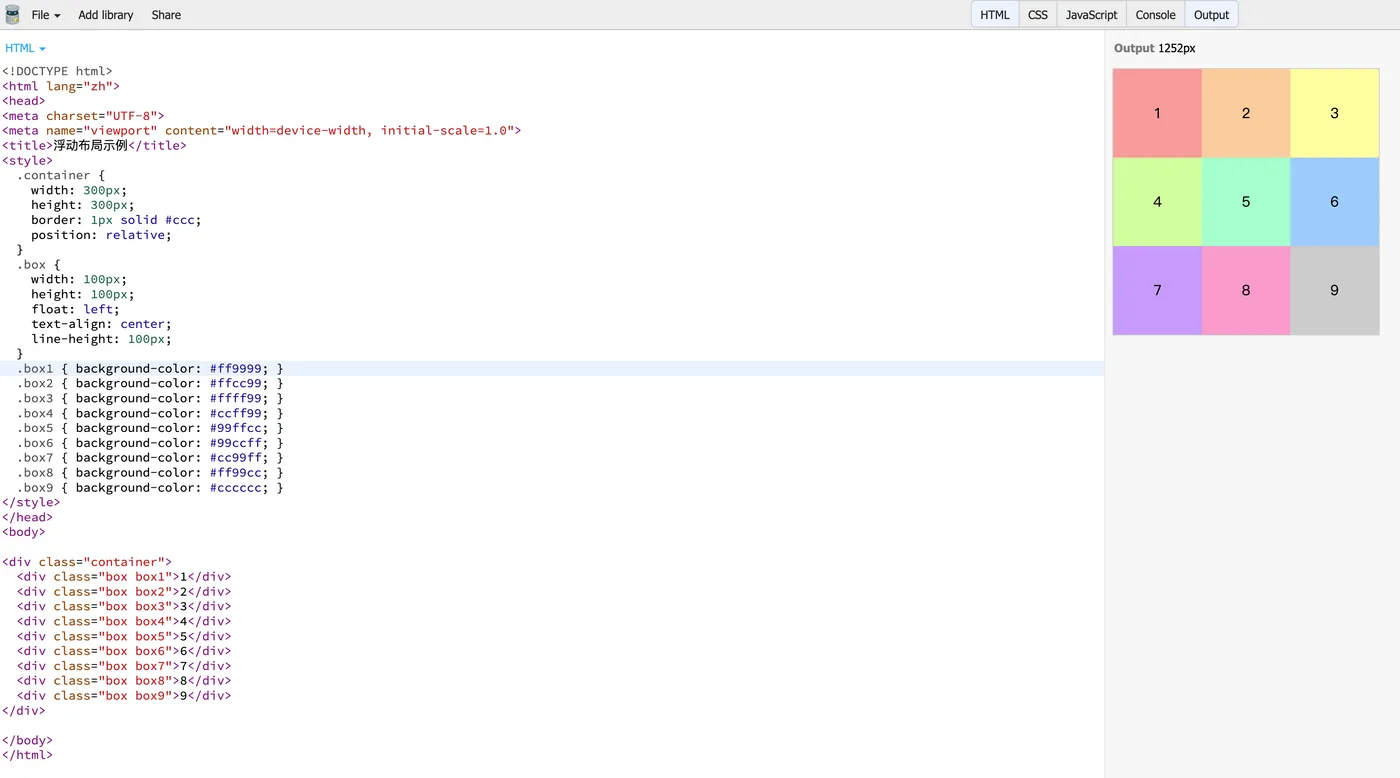
首先假设有一个容器盒子,宽度是300px,高度是300px,它里面有9个div子元素,元素的宽高都是100px,都是float:left左浮动。
正常效果
根据这样的描述,我写了一个正常效果的demo如下:
<!DOCTYPE html>
<html lang="zh">
<head>
<meta charset="UTF-8">
<meta name="viewport" content="width=device-width, initial-scale=1.0">
<title>浮动布局示例</title>
<style>
  .container {
    width: 300px;
    height: 300px;
    border: 1px solid #ccc;
    position: relative;
  }
  .box {
    width: 100px;
    height: 100px;
    float: left;
    text-align: center;
    line-height: 100px;
  }
  .box1 { background-color: #ff9999; }
  .box2 { background-color: #ffcc99; }
  .box3 { background-color: #ffff99; }
  .box4 { background-color: #ccff99; }
  .box5 { background-color: #99ffcc; }
  .box6 { background-color: #99ccff; }
  .box7 { background-color: #cc99ff; }
  .box8 { background-color: #ff99cc; }
  .box9 { background-color: #cccccc; }
</style>
</head>
<body>
<div class="container">
  <div class="box box1">1</div>
  <div class="box box2">2</div>
  <div class="box box3">3</div>
  <div class="box box4">4</div>
  <div class="box box5">5</div
  <div class="box box6">6</div>
  <div class="box box7">7</div>
  <div class="box box8">8</div>
  <div class="box box9">9</div>
</div>
</body>
</html>
正常效果如下:
问题效果
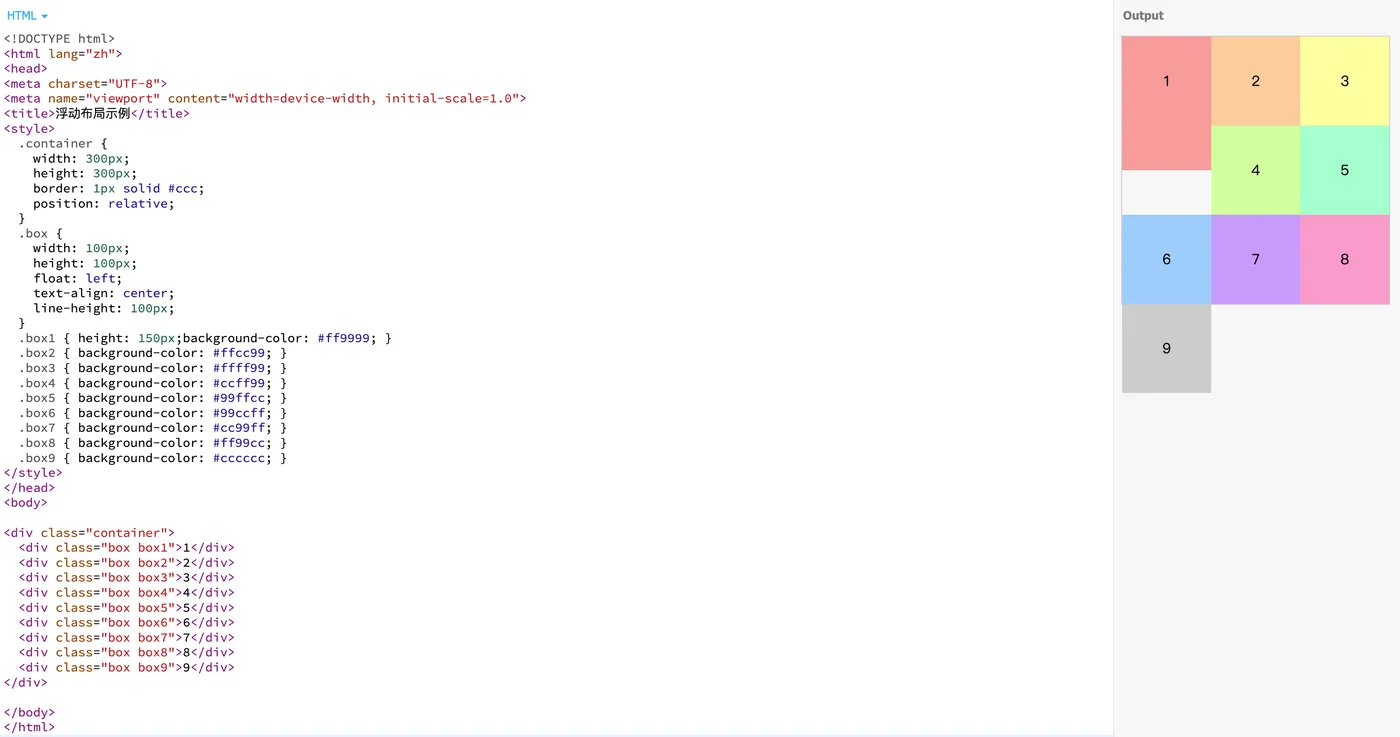
如果我把其中一个子元素,比方说子元素1的高度,修改为150px。此时你会发现,原本的子元素4跑到了原本5的位置,5跑到了原本6的位置,以此类推。
问题代码如下:
<!DOCTYPE html>
<html lang="zh">
<head>
<meta charset="UTF-8">
<meta name="viewport" content="width=device-width, initial-scale=1.0">
<title>浮动布局示例</title>
<style>
  .container {
    width: 300px;
    height: 300px;
    border: 1px solid #ccc;
    position: relative;
  }
  .box {
    width: 100px;
    height: 100px;
    float: left;
    text-align: center;
    line-height: 100px;
  }
  .box1 { height:150px;background-color: #ff9999; }
  .box2 { background-color: #ffcc99; }
  .box3 { background-color: #ffff99; }
  .box4 { background-color: #ccff99; }
  .box5 { background-color: #99ffcc; }
  .box6 { background-color: #99ccff; }
  .box7 { background-color: #cc99ff; }
  .box8 { background-color: #ff99cc; }
  .box9 { background-color: #cccccc; }
</style>
</head>
<body>
<div class="container">
  <div class="box box1">1</div>
  <div class="box box2">2</div>
  <div class="box box3">3</div>
  <div class="box box4">4</div>
  <div class="box box5">5</div>
  <div class="box box6">6</div>
  <div class="box box7">7</div>
  <div class="box box8">8</div>
  <div class="box box9">9</div>
</div>
</body>
</html>
问题效果如下:
解决方案
这个是float浮动布局导致的,如果不用这个布局就不会有这个问题,我们要做的是,清楚浮动给子元素带来的影响。
我这里有个通俗的理解,所有的元素是左浮动,那么每个元素都会尽可能地去贴上一个元素的右边。比方说2会去贴1,3会去贴2。由于1的高度变化了,比2和3要长,那么4正好是可以贴上去的,所以4会贴1,然后原本4的位置被1占用了,4就只能靠右占5的位置,5就占6,以此类推。
要想解决这个问题,那就是强行让4不要去贴1的边。
所以最终的解决方案是,给受到影响的换行子元素,加上clear:left即可。
示例代码如下:
<!DOCTYPE html>
<html lang="zh">
<head>
<meta charset="UTF-8">
<meta name="viewport" content="width=device-width, initial-scale=1.0">
<title>浮动布局示例</title>
<style>
  .container {
    width: 300px;
    height: 300px;
    border: 1px solid #ccc;
    position: relative;
  }
  .box {
    width: 100px;
    height: 100px;
    float: left;
    text-align: center;
    line-height: 100px;
  }
  .box1 { height:150px;background-color: #ff9999; }
  .box2 { background-color: #ffcc99; }
  .box3 { background-color: #ffff99; }
  .box4 { background-color: #ccff99; }
  .box5 { background-color: #99ffcc; }
  .box6 { background-color: #99ccff; }
  .box7 { background-color: #cc99ff; }
  .box8 { background-color: #ff99cc; }
  .box9 { background-color: #cccccc; }
  .box:nth-child(3n+1){
    clear: left
  }
</style>
</head>
<body>
<div class="container">
  <div class="box box1">1</div>
  <div class="box box2">2</div>
  <div class="box box3">3</div>
  <div class="box box4">4</div>
  <div class="box box5">5</div>
  <div class="box box6">6</div>
  <div class="box box7">7</div>
  <div class="box box8">8</div>
  <div class="box box9">9</div>
</div>
</body>
</html>
效果如下:
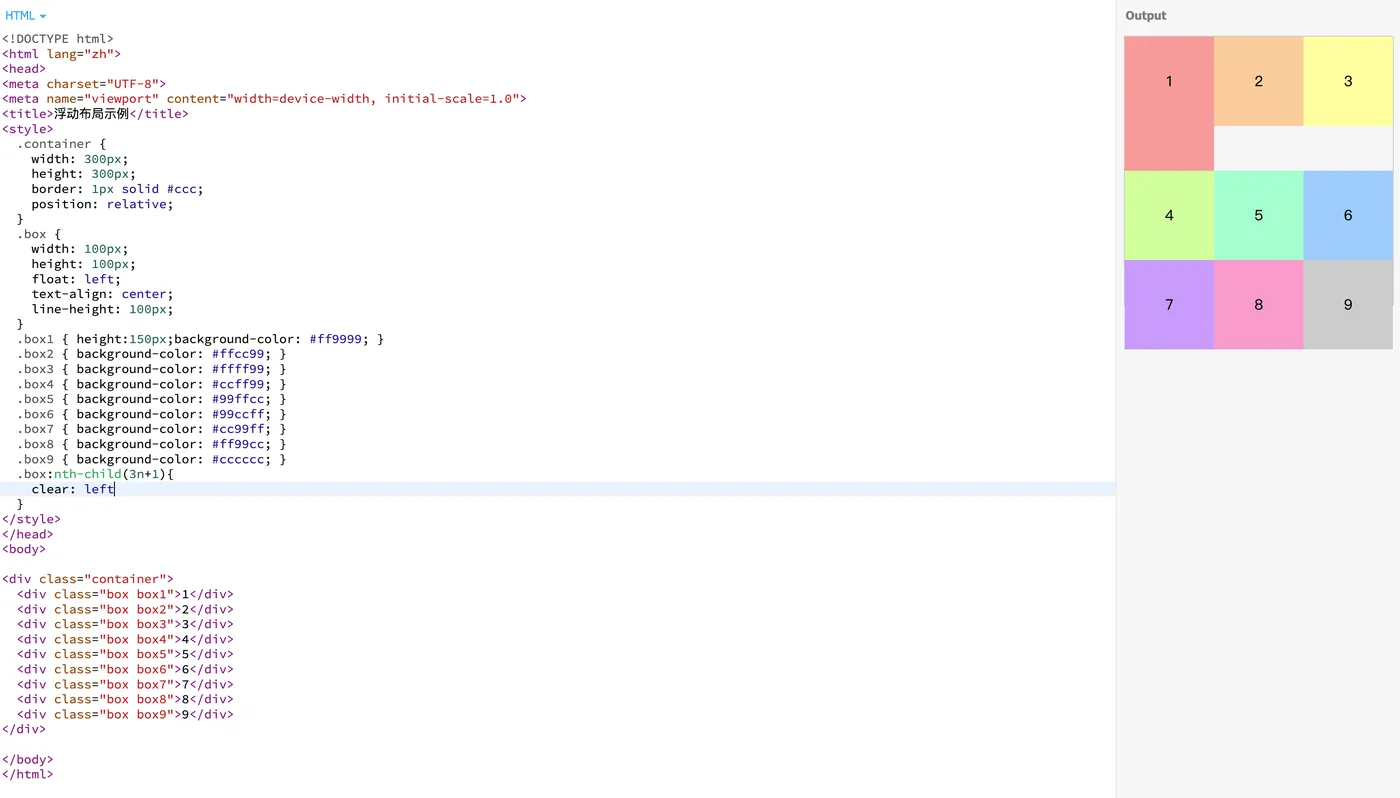
关键是要给3n+1个子元素加上清除左浮动,防止后续其他元素高度变化后,出现类似的问题。
实际案例
我开发的项目中,用到了ant-design-vue 1.7.8这个前端UI框架,里面的formModel表单,表单项用到的就是float布局。
这里有个示例代码,可以复现这个问题。
<!DOCTYPE html>
<html lang="zh">
<head>
<meta charset="UTF-8">
<meta name="viewport" content="width=device-width, initial-scale=1.0">
<title>Ant Design Vue 表单示例</title>
<!-- 引入 Vue 和 Ant Design Vue 1.7.8 的 CDN -->
<script src="https://cdn.bootcdn.net/ajax/libs/vue/2.6.14/vue.min.js"></script>
<link rel="stylesheet" href="https://cdn.bootcdn.net/ajax/libs/ant-design-vue/1.7.8/antd.min.css">
<script src="https://cdn.bootcdn.net/ajax/libs/ant-design-vue/1.7.8/antd.min.js"></script>
</head>
<body>
<div id="app">
  <a-form-model
    ref="formModel"
    :model="form"
    :rules="rules"
    layout="inline"
  >
    <a-row :gutter="24">
      <!-- 多选 Select -->
      <a-col :span="12">
        <a-form-model-item label="兴趣爱好" name="hobbies">
          <a-select
            v-model="form.hobbies"
            mode="multiple"
            placeholder="请选择你的兴趣爱好"
            allow-clear
            style="width:340px"
          >
            <a-select-option v-for="item in options" :key="item.value" :value="item.value">
              {{ item.label }}
            </a-select-option>
          </a-select>
        </a-form-model-item>
      </a-col>
      <!-- 输入框 -->
      <a-col :span="12">
        <a-form-model-item label="姓名" name="name">
          <a-input v-model="form.name" placeholder="请输入姓名"></a-input>
        </a-form-model-item>
      </a-col>
      <!-- 数字输入框 -->
      <a-col :span="12">
        <a-form-model-item label="年龄" name="age">
          <a-input-number v-model="form.age" placeholder="请输入年龄" style="width: 100%;"></a-input-number>
        </a-form-model-item>
      </a-col>
      <!-- 单选框组 -->
      <a-col :span="12">
        <a-form-model-item label="性别" name="gender">
          <a-radio-group v-model="form.gender">
            <a-radio value="male">男</a-radio>
            <a-radio value="female">女</a-radio>
          </a-radio-group>
        </a-form-model-item>
      </a-col>
      <!-- 日期选择器 -->
      <a-col :span="12">
        <a-form-model-item label="生日" name="birthday">
          <a-input v-model="form.birthday" placeholder="选择日期"></a-input>
        </a-form-model-item>
      </a-col>
      <!-- 开关 -->
      <a-col :span="12">
        <a-form-model-item label="是否订阅" name="subscribe">
          <a-switch v-model="form.subscribe"></a-switch>
        </a-form-model-item>
      </a-col>
      <!-- 滑块 -->
      <a-col :span="12">
        <a-form-model-item label="满意度" name="satisfaction">
          <a-slider v-model="form.satisfaction"></a-slider>
        </a-form-model-item>
      </a-col>

      <!-- 滑块 -->
      <a-col :span="12">
        <a-form-model-item label="满意度" name="satisfaction">
          <a-slider v-model="form.satisfaction"></a-slider>
        </a-form-model-item>
      </a-col>
      <!-- 提交与重置按钮 -->
      <a-col :span="24">
        <a-form-model-item>
          <a-button type="primary" @click="handleSubmit">提交</a-button>
          <a-button style="margin-left: 10px;" @click="handleReset">重置</a-button>
        </a-form-model-item>
      </a-col>
    </a-row>
  </a-form-model>
</div>
<script>
  new Vue({
    el: '#app',
    data() {
      return {
        form: {
          hobbies: [],
          name: '',
          age: null,
          gender: '',
          birthday: null,
          subscribe: false,
          satisfaction: 0,
        },
        rules: {
          hobbies: [{ required: true, message: '请选择至少一个兴趣爱好', type: 'array' }],
          name: [{ required: true, message: '请输入姓名' }],
          age: [{ type: 'number', required: true, message: '请输入年龄' }],
          gender: [{ required: true, message: '请选择性别' }],
          birthday: [{ required: true, message: '请选择生日' }],
        },
        options: Array.from({ length: 20 }, (_, index) => ({
          value: `option-${index + 1}`,
          label: `选项 ${index + 1}`,
        })),
      };
    },
    methods: {
      handleSubmit() {
        this.$message.success('表单提交成功:' + JSON.stringify(this.form));
      },
      handleReset() {
        this.$refs.formModel.resetFields();
        this.$message.info('表单已重置');
      },
    },
  });
</script>
</body>
</html>
效果如下:
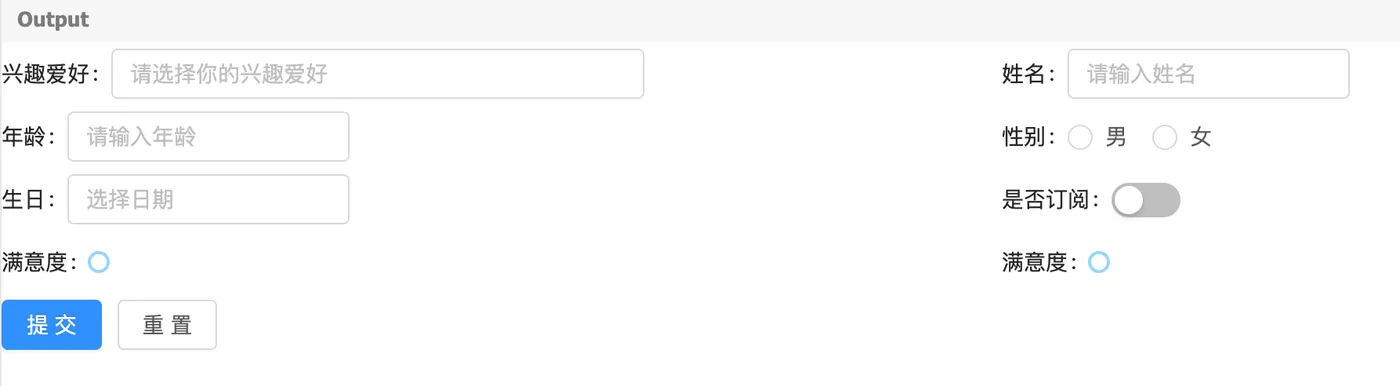
咋一看没问题,但只要你在select中多选,选择足够多,多到足以改变高度,问题就出现了。第三个表单项被挤压到了原本第四个元素的位置。
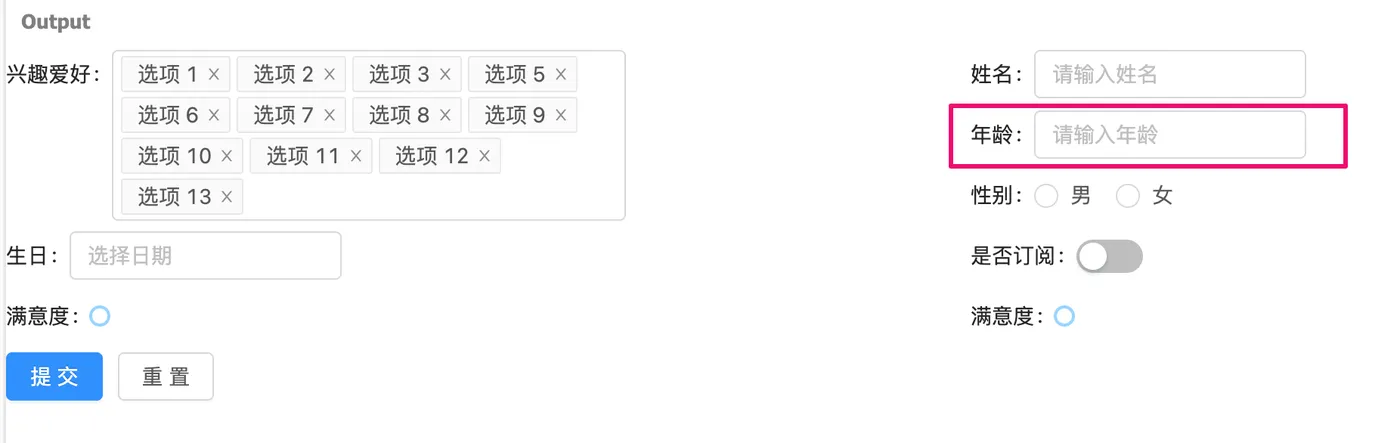
解决办法跟上面一样,设置一个选择器清除左浮动即可。
<!DOCTYPE html>
<html lang="zh">
<head>
<meta charset="UTF-8">
<meta name="viewport" content="width=device-width, initial-scale=1.0">
<title>Ant Design Vue 表单示例</title>
<!-- 引入 Vue 和 Ant Design Vue 1.7.8 的 CDN -->
<script src="https://cdn.bootcdn.net/ajax/libs/vue/2.6.14/vue.min.js"></script>
<link rel="stylesheet" href="https://cdn.bootcdn.net/ajax/libs/ant-design-vue/1.7.8/antd.min.css">
<script src="https://cdn.bootcdn.net/ajax/libs/ant-design-vue/1.7.8/antd.min.js"></script>
<style>
  .ant-row.form-row .ant-col-12:nth-child(3n){
    clear: left;
  }
</style>
</head>
<body>
<div id="app">
  <a-form-model
    ref="formModel"
    :model="form"
    :rules="rules"
    layout="inline"
  >
    <a-row :gutter="24" class="form-row">
      <!-- 多选 Select -->
      <a-col :span="12">
        <a-form-model-item label="兴趣爱好" name="hobbies">
          <a-select
            v-model="form.hobbies"
            mode="multiple"
            placeholder="请选择你的兴趣爱好"
            allow-clear
            style="width:340px"
          >
            <a-select-option v-for="item in options" :key="item.value" :value="item.value">
              {{ item.label }}
            </a-select-option>
          </a-select>
        </a-form-model-item>
      </a-col>
      <!-- 输入框 -->
      <a-col :span="12">
        <a-form-model-item label="姓名" name="name">
          <a-input v-model="form.name" placeholder="请输入姓名"></a-input>
        </a-form-model-item>
      </a-col>
      <!-- 数字输入框 -->
      <a-col :span="12">
        <a-form-model-item label="年龄" name="age">
          <a-input-number v-model="form.age" placeholder="请输入年龄" style="width: 100%;"></a-input-number>
        </a-form-model-item>
      </a-col>
      <!-- 单选框组 -->
      <a-col :span="12">
        <a-form-model-item label="性别" name="gender">
          <a-radio-group v-model="form.gender">
            <a-radio value="male">男</a-radio>
            <a-radio value="female">女</a-radio>
          </a-radio-group>
        </a-form-model-item>
      </a-col>
      <!-- 日期选择器 -->
      <a-col :span="12">
        <a-form-model-item label="生日" name="birthday">
          <a-input v-model="form.birthday" placeholder="选择日期"></a-input>
        </a-form-model-item>
      </a-col>
      <!-- 开关 -->
      <a-col :span="12">
        <a-form-model-item label="是否订阅" name="subscribe">
          <a-switch v-model="form.subscribe"></a-switch>
        </a-form-model-item>
      </a-col>
      <!-- 滑块 -->
      <a-col :span="12">
        <a-form-model-item label="满意度" name="satisfaction">
          <a-slider v-model="form.satisfaction"></a-slider>
        </a-form-model-item>
      </a-col>

      <!-- 滑块 -->
      <a-col :span="12">
        <a-form-model-item label="满意度" name="satisfaction">
          <a-slider v-model="form.satisfaction"></a-slider>
        </a-form-model-item>
      </a-col>
      <!-- 提交与重置按钮 -->
      <a-col :span="24">
        <a-form-model-item>
          <a-button type="primary" @click="handleSubmit">提交</a-button>
          <a-button style="margin-left: 10px;" @click="handleReset">重置</a-button>
        </a-form-model-item>
      </a-col>
    </a-row>
  </a-form-model>
</div>
<script>
  new Vue({
    el: '#app',
    data() {
      return {
        form: {
          hobbies: [],
          name: '',
          age: null,
          gender: '',
          birthday: null,
          subscribe: false,
          satisfaction: 0,
        },
        rules: {
          hobbies: [{ required: true, message: '请选择至少一个兴趣爱好', type: 'array' }],
          name: [{ required: true, message: '请输入姓名' }],
          age: [{ type: 'number', required: true, message: '请输入年龄' }],
          gender: [{ required: true, message: '请选择性别' }],
          birthday: [{ required: true, message: '请选择生日' }],
        },
        options: Array.from({ length: 20 }, (_, index) => ({
          value: `option-${index + 1}`,
          label: `选项 ${index + 1}`,
        })),
      };
    },
    methods: {
      handleSubmit() {
        this.$message.success('表单提交成功:' + JSON.stringify(this.form));
      },
      handleReset() {
        this.$refs.formModel.resetFields();
        this.$message.info('表单已重置');
      },
    },
  });
</script>
</body>
</html>
这样就改好了!
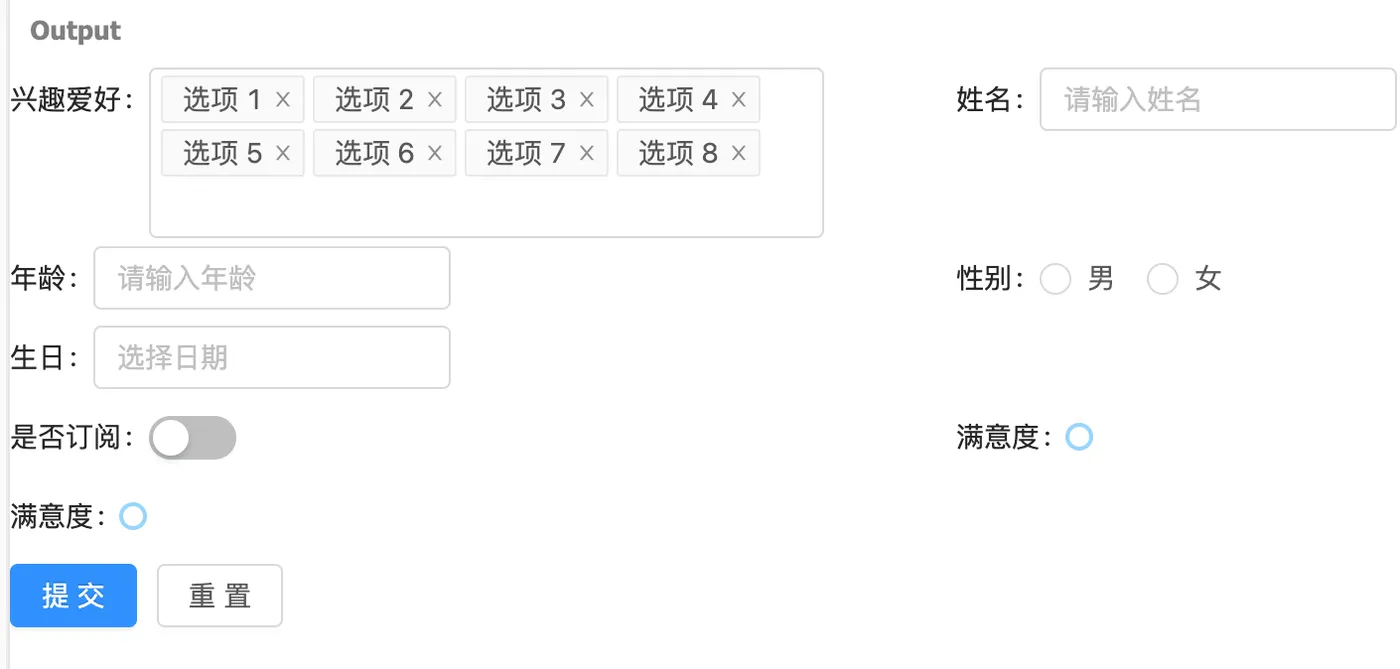
总结
这类问题的解决办法,最好是从源头解决。我曾经尝试过换布局,但这样改动量会比较大,不是很合适。关于float清除浮动的实际含义,可以看看张鑫旭大佬的文章,我放到参考链接里面了。