一、Spring生态系统演进历程
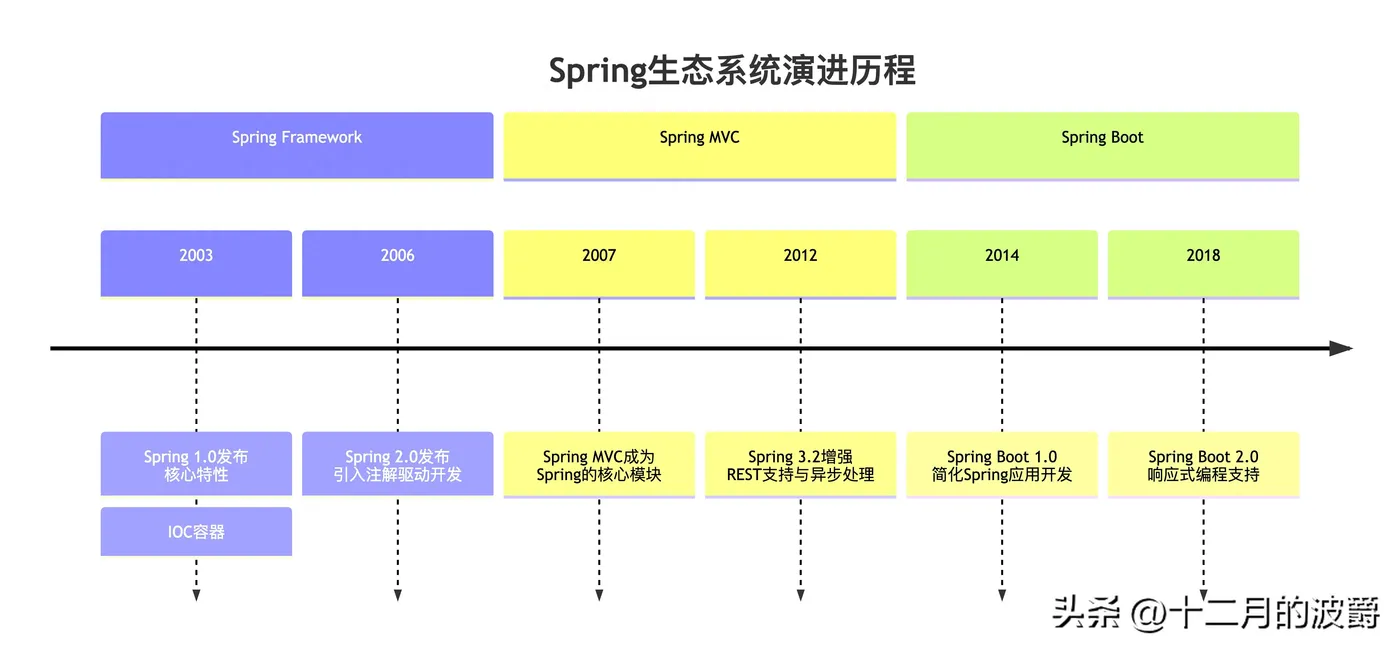
要理解Spring、Spring MVC和Spring Boot的关系,我们首先需要了解Spring生态系统的发展历程。下图展示了这三个核心组件的演进关系:
二、Spring Framework:基石与核心
2.1 核心特性与价值
Spring Framework是整个Spring生态系统的基石,提供了一套完整的基础设施支持:
// 传统的Spring配置方式(XML配置)
// applicationContext.xml
<beans xmlns="http://www.springframework.org/schema/beans"
       xmlns:xsi="http://www.w3.org/2001/XMLSchema-instance"
       xsi:schemaLocation="http://www.springframework.org/schema/beans
       http://www.springframework.org/schema/beans/spring-beans.xsd">

    <bean id="userService" class="com.example.UserService">
        <property name="userRepository" ref="userRepository"/>
    </bean>

    <bean id="userRepository" class="com.example.UserRepositoryImpl"/>
</beans>
// Java代码中使用
ApplicationContext context = new ClassPathXmlApplicationContext("applicationContext.xml");
UserService userService = context.getBean("userService", UserService.class);
2.2 现代注解配置方式
Spring Framework逐渐转向注解驱动的配置方式:
// 使用Java配置类替代XML
@Configuration
public class AppConfig {

    @Bean
    public UserRepository userRepository() {
        return new UserRepositoryImpl();
    }

    @Bean
    public UserService userService(UserRepository userRepository) {
        return new UserService(userRepository);
    }
}
// 组件扫描与自动装配
@Repository
public class UserRepositoryImpl implements UserRepository {
    // 实现代码
}
@Service
public class UserService {
    private final UserRepository userRepository;

    @Autowired
    public UserService(UserRepository userRepository) {
        this.userRepository = userRepository;
    }
}
三、Spring MVC:Web层解决方案
3.1 MVC架构实现
Spring MVC是基于Spring Framework的Web框架,实现了经典的三层架构模式:
// 配置Spring MVC(传统方式)
// web.xml
<web-app>
    <servlet>
        <servlet-name>dispatcher</servlet-name>
        <servlet-class>org.springframework.web.servlet.DispatcherServlet</servlet-class>
        <init-param>
            <param-name>contextConfigLocation</param-name>
            <param-value>/WEB-INF/spring-mvc-config.xml</param-value>
        </init-param>
        <load-on-startup>1</load-on-startup>
    </servlet>

    <servlet-mapping>
        <servlet-name>dispatcher</servlet-name>
        <url-pattern>/</url-pattern>
    </servlet-mapping>
</web-app>
// Spring MVC配置类(现代方式)
@Configuration
@EnableWebMvc
@ComponentScan("com.example.web")
public class WebConfig implements WebMvcConfigurer {

    @Override
    public void configureViewResolvers(ViewResolverRegistry registry) {
        registry.jsp("/WEB-INF/views/", ".jsp");
    }

    @Override
    public void addResourceHandlers(ResourceHandlerRegistry registry) {
        registry.addResourceHandler("/resources/**")
                .addResourceLocations("/resources/");
    }
}
3.2 Controller实现示例
@Controller
@RequestMapping("/users")
public class UserController {

    private final UserService userService;

    public UserController(UserService userService) {
        this.userService = userService;
    }

    @GetMapping("/{id}")
    public String getUser(@PathVariable Long id, Model model) {
        User user = userService.getUserById(id);
        model.addAttribute("user", user);
        return "user-details"; // 视图名称
    }

    @PostMapping
    @ResponseBody
    public ResponseEntity<User> createUser(@RequestBody User user) {
        User createdUser = userService.createUser(user);
        return ResponseEntity.status(HttpStatus.CREATED).body(createdUser);
    }

    @ExceptionHandler(UserNotFoundException.class)
    public ResponseEntity<ErrorResponse> handleUserNotFound(UserNotFoundException ex) {
        ErrorResponse error = new ErrorResponse("USER_NOT_FOUND", ex.getMessage());
        return ResponseEntity.status(HttpStatus.NOT_FOUND).body(error);
    }
}
四、Spring Boot:革命性的开发体验
4.1 自动配置与起步依赖
Spring Boot从根本上简化了Spring应用的开发流程:
// Spring Boot主应用类
@SpringBootApplication
public class MyApplication {

    public static void main(String[] args) {
        SpringApplication.run(MyApplication.class, args);
    }
}
// 等同于以下三个注解的组合:
// @Configuration - 标识为配置类
// @EnableAutoConfiguration - 启用自动配置
// @ComponentScan - 自动扫描组件
// 自定义配置
@Configuration
public class CustomConfig {

    @Bean
    public MyService myService() {
        return new MyService();
    }
}
4.2 内置服务器与外部化配置
// application.properties 或 application.yml
# 服务器配置
server.port=8080
server.servlet.context-path=/myapp
# 数据源配置
spring.datasource.url=jdbc:mysql://localhost:3306/mydb
spring.datasource.username=root
spring.datasource.password=secret
spring.datasource.driver-class-name=com.mysql.cj.jdbc.Driver
# JPA配置
spring.jpa.hibernate.ddl-auto=update
spring.jpa.show-sql=true
spring.jpa.properties.hibernate.dialect=org.hibernate.dialect.MySQL8Dialect
# 自定义配置
app.name=My Spring Boot Application
app.version=1.0.0
五、三者关系与对比分析
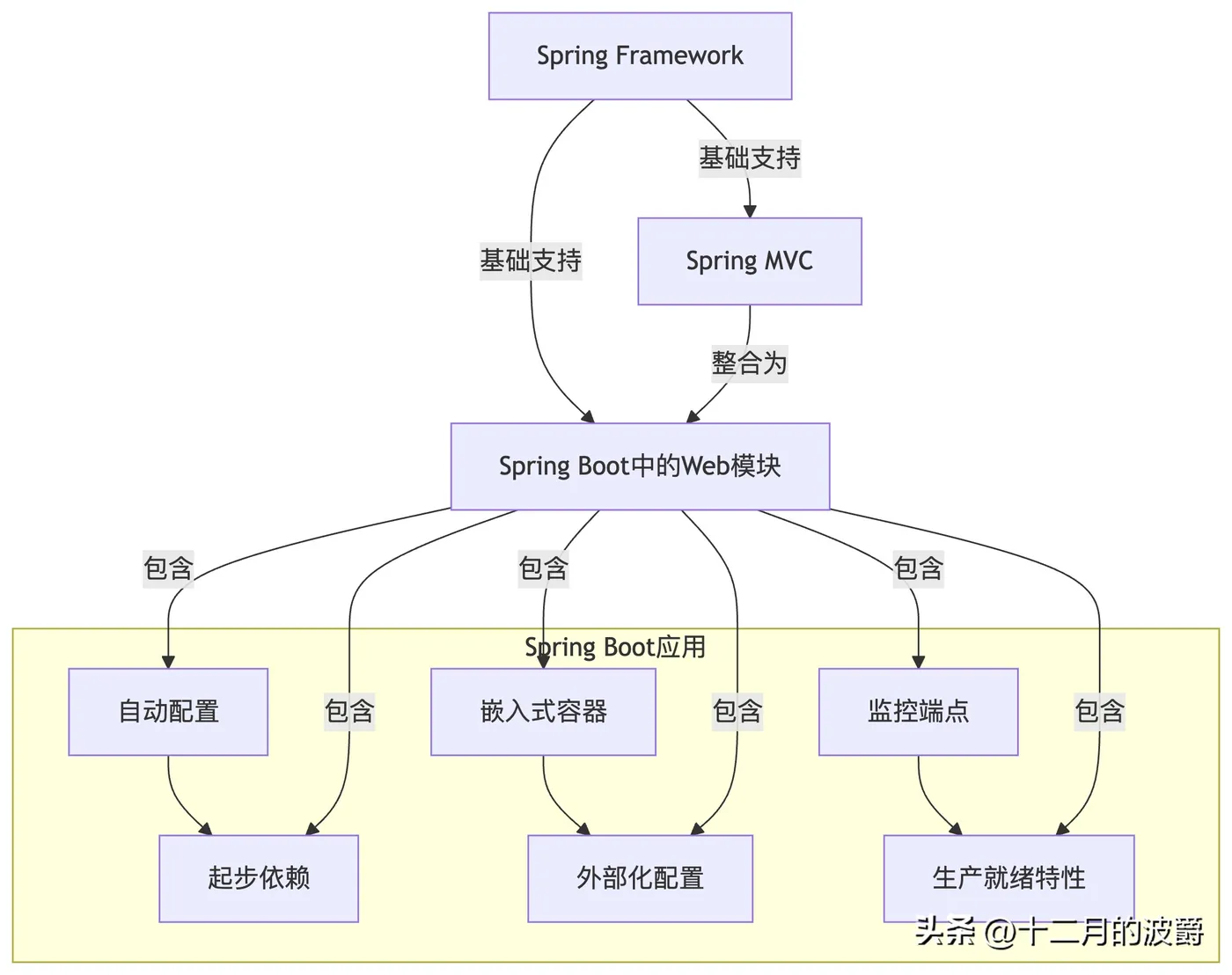
5.1 架构层次关系
5.2 功能特性对比
特性维度 |
Spring Framework |
Spring MVC |
Spring Boot |
定位 |
全功能应用框架 |
Web MVC框架 |
快速开发脚手架 |
配置方式 |
XML或Java配置 |
XML或Java配置 |
自动配置+约定优于配置 |
服务器 |
需要外部Web容器 |
需要外部Web容器 |
内嵌Web容器 |
依赖管理 |
手动管理依赖 |
手动管理依赖 |
起步依赖自动管理 |
部署方式 |
打包为WAR部署 |
打包为WAR部署 |
可执行JAR或WAR |
学习曲线 |
陡峭,需要深入理解 |
中等,需要理解Web概念 |
平缓,快速上手 |
适用场景 |
需要精细控制的大型应用 |
传统Web应用程序 |
微服务、快速原型开发 |
5.3 代码开发体验对比
传统Spring + Spring MVC开发:
// 1. 需要配置web.xml
// 2. 需要配置Spring和Spring MVC的XML文件
// 3. 需要手动配置DispatcherServlet
// 4. 需要外部Tomcat服务器
// 主配置类
@Configuration
@EnableWebMvc
@ComponentScan(basePackages = "com.example")
@PropertySource("classpath:application.properties")
public class AppConfig implements WebMvcConfigurer {

    // 需要手动配置视图解析器
    @Bean
    public ViewResolver viewResolver() {
        InternalResourceViewResolver resolver = new InternalResourceViewResolver();
        resolver.setPrefix("/WEB-INF/views/");
        resolver.setSuffix(".jsp");
        return resolver;
    }

    // 需要手动配置数据源
    @Bean
    public DataSource dataSource() {
        DriverManagerDataSource dataSource = new DriverManagerDataSource();
        dataSource.setDriverClassName(env.getProperty("jdbc.driverClassName"));
        dataSource.setUrl(env.getProperty("jdbc.url"));
        dataSource.setUsername(env.getProperty("jdbc.username"));
        dataSource.setPassword(env.getProperty("jdbc.password"));
        return dataSource;
    }
}
Spring Boot开发:
// 只需要一个主类和一些配置属性
@SpringBootApplication
public class Application {
    public static void main(String[] args) {
        SpringApplication.run(Application.class, args);
    }
}
// 控制器保持相同
@RestController
@RequestMapping("/api/users")
public class UserController {

    // 自动注入服务
    @Autowired
    private UserService userService;

    @GetMapping
    public List<User> getAllUsers() {
        return userService.getAllUsers();
    }
}
六、迁移与整合实战
6.1 从传统Spring迁移到Spring Boot
传统Spring应用改造:
// 1. 添加Spring Boot起步依赖
// pom.xml
<parent>
    <groupId>org.springframework.boot</groupId>
    <artifactId>spring-boot-starter-parent</artifactId>
    <version>3.1.0</version>
</parent>
<dependencies>
    <dependency>
        <groupId>org.springframework.boot</groupId>
        <artifactId>spring-boot-starter-web</artifactId>
    </dependency>
    <dependency>
        <groupId>org.springframework.boot</groupId>
        <artifactId>spring-boot-starter-data-jpa</artifactId>
    </dependency>
</dependencies>
// 2. 移除原有XML配置,转换为自动配置
// 3. 创建Spring Boot主类
@SpringBootApplication
public class Application {
    public static void main(String[] args) {
        SpringApplication.run(Application.class, args);
    }
}
// 4. 逐步替换原有配置为Spring Boot配置方式
6.2 混合配置场景
在某些复杂项目中,可能需要同时使用传统配置和Spring Boot自动配置:
@SpringBootApplication
@ImportResource("classpath:legacy-application-context.xml")
public class HybridApplication {

    // 主方法不变
    public static void main(String[] args) {
        SpringApplication.run(HybridApplication.class, args);
    }

    // 可以混合使用Java配置
    @Configuration
    public static class AdditionalConfig {

        @Bean
        public CustomBean customBean() {
            return new CustomBean();
        }
    }
}
// 在application.properties中指定特定自动配置行为
# 禁用特定的自动配置
spring.autoconfigure.exclude=org.springframework.boot.autoconfigure.jdbc.DataSourceAutoConfiguration
# 但启用其他自动配置
spring.datasource.url=jdbc:mysql://localhost:3306/mydb
七、选择指南与最佳实践
7.1 如何选择合适的技术
- 选择Spring Framework的情况:
- 需要高度定制化的复杂企业应用
- 已有大量基于Spring的遗留系统
- 需要精细控制每个组件的创建和管理
- 选择Spring MVC的情况:
- 构建传统的基于Servlet的Web应用程序
- 需要与现有的JSP、Thymeleaf等视图技术集成
- 项目已经基于Spring Framework,需要添加Web层
- 选择Spring Boot的情况:
- 快速原型开发和微服务架构
- 希望减少配置工作,快速启动项目
- 需要内嵌服务器和自动化部署
- 新手团队或希望提高开发效率
7.2 最佳实践建议
- 渐进式采用:
// 从简单的Spring Boot开始,逐步引入复杂特性
// 1. 开始阶段:使用Spring Boot起步依赖
// 2. 中级阶段:自定义配置和Bean覆盖自动配置
// 3. 高级阶段:创建自定义起步依赖和自动配置
2.配置管理:
yaml
# 使用application.yml进行分层配置
spring:
  profiles:
    active: @activatedProperties@
---
# 开发环境配置
spring:
  config:
    activate:
      on-profile: dev
  datasource:
    url: jdbc:h2:mem:testdb
    username: sa
    password:
---
# 生产环境配置
spring:
  config:
    activate:
      on-profile: prod
  datasource:
    url: jdbc:mysql://prod-db:3306/appdb
    username: ${DB_USERNAME}
    password: ${DB_PASSWORD}
- 监控与健康检查(Spring Boot优势):
// 自动提供的监控端点
// /actuator/health - 应用健康状态
// /actuator/info - 应用信息
// /actuator/metrics - 性能指标
// /actuator/env - 环境变量
// 自定义健康检查
@Component
public class CustomHealthIndicator implements HealthIndicator {

    @Override
    public Health health() {
        // 检查自定义组件健康状态
        if (isCustomComponentHealthy()) {
            return Health.up().withDetail("service", "available").build();
        } else {
            return Health.down().withDetail("service", "unavailable").build();
        }
    }
}
八、总结
Spring Framework、Spring MVC和Spring Boot三者之间的关系可以概括为:
- Spring Framework是基础,提供了核心的IoC容器、AOP、事务管理等基础设施
- Spring MVC是建立在Spring Framework之上的Web框架,处理HTTP请求和响应
- Spring Boot是基于Spring Framework和Spring MVC的快速开发工具,通过自动配置和起步依赖简化开发过程
关键认知:
- Spring Boot不是Spring Framework的替代品,而是其增强工具
- 三者可以独立使用,但通常结合使用以获得最佳开发体验
- 理解底层原理(Spring Framework)有助于更好地使用高层工具(Spring Boot)
现代Spring开发推荐路径:
- 使用Spring Boot作为项目起点
- 利用自动配置减少样板代码
- 在需要时通过自定义配置覆盖默认行为
- 深入理解底层Spring Framework原理以解决复杂问题
通过正确理解和运用这三个组件的关系与特性,Java开发者可以大幅提高开发效率,同时保持代码的质量和可维护性。