【Azure Function App】PowerShell Function 执行 Get-AzAccessToken 的返回值类型问题:System.String 与 System.Security.SecureString

简介: 将PowerShell Function部署到Azure Function App后,Get-AzAccessToken返回值类型在不同环境中有差异。正常为SecureString类型,但部分情况下为System.String类型,导致后续处理出错。解决方法是在profile.ps1中设置环境变量$env:AZUREPS_OUTPUT_PLAINTEXT_AZACCESSTOKEN=false,以禁用明文输出。

问题描述

把PowerShell Function部署到Azure Function App后,发现在不同的环境中,使用Get-AzAccessToken函数得到的返回值类型发生了变化。

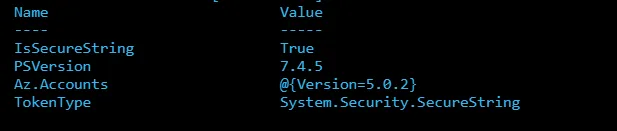
正常情况为 System.Security.SecureString 类型(加密类型字符串),但遇见异常的时候类型为System.String(明文字符串),导致了后面获取AccessToken处理时,因类型不对而报错。

正确的类型要求如下:
如果遇见了类型显示为System.String的情况下,如何来缓解这个问题呢?


问题解答

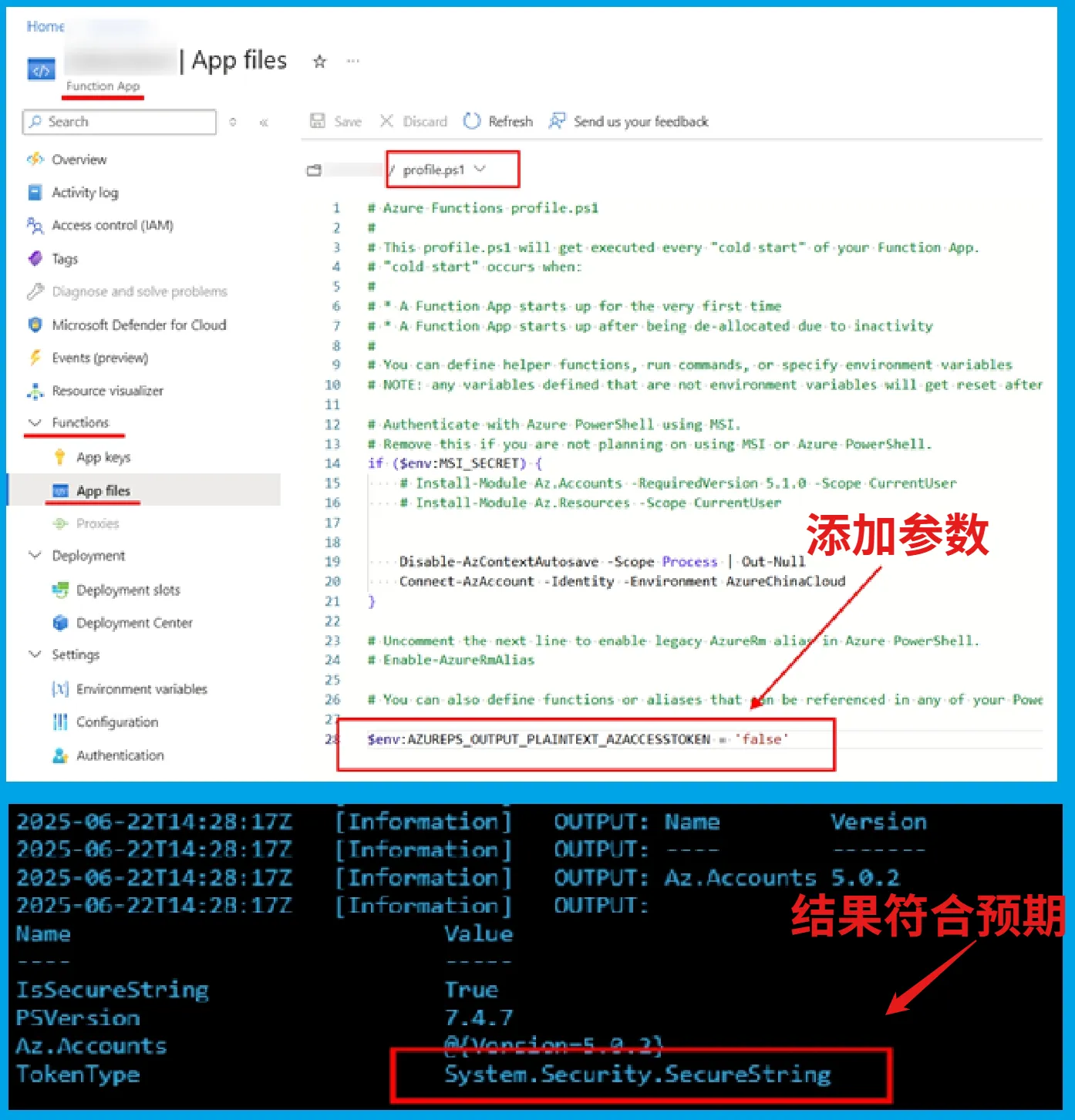
在PowerShell Function的 profile.ps1 文件中增加 变量 $env:AZUREPS_OUTPUT_PLAINTEXT_AZACCESSTOKEN 并设置值为 false, 这样就可以是的PowerShell返回AccessToken的时候不适用纯文本(PlainText)。

操作步骤截图如下
 

出现这种情况的解释

Az.Accounts 模块从 5.0 开始计划引入一个破坏性变更,将默认返回值从明文(plain text)改为 SecureString。然而,在变更发布前,Azure Functions 团队评估后认为这会对现有 PowerShell Function 应用造成重大影响,因为用户在未进行任何更改的情况下就会遭遇运行中断。

为了确保 Azure Functions 应用的稳定性,Azure Function团队做出了一个特例处理: Get-AzAccessToken Functions 环境中运行时,它将默认保留 5.0 之前的行为,返回明文。 当然,命令仍然支持 -AsSecureString 参数,该行为保持不变。

虽然锁定旧 Runtime 看似解决了问题,但这并非推荐做法,因其伴随更多潜在问题。如把Function运行时版本指定为  4.1037.1.23605,可以作为一个临时方案。
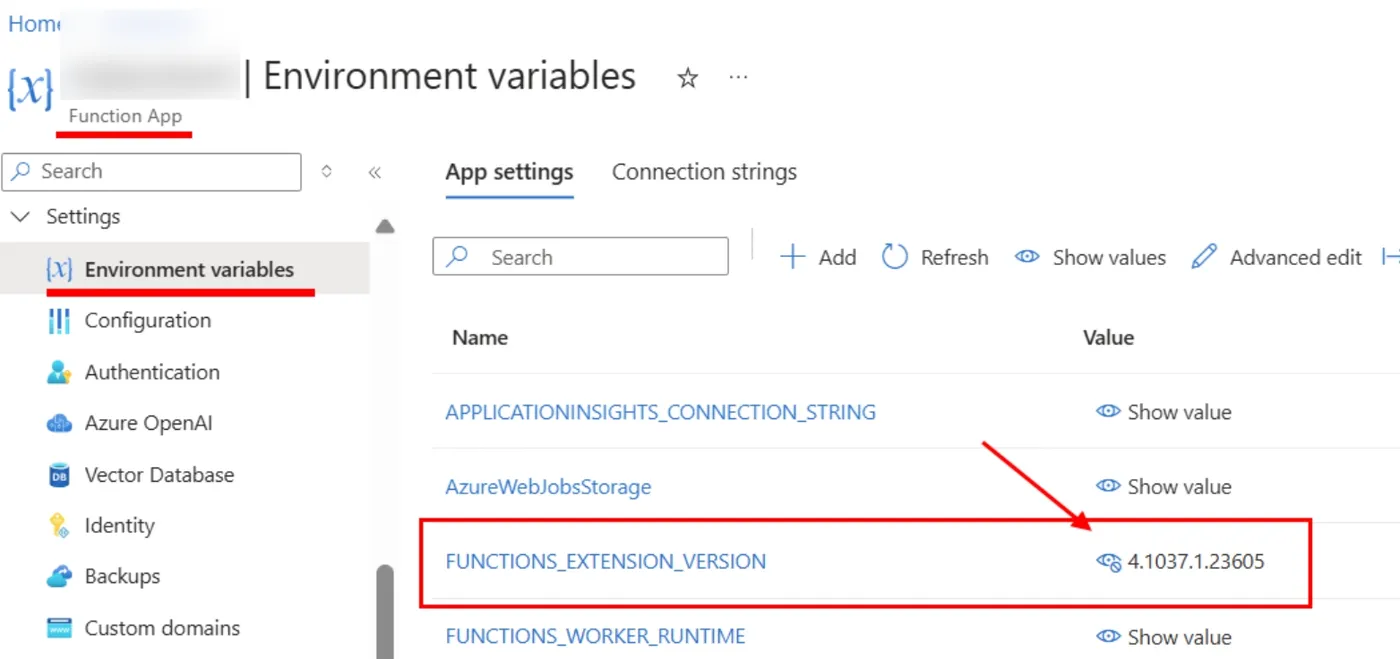
 

但是,Azure Function还是建议最正确的解决方案是:在profile.ps1中增加 环境变量  $env:AZUREPS_OUTPUT_PLAINTEXT_AZACCESSTOKEN  并设置为false。


参考资料

Azure PowerShell release notes : https://learn.microsoft.com/en-us/powershell/azure/release-notes-azureps?view=azps-14.4.0#1400---may-2025

Az.Accounts 5.0.0

  • Changed the default output access token of 'Get-AzAccessToken' from plain text to 'SecureString'.
  • Removed the warning message about failing to initialize PSStyle in automation runbooks. [#26155]
  • Increased the timeout for tab-completion of location, resource group, etc. to 10 seconds.


当在复杂的环境中面临问题,格物之道需:浊而静之徐清,安以动之徐生。 云中,恰是如此!

相关文章
|
API C++
【Azure 环境】VS Code登录China Azure(Function)报错 An error occurred while signing in: invalid_request - AADSTS65002
An error occurred while signing in: invalid_request - AADSTS65002: Consent between first party application 'c27c220f-ce2f-4904-927d-333864217eeb' and first party resource '797f4846-ba00-4fd7-ba43-dac1f8f63013' must be configured via preauthorization - applications owned and operated by Microsoft mus
535 13
|
存储 安全 数据安全/隐私保护
【Azure Function App】在Function App中使用System Managed Identity访问Storage Account
本文介绍了如何在Azure Function中使用托管身份(Managed Identity)替代AzureWebJobsStorage连接函数应用到存储账户,以提高安全性并减少Access Key的使用。具体步骤包括:1) 启用系统分配的身份;2) 为函数应用授予存储访问权限,添加必要角色(如Storage Blob Data Contributor);3) 配置`AzureWebJobsStorage__blobServiceUri`参数指定Blob Service Uri。完成后删除旧配置,即可通过Managed Identity访问Storage Account。
478 20
|
JSON 数据格式
【Azure 环境】当一个Azure Function资源创建很久了,是否可以获取到它的创建时间呢?
用户在尝试获取 Azure Function App 的创建时间时发现,资源 JSON 中缺少 `createdTime` 字段,仅能查看到 `lastModifiedTime`。同时,活动日志和 Azure Resource Graph 查询也未能提供创建时间信息。经解答,Azure 并未为所有资源类型记录创建时间,建议在部署时将创建时间作为标签记录。若创建时间在 90 天内,可通过部署日志间接获取。
328 7
|
JSON 数据格式
【Azure Fabric Service】演示使用PowerShell命令部署SF应用程序(.NET)
本文详细介绍了在中国区微软云Azure上使用Service Fabrics服务时,通过PowerShell命令发布.NET应用的全过程。由于Visual Studio 2022无法直接发布应用,需借助PowerShell脚本完成部署。文章分三步讲解:首先在Visual Studio 2022中打包应用部署包,其次连接SF集群并上传部署包,最后注册应用类型、创建实例并启动服务。过程中涉及关键参数如服务器证书指纹和服务端证书指纹的获取,并附带图文说明,便于操作。参考官方文档,帮助用户成功部署并运行服务。
471 73
|
网络协议 API 网络安全
【Azure Function App】发现部分请求Function App遇见 403.72 报错(请求Body>100KB)
在调用Azure Function的HTTP Trigger时,发送POST请求偶尔出现403错误,且响应为空、Header信息少。经排查发现,当请求Body大于100KB时会触发403.72错误,原因是启用了“Client Certificate mode”为“Optional Interactive User”。解决方法是将该模式设置为“Ignore”。由于TLS重新协商机制限制,大请求体无法正常处理,导致此问题。
366 1
【Function App】在PowerShell Function中指定特殊的Microsoft.Graph.Users版本
在Azure Function App中运行PowerShell Function时,通过Requirements.psd1文件管理模块版本。若需将“Microsoft.Graph.Users”从最新版2.26.0改回2.23.0以避免冲突,可通过以下步骤解决:1) 在requirements.psd1中明确指定版本为2.23.0 2) 在profile.ps1中添加`Import-Module Microsoft.Graph.Users -RequiredVersion 2.23.0`语句。此方法确保加载特定版本模块
285 18
【Azure Function】Function App出现System.IO.FileNotFoundException异常
Exception while executing function: xxxxxxx,The type initializer for 'xxxxxx.Storage.Adls2.StoreDataLakeGen2Reading' threw an exception. Could not load file or assembly 'Microsoft.Extensions.Configuration, Version=9.0.0.0, Culture=neutral, PublicKeyToken=adb9793829ddae60'. The system cannot find the
433 64
|
安全 Linux 开发工具
【Azure Function】分享把Function App从.NET 6.0升级到.NET 8.0 Isolated的步骤
本文介绍了将Azure Function App从.NET 6.0升级到.NET 8.0 Isolated的步骤。.NET 6.0作为长期支持版本,生命周期至2024年11月结束。为确保持续支持,建议升级至更新版本。升级步骤包括安装.NET 8 SDK、更新Azure Functions Core Tools、修改项目文件目标框架为net8.0、更新兼容的NuGet包、本地测试以及重新发布到Azure。更多详细信息可参考官方文档。
533 9
|
JavaScript API
【Azure Function】Function App门户上的Test/Run返回错误:Failed to fetch
Running your function in portal requires the app to explicitly accept requests from https://portal.azure.cn. This is known as cross-origin resource sharing (CORS).Configure CORS to add https://portal.azure.cn to allowed origins.
510 7