
01.前言
6月30日,百度文心大模型4.5正式开源,魔搭社区在开源首日快速接入文心大模型,提供真正可用、好用、可落地的大模型解决方案,现已面向广大企业、开发者下载体验!
模型链接:
https://modelscope.cn/collections/ERNIE-45-56f40e2777e348
代码链接:
https://github.com/PaddlePaddle/ERNIE
02.模型简介
文心4.5系列开源模型共10款,涵盖了激活参数规模分别为47B和3B的混合专家(MoE)模型(最大的模型总参数量为424B),以及0.3B的稠密参数模型。
针对 MoE 架构,研究团队提出了一种创新性的多模态异构模型结构,通过跨模态参数共享机制实现模态间知识融合,同时为各单一模态保留专用参数空间。此架构非常适用于从大语言模型向多模态模型的持续预训练范式,在保持甚至提升文本任务性能的基础上,显著增强多模态理解能力。
文心4.5系列模型均使用飞桨深度学习框架进行高效训练、推理和部署。在大语言模型的预训练中,模型FLOPs利用率(MFU)达到47%。实验结果显示,该系列模型在多个文本和多模态基准测试中达到SOTA水平,在指令遵循、世界知识记忆、视觉理解和多模态推理任务上效果尤为突出。模型权重按照Apache 2.0协议开源,支持开展学术研究和产业应用。此外,基于飞桨提供开源的产业级开发套件,广泛兼容多种芯片,降低后训练和部署门槛。
03.模型技术优势
- 多模态混合专家模型预训练
文心4.5 通过在文本和视觉两种模态上进行联合训练,更好地捕捉多模态信息中的细微差别,提升在文本生成、图像理解以及多模态推理等任务中的表现。为了让两种模态学习时互相提升,研究团队提出了一种多模态异构混合专家模型结构,结合了多维旋转位置编码,并且在损失函数计算时,增强了不同专家间的正交性,同时对不同模态间的词元进行平衡优化,达到多模态相互促进提升的目的。
- 高效训练推理框架
为了支持 文心4.5 模型的高效训练,研究团队提出了异构混合并行和多层级负载均衡策略。通过节点内专家并行、显存友好的流水线调度、FP8混合精度训练和细粒度重计算等多项技术,显著提升了预训练吞吐。推理方面,研究团队提出了多专家并行协同量化方法和卷积编码量化算法 ,实现了效果接近无损的4-bit 量化和2-bit 量化。此外,研究团队还实现了动态角色转换的预填充、解码分离部署技术,可以更充分地利用资源,提升文心4.5 MoE 模型的推理性能。基于飞桨框架,文心4.5 在多种硬件平台均表现出优异的推理性能。
- 针对模态的后训练
为了满足实际场景的不同要求,研究团队对预训练模型进行了针对模态的精调。其中,大语言模型针对通用语言理解和生成进行了优化,多模态大模型侧重于视觉语言理解,支持思考和非思考模式。每个模型采用了SFT、DPO或UPO(Unified Preference Optimization,统一偏好优化技术)的多阶段后训练。
04.魔搭社区介绍
魔搭社区是由阿里联合CCF开源发展委员会推出的模型开源社区,为开发者提供一站式的模型服务,包括模型的管理,下载,调优,训练,推理,部署,社区提供丰富的模型,数据集以及对应的版本管理能力。
魔搭社区目前有来自国内外著名的科技机构在魔搭上开源70000+模型,全面覆盖了视觉、语音、自然语言处理、多模态等领域,同时为开发者提供了过亿小时GPU免费算力,吸引了社区活跃用户超1600万,是国内规模最大最活跃的模型开源社区。
05.模型推理
模型下载
modelscope download PaddlePaddle/ERNIE-4.5-21B-A3B-PT --local_dir ./ERNIE-4.5-21B-A3B-PT
modelscope download PaddlePaddle/ERNIE-4.5-VL-28B-A3B-PT --local_dir ./ERNIE-4.5-VL-28B-A3B-PT

注:建议下载模型后,再使用transformers推理。
模型推理
使用transformers推理(ERNIE-4.5-21B-A3B-PT):
from modelscope import AutoModelForCausalLM, AutoTokenizer
model_name = "./ERNIE-4.5-21B-A3B-PT"
# load the tokenizer and the model
tokenizer = AutoTokenizer.from_pretrained(model_name, trust_remote_code=True)
model = AutoModelForCausalLM.from_pretrained(model_name,device_map="auto", trust_remote_code=True)
# prepare the model input
prompt = "Give me a short introduction to large language model."
messages = [
    {"role": "user", "content": prompt}
]
text = tokenizer.apply_chat_template(
    messages,
    tokenize=False,
    add_generation_prompt=True
)
model_inputs = tokenizer([text], add_special_tokens=False, return_tensors="pt")
# conduct text completion
generated_ids = model.generate(
    model_inputs.input_ids,
    max_new_tokens=1024
)
output_ids = generated_ids[0][len(model_inputs.input_ids[0]):].tolist()
# decode the generated ids
generate_text = tokenizer.decode(output_ids, skip_special_tokens=True).strip("\n")
print("generate_text:", generate_text)

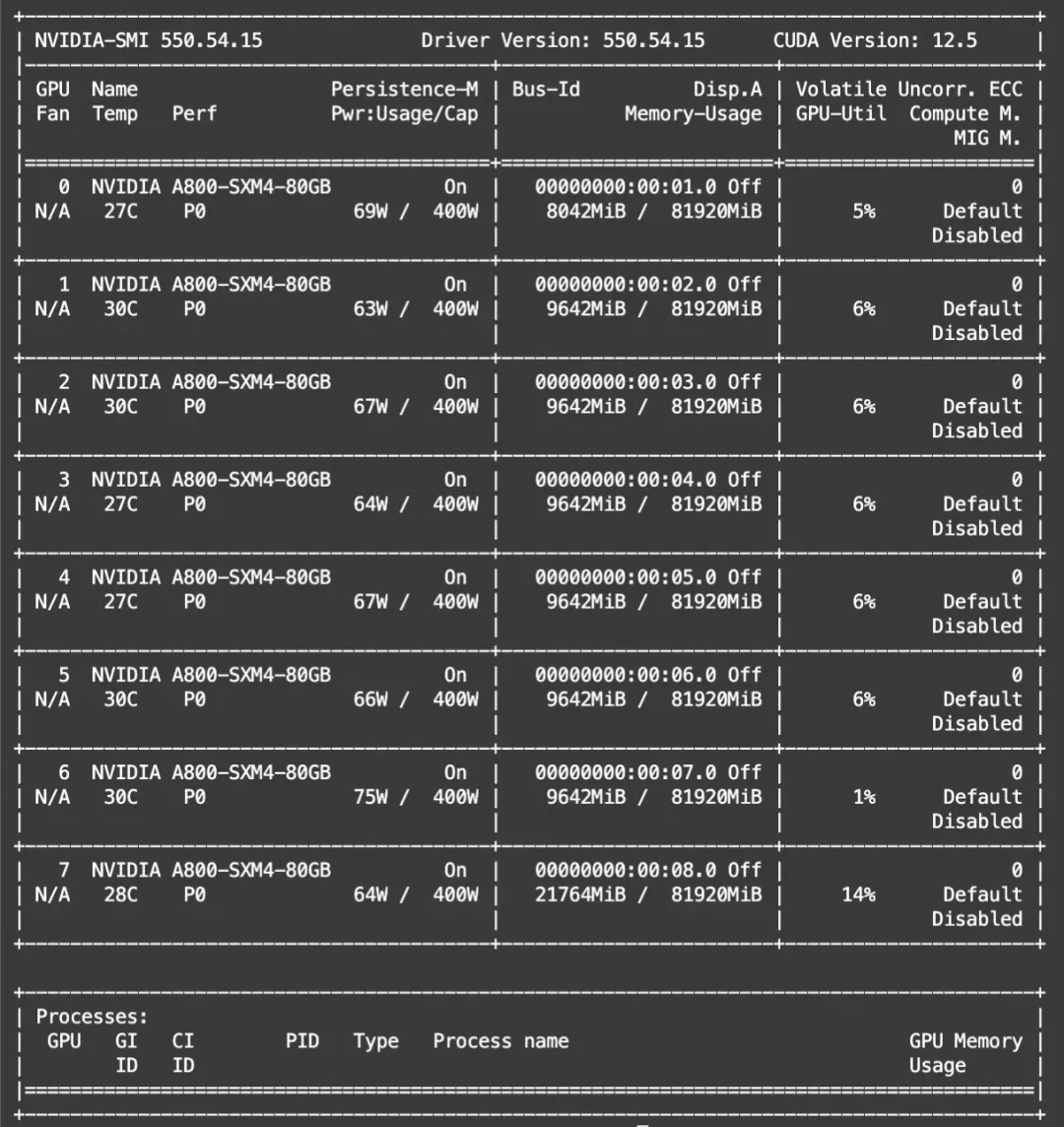
显存占用:

使用transformers推理(ERNIE-4.5-VL-28B-A3B-PT)
import torch
from modelscope import AutoProcessor, AutoTokenizer, AutoModelForCausalLM
model_path = './ERNIE-4.5-VL-28B-A3B-PT'
model = AutoModelForCausalLM.from_pretrained(
    model_path,
    device_map="auto",
    torch_dtype=torch.bfloat16,
    trust_remote_code=True
)
processor = AutoProcessor.from_pretrained(model_path, trust_remote_code=True)
processor.eval()
model.add_image_preprocess(processor)
messages = [
    {
        "role": "user",
        "content": [
            {"type": "text", "text": "Describe the image."},
            {"type": "image_url", "image_url": {"url": "https://paddlenlp.bj.bcebos.com/datasets/paddlemix/demo_images/example1.jpg"}},
        ]
    },
]
text = processor.apply_chat_template(
    messages, tokenize=False, add_generation_prompt=True, enable_thinking=False
)
image_inputs, video_inputs = processor.process_vision_info(messages)
inputs = processor(
    text=[text],
    images=image_inputs,
    videos=video_inputs,
    padding=True,
    return_tensors="pt",
)
device = next(model.parameters()).device
inputs = inputs.to(device)
generated_ids = model.generate(
    inputs=inputs['input_ids'].to(device),
    **inputs,
    max_new_tokens=128
    )
output_text = processor.decode(generated_ids[0])
print(output_text)

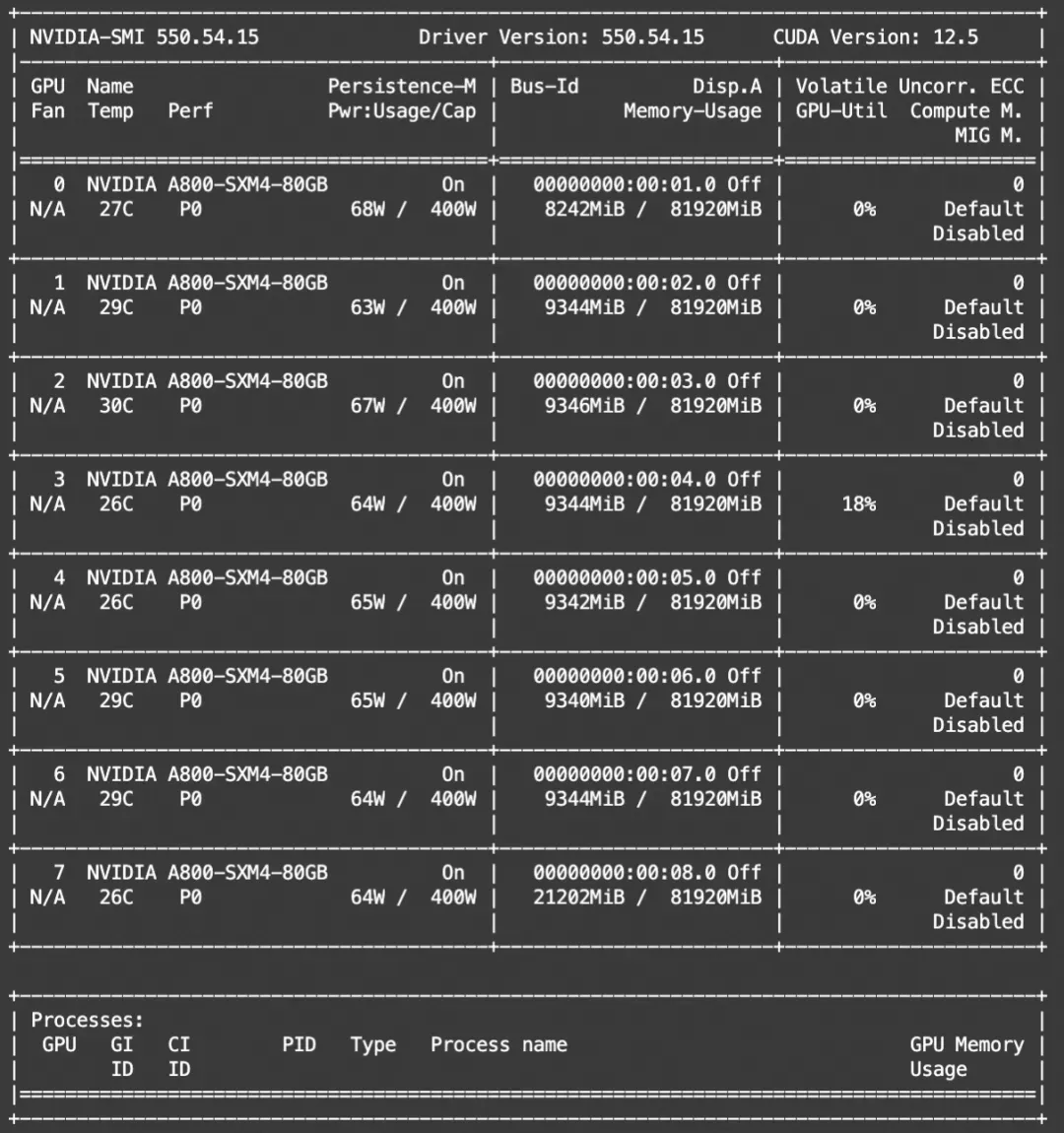
显存占用:

模型部署
建议使用vllm分支:
https://github.com/CSWYF3634076/vllm/tree/ernie
部署代码:
vllm serve ./ERNIE-4.5-21B-A3B-PT --trust-remote-code

06.模型微调
本文介绍使用ms-swift集成的megatron并行技术对ERNIE-4.5-21B-A3B-PT进行自我认知微调。ms-swift是魔搭社区官方提供的大模型与多模态大模型训练部署框架。
ms-swift开源地址:https://github.com/modelscope/ms-swift
在开始微调之前,请确保您的环境已准备妥当。
对megatron相关依赖的安装可以查看megatron-swift训练文档(可直接使用镜像):https://swift.readthedocs.io/zh-cn/latest/Instruction/Megatron-SWIFT%E8%AE%AD%E7%BB%83.html
git clone https://github.com/modelscope/ms-swift.git
cd ms-swift
pip install -e .

微调数据集准备格式如下(system字段可选),在训练脚本中指定`--dataset <dataset_path>`即可。
{"messages": [{"role": "user", "content": "浙江的省会在哪?"}, {"role": "assistant", "content": "浙江的省会在杭州。"}]}

- HF格式的权重转为Megatron格式,并测试转换精度:
# 4 * 20GiB
CUDA_VISIBLE_DEVICES=0,1,2,3 \
swift export \
    --model PaddlePaddle/ERNIE-4.5-21B-A3B-PT \
    --to_mcore true \
    --torch_dtype bfloat16 \
    --output_dir ERNIE-4.5-21B-A3B-PT-mcore \
    --test_convert_precision true



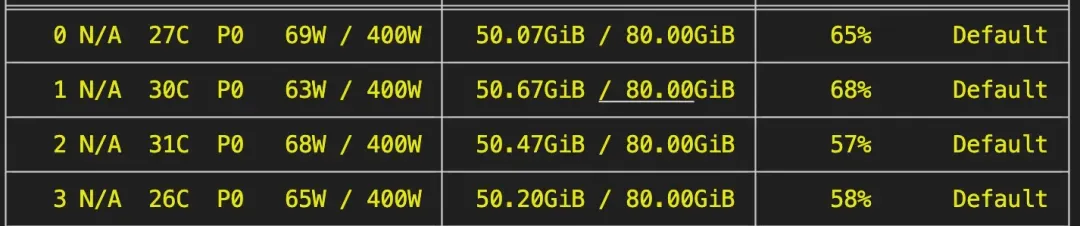
2. 对ERNIE-4.5-21B-A3B-PT-mcore进行自我认知微调(全参数训练)。在4卡A800上所需显存资源为:4 * 51GiB,训练速度为16s/it。该脚本只是方便跑通测试,建议更换更好的通用数据集进行混合。
# 4 * 51GiB, 16s/it
CUDA_VISIBLE_DEVICES=0,1,2,3 \
megatron sft \
    --load ERNIE-4.5-21B-A3B-PT-mcore \
    --dataset 'AI-ModelScope/alpaca-gpt4-data-zh#500' \
              'AI-ModelScope/alpaca-gpt4-data-en#500' \
              'swift/self-cognition#500' \
    --expert_model_parallel_size 4 \
    --moe_grouped_gemm true \
    --moe_shared_expert_overlap true \
    --moe_aux_loss_coeff 0.01 \
    --micro_batch_size 4 \
    --global_batch_size 16 \
    --recompute_granularity full \
    --recompute_method uniform \
    --recompute_num_layers 1 \
    --finetune true \
    --cross_entropy_loss_fusion true \
    --lr 1e-5 \
    --lr_warmup_fraction 0.05 \
    --min_lr 1e-6 \
    --save megatron_output/ERNIE-4.5-21B-A3B-PT \
    --eval_interval 100 \
    --save_interval 100 \
    --max_length 2048 \
    --max_epochs 1 \
    --num_workers 8 \
    --dataset_num_proc 8 \
    --no_save_optim true \
    --no_save_rng true \
    --sequence_parallel true \
    --optimizer_cpu_offload true \
    --use_precision_aware_optimizer true \
    --attention_backend flash \
    --model_author swift \
    --model_name swift-robot

训练显存占用:

训练日志:
3.将Megatron格式权重转为HF格式,并测试转换精度:
CUDA_VISIBLE_DEVICES=0,1,2,3 \
swift export \
    --mcore_model megatron_output/ERNIE-4.5-21B-A3B-PT/vx-xxx \
    --to_hf true \
    --torch_dtype bfloat16 \
    --output_dir megatron_output/ERNIE-4.5-21B-A3B-PT/vx-xxx-hf \
    --test_convert_precision true



4.训练完成后,使用以下命令进行推理:
CUDA_VISIBLE_DEVICES=0,1,2,3 \
swift infer \
    --adapters output/vx-xxx/checkpoint-xxx \
    --stream true \
    --temperature 0 \
    --max_new_tokens 512



5.推送模型到ModelScope:
swift export \
    --adapters output/vx-xxx/checkpoint-xxx \
    --push_to_hub true \
    --hub_model_id '<your-model-id>' \
    --hub_token '<your-sdk-token>'

点击链接,即可跳转模型链接~
