【11】flutter进行了聊天页面的开发-增加了即时通讯聊天的整体页面和组件-切换-朋友-陌生人-vip开通详细页面-即时通讯sdk准备-直播sdk准备-即时通讯有无UI集成的区别介绍-开发完整的社交APP-前端客户端开发+数据联调|以优雅草商业项目为例做开发-flutter开发-全流程-商业应用级实战开发-优雅草Alex
章节内容【11】
【11】flutter进行了聊天页面的开发-增加了即时通讯聊天的整体页面和组件-切换-朋友-陌生人-vip开通详细页面-即时通讯sdk准备-直播sdk准备-即时通讯有无UI集成的区别介绍
开发背景
背景说明要提一点:我们所有的开发耗尽2个月的时间,目前只是整合与记录并且呈现过程,大家不要想的太简单,自己试试就知道了哈,而不是你们以为的很快很简单,这点请必须要知道。
闲话不多,开源仓库地址,可以观摩已经写好的代码:
https://gitee.com/youyacao/ff-flutter
demo下载
https://www.youyacao.cn/freefirend
更新代码文件和日志文件-gitee可见
·完善了vip购买页面的其他功能
·增加了用户邀请码页面
·增加了申请主播资料填写页面
·增加了安全中心介绍页
·增加了帮助中心介绍页
·创建腾讯云直播SDK相关信息
·创建即时通讯sdk相关信息
assets/images/invite_box.png                       | Bin 0 -> 340684 bytes
 assets/images/invite_friend_icon.png               | Bin 0 -> 13944 bytes
 assets/images/invite_gold_coin.png                 | Bin 0 -> 17238 bytes
 assets/images/vip_advance.png                      | Bin 0 -> 10671 bytes
 assets/images/vip_all_videos.png                   | Bin 0 -> 17366 bytes
 assets/images/vip_auto_renew.png                   | Bin 0 -> 6721 bytes
 assets/images/vip_hd.png                           | Bin 0 -> 15988 bytes
 assets/images/vip_no_ads.png                       | Bin 0 -> 16945 bytes
 lib/routes/app_pages.dart                          |  30 ++++
 lib/routes/app_routes.dart                         |   5 +
 lib/screens/account/widgets/menu_list.dart         |  87 ++++++----
 lib/screens/account/widgets/user_info.dart         |  27 +--
 lib/screens/anchor_apply/index.dart                |  90 ++++++++++
 .../anchor_apply/widgets/anchor_apply_form.dart    | 155 +++++++++++++++++
 lib/screens/help_center/index.dart                 |  75 ++++++++
 .../help_center/widgets/help_menu_item.dart        |  45 +++++
 lib/screens/invite_friends/index.dart              |  22 +++
 .../invite_friends/widgets/invite_card.dart        | 188 +++++++++++++++++++++
 .../invite_friends/widgets/invite_header.dart      |  41 +++++
 lib/screens/personal_data/index.dart               |  33 ++++
 .../personal_data/widgets/personal_data_form.dart  | 147 ++++++++++++++++
 lib/screens/security_center/index.dart             |  79 +++++++++
 .../widgets/security_menu_item.dart                |  45 +++++
 lib/screens/vip/index.dart                         |  27 ++-
 lib/screens/vip/widgets/member_benefits.dart       |  78 +++++++++
 lib/screens/vip/widgets/member_combo.dart          |   4 +-
 lib/screens/vip/widgets/vip_purchase.dart          |  90 ++++++++++
 27 files changed, 1218 insertions(+), 50 deletions(-)
 create mode 100644 assets/images/invite_box.png
 create mode 100644 assets/images/invite_friend_icon.png
 create mode 100644 assets/images/invite_gold_coin.png
 create mode 100644 assets/images/vip_advance.png
 create mode 100644 assets/images/vip_all_videos.png
 create mode 100644 assets/images/vip_auto_renew.png
 create mode 100644 assets/images/vip_hd.png
 create mode 100644 assets/images/vip_no_ads.png
 create mode 100644 lib/screens/anchor_apply/index.dart
 create mode 100644 lib/screens/anchor_apply/widgets/anchor_apply_form.dart
 create mode 100644 lib/screens/help_center/index.dart
 create mode 100644 lib/screens/help_center/widgets/help_menu_item.dart
 create mode 100644 lib/screens/invite_friends/index.dart
 create mode 100644 lib/screens/invite_friends/widgets/invite_card.dart
 create mode 100644 lib/screens/invite_friends/widgets/invite_header.dart
 create mode 100644 lib/screens/personal_data/index.dart
 create mode 100644 lib/screens/personal_data/widgets/personal_data_form.dart
 create mode 100644 lib/screens/security_center/index.dart
 create mode 100644 lib/screens/security_center/widgets/security_menu_item.dart
 create mode 100644 lib/screens/vip/widgets/member_benefits.dart
 create mode 100644 lib/screens/vip/widgets/vip_purchase.dart
实战开始
页面结果
先看看结果
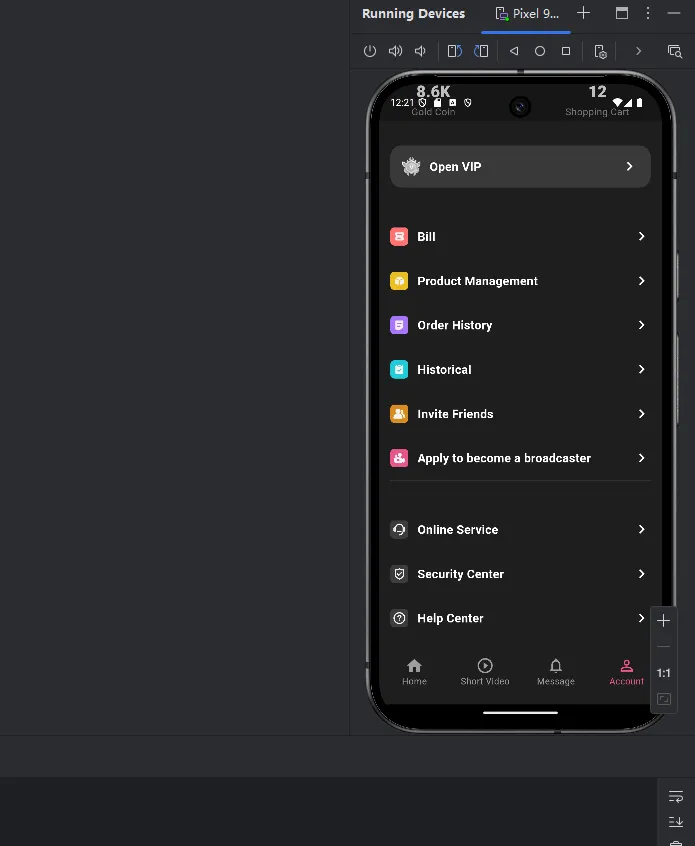
个人中心的
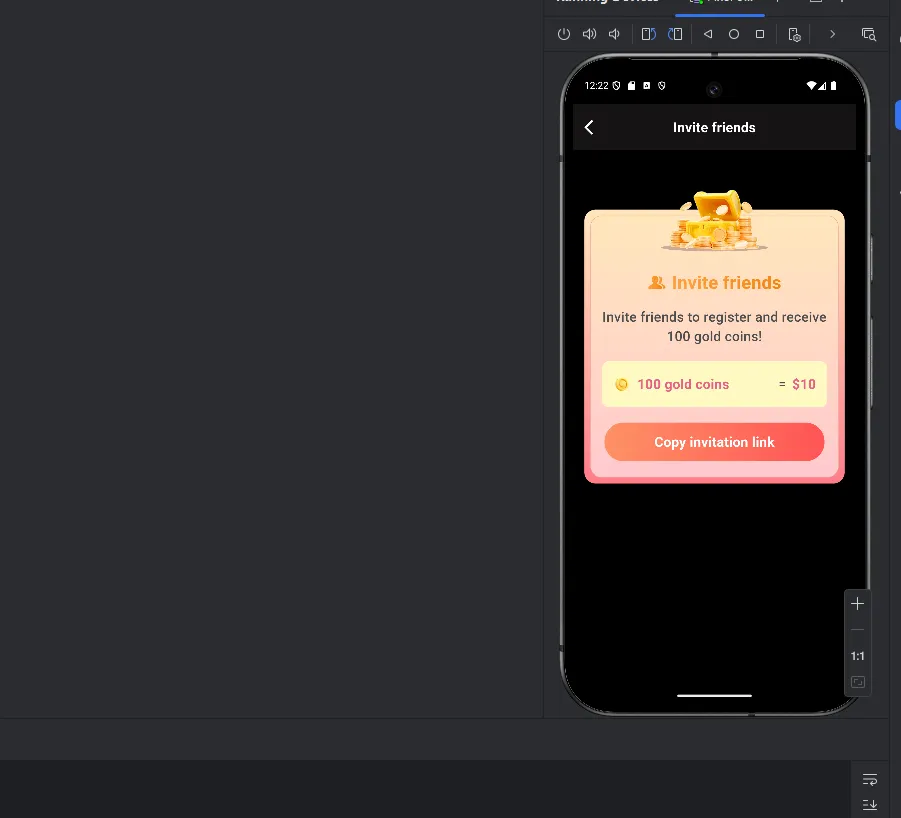
邀请页面
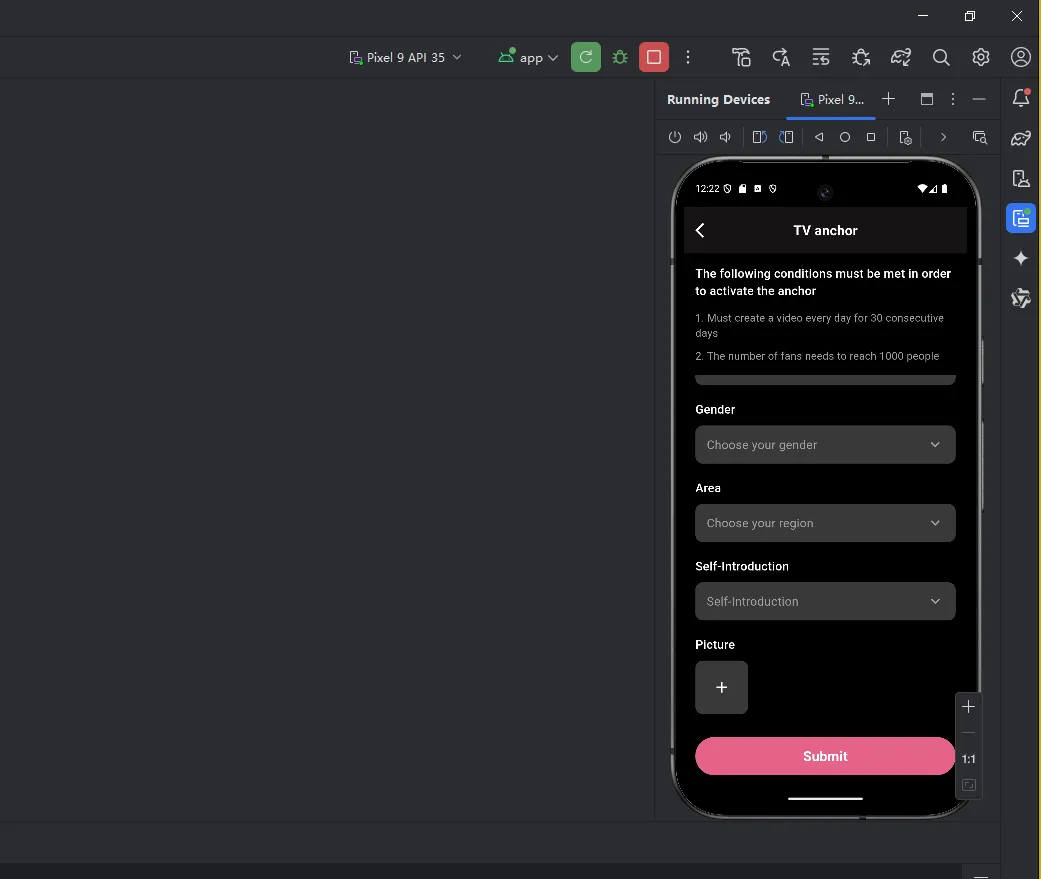
直播页面
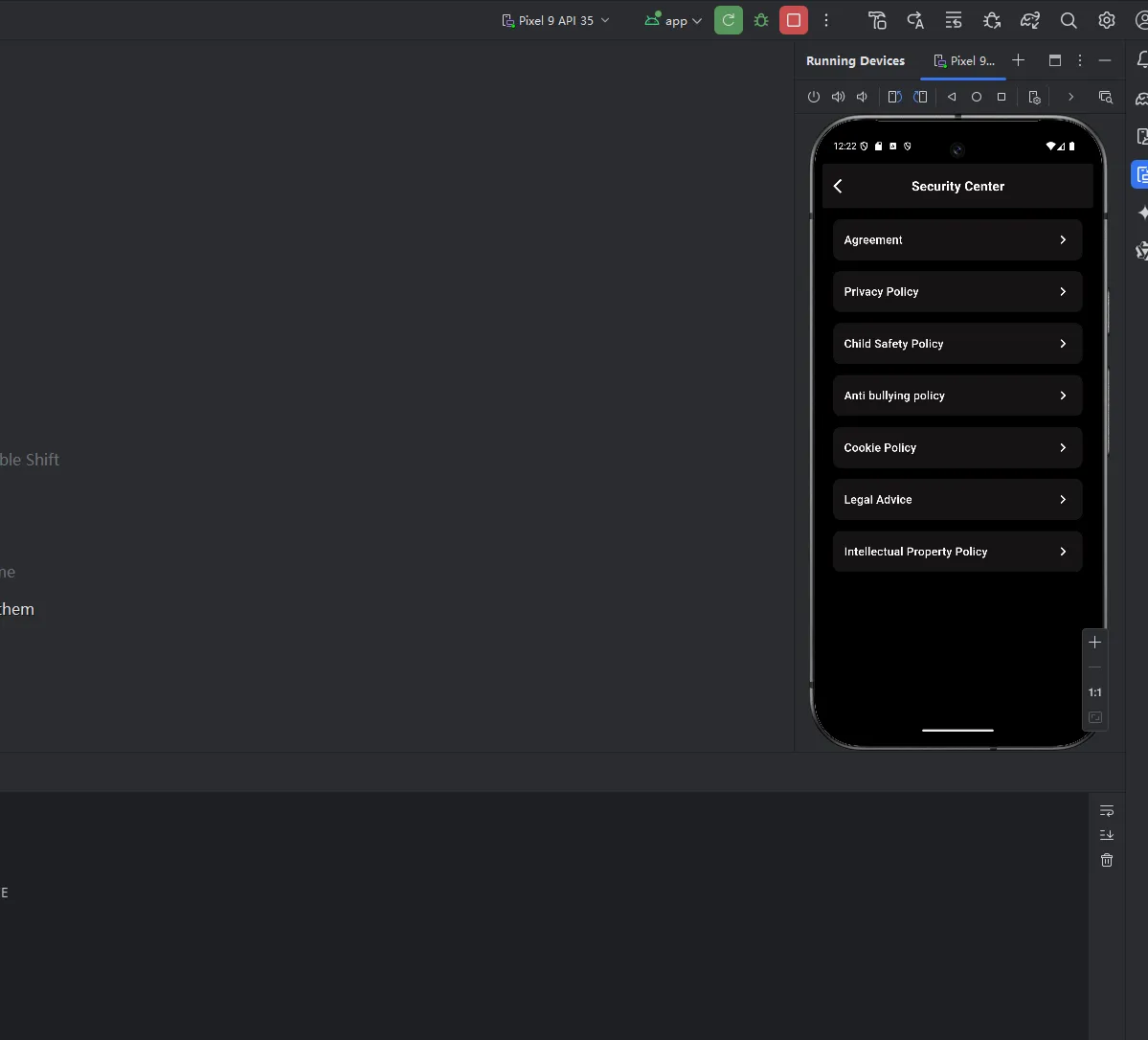
帮助中心页面以及安全中心页面 ,类似就一个代替
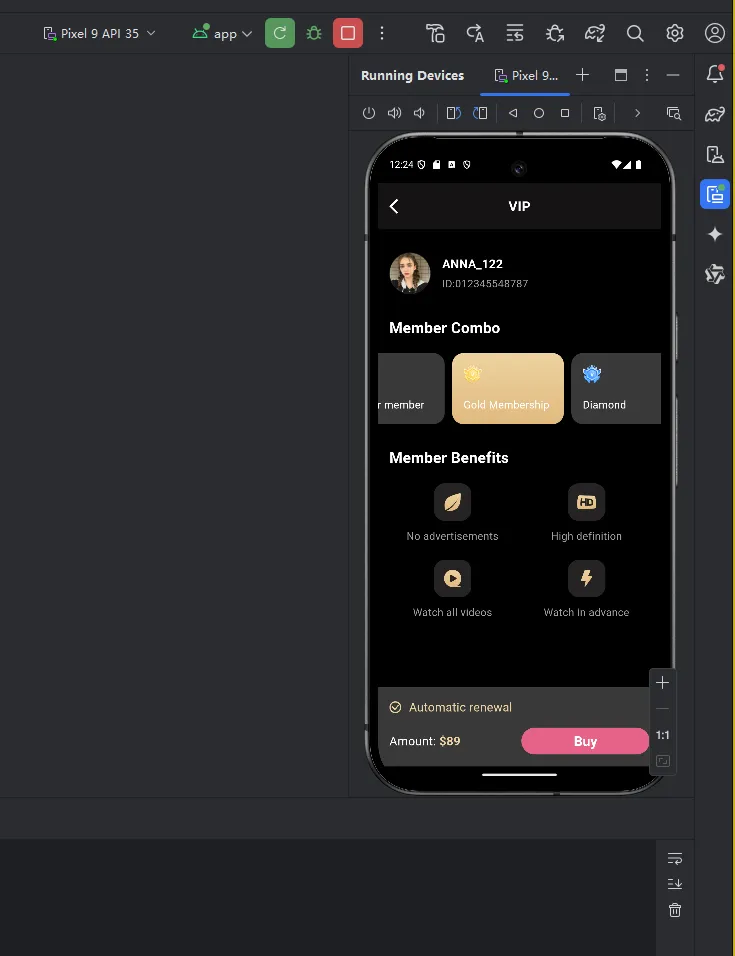
购买vip页面完善。
代码部分
先看个人中心页面的变化:
personal_data_form.dart
import 'package:flutter/material.dart';
import 'package:flutter_screenutil/flutter_screenutil.dart';
class PersonalDataForm extends StatelessWidget {
  @override
  Widget build(BuildContext context) {
    return SingleChildScrollView(
      child: Padding(
        padding: EdgeInsets.symmetric(horizontal: 60.w),
        child: Column(
          crossAxisAlignment: CrossAxisAlignment.start,
          children: [
            SizedBox(height: 60.h),
            _buildLabel('Profile picture'),
            SizedBox(height: 20.h),
            // 头像选择区域
            Container(
              width: 140.w,
              height: 140.h,
              decoration: BoxDecoration(
                color: const Color(0xFF393939),
                borderRadius: BorderRadius.circular(20.r),
              ),
              child: Center(
                child: Icon(
                  Icons.add,
                  color: Colors.white,
                  size: 48.sp,
                ),
              ),
            ),
            SizedBox(height: 40.h),
            _buildLabel('Name'),
            SizedBox(height: 20.h),
            _buildTextField('Name'),
            SizedBox(height: 40.h),
            _buildLabel('Date of birth'),
            SizedBox(height: 20.h),
            _buildTextField('Date of birth', suffixIcon: Icons.calendar_today),
            SizedBox(height: 40.h),
            _buildLabel('Gender'),
            SizedBox(height: 20.h),
            _buildDropdown('Choose your gender'),
            SizedBox(height: 40.h),
            _buildLabel('Area'),
            SizedBox(height: 20.h),
            _buildDropdown('Choose your region'),
            SizedBox(height: 60.h),
            _buildConfirmButton(),
          ],
        ),
      ),
    );
  }
  Widget _buildLabel(String text) {
    return Text(
      text,
      style: TextStyle(
        color: Colors.white,
        fontSize: 32.sp,
        fontWeight: FontWeight.w500,
      ),
    );
  }
  Widget _buildTextField(String hint, {IconData? suffixIcon}) {
    return Container(
      height: 100.h,
      decoration: BoxDecoration(
        color: const Color(0xFF393939),
        borderRadius: BorderRadius.circular(20.r),
      ),
      child: TextField(
        style: TextStyle(
          color: Colors.white,
          fontSize: 32.sp,
        ),
        decoration: InputDecoration(
          hintText: hint,
          hintStyle: TextStyle(
            color: Colors.grey,
            fontSize: 32.sp,
          ),
          border: InputBorder.none,
          contentPadding: EdgeInsets.symmetric(horizontal: 30.w),
          suffixIcon: suffixIcon != null
              ? Icon(
                  suffixIcon,
                  color: Colors.grey,
                  size: 48.sp,
                )
              : null,
        ),
      ),
    );
  }
  Widget _buildDropdown(String hint) {
    return Container(
      height: 100.h,
      padding: EdgeInsets.symmetric(horizontal: 30.w),
      decoration: BoxDecoration(
        color: const Color(0xFF393939),
        borderRadius: BorderRadius.circular(20.r),
      ),
      child: Row(
        mainAxisAlignment: MainAxisAlignment.spaceBetween,
        children: [
          Text(
            hint,
            style: TextStyle(
              color: Colors.grey,
              fontSize: 32.sp,
            ),
          ),
          Icon(
            Icons.keyboard_arrow_down,
            color: Colors.grey,
            size: 48.sp,
          ),
        ],
      ),
    );
  }
  Widget _buildConfirmButton() {
    return Container(
      width: double.infinity,
      height: 100.h,
      decoration: BoxDecoration(
        color: const Color(0xFFE56389),
        borderRadius: BorderRadius.circular(50.r),
      ),
      child: Center(
        child: Text(
          'Confirm Save',
          style: TextStyle(
            color: Colors.white,
            fontSize: 36.sp,
            fontWeight: FontWeight.bold,
          ),
        ),
      ),
    );
  }
}
这段代码定义了一个名为 PersonalDataForm 的无状态小部件,用于显示个人资料表单。表单包含头像选择、姓名、出生日期、性别、地区输入框及确认按钮。各个输入项通过 _buildLabel、_buildTextField、_buildDropdown 和 _buildConfirmButton 方法构建。
控制流图
flowchart TD
    A[开始] --> B[创建 SingleChildScrollView]
    B --> C[创建 Padding]
    C --> D[创建 Column]
    D --> E{添加子组件}
    E -->|Profile picture 标签| F[创建 _buildLabel]
    F --> G[创建 SizedBox]
    G --> H[创建 Container 头像选择区域]
    H --> I[创建 SizedBox]
    I --> J[创建 Name 标签]
    J --> K[创建 SizedBox]
    K --> L[创建 Name 输入框]
    L --> M[创建 SizedBox]
    M --> N[创建 Date of birth 标签]
    N --> O[创建 SizedBox]
    O --> P[创建 Date of birth 输入框]
    P --> Q[创建 SizedBox]
    Q --> R[创建 Gender 标签]
    R --> S[创建 SizedBox]
    S --> T[创建 Gender 下拉框]
    T --> U[创建 SizedBox]
    U --> V[创建 Area 标签]
    V --> W[创建 SizedBox]
    W --> X[创建 Area 下拉框]
    X --> Y[创建 SizedBox]
    Y --> Z[创建 Confirm Save 按钮]
购买vip页面的代码:
import 'package:flutter/material.dart';
import 'package:flutter_screenutil/flutter_screenutil.dart';
import 'widgets/vip_header.dart';
import 'widgets/vip_user_info.dart';
import 'widgets/member_combo.dart';
import 'widgets/member_benefits.dart';
import 'widgets/vip_purchase.dart';
class VipScreen extends StatelessWidget {
  @override
  Widget build(BuildContext context) {
    return Scaffold(
      backgroundColor: Colors.black,
      body: SafeArea(
        bottom: false, // 不处理底部安全区域
        child: Column(
          children: [
            Expanded(
              child: SingleChildScrollView(
                child: Column(
                  children: [
                    VipHeader(),
                    VipUserInfo(),
                    MemberCombo(),
                    MemberBenefits(),
                  ],
                ),
              ),
            ),
            VipPurchase(),
          ],
        ),
      ),
    );
  }
}
可以看到 首页只是用来引用组件,
vip_purchase.dart
import 'package:flutter/material.dart';
import 'package:flutter_screenutil/flutter_screenutil.dart';
class VipPurchase extends StatelessWidget {
  @override
  Widget build(BuildContext context) {
    return Container(
      padding: EdgeInsets.symmetric(horizontal: 30.w),
      decoration: BoxDecoration(
        color: const Color(0xFF393939),
        borderRadius: BorderRadius.circular(4.r),
      ),
      child: Column(
        // mainAxisSize: MainAxisSize.min,
        crossAxisAlignment: CrossAxisAlignment.start,
        children: [
          SizedBox(height: 30.h),
          Row(
            children: [
              Image.asset(
                'assets/images/vip_auto_renew.png',
                width: 32.w,
                height: 32.h,
                color: const Color(0xFFECD29F),
              ),
              SizedBox(width: 20.w),
              Text(
                'Automatic renewal',
                style: TextStyle(
                  color: const Color(0xFFECD29F),
                  fontSize: 32.sp,
                ),
              ),
            ],
          ),
          SizedBox(
            height: 133.h,
            child: Row(
              mainAxisAlignment: MainAxisAlignment.spaceBetween,
              children: [
                Row(
                  children: [
                    Text(
                      'Amount: ',
                      style: TextStyle(
                        color: Colors.white,
                        fontSize: 32.sp,
                      ),
                    ),
                    Text(
                      '\$89',
                      style: TextStyle(
                        color: const Color(0xFFECD29F),
                        fontSize: 32.sp,
                        fontWeight: FontWeight.bold,
                      ),
                    ),
                  ],
                ),
                GestureDetector(
                  onTap: () {
                    print('Buy clicked');
                  },
                  child: Container(
                    width: 340.w,
                    height: 70.h,
                    decoration: BoxDecoration(
                      color: const Color(0xFFE56389),
                      borderRadius: BorderRadius.circular(35.r),
                    ),
                    child: Center(
                      child: Text(
                        'Buy',
                        style: TextStyle(
                          color: Colors.white,
                          fontSize: 36.sp,
                          fontWeight: FontWeight.bold,
                        ),
                      ),
                    ),
                  ),
                ),
              ],
            ),
          ),
        ],
      ),
    );
  }
}
member_combo.dart
import 'package:flutter/material.dart';
import 'package:flutter_screenutil/flutter_screenutil.dart';
class MemberCombo extends StatefulWidget {
  @override
  State<MemberCombo> createState() => _MemberComboState();
}
class _MemberComboState extends State<MemberCombo> {
  int selectedIndex = 0;
  final List<Map<String, dynamic>> memberTypes = [
    {
      'title': 'Regular member',
      'icon': 'assets/images/vip_regular.png',
      'darkColor': const Color(0xFF393939),
    },
    {
      'title': 'Gold Membership',
      'icon': 'assets/images/vip_gold.png',
      'darkColor': const Color(0xFF393939),
    },
    {
      'title': 'Diamond',
      'icon': 'assets/images/vip_diamond.png',
      'darkColor': const Color(0xFF393939),
    },
  ];
  final Gradient selectedGradient = const LinearGradient(
    begin: Alignment.topCenter,
    end: Alignment.bottomCenter,
    colors: [
      Color(0xFFECD29F),
      Color(0xFFE1BA7F),
    ],
  );
  @override
  Widget build(BuildContext context) {
    return Container(
      margin: EdgeInsets.only(top: 60.h),
      child: Column(
        crossAxisAlignment: CrossAxisAlignment.start,
        children: [
          Padding(
            padding: EdgeInsets.only(left: 30.w, bottom: 38.h),
            child: Text(
              'Member Combo',
              style: TextStyle(
                color: Colors.white,
                fontSize: 40.sp,
                fontWeight: FontWeight.bold,
              ),
            ),
          ),
          SizedBox(
            height: 186.h,
            child: ListView.builder(
              scrollDirection: Axis.horizontal,
              padding: EdgeInsets.symmetric(horizontal: 30.w),
              itemCount: memberTypes.length,
              itemBuilder: (context, index) {
                final isSelected = selectedIndex == index;
                return GestureDetector(
                  onTap: () {
                    setState(() {
                      selectedIndex = index;
                    });
                  },
                  child: Container(
                    width: 296.w,
                    margin: EdgeInsets.only(right: 20.w),
                    decoration: BoxDecoration(
                      gradient: isSelected ? selectedGradient : null,
                      color:
                          isSelected ? null : memberTypes[index]['darkColor'],
                      borderRadius: BorderRadius.circular(30.r),
                    ),
                    child: Stack(
                      children: [
                        Positioned(
                          left: 30.w,
                          top: 30.h,
                          child: Image.asset(
                            memberTypes[index]['icon'],
                            width: 48.w,
                            height: 48.h,
                          ),
                        ),
                        Positioned(
                          left: 30.w,
                          bottom: 30.h,
                          child: Text(
                            memberTypes[index]['title'],
                            style: TextStyle(
                              color: Colors.white,
                              fontSize: 28.sp,
                              fontWeight: FontWeight.w400,
                            ),
                          ),
                        ),
                      ],
                    ),
                  ),
                );
              },
            ),
          ),
        ],
      ),
    );
  }
}
本章其他界面也没有复杂的部分,其他代码直接登录gitee 去看即可,已经公开的,我们接下来直接进入SDK应用创建部分
直播sdk创建
先是直播sdk,正常用户只有一次机会,14天测试期,要珍惜,如果测试完了过期的不能删除,也无法使用
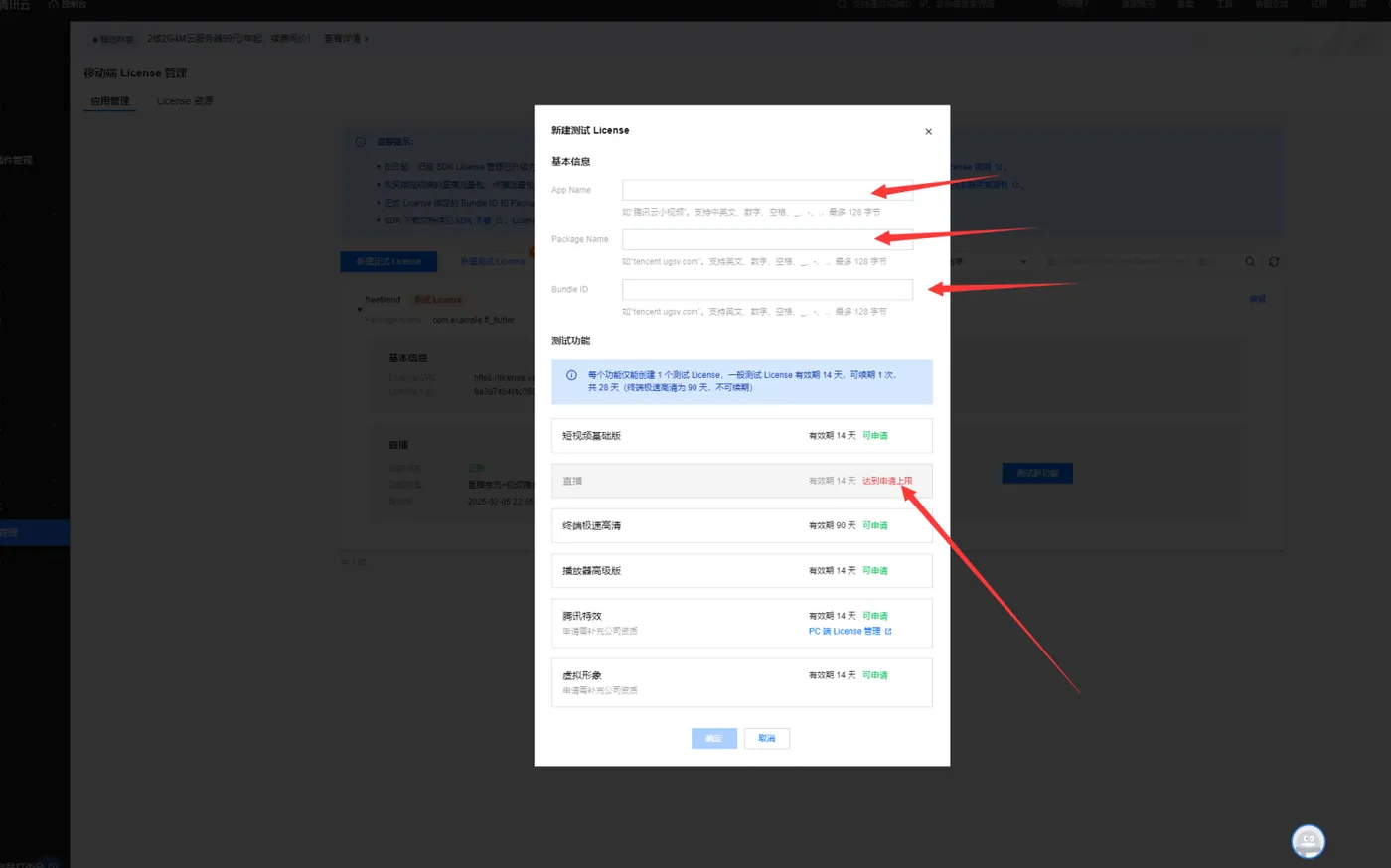

核心资料是app name License URL和License Key
即时通讯im
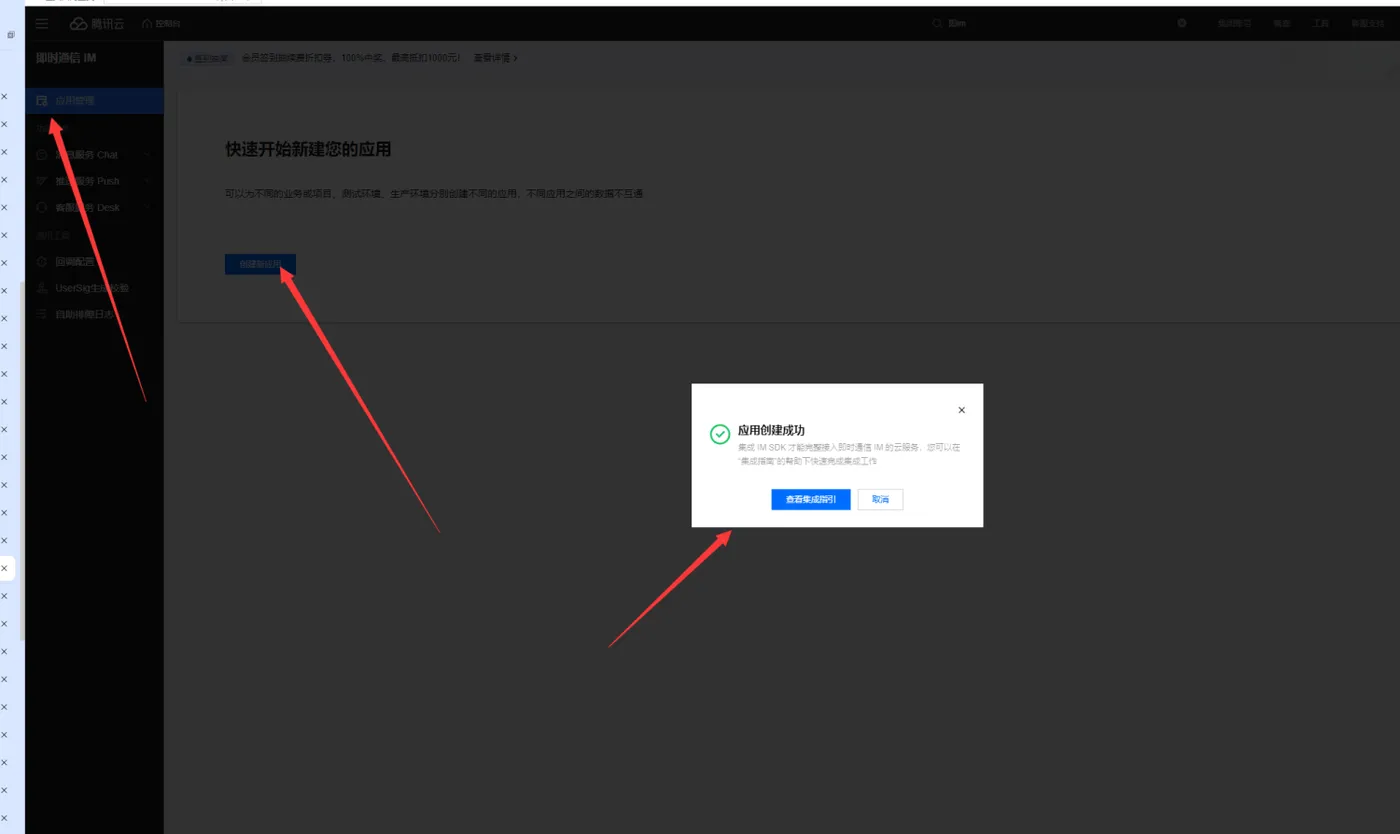
即时通讯的关键信息,
SDKAppID:
1600071385
应用名称:
freefirend
密钥:
这里就脱敏一下。