【Azure Blob】关闭Blob 匿名访问,iOS Objective-C SDK连接Storage Account报错

简介: 【Azure Blob】关闭Blob 匿名访问,iOS Objective-C SDK连接Storage Account报错

问题描述

iOS Objective-C 应用,连接Azure Storage Account, 根据官网Example代码,在没有关闭Storage Account的匿名访问时,程序正常运行。
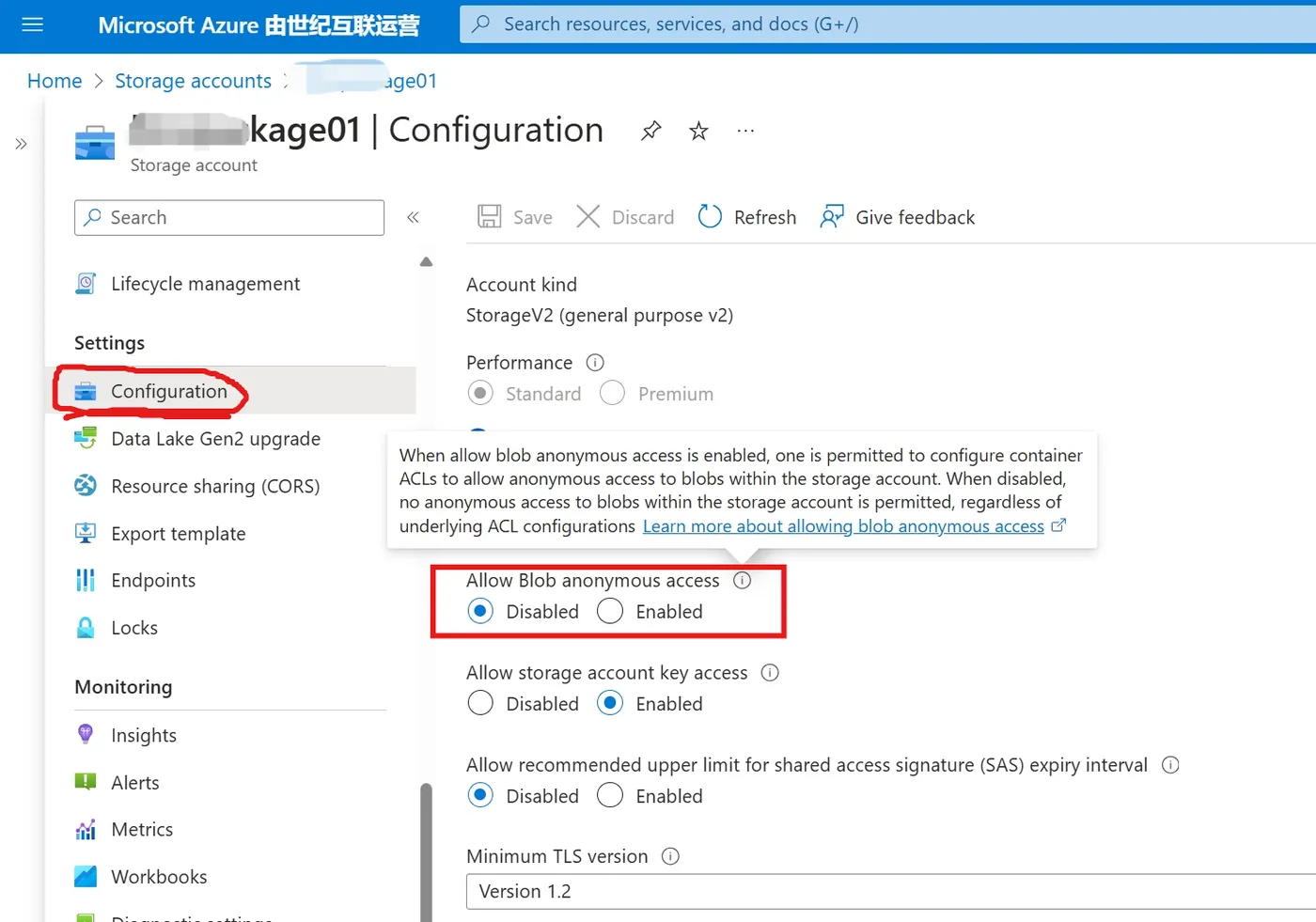
但是,只要关闭了匿名访问,上传blob到Container中,就会报错:Public access is not permitted on this storage account
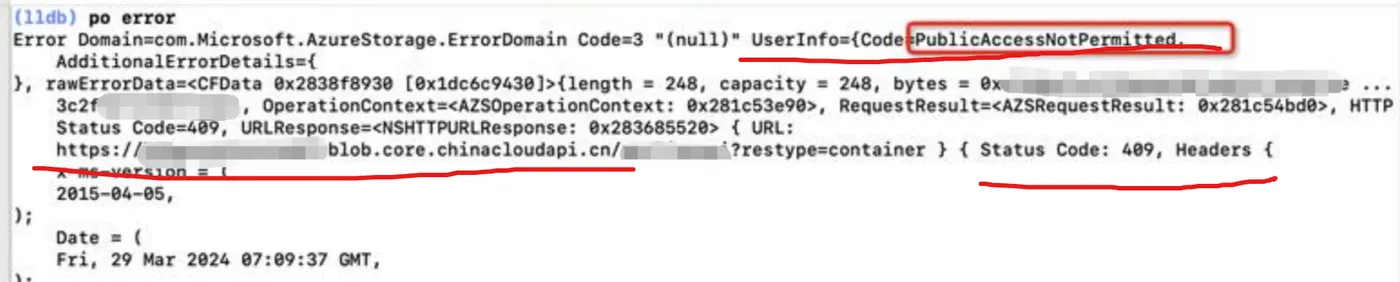
 

问题解答

查看示例代码:

-(void)createContainerWithPublicAccess{
    NSError *accountCreationError;
    // Create a storage account object from a connection string.
    AZSCloudStorageAccount *account = [AZSCloudStorageAccount accountFromConnectionString:@"DefaultEndpointsProtocol=https;AccountName=your_account_name_here;AccountKey=your_account_key_here" error:&accountCreationError];
    if(accountCreationError){
        NSLog(@"Error in creating account.");
    }
    // Create a blob service client object.
    AZSCloudBlobClient *blobClient = [account getBlobClient];
    // Create a local container object.
    AZSCloudBlobContainer *blobContainer = [blobClient containerReferenceFromName:@"containerpublic"];
    // Create container in your Storage account if the container doesn't already exist
    [blobContainer createContainerIfNotExistsWithAccessType:AZSContainerPublicAccessTypeContainer requestOptions:nil operationContext:nil completionHandler:^(NSError *error, BOOL exists){
        if (error){
            NSLog(@"Error in creating container.");
        }
    }];
}

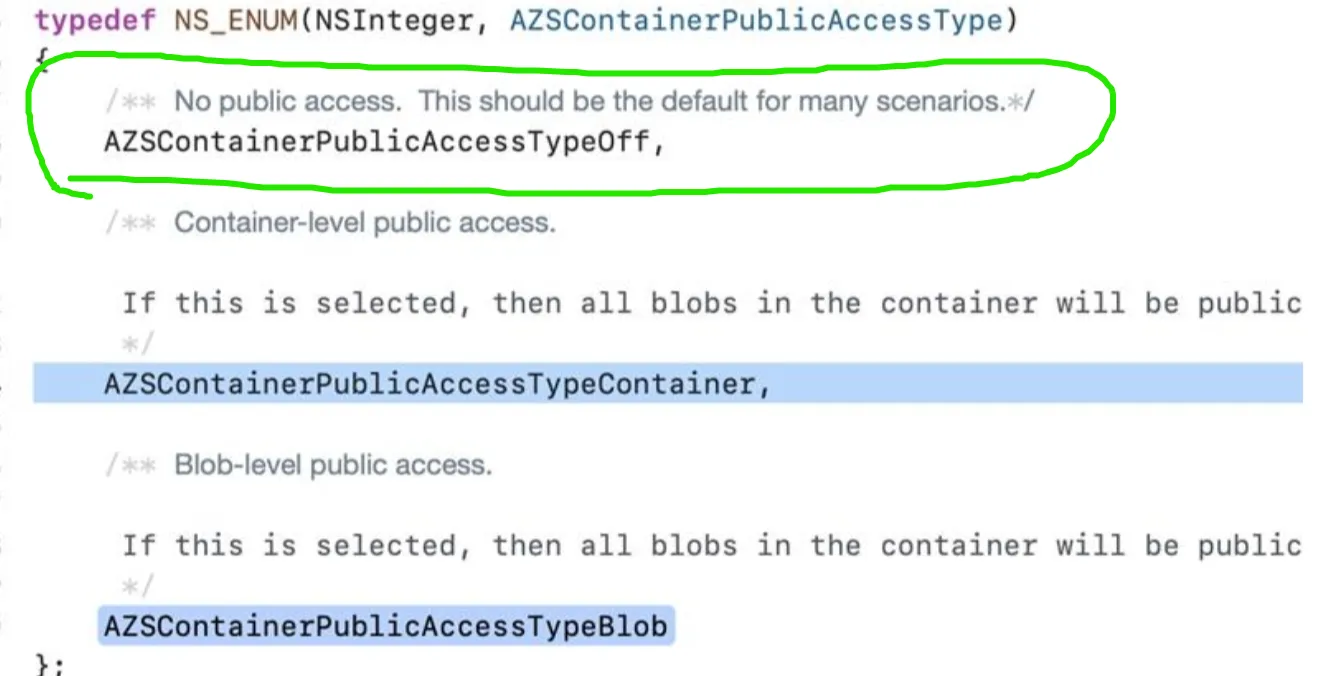
关键就是 blobContainer createContainerIfNotExistsWithAccessType:AZSContainerPublicAccessTypeContainer  这一句代码。因为示例代码中使用的是Public Access方式create container,虽然连接字符串中由Account Key,但是代码中使用的是Public Access。所以当关闭Public Access后,程序就会报错。

AZSContainerPublicAccessTypeContainer 修改为  AZSContainerPublicAccessTypeOff  就可以了。
 

NOTES:

  • No public read access: The container and its blobs can be accessed only with an authorized request. This option is the default for all new containers.
  • Public read access for container and its blobs: Container and blob data can be read by anonymous request, except for container permission settings and container metadata. Clients can enumerate blobs within the container by anonymous request, but cannot enumerate containers within the storage account.
  • Public read access for blobs only: Blobs within the container can be read by anonymous request, but container data is not available anonymously. Anonymous clients cannot enumerate the blobs within the container.


参考资料

设置Storage Account Container容器权限 : https://learn.microsoft.com/zh-cn/previous-versions/azure/storage/blobs/storage-ios-how-to-use-blob-storage#set-container-permissions


[END]

相关文章
|
iOS开发 开发者
uniapp开发ios打包Error code = -5000 Error message: Error: certificate file(p12) import failed!报错问题如何解决
891 67
uniapp开发ios打包Error code = -5000 Error message: Error: certificate file(p12) import failed!报错问题如何解决
|
存储 XML 开发工具
【Azure Storage Account】利用App Service作为反向代理, 并使用.NET Storage Account SDK实现上传/下载操作
本文介绍了如何在Azure上使用App Service作为反向代理,以自定义域名访问Storage Account。主要内容包括: 1. **设置反向代理**:通过配置`applicationhost.xdt`和`web.config`文件,启用IIS代理功能并设置重写规则。 2. **验证访问**:测试原生URL和自定义域名的访问效果,确保两者均可正常访问Storage Account。 3. **.NET SDK连接**:使用共享访问签名(SAS URL)初始化BlobServiceClient对象,实现通过自定义域名访问存储服务。
225 1
|
JavaScript 前端开发 开发工具
【Azure Developer】使用JavaScript通过SDK进行monitor-query的client认证报错问题
AADSTS90002: Tenant 'xxxxxxxx-xxxx-xxxx-xxxx-xxxxxxxxxxxx' not found. Check to make sure you have the correct tenant ID and are signing into the correct cloud. Check with your subscription administrator, this may happen if there are no active subscriptions for the tenant.
171 1
|
API iOS开发 开发者
Snapchat API 访问:Objective-C 实现示例
408 11
|
iOS开发
url中带中文,ios报错问题
url中带中文,ios报错问题
|
存储 API 开发工具
【Azure Storage Blob】如何通过.NET Azure Storage Blobs SDK获取到Blob的MD5值呢?
197 3
|
7月前
|
开发工具 Android开发
X Android SDK file not found: adb.安卓开发常见问题-Android SDK 缺少 `adb`(Android Debug Bridge)-优雅草卓伊凡
764 11
X Android SDK file not found: adb.安卓开发常见问题-Android SDK 缺少 `adb`(Android Debug Bridge)-优雅草卓伊凡
|
前端开发 Java Shell
【08】flutter完成屏幕适配-重建Android,增加GetX路由,屏幕适配,基础导航栏-多版本SDK以及gradle造成的关于fvm的使用(flutter version manage)-卓伊凡换人优雅草Alex-开发完整的社交APP-前端客户端开发+数据联调|以优雅草商业项目为例做开发-flutter开发-全流程-商业应用级实战开发-优雅草Alex
882 20
【08】flutter完成屏幕适配-重建Android,增加GetX路由,屏幕适配,基础导航栏-多版本SDK以及gradle造成的关于fvm的使用(flutter version manage)-卓伊凡换人优雅草Alex-开发完整的社交APP-前端客户端开发+数据联调|以优雅草商业项目为例做开发-flutter开发-全流程-商业应用级实战开发-优雅草Alex
|
JavaScript 前端开发 Java
[Android][Framework]系统jar包,sdk的制作及引用
[Android][Framework]系统jar包,sdk的制作及引用
561 0
|
程序员 开发工具 Android开发
Android|使用阿里云推流 SDK 实现双路推流不同画面
本文记录了一种使用没有原生支持多路推流的阿里云推流 Android SDK,实现同时推送两路不同画面的流的方法。
386 7

热门文章

最新文章