【Azure 应用服务】使用Docker Compose创建App Service遇见"Linux Version is too long. It cannot be more than 4000 characters"错误

简介: 【Azure 应用服务】使用Docker Compose创建App Service遇见"Linux Version is too long. It cannot be more than 4000 characters"错误

问题描述

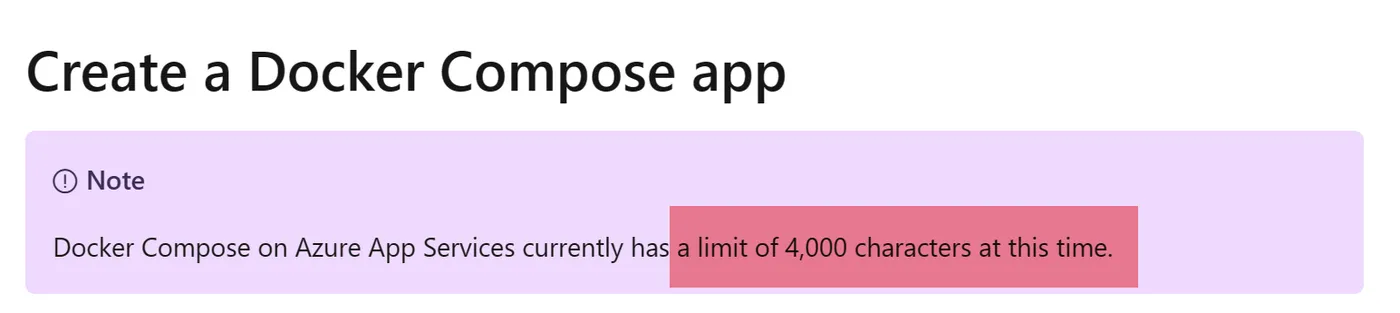
使用Docker Compose方式合并多个镜像(Images)文件,然后部署到App Service中,结果失败。报错 Linux Version 太长,不能超过4000个字符。

错误消息:

{

"code":"DeploymentFailed",

"message":"At least one resource deployment operation failed. Please list deployment operations for details. Please see https://aka.ms/arm-deployment-operations for usage details.",

"details":[

{"message":"Linux Version is too long. It cannot be more than 4000 characters."}

]

}


问题解答

这是因为App Service 会把 Docker compose.yml 文件中的内容以Base64格式编码后,赋值给Linux Version。而Linux Version的长度限制为4000个, 这是App Service For Linux平台限制,无法修改。
代替方案

可以使用方案有:

1)精简 Docker Compose.yaml 文件,把其中App Service不支持的指令或无关紧要的内容移除。App Service不支持的选项有:https://docs.azure.cn/zh-cn/app-service/configure-custom-container?pivots=container-linux&tabs=debian#docker-compose-options

2)使用 AKS(Azure Kubernetes Service) 服务 : https://docs.azure.cn/zh-cn/aks/tutorial-kubernetes-prepare-app

3)使用 ACI (Azure Container Instance) 服务 : https://learn.microsoft.com/en-us/azure/container-instances/tutorial-docker-compose


参考资料

Create Docker Comose App: https://learn.microsoft.com/en-us/azure/app-service/quickstart-multi-container#create-a-docker-compose-app

相关文章
|
存储 SQL 虚拟化
Omnissa App Volumes 4, version 2503 - 实时应用程序交付系统
301 7
Omnissa App Volumes 4, version 2503 - 实时应用程序交付系统
|
安全 Java 应用服务中间件
【Azure 应用服务】App Service 默认页面暴露Tomcat版本信息,存在安全风险
312 2
|
Docker 容器
14 response from daemon: open \\.\pipe\docker_engine_linux: The system cannot find the file speci
553 1
|
Oracle Java 关系型数据库
Linux下JDK环境的配置及 bash: /usr/local/java/bin/java: cannot execute binary file: exec format error问题的解决
如果遇到"exec format error"问题,文章建议先检查Linux操作系统是32位还是64位,并确保安装了与系统匹配的JDK版本。如果系统是64位的,但出现了错误,可能是因为下载了错误的JDK版本。文章提供了一个链接,指向Oracle官网上的JDK 17 Linux版本下载页面,并附有截图说明。
Linux下JDK环境的配置及 bash: /usr/local/java/bin/java: cannot execute binary file: exec format error问题的解决
|
应用服务中间件 Linux 网络安全
【Azure 应用服务】App Service for Linux 环境中为Tomcat页面修改默认的Azure 404页面
292 5
|
Linux
Linux命令行文档查看cat、less、more、head、tail和图片查看
524 0
|
Docker 容器
【Azure 应用服务】App Service for Container 无法拉取Docker Hub中的镜像替代方案
304 0
|
API C++
【Azure 应用服务】Azure Function App在部署时候遇见 503 ServiceUnavailable
184 0
|
网络协议
【Azure 应用服务】Azure Data Factory中调用Function App遇见403 - Forbidden
150 0
【Azure 应用服务】当在Azure App Service的门户上 Log Stream 日志无输出,需要如何操作让其输出Application Logs呢?
202 0

热门文章

最新文章