问题描述
使用.Net Framework 4.5.2为架构的Service Fabric微服务应用,在升级后发布到Azure Fabric中,服务无法运行。通过Service Fabric Explorer查看到服务出现Warning。全部的错误消息为:
| SF Explorer中查看状态 | 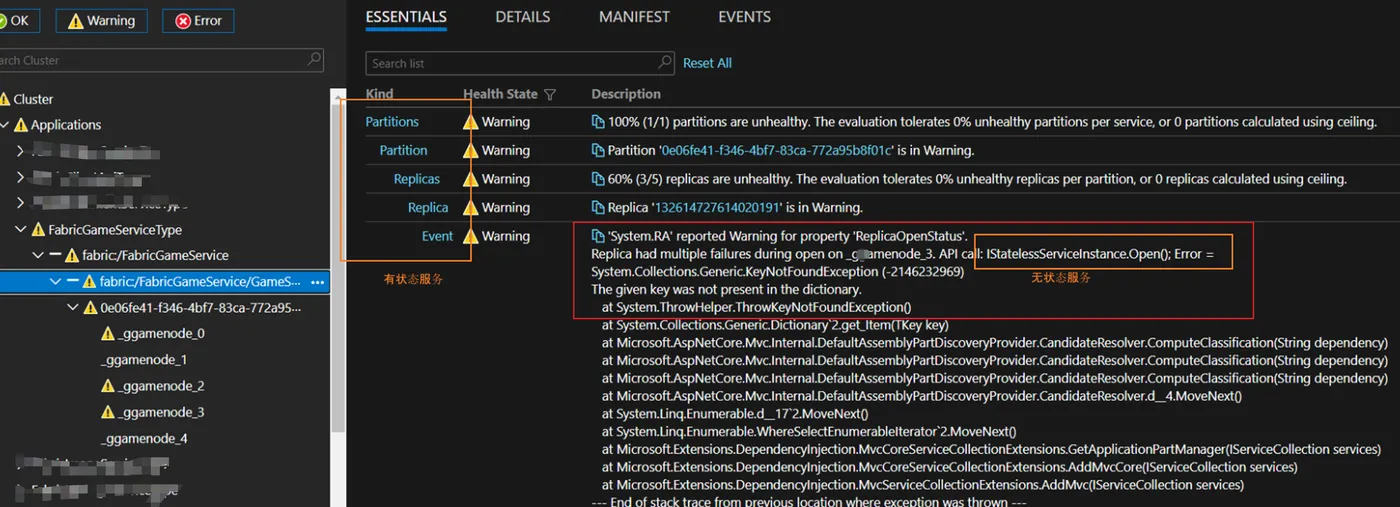 |
| SF副本节点中的全部状态错误 | 'System.RA' reported Warning for property 'ReplicaOpenStatus'. Replica had multiple failures during open on _ggamenode_0. API call: IStatelessServiceInstance.Open(); Error = System.Collections.Generic.KeyNotFoundException (-2146232969) The given key was not present in the dictionary. at System.ThrowHelper.ThrowKeyNotFoundException() at System.Collections.Generic.Dictionary`2.get_Item(TKey key) at Microsoft.AspNetCore.Mvc.Internal.DefaultAssemblyPartDiscoveryProvider.CandidateResolver.ComputeClassification(String dependency) at Microsoft.AspNetCore.Mvc.Internal.DefaultAssemblyPartDiscoveryProvider.CandidateResolver.ComputeClassification(String dependency) at Microsoft.AspNetCore.Mvc.Internal.DefaultAssemblyPartDiscoveryProvider.CandidateResolver.ComputeClassification(String dependency) at Microsoft.AspNetCore.Mvc.Internal.DefaultAssemblyPartDiscoveryProvider.CandidateResolver.d__4.MoveNext() at System.Linq.Enumerable.d__17`2.MoveNext() at System.Linq.Enumerable.WhereSelectEnumerableIterator`2.MoveNext() at Microsoft.Extensions.DependencyInjection.MvcCoreServiceCollectionExtensions.GetApplicationPartManager(IServiceCollection services) at Microsoft.Extensions.DependencyInjection.MvcCoreServiceCollectionExtensions.AddMvcCore(IServiceCollection services) at Microsoft.Extensions.DependencyInjection.MvcServiceCollectionExtensions.AddMvc(IServiceCollection services) --- End of stack trace from previous location where exception was thrown --- at System.Runtime.ExceptionServices.ExceptionDispatchInfo.Throw() at Microsoft.AspNetCore.Hosting.ConventionBasedStartup.ConfigureServices(IServiceCollection services) at Microsoft.AspNetCore.Hosting.Internal.WebHost.EnsureApplicationServices() at Microsoft.AspNetCore.Hosting.Internal.WebHost.BuildApplication() at Microsoft.AspNetCore.Hosting.WebHostBuilder.Build() at Microsoft.ServiceFabric.Services.Communication.AspNetCore.AspNetCoreCommunicationListener.OpenAsync(CancellationToken cancellationToken) at Microsoft.ServiceFabric.Services.Runtime.StatelessServiceInstanceAdapter.d__13. |
问题分析及解决
在错误消息中,Microsoft.AspNetCore.Mvc组件抛出了“System.Collections.Generic.KeyNotFoundException (-2146232969)The given key was not present in the dictionary.” 异常。在Stack Overflow中,查到KeyNotFoundException是当前ASP.NET Core 2.1的一个已知Issue。
是因为在安装 .Net Core 2.1后,与旧版本之间存在环境变量的依赖冲突问题。可以通过修改版本(如2.0)来避免这个问题。
如在项目文件中修改Microsoft.AspNetCore.Mvc版本(PS: 最便捷的方式是在Visual Studio 2019 IDE中通过NuGet修改版本,它会同步更新相关依赖),
<PackageReference Include="Microsoft.AspNetCore.Mvc" Version="2.0.4" />
<PackageReference Include="Microsoft.AspNetCore.Server.Kestrel" Version="2.0.3" />
Microsoft.AspNetCore 2.0.4
Dependencies
- .NETStandard 2.0
- Microsoft.AspNetCore.Diagnostics (>= 2.0.3)
- Microsoft.AspNetCore.Hosting (>= 2.0.3)
- Microsoft.AspNetCore.Routing (>= 2.0.3)
- Microsoft.AspNetCore.Server.IISIntegration (>= 2.0.3)
- Microsoft.AspNetCore.Server.Kestrel (>= 2.0.4)
- Microsoft.AspNetCore.Server.Kestrel.Https (>= 2.0.4)
- Microsoft.Extensions.Configuration.CommandLine (>= 2.0.2)
- Microsoft.Extensions.Configuration.EnvironmentVariables (>= 2.0.2)
- Microsoft.Extensions.Configuration.FileExtensions (>= 2.0.2)
- Microsoft.Extensions.Configuration.Json (>= 2.0.2)
- Microsoft.Extensions.Configuration.UserSecrets (>= 2.0.2)
- Microsoft.Extensions.Logging (>= 2.0.2)
- Microsoft.Extensions.Logging.Configuration (>= 2.0.2)
- Microsoft.Extensions.Logging.Console (>= 2.0.2)
- Microsoft.Extensions.Logging.Debug (>= 2.0.2)
而在升级AspNetCore的版本后,在项目中有些依赖也会同步升级(https://www.nuget.org/packages/Microsoft.AspNetCore/2.0.4),所以想要注意以下几点:
1) Microsoft.ServiceFabric.AspNetCore.WebListener升级后,UseWebListener 已经被替换成UseHttpSys。(Link: https://github.com/aspnet/Hosting/issues/1128)
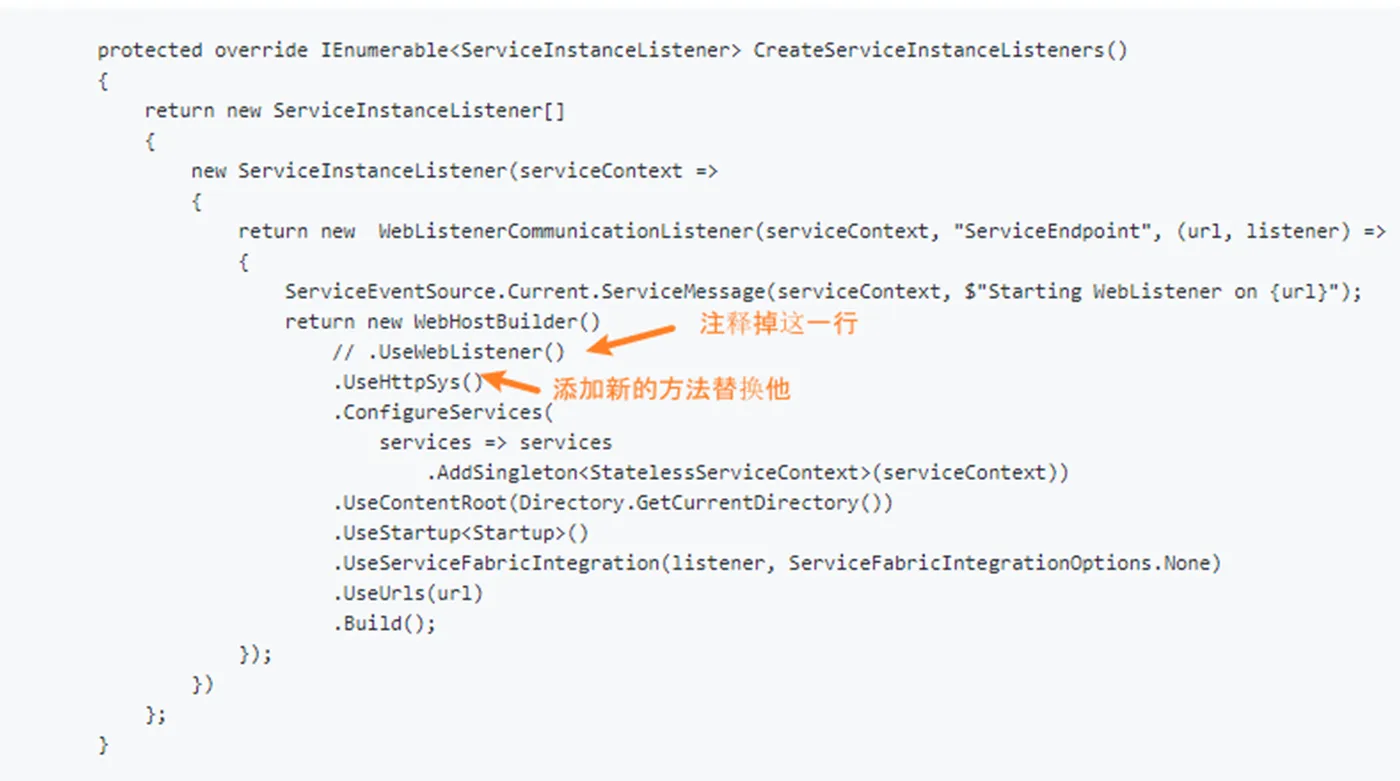
2)实际使用中,发现UseHttpSys后需要的依赖包,与Microsoft.AspNetCore包含相同的依赖,而引起包冲突。应使用UseKestrel方法
/// <summary>
        /// Optional override to create listeners (like tcp, http) for this service instance.
        /// </summary>
        /// <returns>The collection of listeners.</returns>
        protected override IEnumerable<ServiceInstanceListener> CreateServiceInstanceListeners()
        {
            return new ServiceInstanceListener[]
            {
                new ServiceInstanceListener(serviceContext =>
                    new KestrelCommunicationListener(serviceContext, "ServiceEndpoint", (url, listener) =>
                    {
                        ServiceEventSource.Current.ServiceMessage(serviceContext, $"Starting Kestrel on {url}");
                        return new WebHostBuilder()
                                    .UseKestrel()
                                    .ConfigureServices(
                                        services => services
                                            .AddSingleton<StatelessServiceContext>(serviceContext))
                                    .UseContentRoot(Directory.GetCurrentDirectory())
                                    .UseStartup<Startup>()
                                    .UseServiceFabricIntegration(listener, ServiceFabricIntegrationOptions.None)
                                    .UseUrls(url)
                                    .Build();
                    }))
            };
        }
3) 部署包中依赖混乱,抛出加载Abstractions 1.1.1.0旧版本的Dll。正确的版本应该为2.0及以上
'System.RA' reported Warning for property 'ReplicaOpenStatus'. Replica had multiple failures during open on _ggamenode_0.
API call: IStatelessServiceInstance.Open(); Error = System.IO.FileLoadException (-2146234304)
 Could not load file or assembly
'Microsoft.AspNetCore.Hosting.Abstractions, Version=1.1.1.0, Culture=neutral, PublicKeyToken=adb9793829ddae60'
or one of its dependencies. The located assembly's manifest definition does not match the assembly reference. (Exception from HRESULT: 0x80131040)
System.IO.FileLoadException (-2146234304) Could not load file or assembly '
Microsoft.AspNetCore.Hosting.Abstractions, Version=1.0.0.0, Culture=neutral, PublicKeyToken=adb9793829
at SmsServiceApi.SmsServiceApi.<>c.b__1_0(StatelessServiceContext serviceContext)
at Microsoft.ServiceFabric.Services.Runtime.StatelessServiceInstanceAdapter.d__13.MoveNext()
--- End of stack trace from previous location where exception was thrown
--- at System.Runtime.ExceptionServices.ExceptionDispatchInfo.Throw()
at System.Runtime.CompilerServices.TaskAwaiter.HandleNonSuccessAndDebuggerNotification(Task task)
at Microsoft.ServiceFabric.Services.Runtime.StatelessServiceInstanceAdapter.d__0.MoveNext()
For more information see: https://aka.ms/sfhealth
在修改版本问题方面,除了在project的config文件中修改为正确的版本,还需要检查打包后的部署包中Dll的版本。

参考资料
AspNet Core WebApi fails at startup with error System.Collections.Generic.KeyNotFoundException :https://stackoverflow.com/questions/51446570/aspnet-core-webapi-fails-at-startup-with-error-system-collections-generic-keynot
Service fabric API cannot run in azure SF cluster : https://github.com/microsoft/service-fabric-issues/issues/1190
Service Fabric & ASP.NET Core 2.0 fails to run/start site: https://github.com/aspnet/Hosting/issues/1128
Application services not starting - KeyNotFoundException (AspNetCore 1.1): https://github.com/microsoft/service-fabric-issues/issues/1086
Microsoft.AspNetCore: https://www.nuget.org/packages/Microsoft.AspNetCore/2.0.4