javaweb实训第五天下午——xml配置文件约束报错问题

简介: 问题描述:如果电脑连不上网,或者网速不好可能会造成Spring框架中xml配置文件出现错误。但是这个错误不影响项目的运行的;

问题描述:

  1. 如果电脑连不上网,或者网速不好可能会造成Spring框架中xml配置文件出现错误。但是这个错误不影响项目的运行的;
<beans xmlns="http://www.springframework.org/schema/beans" 
  xmlns:xsi="http://www.w3.org/2001/XMLSchema-instance"
  xmlns:aop="http://www.springframework.org/schema/aop"
  xmlns:context="http://www.springframework.org/schema/context" 
  xmlns:jee="http://www.springframework.org/schema/jee" 
  xmlns:util="http://www.springframework.org/schema/util"
  xmlns:tx="http://www.springframework.org/schema/tx"
  xmlns:mvc="http://www.springframework.org/schema/mvc"
  xsi:schemaLocation="
    http://www.springframework.org/schema/beans http://www.springframework.org/schema/beans/spring-beans-4.1.xsd
    http://www.springframework.org/schema/context http://www.springframework.org/schema/context/spring-context-4.1.xsd
    http://www.springframework.org/schema/jee http://www.springframework.org/schema/jee/spring-jee-4.1.xsd
    http://www.springframework.org/schema/tx http://www.springframework.org/schema/tx/spring-tx-4.1.xsd
    http://www.springframework.org/schema/mvc 
    http://www.springframework.org/schema/mvc/spring-mvc-4.1.xsd
    http://www.springframework.org/schema/util http://www.springframework.org/schema/util/spring-util-4.1.xsd
    http://www.springframework.org/schema/aop
        http://www.springframework.org/schema/aop/spring-aop-4.1.xsd">

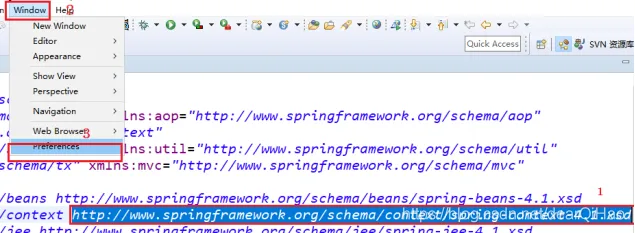
从上面可以知道xml文件中是一大堆Schema约束,而且是在线的(看黄色部分),如果没有网络或网络较差可能就会出现错误;

解决办法:将这个url地址关联到本地Schmea约束(课件 – day01 – resources – schema – 各种各样的约束)

Spring系列.xml报错:

20210602155654807.png

一般情况下错误提示中会是context报错:

20210602155706446.png

一般情况下错误提示中会是context报错:

20210602155710170.png

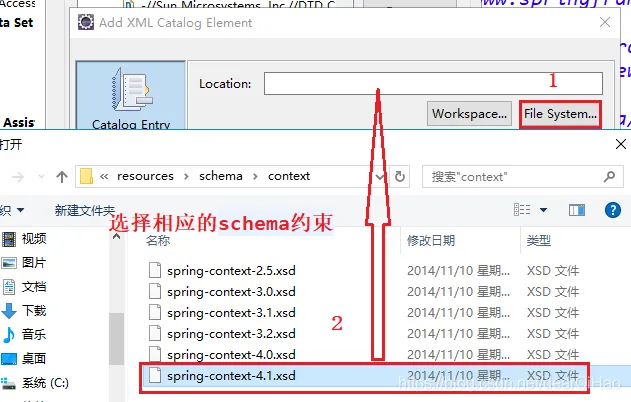
选择XML Catalog – 点击Add…添加:

20210602155713733.png

Location要与Key相对应:

20210602155717518.png

20210602155728431.png

一定要清理下:

20210602155733342.png

2021060215574725.png 

目录
相关文章
|
5月前
|
人工智能 Ubuntu 前端开发
Dify部署全栈指南:AI从Ubuntu配置到HTTPS自动化的10倍秘籍
本文档介绍如何部署Dify后端服务及前端界面,涵盖系统环境要求、依赖安装、代码拉取、环境变量配置、服务启动、数据库管理及常见问题解决方案,适用于开发与生产环境部署。
1142 1
|
9月前
|
应用服务中间件 Linux 网络安全
Centos 8.0中Nginx配置文件和https正书添加配置
这是一份Nginx配置文件,包含HTTP与HTTPS服务设置。主要功能如下:1) 将HTTP(80端口)请求重定向至HTTPS(443端口),增强安全性;2) 配置SSL证书,支持TLSv1.1至TLSv1.3协议;3) 使用uWSGI与后端应用通信(如Django);4) 静态文件托管路径设为`/root/code/static/`;5) 定制错误页面(404、50x)。适用于Web应用部署场景。
865 87
|
4月前
|
网络安全 开发工具 git
在GitLab CI中同步HTTPS仓库地址的yaml配置
最后,提交并推送 `.gitlab-ci.yml`文件到您的GitLab仓库。GitLab CI/CD将自动识别这个文件,并在每次推送到 `master`分支时执行定义的同步任务。
216 16
|
8月前
|
网络协议 开发工具 git
解决 git 报错 “fatal: unable to access ‘https://github.com/.../.git‘: Recv failure Connection was rese
在使用 Git/Git小乌龟 进行代码管理的过程中,经常会遇到各种各样的问题,其中之一就是在执行 git clone 或 git pull 等操作时出现 “fatal: unable to access ‘https://github.com/…/.git’: Recv failure Connection was reset” 的报错。这个问题通常是由网络连接问题或代理设置不正确导致的。在我的个人使用经验中,我亲自尝试了四种方法,它们都能够有效地解决这个报错。个人比较推荐方法二。
5310 1
|
网络协议 Java 应用服务中间件
tomcat配置域名及HTTPS
tomcat配置域名及HTTPS
|
安全 应用服务中间件 网络安全
49.3k star,本地 SSL 证书生成神器,轻松解决 HTTPS 配置痛点
mkcert是一款由Filippo Valsorda开发的免费开源工具,专为生成受信任的本地SSL/TLS证书而设计。它通过简单的命令自动生成并安装本地信任的证书,使本地环境中的HTTPS配置变得轻松无比。mkcert支持多个操作系统,已获得49.2K的GitHub Star,成为开发者首选的本地SSL工具。
796 10
|
数据安全/隐私保护 Docker 容器
配置Harbor支持https功能实战篇
关于如何配置Harbor支持HTTPS功能的详细教程。
1014 13
配置Harbor支持https功能实战篇
HAProxy的高级配置选项-配置haproxy支持https协议及服务器动态上下线
文章介绍了如何配置HAProxy以支持HTTPS协议和实现服务器的动态上下线。
873 8
HAProxy的高级配置选项-配置haproxy支持https协议及服务器动态上下线
|
分布式计算 Hadoop Devops
Hadoop集群配置https实战案例
本文提供了一个实战案例,详细介绍了如何在Hadoop集群中配置HTTPS,包括生成私钥和证书文件、配置keystore和truststore、修改hdfs-site.xml和ssl-client.xml文件,以及重启Hadoop集群的步骤,并提供了一些常见问题的故障排除方法。
435 3
Hadoop集群配置https实战案例