一,
前言
本文主要内容是通过elasticsearch的api来进行一些集群的管理和信息查询工作,以及elasticsearch用户的增删改查和密码的重设以及重置如何操作
上文主要介绍了elasticsearch低版本集群的部署和密码的设定,这些是大大的提高了集群的安全性,但关于security(安全性)只是稍微提及,本文将要更加的深入的介绍这些安全措施,其次是部署完集群仅仅是第一步,如何正确的使用,高效的使用集群才是最终的目的,本文也将从这些方面做一个简单的论述。
二,
elasticsearch的安全插件----xpack
该插件主要是两个功能,第一个是通过config文件夹下的elasticsearch-keystone文件加密api,使得在使用api的时候必须要先检验预设的用户和密码
其次是ssl加密,通过certgen这个工具生成自签的ca证书(高版本的es这个工具可能改名),以提高elasticsearch的网络安全
在主配置文件中,有以下三个选项,这三个选项是这两个功能的开关:
xpack.security.enabled: true
xpack.security.transport.ssl.enabled: false
xpack.security.http.ssl.ssl.enabled: false
上文讲了密码校验的开启,ssl如何开启没有说,本文就把这个补充上吧
xpack.security.transport.ssl.enabled: false 这个选项应该是集群间ssl自签证书验证,防止恶意的增添节点
xpack.security.http.ssl.ssl.enabled: false 这个选项应该是使用自签证书,外部访问集群的时候需要证书验证,通俗的说就是https
那么,先开启xpack.security.transport.ssl.enabled,具体步骤如下:
1,在master节点生成ca证书(这个证书带密码,也可以不带密码,我这里用了密码,随意设置一个记得住的就可以了)# 生成elastic-stack-ca.p12文件
[root@node1 es]# ./bin/x-pack/certutil ca
This tool assists you in the generation of X.509 certificates and certificate
signing requests for use with SSL/TLS in the Elastic stack.
The 'ca' mode generates a new 'certificate authority'
This will create a new X.509 certificate and private key that can be used
to sign certificate when running in 'cert' mode.
Use the 'ca-dn' option if you wish to configure the 'distinguished name'
of the certificate authority
By default the 'ca' mode produces a single PKCS#12 output file which holds:
    * The CA certificate
    * The CA's private key
If you elect to generate PEM format certificates (the -pem option), then the output will
be a zip file containing individual files for the CA certificate and private key
Please enter the desired output file [elastic-stack-ca.p12]:
Enter password for elastic-stack-ca.p12 :
2,生成elastic-certificates.p12这个文件,在其它节点生成同样的文件,命令稍微修改一下#### 生成elastic-certificates.p12文件,供elasticsearch使用(只在master节点生成,然后拷贝到其它节点即可,scp命令或者什么其它的方式都可以,不得在其它节点自己生成):
[root@node1 es]# ./bin/x-pack/certutil cert --ca elastic-stack-ca.p12
This tool assists you in the generation of X.509 certificates and certificate
signing requests for use with SSL/TLS in the Elastic stack.
The 'cert' mode generates X.509 certificate and private keys.
    * By default, this generates a single certificate and key for use
       on a single instance.
    * The '-multiple' option will prompt you to enter details for multiple
       instances and will generate a certificate and key for each one
    * The '-in' option allows for the certificate generation to be automated by describing
       the details of each instance in a YAML file
    * An instance is any piece of the Elastic Stack that requires a SSL certificate.
      Depending on your configuration, Elasticsearch, Logstash, Kibana, and Beats
      may all require a certificate and private key.
    * The minimum required value for each instance is a name. This can simply be the
      hostname, which will be used as the Common Name of the certificate. A full
      distinguished name may also be used.
    * A filename value may be required for each instance. This is necessary when the
      name would result in an invalid file or directory name. The name provided here
      is used as the directory name (within the zip) and the prefix for the key and
      certificate files. The filename is required if you are prompted and the name
      is not displayed in the prompt.
    * IP addresses and DNS names are optional. Multiple values can be specified as a
      comma separated string. If no IP addresses or DNS names are provided, you may
      disable hostname verification in your SSL configuration.
    * All certificates generated by this tool will be signed by a certificate authority (CA).
    * The tool can automatically generate a new CA for you, or you can provide your own with the
         -ca or -ca-cert command line options.
By default the 'cert' mode produces a single PKCS#12 output file which holds:
    * The instance certificate
    * The private key for the instance certificate
    * The CA certificate
If you elect to generate PEM format certificates (the -pem option), then the output will
be a zip file containing individual files for the instance certificate, the key and the CA certificate
If you elect to generate multiple instances certificates, the output will be a zip file
containing all the generated certificates
Enter password for CA (elastic-stack-ca.p12) :
Please enter the desired output file [elastic-certificates.p12]:
Enter password for elastic-certificates.p12 :
Certificates written to /data/es/elastic-certificates.p12
This file should be properly secured as it contains the private key for
your instance.
This file is a self contained file and can be copied and used 'as is'
For each Elastic product that you wish to configure, you should copy
this '.p12' file to the relevant configuration directory
and then follow the SSL configuration instructions in the product guide.
For client applications, you may only need to copy the CA certificate and
configure the client to trust this certificate.
3,如果该证书设置了证书,那么需要节点认证通过,否则会报没有权限读取(每个节点都执行):
./bin/elasticsearch-keystore add xpack.security.transport.ssl.keystore.secure_password
./bin/elasticsearch-keystore add xpack.security.transport.ssl.truststore.secure_password
4,为了防止elasticsearch因为权限问题启动失败,再次递归赋属组:
chown -Rf es. /data/es
5,elasticsearch主配置文件的修改
在主配置文件末尾添加如下内容:
xpack.security.enabled: true
xpack.security.transport.ssl.enabled: true
http.cors.enabled: true
http.cors.allow-origin: "*"
http.cors.allow-methods : OPTIONS, HEAD, GET, POST, PUT, DELETE
http.cors.allow-headers : X-Requested-With,X-Auth-Token,Content-Type,Content-Length
xpack.security.transport.ssl.verification_mode: certificate
xpack.security.transport.ssl.keystore.path: /data/es/config/cert/elastic-certificates.p12
xpack.security.transport.ssl.truststore.path: /data/es/config/cert/elastic-certificates.p12
6,在补充说明一下:
因为elasticsearch集群是使用的发现机制,因此,master在扫描到同网段其它的服务器的9300-9305端口的时候,就会将其自动加入集群,而如果没有任何验证的加入节点是非常危险的,因此,证书的密码建议是最好设置,恶意节点将会因为没有证书文件并通过节点认证而无法随意加入集群,这样,我们的集群将会比较的安全。
verification_mode 控制服务器证书的验证。有效值为:
- # full 验证提供的证书是否由可信机构 (CA) 签名,并验证服务器的主机名(或 IP 地址)是否与证书中标识的名称相匹配。
- # strict 验证提供的证书是否由可信机构 (CA) 签名,并验证服务器的主机名(或 IP 地址)是否与证书中标识的名称相匹配。如果 Subject Alternative Name 为空,则返回错误。
- # certificate 验证提供的证书是否由可信机构 (CA) 签名,但不执行任何主机名验证。
- # none 不执行服务器证书的验证。此模式会禁用 SSL/TLS 的许多安全优势,应仅在谨慎考虑后使用。它主要用作尝试解决 TLS 错误时的临时诊断机制;强烈建议不要在生产环境中使用它。
keystore:存放公钥,私钥,数字签名等信息
truststore:存放信任的证书
keystore和truststore都存放key,不同的地方是truststore只存放公钥的数字证书,代表了可以信任的证书,keystore存放私钥相关.
三,
elasticsearch利用x-pack开启https
得先说明,https是可以使用自签证书的,虽然实际意义不大,那在elasticsearch里自然也是可以使用自签证书的了,在elasticsearch里主要是通过certutil这个工具生成的,该工具主要是自动化,使用简单。
集群主机名信息:
[root@node4 ~]# cat /etc/hosts
127.0.0.1   localhost localhost.localdomain localhost4 localhost4.localdomain4
::1         localhost localhost.localdomain localhost6 localhost6.localdomain6
# kubekey hosts BEGIN
192.168.123.14  node4.cluster.local node4 node-4
192.168.123.11  node1.cluster.local node1 node-1
192.168.123.12  node2.cluster.local node2 node-2
192.168.123.13  node3.cluster.local node3 node-3
127.0.0.1 lb.kubesphere.local
# kubekey hosts END
根据以上信息,编写证书信息文件(主机名和IP地址一一对应哦):
[root@node4 ~]# cat instances.yml
instances:
  - name: "node-1"
    dns: ['192.168.123.11']
  - name: "node-2"
    dns: ['192.168.123.12']
  - name: "node-3"
    dns: ['192.168.123.13']
  - name: 'node-4'
    dns: ['192.168.123.14']
执行以下命令生成证书包:
###注:生成的证书格式是pem的,可以直接使用,无需任何转换(哪个服务器都可以,随便找个服务器就可以了)
/data/es/bin/x-pack/certutil cert ca --pem --in instances.yml --out /root/certs.zip
解压上面在root根目录下生成的证书包:
replace ca/ca.crt? [y]es, [n]o, [A]ll, [N]one, [r]ename: A
  inflating: ca/ca.crt
  inflating: node-1/node-1.crt
  inflating: node-1/node-1.key
  inflating: node-2/node-2.crt
  inflating: node-2/node-2.key
  inflating: node-3/node-3.crt
  inflating: node-3/node-3.key
  inflating: node-4/node-4.crt
  inflating: node-4/node-4.key
可以看到有5个文件夹,在elasticsearch的主配置文件末尾添加如下内容:
node-1服务器:
xpack.security.http.ssl.enabled: true
xpack.security.http.ssl.key: /data/es/config/cert/node-1.key
xpack.security.http.ssl.certificate: /data/es/config/cert/node-1.crt
xpack.security.http.ssl.certificate_authorities: /data/es/config/cert/ca.crt
node-2服务器:
xpack.security.http.ssl.enabled: true
xpack.security.http.ssl.key: /data/es/config/cert/node-2.key
xpack.security.http.ssl.certificate: /data/es/config/cert/node-2.crt
xpack.security.http.ssl.certificate_authorities: /data/es/config/cert/ca.crt
node-3服务器:
xpack.security.http.ssl.enabled: true
xpack.security.http.ssl.key: /data/es/config/cert/node-3.key
xpack.security.http.ssl.certificate: /data/es/config/cert/node-3.crt
xpack.security.http.ssl.certificate_authorities: /data/es/config/cert/ca.crt
node-4服务器:
xpack.security.http.ssl.enabled: true
xpack.security.http.ssl.key: /data/es/config/cert/node-4.key
xpack.security.http.ssl.certificate: /data/es/config/cert/node-4.crt
xpack.security.http.ssl.certificate_authorities: /data/es/config/cert/ca.crt
以上配置都是用的绝对路径,因此,将前面的cert.zip 文件内的对应文件放置到对应的服务器的指定路径下即可了,注意,注意,需要给证书赋予es用户权限,这一步不能漏,也就是chown -Rf /data/es 这个命令
然后重启所有节点的elasticsearch服务
如果没有报错的话,打开浏览器输入以下网址将可以看到https开启了:

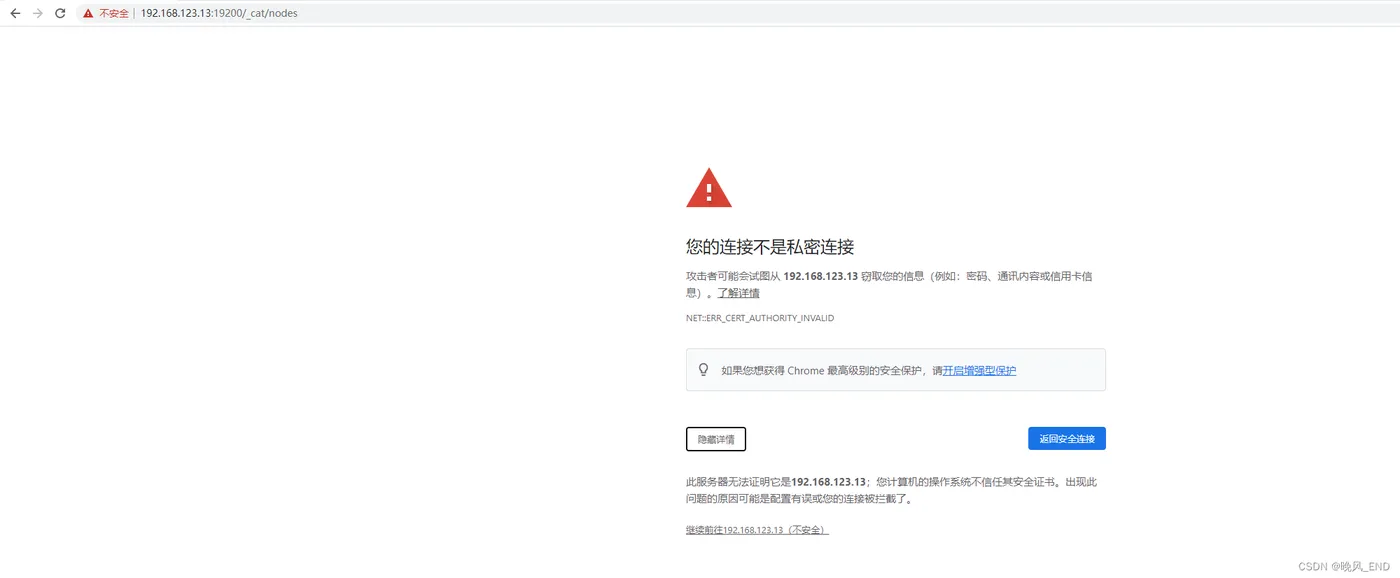

可以看到13服务器有日志警告,不过无所吊谓:
[2023-12-12T23:04:38,187][INFO ][o.e.c.s.ClusterApplierService] [node-2] added {{node-1}{Ihs-2_jwTte3q7zd82z9cg}{2ooshKAZR4epjmfAJ0U2IQ}{192.168.123.11}{192.168.123.11:9300}{ml.machine_memory=8975544320, ml.max_open_jobs=20, ml.enabled=true},}, reason: apply cluster state (from master [master {node-3}{kZxWJkP1Tjqo1DkDLcKg0w}{qPA_ePYYTW21FGt2xhMe8A}{192.168.123.13}{192.168.123.13:9300}{ml.machine_memory=8370089984, ml.max_open_jobs=20, ml.enabled=true} committed version [80]])
[2023-12-12T23:05:20,748][WARN ][o.e.x.s.t.n.SecurityNetty4HttpServerTransport] [node-2] http client did not trust this server's certificate, closing connection [id: 0x240d6693, L:0.0.0.0/0.0.0.0:19200 ! R:/192.168.123.1:59482]
[2023-12-12T23:05:20,748][WARN ][o.e.x.s.t.n.SecurityNetty4HttpServerTransport] [node-2] http client did not trust this server's certificate, closing connection [id: 0xef2c0f9e, L:0.0.0.0/0.0.0.0:19200 ! R:/192.168.123.1:59483]
[2023-12-12T23:05:28,605][WARN ][o.e.x.s.t.n.SecurityNetty4HttpServerTransport] [node-2] http client did not trust this server's certificate, closing connection [id: 0x8abd3207, L:0.0.0.0/0.0.0.0:19200 ! R:/192.168.123.1:59488]
[2023-12-12T23:05:43,343][WARN ][o.e.x.s.t.n.SecurityNetty4HttpServerTransport] [node-2] http client did not trust this server's certificate, closing connection [id: 0xd9b903fb, L:0.0.0.0/0.0.0.0:19200 ! R:/192.168.123.1:59489]
四,
报错一览:
1,
[2023-12-12T22:07:44,555][ERROR][o.e.b.Bootstrap          ] Exception
java.lang.IllegalStateException: failed to load plugin class [org.elasticsearch.xpack.core.XPackPlugin]
        at org.elasticsearch.plugins.PluginsService.loadPlugin(PluginsService.java:563) ~[elasticsearch-6.2.4.jar:6.2.4]
        at org.elasticsearch.plugins.PluginsService.loadBundle(PluginsService.java:505) ~[elasticsearch-6.2.4.jar:6.2.4]
        at org.elasticsearch.plugins.PluginsService.loadBundles(PluginsService.java:422) ~[elasticsearch-6.2.4.jar:6.2.4]
        at org.elasticsearch.plugins.PluginsService.<init>(PluginsService.java:146) ~[elasticsearch-6.2.4.jar:6.2.4]
        at org.elasticsearch.node.Node.<init>(Node.java:303) ~[elasticsearch-6.2.4.jar:6.2.4]
        at org.elasticsearch.node.Node.<init>(Node.java:246) ~[elasticsearch-6.2.4.jar:6.2.4]
        at org.elasticsearch.bootstrap.Bootstrap$5.<init>(Bootstrap.java:213) ~[elasticsearch-6.2.4.jar:6.2.4]
        at org.elasticsearch.bootstrap.Bootstrap.setup(Bootstrap.java:213) ~[elasticsearch-6.2.4.jar:6.2.4]
        at org.elasticsearch.bootstrap.Bootstrap.init(Bootstrap.java:323) [elasticsearch-6.2.4.jar:6.2.4]
        at org.elasticsearch.bootstrap.Elasticsearch.init(Elasticsearch.java:121) [elasticsearch-6.2.4.jar:6.2.4]
        at org.elasticsearch.bootstrap.Elasticsearch.execute(Elasticsearch.java:112) [elasticsearch-6.2.4.jar:6.2.4]
        at org.elasticsearch.cli.EnvironmentAwareCommand.execute(EnvironmentAwareCommand.java:86) [elasticsearch-6.2.4.jar:6.2.4]
        at org.elasticsearch.cli.Command.mainWithoutErrorHandling(Command.java:124) [elasticsearch-cli-6.2.4.jar:6.2.4]
        at org.elasticsearch.cli.Command.main(Command.java:90) [elasticsearch-cli-6.2.4.jar:6.2.4]
        at org.elasticsearch.bootstrap.Elasticsearch.main(Elasticsearch.java:92) [elasticsearch-6.2.4.jar:6.2.4]
        at org.elasticsearch.bootstrap.Elasticsearch.main(Elasticsearch.java:85) [elasticsearch-6.2.4.jar:6.2.4]
Caused by: java.lang.reflect.InvocationTargetException
        at sun.reflect.NativeConstructorAccessorImpl.newInstance0(Native Method) ~[?:?]
        at sun.reflect.NativeConstructorAccessorImpl.newInstance(NativeConstructorAccessorImpl.java:62) ~[?:?]
        at sun.reflect.DelegatingConstructorAccessorImpl.newInstance(DelegatingConstructorAccessorImpl.java:45) ~[?:?]
        at java.lang.reflect.Constructor.newInstance(Constructor.java:423) ~[?:1.8.0_392]
        at org.elasticsearch.plugins.PluginsService.loadPlugin(PluginsService.java:554) ~[elasticsearch-6.2.4.jar:6.2.4]
        ... 15 more
Caused by: org.elasticsearch.ElasticsearchException: failed to initialize a TrustManagerFactory
        at org.elasticsearch.xpack.core.ssl.StoreTrustConfig.createTrustManager(StoreTrustConfig.java:72) ~[?:?]
        at org.elasticsearch.xpack.core.ssl.SSLService.createSslContext(SSLService.java:419) ~[?:?]
        at java.util.HashMap.computeIfAbsent(HashMap.java:1128) ~[?:1.8.0_392]
        at org.elasticsearch.xpack.core.ssl.SSLService.lambda$loadSSLConfigurations$0(SSLService.java:465) ~[?:?]
        at java.util.ArrayList.forEach(ArrayList.java:1259) ~[?:1.8.0_392]
        at org.elasticsearch.xpack.core.ssl.SSLService.loadSSLConfigurations(SSLService.java:464) ~[?:?]
        at org.elasticsearch.xpack.core.ssl.SSLService.<init>(SSLService.java:91) ~[?:?]
        at org.elasticsearch.xpack.core.XPackPlugin.<init>(XPackPlugin.java:127) ~[?:?]
        at sun.reflect.NativeConstructorAccessorImpl.newInstance0(Native Method) ~[?:?]
        at sun.reflect.NativeConstructorAccessorImpl.newInstance(NativeConstructorAccessorImpl.java:62) ~[?:?]
        at sun.reflect.DelegatingConstructorAccessorImpl.newInstance(DelegatingConstructorAccessorImpl.java:45) ~[?:?]
        at java.lang.reflect.Constructor.newInstance(Constructor.java:423) ~[?:1.8.0_392]
        at org.elasticsearch.plugins.PluginsService.loadPlugin(PluginsService.java:554) ~[elasticsearch-6.2.4.jar:6.2.4]
        ... 15 more
Caused by: java.io.IOException: keystore password was incorrect
        at sun.security.pkcs12.PKCS12KeyStore.engineLoad(PKCS12KeyStore.java:2089) ~[?:?]
        at java.security.KeyStore.load(KeyStore.java:1445) ~[?:1.8.0_392]
        at org.elasticsearch.xpack.core.ssl.CertUtils.readKeyStore(CertUtils.java:276) ~[?:?]
        at org.elasticsearch.xpack.core.ssl.CertUtils.trustManager(CertUtils.java:267) ~[?:?]
        at org.elasticsearch.xpack.core.ssl.StoreTrustConfig.createTrustManager(StoreTrustConfig.java:70) ~[?:?]
        at org.elasticsearch.xpack.core.ssl.SSLService.createSslContext(SSLService.java:419) ~[?:?]
        at java.util.HashMap.computeIfAbsent(HashMap.java:1128) ~[?:1.8.0_392]
        at org.elasticsearch.xpack.core.ssl.SSLService.lambda$loadSSLConfigurations$0(SSLService.java:465) ~[?:?]
        at java.util.ArrayList.forEach(ArrayList.java:1259) ~[?:1.8.0_392]
        at org.elasticsearch.xpack.core.ssl.SSLService.loadSSLConfigurations(SSLService.java:464) ~[?:?]
        at org.elasticsearch.xpack.core.ssl.SSLService.<init>(SSLService.java:91) ~[?:?]
        at org.elasticsearch.xpack.core.XPackPlugin.<init>(XPackPlugin.java:127) ~[?:?]
        at sun.reflect.NativeConstructorAccessorImpl.newInstance0(Native Method) ~[?:?]
        at sun.reflect.NativeConstructorAccessorImpl.newInstance(NativeConstructorAccessorImpl.java:62) ~[?:?]
        at sun.reflect.DelegatingConstructorAccessorImpl.newInstance(DelegatingConstructorAccessorImpl.java:45) ~[?:?]
        at java.lang.reflect.Constructor.newInstance(Constructor.java:423) ~[?:1.8.0_392]
        at org.elasticsearch.plugins.PluginsService.loadPlugin(PluginsService.java:554) ~[elasticsearch-6.2.4.jar:6.2.4]
以上报错关键词是java.io.IOException: keystore password was incorrect和 sun.reflect.NativeConstructorAccessorImpl.newInstance0(Native Method)
很明显是io读写错误,根本原因是无权读写,这里说的应该是前面添加的证书文件没有添加es属组才造成的,因此,chown -Rf /data/es ,在重启服务,发现没有报错了
2,
[node-2] failed to send join request to master [{node-1}{Ao_m-rPfTnmEB8CBPL-U5A}{vCkhIJX6T6mXYlAlty40CA}{192.168.123.11}{192.168.123.11:9300}{ml.machine_memory=4142223360, ml.max_open_jobs=20, xpack.installed=true, ml.enabled=true}], reason [RemoteTransportException[[node-1][192.168.123.11:9300][internal:discovery/zen/join]]; nested: IllegalArgumentException[can't add node {node-2}{Ao_m-rPfTnmEB8CBPL-U5A}{9koFdxABR-msIkioIDbjzA}{192.168.123.12}{192.168.123.12:9300}{ml.machine_memory=4142223360, ml.max_open_jobs=20, xpack.installed=true, ml.enabled=true}, found existing node {node-1}{Ao_m-rPfTnmEB8CBPL-U5A}{vCkhIJX6T6mXYlAlty40CA}{192.168.123.11}{192.168.123.11:9300}{ml.machine_memory=4142223360, xpack.installed=true, ml.max_open_jobs=20, ml.enabled=true} with the same id but is a different node instance];
由于es集群安装的时候是从一个节点直接拷贝到其它节点的,不是解压文件,在拷贝前,节点启动过一次,自动生成了data文件夹和其下的内容,里面包含了上一个节点的信息
因此,解决方案为删除/data/es/data目录下的所有内容:
[root@node2 ~]# rm -rf /data/es/data/*
再次启动就没有此报错了
五,
简单的elasticsearch的api使用
1,
查看所有节点
[root@node1 x-pack]# curl -k -XGET https://192.168.123.11:19200/_cat/nodes -uelastic
Enter host password for user 'elastic':
192.168.123.14 45 93 0 0.28 0.26 0.32 mdi - node-4
192.168.123.13 26 63 2 0.36 0.18 0.20 mdi * node-3
192.168.123.12 23 81 1 0.54 0.34 0.29 mdi - node-2
192.168.123.11 36 61 1 0.06 0.15 0.20 mdi - node-1
第一列(ip):es节点ip
第二列(heap.percent):堆内存占比
第三列(ram.percent):内存使用占比
第四列(cpu):cpu使用率
第五列(load_1m):1分钟内平均load情况,ms
第六列(load_5m):5分钟内平均load情况,ms
第七列(load_15m):15分钟内平均load情况,ms
第八列(node.role):节点权限
第九列(master):是否master节点,*为master节点
第十列(name):节点名称
2,
查看所有索引信息:
[root@node1 x-pack]# curl -k -XGET https://192.168.123.11:19200/_cat/indices -uelastic
Enter host password for user 'elastic':
green open .watcher-history-7-2023.12.09 _WVuCnwrSlGtYaLbSAfbLg 1 1   549     0   1.5mb 808.3kb
green open .watcher-history-7-2023.12.10 zcAH_IgISayByx6-K4ueGQ 1 1  3989     0  11.3mb   5.6mb
green open .monitoring-alerts-6          Pm5Cw8UkQAamSkvOxccFow 1 1     7     0  84.1kb    42kb
green open .triggered_watches            -XApiGASS1a_jDOQMmthaA 1 1     0     0 146.5kb  73.2kb
green open .monitoring-es-6-2023.12.09   4GLFZLlsRH6nj4ZKIUsxvw 1 1  7439    28     9mb   4.5mb
green open .monitoring-es-6-2023.12.10   h1y4V6UMQFGecE78sfBqIA 1 1 58643 31012  81.1mb  40.5mb
green open my_index                      ApVYPzGuQS60iOFF_ur6nA 5 1     2     0  17.9kb   8.9kb
green open .watcher-history-7-2023.12.12 XZkWSqt1Txm-vpSCYWMlNg 1 1   585     0     2mb     1mb
green open .security-6                   VMkr4AP3TbOI1fVJCF9ZJQ 1 3     3     0  39.4kb   9.8kb
green open .watches                      S9Gd2ZUuTtazqQpN45sx9Q 1 1     6     0 469.1kb  58.7kb
green open .monitoring-es-6-2023.12.12   HkMeJ9DAQSue1nZJrRMtYg 1 1 10765    32  16.5mb   8.2mb
health: 索引的健康状态
status: 索引的开启状态
index:  索引名字
uuid: 索引的uuid
pri:  索引的主分片数量
rep:  索引的复制分片数量
docs.count: 索引下的文档总数
docs.deleted: 索引下删除状态的文档数
store.size: 主分片+复制分片的大小
pri.store.size: 主分片的大小
3,
查看节点的健康状态:
[root@node1 x-pack]# curl -k -XGET https://192.168.123.11:19200/_cat/health -uelastic
Enter host password for user 'elastic':
1702398729 00:32:09 myes green 4 4 32 15 0 0 0 0 - 100.0%
epoch:  自标准时间(1970-01-01 00:00:00)以来的秒数
timestamp:  时间
cluster:  集群名称
status: 集群状态
node.total: 节点总数
node.data:  数据节点总数
shards: 分片总数
pri:  主分片总数
repo: 复制节点的数量
init: 初始化节点的数量
unassign: 未分配分片的数量
pending_tasks:  待定任务数
max_task_wait_time: 等待最长任务的等待时间
active_shards_percent:  活动分片百分比
这里集群状态为绿色green表示健康,黄色yellow表示集群有问题,需要介入排查问题,红色red表示集群不求行了,需要深度介入,要不就是摆烂,一拍两散。
全部主分片为active状态则为绿色,active的判断标准是分片为started或relocating状态,
备注:当source节点的分片处于relocating,那么target节点的同个分片处于INITIALIZING。INITIALIZING状态可能是节点从其他节点恢复(relocating、replica copy)、snapshot恢复或者从本地恢复
简单的说
绿色:索引的所有分片都正常分配。
黄色:至少有一个副本没有得到正确的分配。
红色:至少有一个主分片没有得到正确的分配。
3.
查看集群所有的索引的状态:
[root@node1 x-pack]# curl -k -XGET https://192.168.123.11:19200/_cluster/health?level=indices  -uelastic
Enter host password for user 'elastic':
{"cluster_name":"myes","status":"green","timed_out":false,"number_of_nodes":4,"number_of_data_nodes":4,"active_primary_shards":15,"active_shards":32,"relocating_shards":0,"initializing_shards":0,"unassigned_shards":0,"delayed_unassigned_shards":0,"number_of_pending_tasks":0,"number_of_in_flight_fetch":0,"task_max_waiting_in_queue_millis":0,"active_shards_percent_as_number":100.0,"indices":{".monitoring-es-6-2023.12.10":{"status":"green","number_of_shards":1,"number_of_replicas":1,"active_primary_shards":1,"active_shards":2,"relocating_shards":0,"initializing_shards":0,"unassigned_shards":0},".watcher-history-7-2023.12.09":{"status":"green","number_of_shards":1,"number_of_replicas":1,"active_primary_shards":1,"active_shards":2,"relocating_shards":0,"initializing_shards":0,"unassigned_shards":0},".triggered_watches":{"status":"green","number_of_shards":1,"number_of_replicas":1,"active_primary_shards":1,"active_shards":2,"relocating_shards":0,"initializing_shards":0,"unassigned_shards":0},".monitoring-es-6-2023.12.12":{"status":"green","number_of_shards":1,"number_of_replicas":1,"active_primary_shards":1,"active_shards":2,"relocating_shards":0,"initializing_shards":0,"unassigned_shards":0},".monitoring-alerts-6":{"status":"green","number_of_shards":1,"number_of_replicas":1,"active_primary_shards":1,"active_shards":2,"relocating_shards":0,"initializing_shards":0,"unassigned_shards":0},"my_index":{"status":"green","number_of_shards":5,"number_of_replicas":1,"active_primary_shards":5,"active_shards":10,"relocating_shards":0,"initializing_shards":0,"unassigned_shards":0},".watcher-history-7-2023.12.12":{"status":"green","number_of_shards":1,"number_of_replicas":1,"active_primary_shards":1,"active_shards":2,"relocating_shards":0,"initializing_shards":0,"unassigned_shards":0},".monitoring-es-6-2023.12.09":{"status":"green","number_of_shards":1,"number_of_replicas":1,"active_primary_shards":1,"active_shards":2,"relocating_shards":0,"initializing_shards":0,"unassigned_shards":0},".watcher-history-7-2023.12.10":{"status":"green","number_of_shards":1,"number_of_replicas":1,"active_primary_shards":1,"active_shards":2,"relocating_shards":0,"initializing_shards":0,"unassigned_shards":0},".watches":{"status":"green","number_of_shards":1,"number_of_replicas":1,"active_primary_shards":1,"active_shards":2,"relocating_shards":0,"initializing_shards":0,"unassigned_shards":0},".security-6":{"status":"green","number_of_shards":1,"number_of_replicas":3,"active_primary_shards":1,"active_shards":4,"relocating_shards":0,"initializing_shards":0,"unassigned_shards":0}}}
当然了,我这个示例健康的很
4,
在使用的插件信息:
这个没什么好说的,我现在就只用了x-pack插件
[root@node1 x-pack]# curl -k -XGET https://192.168.123.11:19200/_cat/plugins  -uelastic
Enter host password for user 'elastic':
node-4 x-pack-core        6.2.4
node-4 x-pack-deprecation 6.2.4
node-4 x-pack-graph       6.2.4
node-4 x-pack-logstash    6.2.4
node-4 x-pack-ml          6.2.4
node-4 x-pack-monitoring  6.2.4
node-4 x-pack-security    6.2.4
node-4 x-pack-upgrade     6.2.4
node-4 x-pack-watcher     6.2.4
node-3 x-pack-core        6.2.4
node-3 x-pack-deprecation 6.2.4
node-3 x-pack-graph       6.2.4
node-3 x-pack-logstash    6.2.4
node-3 x-pack-ml          6.2.4
node-3 x-pack-monitoring  6.2.4
node-3 x-pack-security    6.2.4
node-3 x-pack-upgrade     6.2.4
node-3 x-pack-watcher     6.2.4
node-2 x-pack-core        6.2.4
node-2 x-pack-deprecation 6.2.4
node-2 x-pack-graph       6.2.4
node-2 x-pack-logstash    6.2.4
node-2 x-pack-ml          6.2.4
node-2 x-pack-monitoring  6.2.4
node-2 x-pack-security    6.2.4
node-2 x-pack-upgrade     6.2.4
node-2 x-pack-watcher     6.2.4
node-1 x-pack-core        6.2.4
node-1 x-pack-deprecation 6.2.4
node-1 x-pack-graph       6.2.4
node-1 x-pack-logstash    6.2.4
node-1 x-pack-ml          6.2.4
node-1 x-pack-monitoring  6.2.4
node-1 x-pack-security    6.2.4
node-1 x-pack-upgrade     6.2.4
node-1 x-pack-watcher     6.2.4
5,
通过api重置用户密码
这个比较有意思,现在是启用了https,那么,https的时候怎么通过api重置呢?
一开始报错如下:
[root@node1 ~]# curl -k -H "Content-Type:application/json" -XPOST -u elastic  ‘https://192.168.123.11:19200/_xpack/security/user/elastic/_password‘ -d ‘{ "password" : "123456" }
Enter host password for user 'elastic':
curl: (1) Protocol ‘https not supported or disabled in libcurl
curl: (6) Could not resolve host: password; Unknown error
curl: (6) Could not resolve host: ; Unknown error
curl: (7) Failed to connect to 0.1.226.64: Invalid argument
curl: (3) [globbing] unmatched close brace/bracket at pos 1
关键报错是Protocol ‘https not supported or disabled in libcurl,根据百度信息,说是curl命令可能不支持https,OK,curl -V 命令可以查询到,是支持https的,-k参数也添加了:
(不支持https的curl版本是curl 7.19.4,而我的版本是7.29.0)
[root@node1 ~]# curl -V
curl 7.29.0 (x86_64-redhat-linux-gnu) libcurl/7.29.0 NSS/3.36 zlib/1.2.7 libidn/1.28 libssh2/1.4.3
Protocols: dict file ftp ftps gopher http https imap imaps ldap ldaps pop3 pop3s rtsp scp sftp smtp smtps telnet tftp
Features: AsynchDNS GSS-Negotiate IDN IPv6 Largefile NTLM NTLM_WB SSL libz unix-sockets
OK,暂时无果后,继续找寻解决办法,有一个博文说了https也就是URL要使用双引号包裹,报错的命令里是单引号,那就试一试,命令更改为如下:
[root@node1 ~]# curl -k  -H "Content-Type:application/json" -XPOST -u elastic  "https://192.168.123.11:19200/_xpack/security/user/elastic/_password" -d '{ "password" : "123456" }'
Enter host password for user 'elastic':
{}
完美重置密码!!!
6,
查看所有用户的信息
[root@node1 ~]# curl -k  -H "Content-Type:application/json" -XGET   "https://192.168.123.11:19200/_xpack/security/user" -uelastic
Enter host password for user 'elastic':
{"elastic":{"username":"elastic","roles":["superuser"],"full_name":null,"email":null,"metadata":{"_reserved":true},"enabled":true},"kibana":{"username":"kibana","roles":["kibana_system"],"full_name":null,"email":null,"metadata":{"_reserved":true},"enabled":true},"logstash_system":{"username":"logstash_system","roles":["logstash_system"],"full_name":null,"email":null,"metadata":{"_reserved":true},"enabled":true}}