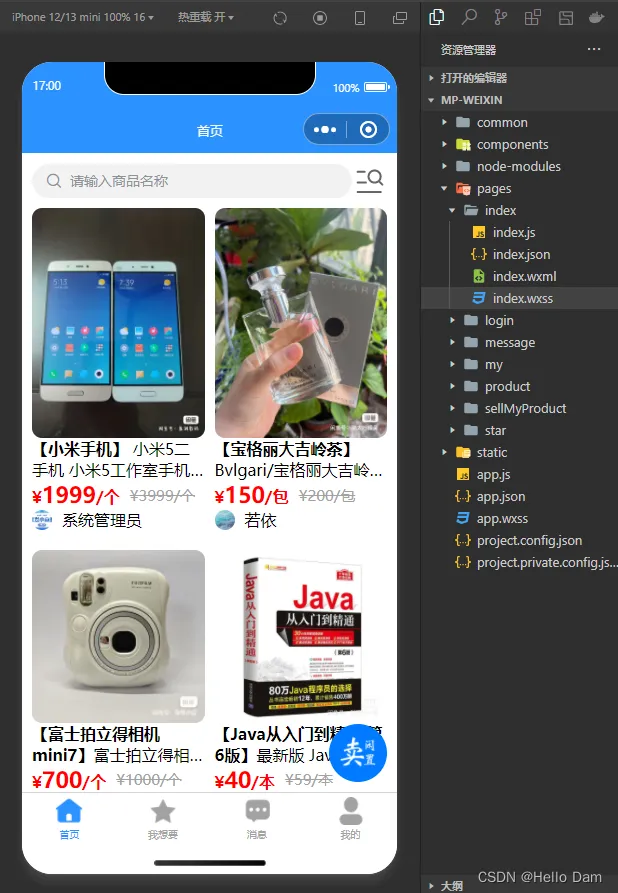
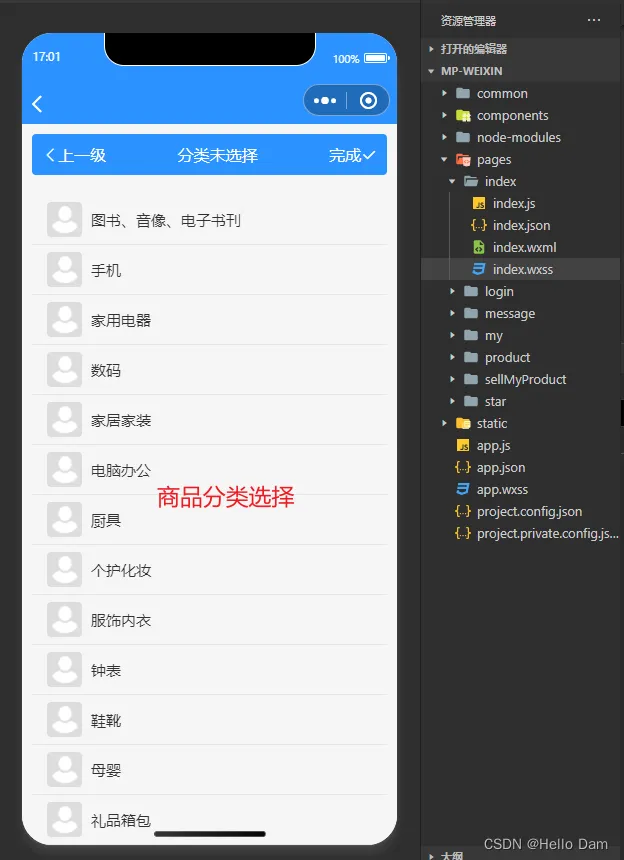
界面效果
【说明】
- 界面中商品的图片来源于闲鱼,若侵权请联系删除
- 关于商品分类页面的实现,请在我的Uniapp系列文章中寻找来查看
- 关于页面中悬浮按钮的实现,请在我的Uniapp系列文章中寻找来查看
界面实现
工具js
该工具类的作用是,给定一个图片的url地址,计算出图片的高宽比,计算高宽比的作用是让图片可以按照正常比例显示
/**
 * 获取uuid
 */
export default {
  /**
   * 获取高宽比 乘以 100%
   */
  getAspectRatio(url) {
    uni.getImageInfo({
      src: url,
      success: function(res) {
        let aspectRatio = res.height * 100.0 / res.width;
        // console.log("aspectRatio:" + aspectRatio);
        return aspectRatio + "%";
      }
    });
  },
}
页面
首页
<template> <view class="content"> <view style="display: flex;align-items: center;"> <u-search placeholder="请输入商品名称" v-model="searchForm.keyword" @search="listProductVo" :showAction="false" :clearabled="true"></u-search> <text class="iconfont" style="font-size: 35px;" @click="selectCategory()"></text> </view> <u-row customStyle="margin-top: 10px" gutter="10" align="start" v-if="productList[0].length>0&&loadData==false"> <u-col span="6" class="col" v-for="(data,index) in productList" :key="index"> <view class="productVoItem" v-for="(productVo,index1) in data" :key="index1" @click="seeProductDetail(productVo)"> <u--image v-if="productVo.picList!=null&&productVo.picList.length>0" :showLoading="true" :src="productVo.picList[0]" width="100%" :height="getAspectRatio(productVo.picList[0])" radius="10" mode="widthFix"></u--image> <!-- <u--image v-else :showLoading="true" :src="src" @click="click"></u--image> --> <view class="productMes"> <text class="productName">【{{productVo.name}}】</text> <text> {{productVo.description==null?'':productVo.description}} </text> </view> <view style="display: flex;align-items: center;"> <!-- 现价 --> <view class="price">¥<text class="number">{{productVo.price}}</text>/{{productVo.unit}}</view> <view style="width: 10px;"></view> <!-- 原价 --> <view class="originPrice">¥{{productVo.originalPrice}}/{{productVo.unit}} </view> </view> <view style="display: flex;align-items: center;"> <u--image :src="productVo.avatar" width="20" height="20" shape="circle"></u--image> <view style="width: 10px;"></view> <view> {{productVo.nickname}}</view> </view> </view> </u-col> </u-row> <u-empty v-if="productList[0].length==0&&loadData==false" mode="data" texColor="#ffffff" iconSize="180" iconColor="#D7DEEB" text="所选择的分类没有对应的商品,请重新选择" textColor="#D7DEEB" textSize="18" marginTop="30"> </u-empty> <view style="margin-top: 20px;" v-if="loadData==true"> <u-skeleton :loading="true" :animate="true" rows="10"></u-skeleton> </view> <!-- 浮动按钮 --> <FloatButton @click="cellMyProduct()"> <u--image :src="floatButtonPic" shape="circle" width="60px" height="60px"></u--image> </FloatButton> </view> </template> <script> import FloatButton from "@/components/FloatButton/FloatButton.vue"; import { listProductVo } from "@/api/market/prodct.js"; import pictureApi from "@/utils/picture.js"; export default { components: { FloatButton }, onShow: function() { let categoryNameList = uni.getStorageSync("categoryNameList"); if (categoryNameList) { this.categoryNameList = categoryNameList; this.searchForm.productCategoryId = uni.getStorageSync("productCategoryId"); this.searchForm.keyword = this.getCategoryLayerName(this.categoryNameList); uni.removeStorageSync("categoryNameList"); uni.removeStorageSync("productCategoryId"); this.listProductVo(); } }, data() { return { title: 'Hello', // 浮动按钮的图片 floatButtonPic: require("@/static/cellLeaveUnused.png"), searchForm: { // 商品搜索关键词 keyword: "", productCategoryId: undefined }, productList: [ [], [] ], loadData: false, } }, onLoad() { }, created() { this.listProductVo(); }, methods: { /** * 查询商品vo集合 */ listProductVo() { this.loadData = true; listProductVo(this.searchForm).then(res => { this.loadData = false; // console.log("listProductVo:" + JSON.stringify(res)) let productVoList = res.rows; this.productList = [ [], [] ]; for (var i = 0; i < productVoList.length; i++) { if (i % 2 == 0) { // 第一列数据 this.productList[0].push(productVoList[i]); } else { // 第二列数据 this.productList[1].push(productVoList[i]); } } }) }, /** * 跳转到卖闲置页面 */ cellMyProduct() { console.log("我要卖闲置"); uni.navigateTo({ url: "/pages/sellMyProduct/sellMyProduct" }) }, /** * 获取高宽比 乘以 100% */ getAspectRatio(url) { return pictureApi.getAspectRatio(url); }, /** * 选择分类 */ selectCategory() { uni.navigateTo({ url: "/pages/sellMyProduct/selectCategory" }) }, /** * 获取商品名称 */ getCategoryLayerName() { let str = ''; for (let i = 0; i < this.categoryNameList.length - 1; i++) { str += this.categoryNameList[i] + '/'; } return str + this.categoryNameList[this.categoryNameList.length - 1]; }, /** * 查看商品的详情 */ seeProductDetail(productVo) { // console.log("productVo:"+JSON.stringify(productVo)) uni.navigateTo({ url: "/pages/product/detail?productVo=" + encodeURIComponent(JSON.stringify(productVo)) }) } } } </script> <style lang="scss"> .content { padding: 20rpx; .col { width: 50%; } .productVoItem { margin-bottom: 20px; .productMes { overflow: hidden; text-overflow: ellipsis; display: -webkit-box; /* 显示2行 */ -webkit-line-clamp: 2; -webkit-box-orient: vertical; .productName { font-weight: bold; } } .price { color: #ff0000; font-weight: bold; .number { font-size: 22px; } } .originPrice { color: #A2A2A2; font-size: 15px; // 给文字添加中划线 text-decoration: line-through; } } } </style>
让文字只显示两行
overflow: hidden;
text-overflow: ellipsis;
display: -webkit-box;
/* 显示2行 */
-webkit-line-clamp: 2;
-webkit-box-orient: vertical;
路由跳转传递对象
因为首页已经查询到商品的很多信息了,点击查看商品详情的时候,很多信息不需要再查询一遍了,可以直接将商品的已知信息通过路由传递到新的页面去,需要注意的时候,将对象作为参数传递之前,需要先将对象进行编码
uni.navigateTo({
  url: "/pages/product/detail?productVo=" + encodeURIComponent(JSON.stringify(productVo))
})
将商品分为两列显示
首先将查询到的商品分为两组
let productVoList = res.rows;
this.productList = [
  [],
  []
];
for (var i = 0; i < productVoList.length; i++) {
  if (i % 2 == 0) {
    // 第一列数据
    this.productList[0].push(productVoList[i]);
  } else {
    // 第二列数据
    this.productList[1].push(productVoList[i]);
  }
}
然后在布局中使用行列布局即可,即使用一行两列的方式来显示商品信息
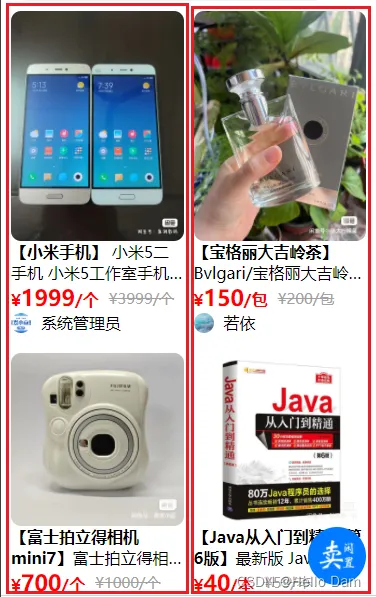
使用中划线划掉原价

// 给文字添加中划线
text-decoration: line-through;
后端
商品
controller
 /**
  * 查询商品Vo列表
  */
 @PreAuthorize("@ss.hasPermi('market:product:list')")
 @PostMapping("/listProductVo")
 @ApiOperation("获取商品列表")
 public TableDataInfo listProductVo(@RequestBody ProductVo productVo) {
     startPage();
     if (productVo.getProductCategoryId() != null) {
         // --if-- 当分类不为空的时候,只按照分类来搜索
         productVo.setKeyword(null);
     }
     List<ProductVo> list = productService.selectProductVoList(productVo);
     return getDataTable(list);
 }
service
/**
 * 查询商品Vo列表
 *
 * @param productVo
 * @return
 */
@Override
public List<ProductVo> selectProductVoList(ProductVo productVo) {
//        List<ProductVo> productVoList = new ArrayList<>();
    List<ProductVo> productVoList = baseMapper.selectProductVoList(productVo);
    ///设置每个商品的图片
    // 获取所有商品的id
    List<Long> productIdList = productVoList.stream().map(item -> {
        return item.getId();
    }).collect(Collectors.toList());
    // 查询出所有商品的图片
    if (productIdList.size() > 0) {
        List<Picture> pictureList = pictureService.selectPictureListByItemIdListAndType(productIdList, PictureType.PRODUCT.getType());
        Map<Long, List<String>> itemIdAndPicList = new HashMap<>();
        for (Picture picture : pictureList) {
            if (!itemIdAndPicList.containsKey(picture.getItemId())) {
                List<String> picList = new ArrayList<>();
                picList.add(picture.getAddress());
                itemIdAndPicList.put(picture.getItemId(), picList);
            } else {
                itemIdAndPicList.get(picture.getItemId()).add(picture.getAddress());
            }
        }
        // 给每个商品设置图片
        for (ProductVo vo : productVoList) {
            vo.setPicList(itemIdAndPicList.get(vo.getId()));
        }
    }
    return productVoList;
}
mapper
void starNumDiffOne(@Param("productId") Long productId);
sql
  <select id="selectProductVoList" parameterType="ProductVo" resultMap="ProductVoResult">
      SELECT
      p.id,
      p.NAME,
      p.description,
      p.original_price,
      p.price,
      p.product_category_id,
      pc.NAME AS productCategoryName,
      p.user_id,
      u.user_name as username,
      u.nick_name as nickname,
      u.avatar as avatar,
      p.reviewer_id,
      u1.user_name as reviewerUserName,
      p.fineness,
      p.unit,
      p.STATUS,
      p.is_contribute,
      p.functional_status,
      p.brand_id,
      b.NAME AS brandName
      FROM
      product AS p
      LEFT JOIN product_category AS pc ON p.product_category_id = pc.id
      LEFT JOIN brand AS b ON p.brand_id = b.id
      LEFT JOIN sys_user AS u ON p.user_id = u.user_id
      LEFT JOIN sys_user AS u1 ON p.reviewer_id = u1.user_id
      <where>
          <if test="keyword != null  and keyword != ''">and p.name like concat('%', #{keyword}, '%')</if>
          <if test="keyword != null  and keyword != ''">or p.description like concat('%', #{keyword}, '%')</if>
          <if test="productCategoryId != null  and productCategoryId != ''">and p.product_category_id =
              #{productCategoryId}
          </if>
      </where>
  </select>