1. Camera2架构
在Google 推出Android 5.0的时候, Android Camera API 版本升级到了API2(android.hardware.camera2), 之前使用的API1(android.hardware.camera)就被标为 Deprecated 了。
Camera API2相较于API1有很大不同, 并且API2是为了配合HAL3进行使用的, API2有很多API1不支持的特性, 比如:
- 更先进的API架构;
- 可以获取更多的帧(预览/拍照)信息以及手动控制每一帧的参数;
- 对Camera的控制更加完全(比如支持调整focus distance, 剪裁预览/拍照图片);
- 支持更多图片格式(yuv/raw)以及高速连拍等。
在API架构方面, Camera2和之前的Camera有很大区别, APP和底层Camera之前可以想象成用管道方式连接, 如下图:
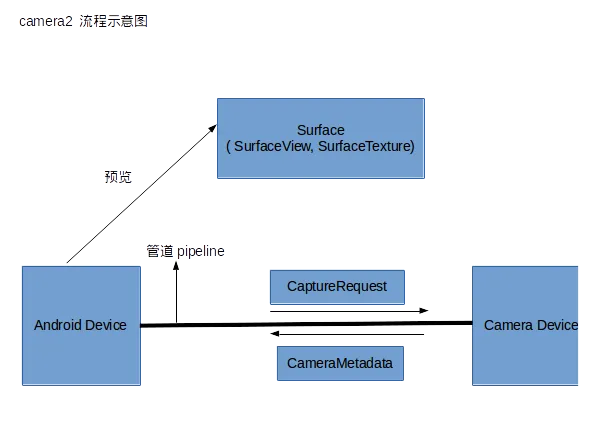
这里引用了管道的概念将安卓设备和摄像头之间联通起来,系统向摄像头发送 Capture 请求,而摄像头会返回 CameraMetadata。这一切建立在一个叫作 CameraCaptureSession 的会话中。
下面是 camera2包中的主要类:
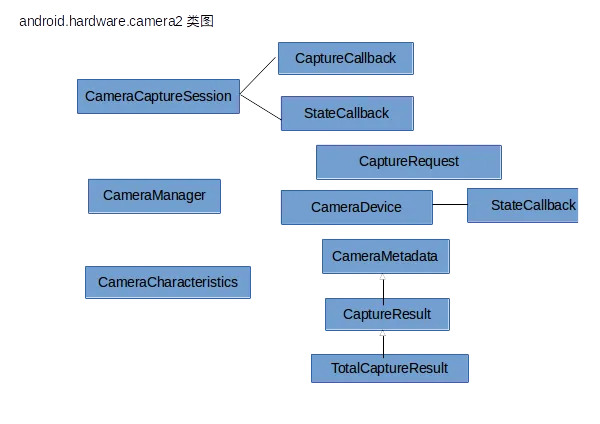
其中 CameraManager 是那个站在高处统管所有摄像投设备(CameraDevice)的管理者,而每个 CameraDevice 自己会负责建立 CameraCaptureSession 以及建立 CaptureRequest。
CameraCharacteristics 是 CameraDevice 的属性描述类,非要做个对比的话,那么它与原来的 CameraInfo 有相似性。
CameraManager处于顶层管理位置负责检测获取所有摄像头及其特性和传入指定的CameraDevice.StateCallback回调打开指定摄像头,CameraDevice是负责管理抽象对象,包括监听Camera 的状态回调CameraDevice.StateCallback、创建CameraCaptureSession和CameraRequest,CameraCaptureSession用于描述一次图像捕获操作,主要负责监听自己会话的状态回调CameraCaptureSession.StateCallback和CameraCaptureSession.CaptureCallback捕获回调,还有发送处理CameraRequest;CameraRequest则可以看成是一个"JavaBean"的作用用于描述希望什么样的配置来处理这次请求;最后三个回调用于监听对应的状态。
2. 官方解释
The android.hardware.camera2 package provides an interface to individual camera devices connected to an Android device. It replaces the deprecated Camera class.
This package models a camera device as a pipeline, which takes in input requests for capturing a single frame, captures the single image per the request, and then outputs one capture result metadata packet, plus a set of output image buffers for the request. The requests are processed in-order, and multiple requests can be in flight at once. Since the camera device is a pipeline with multiple stages, having multiple requests in flight is required to maintain full framerate on most Android devices.
To enumerate, query, and open available camera devices, obtain a CameraManager instance.
Individual CameraDevices provide a set of static property information that describes the hardware device and the available settings and output parameters for the device. This information is provided through the CameraCharacteristics object, and is available through getCameraCharacteristics(String)
To capture or stream images from a camera device, the application must first create a camera capture session with a set of output Surfaces for use with the camera device, with createCaptureSession(SessionConfiguration). Each Surface has to be pre-configured with an appropriate size and format (if applicable) to match the sizes and formats available from the camera device. A target Surface can be obtained from a variety of classes, including SurfaceView, SurfaceTexture via Surface(SurfaceTexture), MediaCodec, MediaRecorder, Allocation, and ImageReader.
Generally, camera preview images are sent to SurfaceView or TextureView (via its SurfaceTexture). Capture of JPEG images or RAW buffers for DngCreator can be done with ImageReader with the JPEG and RAW_SENSOR formats. Application-driven processing of camera data in RenderScript, OpenGL ES, or directly in managed or native code is best done through Allocation with a YUV Type, SurfaceTexture, and ImageReader with a YUV_420_888 format, respectively.
The application then needs to construct a CaptureRequest, which defines all the capture parameters needed by a camera device to capture a single image. The request also lists which of the configured output Surfaces should be used as targets for this capture. The CameraDevice has a factory method for creating a request builder for a given use case, which is optimized for the Android device the application is running on.
Once the request has been set up, it can be handed to the active capture session either for a one-shot capture or for an endlessly repeating use. Both methods also have a variant that accepts a list of requests to use as a burst capture / repeating burst. Repeating requests have a lower priority than captures, so a request submitted through capture() while there's a repeating request configured will be captured before any new instances of the currently repeating (burst) capture will begin capture.
After processing a request, the camera device will produce a TotalCaptureResult object, which contains information about the state of the camera device at time of capture, and the final settings used. These may vary somewhat from the request, if rounding or resolving contradictory parameters was necessary. The camera device will also send a frame of image data into each of the output Surfaces included in the request. These are produced asynchronously relative to the output CaptureResult, sometimes substantially later.
3. Camera2 API调用基础流程:
- 通过context.getSystemService(Context.CAMERA_SERVICE) 获取CameraManager;
- 调用CameraManager .open()方法在回调中得到CameraDevice;
- 通过CameraDevice.createCaptureSession() 在回调中获取CameraCaptureSession;
- 构建CaptureRequest, 有三种模式可选 预览/拍照/录像.;
- 通过 CameraCaptureSession发送CaptureRequest, capture表示只发一次请求, setRepeatingRequest表示不断发送请求;
- 拍照数据可以在ImageReader.OnImageAvailableListener回调中获取, CaptureCallback中则可获取拍照实际的参数和Camera当前状态。
4. 如何实现camera2数据对接RTMP推送:
通过OnImageAvailableListenerImpl 获取到原始数据,推送端以大牛直播SDK https://github.com/daniulive/SmarterStreaming/ 的万能推送接口为例,获取数据后,调用SmartPublisherOnImageYUV420888() 完成数据传送,底层进行二次处理后,编码后传输即可。
接口描述:
  /*
  *  专门为android.media.Image的android.graphics.ImageFormat.YUV_420_888格式提供的接口
  *
    * @param  width: 必须是8的倍数
  *
    * @param  height: 必须是8的倍数
  *
  * @param  crop_left: 剪切左上角水平坐标, 一般根据android.media.Image.getCropRect() 填充
  *
  * @param  crop_top: 剪切左上角垂直坐标, 一般根据android.media.Image.getCropRect() 填充
  *
    * @param  crop_width: 必须是8的倍数, 填0将忽略这个参数, 一般根据android.media.Image.getCropRect() 填充
  *
    * @param  crop_height: 必须是8的倍数, 填0将忽略这个参数,一般根据android.media.Image.getCropRect() 填充
    *
    * @param y_plane 对应android.media.Image.Plane[0].getBuffer()
    *
    * @param y_row_stride 对应android.media.Image.Plane[0].getRowStride()
  *
  * @param u_plane 对应android.media.Image.Plane[1].getBuffer()
  *
  * @param v_plane 对应android.media.Image.Plane[2].getBuffer()
  *
  * @param uv_row_stride 对应android.media.Image.Plane[1].getRowStride()
  *
  * @param uv_pixel_stride 对应android.media.Image.Plane[1].getPixelStride()
  *
    * @param  rotation_degree: 顺时针旋转, 必须是0, 90, 180, 270
  *
    * @param  is_vertical_flip: 是否垂直翻转, 0不翻转, 1翻转
  *
    * @param  is_horizontal_flip:是否水平翻转, 0不翻转, 1翻转
  *
    * @param  scale_width: 缩放宽,必须是8的倍数, 0不缩放
  *
    * @param  scale_height: 缩放高, 必须是8的倍数, 0不缩放
  *
  * @param  scale_filter_mode: 缩放质量, 范围必须是[1,3], 传0使用默认速度
  *
  * @return {0} if successful
    */
  public native int SmartPublisherOnImageYUV420888(long handle, int width, int height,
                           int crop_left, int crop_top, int crop_width, int crop_height,
                           ByteBuffer y_plane, int y_row_stride,
                           ByteBuffer u_plane, ByteBuffer v_plane, int uv_row_stride, int uv_pixel_stride,
                           int rotation_degree, int is_vertical_flip, int is_horizontal_flip,
                           int scale_width, int scale_height, int scale_filter_mode);
    private class OnImageAvailableListenerImpl implements ImageReader.OnImageAvailableListener {
        @Override
        public void onImageAvailable(ImageReader reader) {
            Image image = reader.acquireLatestImage();
            if ( image != null )
            {
                if ( camera2Listener != null )
                {
                    camera2Listener.onCameraImageData(image);
                }
                image.close();
            }
        }
    }
    @Override
    public void onCameraImageData(Image image) {
        synchronized(this)
        {
            Rect crop_rect = image.getCropRect();
            if(isPushingRtmp || isRTSPPublisherRunning) {
                if(libPublisher != null)
                {
                    Image.Plane[] planes = image.getPlanes();
                    //  crop_rect.left, crop_rect.top, crop_rect.width(), crop_rect.height(),
                    //  这里缩放宽高可以填0,使用原视视频宽高都可以的
                    libPublisher. SmartPublisherOnImageYUV420888(publisherHandle, image.getWidth(), image.getHeight(),
                            crop_rect.left, crop_rect.top, crop_rect.width(), crop_rect.height(),
                            planes[0].getBuffer(), planes[0].getRowStride(),
                            planes[1].getBuffer(), planes[2].getBuffer(), planes[1].getRowStride(), planes[1].getPixelStride(),
                            displayOrientation, 0, 0,
                            videoWidth, videoHeight, 1);
                }
            }
        }
    }
5. Camera2对焦API扩展说明
当前是否开启自动对焦,以及设置它的模式。
它只有在 android.control.mode = AUTO 和镜头没有固定焦距(i.e android.lens.info.minimumFocusDistance > 0)的情况下,才有用。
当aeMode 为 OFF时,AF的行为取决了设备。
建议在将android.control.aeMode设置为OFF之前使用android.control.afTrigger锁定AF,或者在AE关闭时将AF模式设置为OFF。
它的值有:
1.OFF:自动对焦程序不再控制镜头;foucusDistance 由application控制。
2.AUTO:基本自动对焦模式。在这个模式中,镜头不会移动,除非 autofocus trigger 被触发。当 trigger是activated的时候,AF的状态将转换为ACTIVE_SCAN,然后出 scan的结果(FOCUSED or NOT_FOCUSED) 如果镜头没有固定焦距,所有设备都支持。
3.MACRO:特写聚焦模式。在这个模式中,镜头不回移动,除非autofocus trigger 的行为被调用。 当 trigger 被触发后,AF的状态将转换为ACTIVE_SCAN,然后出扫描结果(FOCUSED or NOT_FOCUSED)。这个模式对那些离镜头很近的物体的对焦进行优化。也就是微距。
4.CONTINUOUS_VIDEO:在该模式中,AF算法连续地修改镜头位置以尝试提供恒定对焦的图像流,缺点是对焦过程中焦点的移动较慢。
The focusing behavior should be suitable for good quality video recording; typically this means slower focus movement and no overshoots. When the AF trigger is not involved, the AF algorithm should start in INACTIVE state, and then transition into PASSIVE_SCAN and PASSIVE_FOCUSED states as appropriate. When the AF trigger is activated, the algorithm should immediately transition into AF_FOCUSED or AF_NOT_FOCUSED as appropriate, and lock the lens position until a cancel AF trigger is received.
一旦收到取消,算法应转换回INACTIVE并恢复被动扫描。 请注意,此行为与CONTINUOUS_PICTURE不同,因为必须立即取消正在进行的PASSIVE_SCAN。
5.CONTINUOUS_PICTURE:在该模式中,AF算法连续地修改镜头位置以尝试提供恒定对焦的图像流,对焦的过程尽可能的快,建议使用。
The focusing behavior should be suitable for still image capture; typically this means focusing as fast as possible. When the AF trigger is not involved, the AF algorithm should start in INACTIVE state, and then transition into PASSIVE_SCAN and PASSIVE_FOCUSED states as appropriate as it attempts to maintain focus. When the AF trigger is activated, the algorithm should finish its PASSIVE_SCAN if active, and then transition into AF_FOCUSED or AF_NOT_FOCUSED as appropriate, and lock the lens position until a cancel AF trigger is received.