报错:CommandNotFoundError: Your shell has not been properly configured to use ‘conda activate‘. 问题解决

简介: 报错:CommandNotFoundError: Your shell has not been properly configured to use ‘conda activate‘. 问题解决

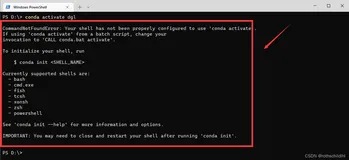
今天在VS code里跑一个小网络,想先切换conda环境,发现无法切换了,并提示报错为:

PS E:\XXX> conda activate XXXXX
CommandNotFoundError: Your shell has not been properly configured to use 'conda activate'.
If using 'conda activate' from a batch script, change your
invocation to 'CALL conda.bat activate'.
To initialize your shell, run
    $ conda init <SHELL_NAME>
Currently supported shells are:
  - bash
  - cmd.exe
  - fish
  - tcsh
  - xonsh
  - zsh
  - powershell
See 'conda init --help' for more information and options.
IMPORTANT: You may need to close and restart your shell after running 'conda init'.


查了下原因,大概意思是初次使用Anaconda时,没有预先对命令行进行预载。解决办法非常简单,在上文报错的提示中也说明了,根据提示运行对应的命令即可

conda init {TERMINAL_TYPE}


即,在windows下,终端中输入

conda init cmd.exe


在linux下,终端中输入

conda init bash


在VScode中,我使用了powershell,运行结束后重启终端应该就能解决

目录
相关文章
|
Shell Linux
解决脚本文件无法执行conda命令的问题:CommandNotFoundError: Your shell has not been properly configured to use
使用Linux系统时,有时候希望利用一个脚本执行多条命令来节省时间,其中如果安装有anaconda,需要切换环境或者关闭conda环境,按道理说,在终端里可以通过命令
2165 0
|
Shell Windows
[记录condaのbug] CommandNotFoundError: Your shell has not been properly configured to use ‘conda...
[记录condaのbug] CommandNotFoundError: Your shell has not been properly configured to use ‘conda...
[记录condaのbug] CommandNotFoundError: Your shell has not been properly configured to use ‘conda...
|
Shell
CommandNotFoundError: Your shell has not been properly configured to use ‘conda activate‘.简单解决方案
2446 0
CommandNotFoundError: Your shell has not been properly configured to use ‘conda activate‘.简单解决方案
|
Ubuntu Shell Python
在ubuntu16.04中输入不存在shell命令时,报错ModuleNotFoundError的解决方案
717 0
|
Shell Linux Windows
Linux shell 执行报错 字符编码转换 iconv/dos2unix 将 gbk/gb2312 转utf8 解决方案
功能: 1. 解决字符转换,字符乱码。2.解决执行报错 ^M 。 sudo dos2unix $file # 非常重要:解决 windows 和 ubuntu下的 ^M 字符错误, shell 执行报错 ^M ; 这个符号是 windows 的换行符号
701 0
|
Shell
【已解决】CommandNotFoundError: Your shell has not been properly configured to use ‘conda activate‘.
534 0
|
Shell Linux
全网首发:MAC上运行SHELL脚本,typeset -l报错
256 0
|
3月前
|
存储 安全 Unix
七、Linux Shell 与脚本基础
别再一遍遍地敲重复的命令了,把它们写进Shell脚本,就能一键搞定。脚本本质上就是个存着一堆命令的文本文件,但要让它“活”起来,有几个关键点:文件开头最好用#!/usr/bin/env bash来指定解释器,并用chmod +x给它执行权限。执行时也有讲究:./script.sh是在一个新“房间”(子Shell)里跑,不影响你;而source script.sh是在当前“房间”里跑,适合用来加载环境变量和配置文件。
440 11
|
3月前
|
存储 Shell Linux
八、Linux Shell 脚本:变量与字符串
Shell脚本里的变量就像一个个贴着标签的“箱子”。装东西(赋值)时,=两边千万不能有空格。用单引号''装进去的东西会原封不动,用双引号""则会让里面的$变量先“变身”再装箱。默认箱子只能在当前“房间”(Shell进程)用,想让隔壁房间(子进程)也能看到,就得给箱子盖个export的“出口”戳。此外,Shell还自带了$?(上条命令的成绩单)和$1(别人递进来的第一个包裹)等许多特殊箱子,非常有用。
|
6月前
|
Shell
Shell脚本循环控制:shift、continue、break、exit指令
使用这些命令可以让你的Shell脚本像有生命一样动起来。正确使用它们,你的脚本就能像一场精心编排的舞蹈剧目,既有旋律的起伏,也有节奏的跳跃,最终以一场惊艳的表演结束。每一个动作、每一个转折点,都准确、优雅地完成所需要表达的逻辑。如此,你的脚本不只是冰冷的代码,它透过终端的界面,跳着有节奏的舞蹈,走进观众——使用者的心中。
277 60