文章目录
前言
缓存的作用:不加缓存 1。查询的效率降低 2。增大了数据库的压力
- 一级缓存:会话级别的
- 二级缓存:进程级别的
- 三级缓存:自定义缓存
项目中要使用缓存 全局配置文件中 settings 我们需要打开, 在对应的映射文件中 <cache>,一级缓存是默认使用的。二级缓存我们需要自己开启:一级和二级缓存的执行的先后顺序:先查二级缓存。二级缓存没有进行一级缓存。一级缓存如果还是没有那么走数据库查询
作用域:一级缓存的作用域是session级别的,命中率很低。
1. 环境搭建
1.1 依赖引入
<!--引入mybatis依赖-->
<dependency>
<groupId>org.mybatis</groupId>
<artifactId>mybatis</artifactId>
<version>3.5.13</version>
</dependency>
<!--mysql-->
<dependency>
<groupId>mysql</groupId>
<artifactId>mysql-connector-java</artifactId>
<version>8.0.22</version>
</dependency>
<dependency>
<groupId>junit</groupId>
<artifactId>junit</artifactId>
<version>4.12</version>
<scope>test</scope>
</dependency>
1.2 mybatis-config.xml配置
配置db.properties
driver=com.mysql.cj.jdbc.Driver
url=jdbc:mysql://ip:3306/mybatisplus?useSSL=false&autoReconnect=true&useUnicode=true&characterEncoding=utf8&zeroDateTimeBehavior=convertToNull&serverTimezone=Asia/Shanghai
username=root
password=123456
在mybatis-config.xml引入db.properties
<?xml version="1.0" encoding="UTF-8" ?>
<!DOCTYPE configuration
PUBLIC "-//mybatis.org//DTD Config 3.0//EN"
"https://mybatis.org/dtd/mybatis-3-config.dtd">
<configuration>
<!---导入配置文件-->
<properties resource="db.properties"></properties>
<environments default="development">
<environment id="development">
<transactionManager type="JDBC"/>
<dataSource type="POOLED">
<property name="driver" value="${driver}"/>
<property name="url" value="${url}"/>
<property name="username" value="${username}"/>
<property name="password" value="${password}"/>
</dataSource>
</environment>
</environments>
<mappers>
<mapper resource="mapper/PersonMapper.xml"/>
</mappers>
</configuration>
1.3 实体类
省略set get方法
/**
* person实体类
*/
public class Person {
private Long id;
private String name;
private Integer age;
private String email;
}
1.4 mapper
mapper接口
/**
* 查询患者
*/
public interface PersonMapper {
/**
* 根据id查询人员信息
* @param id
* @return
*/
Person selectPerson(long id);
}
mapper映射文件
<?xml version="1.0" encoding="UTF-8" ?>
<!DOCTYPE mapper
PUBLIC "-//mybatis.org//DTD Mapper 3.0//EN"
"https://mybatis.org/dtd/mybatis-3-mapper.dtd">
<mapper namespace="com.elite.mybatis.mapper.PersonMapper">
<!--查询人员信息-->
<select id="selectPerson" resultType="com.elite.mybatis.entity.Person">
select * from person where id = #{id}
</select>
</mapper>
1.5 测试
/**
* 查询人员信息
*/
@Test
public void testSelect() throws IOException {
InputStream resourceAsStream = Resources.getResourceAsStream("mybatis-config.xml");
SqlSessionFactory sqlSessionFactory = new SqlSessionFactoryBuilder().build(resourceAsStream);
SqlSession sqlSession = sqlSessionFactory.openSession();
Person person = sqlSession.selectOne("com.elite.mybatis.mapper.PersonMapper.selectPerson", 1L);
System.out.println(person.toString());
///Person{id=1, name='elite', age=22, email='elite@qq.com'}
}
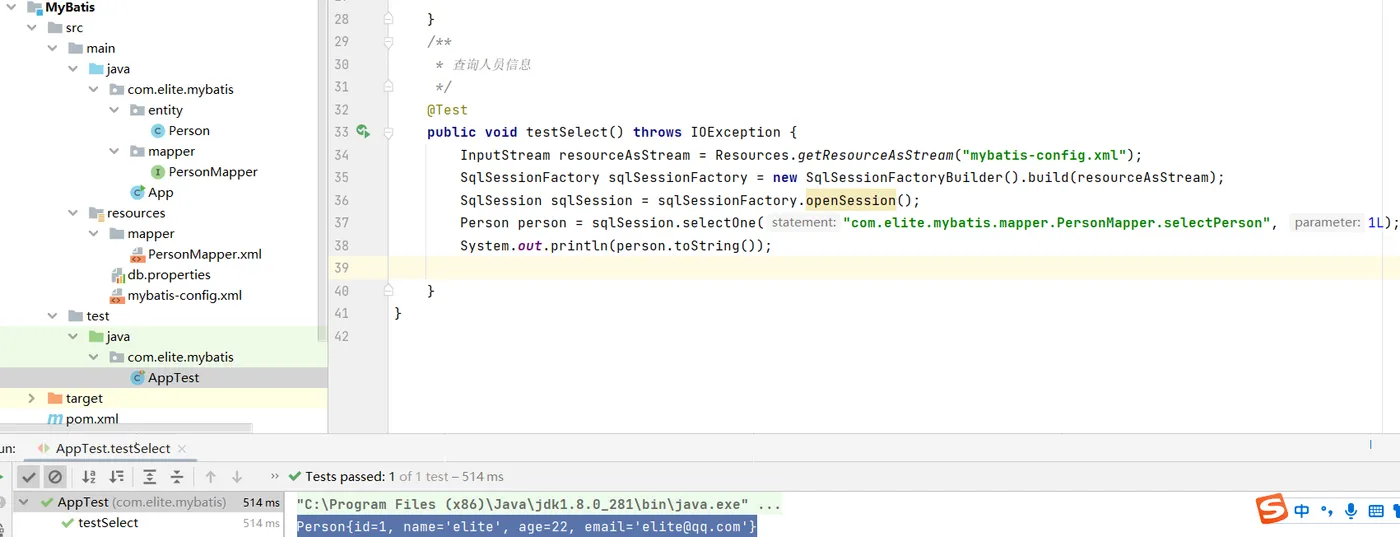
项目结构:
2.缓存
2.1 一级缓存
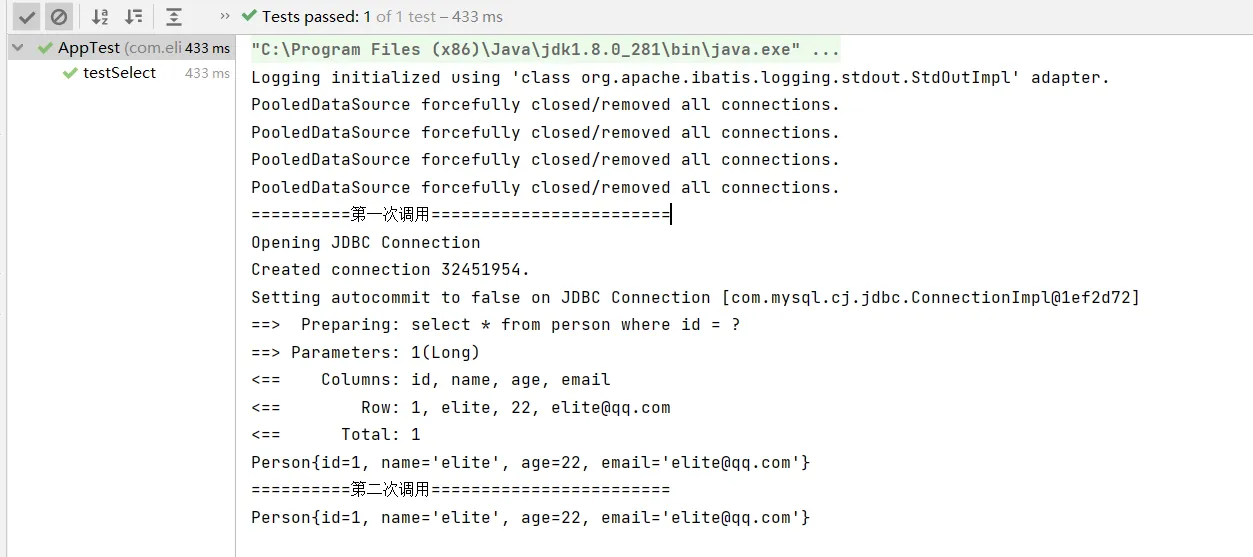
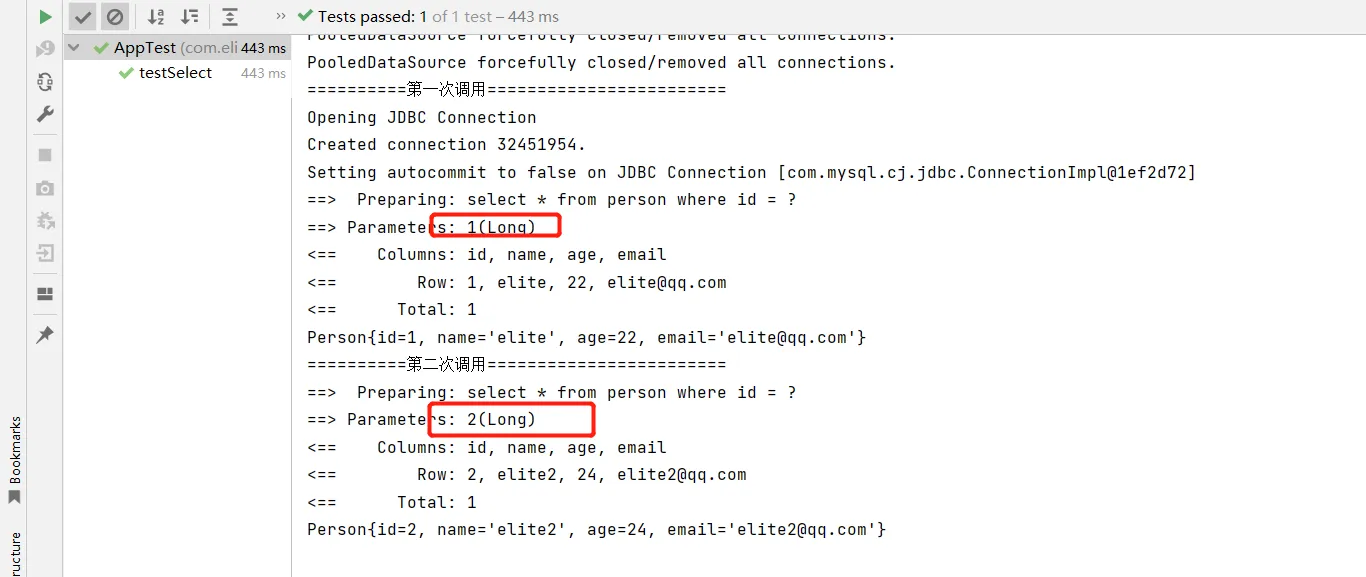
一级缓存默认是开启的,作用域是SqlSession 级别的,所以命中率极低。相同SqlSession ,多次调用同一个Mapper和同一个方法的同一个参数,只会进行一次数据库查询,然后把数据缓存到缓冲中,以后直接先从缓存中取出数据,不会直接去查数据库
mybatis-config.xml 配置日志
<!--设置日志实现-->
<settings>
<setting name="logImpl" value="STDOUT_LOGGING"/>
</settings>
开启日志
<!--加入日志-->
<dependency>
<groupId>ch.qos.logback</groupId>
<artifactId>logback-classic</artifactId>
<version>1.4.2</version>
配置日志文件logback.xml
<?xml version="1.0" encoding="UTF-8"?>
<!DOCTYPE configuration>
<configuration>
<appender name="stdout" class="ch.qos.logback.core.ConsoleAppender">
<encoder>
<pattern>%5level [%thread] - %msg%n</pattern>
</encoder>
</appender>
<logger name="com.elite.mybatis.mapper.PersonMapper">
<level value="trace"/>
<Root level="info" >
<AppenderRef ref="stdout"/>
</Root>
</logger>
</configuration>
测试
/**
* 查询人员信息
*/
@Test
public void testSelect() throws IOException {
InputStream resourceAsStream = Resources.getResourceAsStream("mybatis-config.xml");
SqlSessionFactory sqlSessionFactory = new SqlSessionFactoryBuilder().build(resourceAsStream);
SqlSession sqlSession = sqlSessionFactory.openSession();
System.out.println("==========第一次调用========================");
Person person = sqlSession.selectOne("com.elite.mybatis.mapper.PersonMapper.selectPerson", 1L);
System.out.println(person.toString());
System.out.println("==========第二次调用========================");
Person person1 = sqlSession.selectOne("com.elite.mybatis.mapper.PersonMapper.selectPerson", 1L);
System.out.println(person1.toString());
}
相同mapper,相同参数
相同mapper,不同参数
2.2 二级缓存
二级缓存:
是多个 SqlSession 共享的,其作用域是 mapper 的同一个 namespace,不同 的 sqlSession 两次执行相同 namespace 下的 sql 语句且向 sql 中传递参数也相同即最终执行 相同的 sql 语句,第一次执行完毕会将数据库中查询的数据写到缓存(内存),第二次会从 缓存中获取数据将不再从数据库查询,从而提高查询效率。Mybatis 默认没有开启二级缓存 需要在 setting 全局参数中配置开启二级缓存。
mybatis-config.xml配置文件开启缓存配置
<settings>
<!--设置日志实现-->
<setting name="logImpl" value="STDOUT_LOGGING"/>
<!--开启二级缓存-->
<setting name="cacheEnabled" value="true"/>
</settings>
实体类实现序列化
public class Person implements Serializable {
}
mapper的xml配置缓存
<?xml version="1.0" encoding="UTF-8" ?>
<!DOCTYPE mapper
PUBLIC "-//mybatis.org//DTD Mapper 3.0//EN"
"https://mybatis.org/dtd/mybatis-3-mapper.dtd">
<mapper namespace="com.elite.mybatis.mapper.PersonMapper">
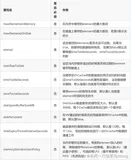
<!--eviction: 清空缓存的策略
readOnly: 是否只读
flushInterval: 每个60秒刷新一次缓存
size: 内存大小,最多存储结果对象或者列表的512个引用 -->
<cache readOnly="true" eviction="FIFO" flushInterval="60000" size="512"/>
<!--查询人员信息-->
<select id="selectPerson" resultType="com.elite.mybatis.entity.Person" flushCache="false" useCache="true" >
select * from person where id = #{id}
</select>
</mapper>
测试代码
/**
* 查询人员信息
*/
@Test
public void testSelect1() throws IOException {
InputStream resourceAsStream = Resources.getResourceAsStream("mybatis-config.xml");
SqlSessionFactory sqlSessionFactory = new SqlSessionFactoryBuilder().build(resourceAsStream);
SqlSession sqlSession = sqlSessionFactory.openSession(true);
System.out.println("==========第一个sqlSession="+sqlSession.hashCode()+"========================");
PersonMapper personMapper = sqlSession.getMapper(PersonMapper.class);
System.out.println( personMapper.selectPerson(1L).toString());
sqlSession.close();
SqlSession sqlSession1 = sqlSessionFactory.openSession(true);
System.out.println("==========第二个sqlSession="+sqlSession1.hashCode()+"========================");
PersonMapper personMapper1 = sqlSession1.getMapper(PersonMapper.class);
System.out.println(personMapper1.selectPerson(1L).toString());
sqlSession1.close();
}
测试,缓存命中率只有0.5
==========第一个sqlSession=236230========================
Cache Hit Ratio [com.elite.mybatis.mapper.PersonMapper]: 0.0
Opening JDBC Connection
Created connection 17500244.
==> Preparing: select * from person where id = ?
==> Parameters: 1(Long)
<== Columns: id, name, age, email
<== Row: 1, elite, 22, elite@qq.com
<== Total: 1
Person{id=1, name='elite', age=22, email='elite@qq.com'}
Closing JDBC Connection [com.mysql.cj.jdbc.ConnectionImpl@10b0854]
Returned connection 17500244 to pool.
==========第二个sqlSession=29457283========================
Cache Hit Ratio [com.elite.mybatis.mapper.PersonMapper]: 0.5
Opening JDBC Connection
Checked out connection 17500244 from pool.
==> Preparing: select * from person where id = ?
==> Parameters: 1(Long)
<== Columns: id, name, age, email
<== Row: 1, elite, 22, elite@qq.com
<== Total: 1
Person{id=1, name='elite', age=22, email='elite@qq.com'}
Closing JDBC Connection [com.mysql.cj.jdbc.ConnectionImpl@10b0854]
Returned connection 17500244 to pool.
2.3 三级缓存
由于一级缓存二级缓存的命中率极低,都是在单个进程之类进行缓存,多进程缓存就不好使,mybatis默认提供了接口可以自定义缓存。
此处我们整合redis进行缓存。
引入缓存的依赖
<!--mybatis-redis缓存依赖-->
<dependency>
<groupId>org.mybatis.caches</groupId>
<artifactId>mybatis-redis</artifactId>
<version>1.0.0-beta2</version>
</dependency>
配置文件redis.properties
host=redis ip
port=6379
connectionTimeout=500000
password=
database=0
自定义缓存实现cache接口
package com.elite.mybatis.cache;
import org.apache.ibatis.cache.Cache;
import org.mybatis.caches.redis.*;
import redis.clients.jedis.Jedis;
import redis.clients.jedis.JedisPool;
import java.io.IOException;
import java.io.InputStream;
import java.util.Map;
import java.util.Properties;
import java.util.concurrent.locks.ReadWriteLock;
import java.util.concurrent.locks.ReentrantReadWriteLock;
/**
* 自定义com.elite.mybatis.cache.MyRedisCache;
*/
public class MyRedisCache implements Cache {
private final ReadWriteLock readWriteLock = new ReentrantReadWriteLock();
private String id;
private static JedisPool pool;
public MyRedisCache(String id) throws IOException {
if (id == null) {
throw new IllegalArgumentException("Cache instances require an ID");
} else {
this.id = id;
Properties properties = new Properties();
// 使用ClassLoader加载properties配置文件生成对应的输入流
InputStream in = MyRedisCache.class.getClassLoader().getResourceAsStream("redis.properties");
// 使用properties对象加载输入流
properties.load(in);
//获取key对应的value值
String host = properties.getProperty("host");
String port = properties.getProperty("port");
in.close();
RedisConfig redisConfig =new RedisConfig();
pool = new JedisPool(redisConfig,host,Integer.valueOf(port), 5000, 5000,null,0,"mybatis-redis" );
}
}
private Object execute(RedisCallback callback) {
Jedis jedis = pool.getResource();
Object var3;
try {
var3 = callback.doWithRedis(jedis);
} finally {
jedis.close();
}
return var3;
}
public String getId() {
return this.id;
}
public int getSize() {
return (Integer)this.execute(new RedisCallback() {
public Object doWithRedis(Jedis jedis) {
Map<byte[], byte[]> result = jedis.hgetAll(MyRedisCache.this.id.toString().getBytes());
return result.size();
}
});
}
public void putObject(final Object key, final Object value) {
this.execute(new RedisCallback() {
public Object doWithRedis(Jedis jedis) {
jedis.hset(MyRedisCache.this.id.toString().getBytes(), key.toString().getBytes(), SerializeUtil.serialize(value));
return null;
}
});
}
public Object getObject(final Object key) {
return this.execute(new RedisCallback() {
public Object doWithRedis(Jedis jedis) {
return SerializeUtil.unserialize(jedis.hget(MyRedisCache.this.id.toString().getBytes(), key.toString().getBytes()));
}
});
}
public Object removeObject(final Object key) {
return this.execute(new RedisCallback() {
public Object doWithRedis(Jedis jedis) {
return jedis.hdel(MyRedisCache.this.id.toString(), new String[]{key.toString()});
}
});
}
public void clear() {
this.execute(new RedisCallback() {
public Object doWithRedis(Jedis jedis) {
jedis.del(MyRedisCache.this.id.toString());
return null;
}
});
}
public ReadWriteLock getReadWriteLock() {
return this.readWriteLock;
}
public String toString() {
return "Redis {" + this.id + "}";
}
}
配置mapper xml配置
<!--设置三级缓存类地址-->
<cache type="com.elite.mybatis.cache.MyRedisCache" />
测试
/**
* 查询人员信息
*/
@Test
public void testSelect3() throws IOException {
InputStream resourceAsStream = Resources.getResourceAsStream("mybatis-config.xml");
SqlSessionFactory sqlSessionFactory = new SqlSessionFactoryBuilder().build(resourceAsStream);
SqlSession sqlSession = sqlSessionFactory.openSession(true);
PersonMapper personMapper = sqlSession.getMapper(PersonMapper.class);
System.out.println( personMapper.selectPerson(1L).toString());
sqlSession.close();
}
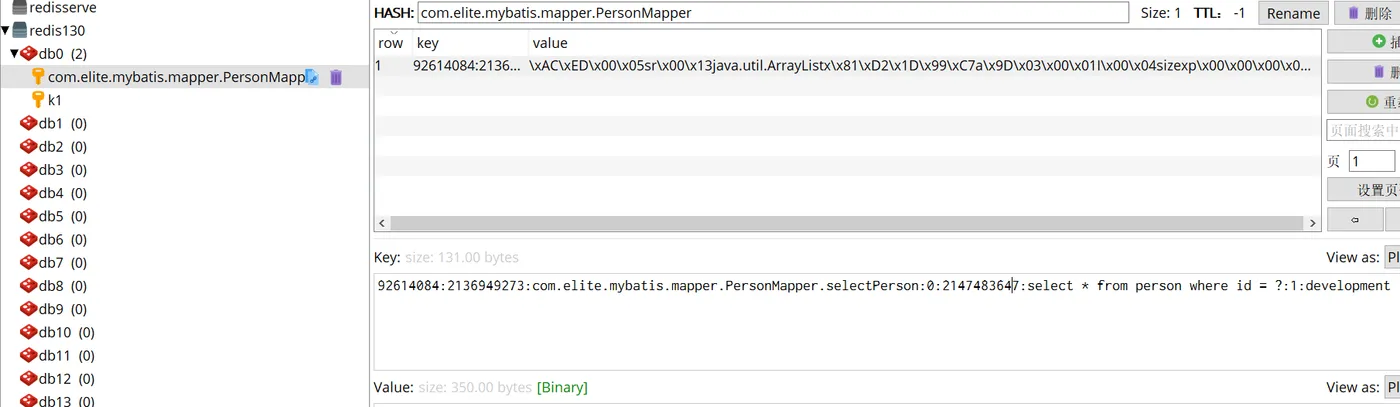
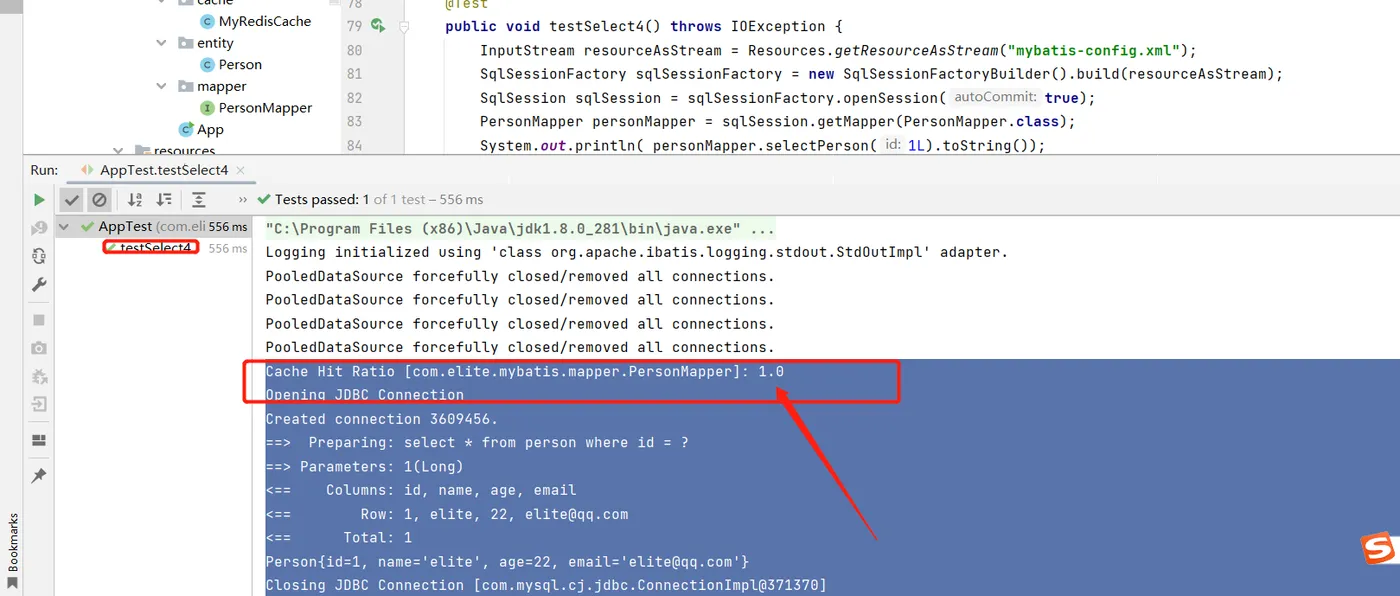
第二次再次执行查询命中率1.0