
实验环境:Centos7.7
实验思路: 下载源码包,编译安装,讲代码封装到一个函数里,通过read -p实现函数调用
1.apache函数
#! /bin/bash
# by caq 0530
# auto_install_lamp
#链接:https://pan.baidu.com/s/1ZOaqgznBZsTStWaaM7S2Ag
#提取码:wjrz
#方便下载,当然也可以在官网下载
apache()
{
H_FILES=httpd-2.4.43.tar.gz
H_PREFIX=/usr/local/httpd/
a=apr-1.7.0.tar.gz
b=apr-util-1.6.1.tar.gz
c=apr-1.7.0
d=apr-util-1.6.1
systemctl stop firewalld
setenforce 0
yum -y install \
gcc \
gcc-c++ \
expat-devel \
perl \
net-tools \
vim
if [[ ! -f $a ]];then
        echo "Please Download $a"
elif [[ ! -f $b ]];then
        echo "Please Download $b"
elif [[ ! -f $H_FILES ]];then
        echo "Please Download $H_FILES"
else
        tar xvf $a
        tar xvf $b
        tar xvf $H_FILES
fi
mv $c $H_FILES_DIR/srclib/apr
if [[ $? -eq 0 ]];then
        make && make install
else
        echo "error,please check $H_FILE_DIR!"
fi
cp /usr/local/httpd/bin/apachectl /etc/init.d/httpd
sed '/bash/a # chkconfig: 35 85 21' /etc/init.d/httpd
chkconfig --add httpd
systemctl daemon-reload
sed -i 's/#ServerName www.example.com:80/ServerName www.example.com/g' /etc/httpd.conf
ln -s /usr/local/httpd/conf/httpd.conf /etc/httpd.conf
ln -s /usr/local/httpd/bin/* /usr/local/bin/
systemctl start httpd
systemctl enable httpd
echo '--------------------------------'
echo "apache install sueccessful"
echo '-------------------------------'
}
装完apachel后可以访问测试页面,看是否安装成功

(注意,网页默认显示内容为:/usr/local/httpd/htdocs/index.html)
2.Mysql函数
mysql()
{
M_FILE=mysql-5.5.62.tar.gz
M_DIR=mysql-5.5.62
C_FILE=cmake-2.8.11.2.tar.gz
C_DIR=cmake-2.8.11.2
# install cmake
# edit install
cd
cd $C_DIR
./configure
if [[ $? -eq 0 ]];then
        make && make install
else
        echo "error,please $C_DIR!"
fi
cd
# config mysql
mkdir -p /usr/local/mysql/data
groupadd mysql
useradd -g mysql -s /usr/sbin/nologin mysql
if [[ ! -f $M_FILE ]];then
        echo "Please Download $M_FILE"
else
        tar zxvf $M_FILE
fi
cd $M_DIR
if [[ $? -eq 0 ]];then
        make && make install
else
        echo "error,please CMAKE!"
fi
rm -rf /etc/my.cnf
cp support-files/my-medium.cnf /etc/my.cnf
#set authority
chmod +x /usr/local/mysql
chown -R mysql:mysql /usr/local/mysql
chown -R mysql:mysql /usr/local/mysql/data
#config auto start
cp support-files/mysql.server /etc/init.d/mysqld
chmod +x /etc/init.d/mysqld
chkconfig --add mysqld
chkconfig mysqld on
cat << EOF >> /root/qwe.txt
datadir = /usr/local/mysql/data
log-error = /usr/local/mysql/data/error.log
pid-file = /usr/local/mysql/data/mysql.pid
user = mysql
tmpdir = /tmp
EOF
sed -i '/\[mysqld\]/r /root/qqqq.txt' /etc/my.cnf
/usr/local/mysql/scripts/mysql_install_db --user=mysql --basedir=/usr/local/mysql --datadir=/usr/local/mysql/data
echo "PATH=$PATH:/usr/local/mysql/bin">>/etc/profile
source  /etc/profile
service mysqld start
service mysqld enable
mysqladmin -u root password "123"
echo "-------------------------"
echo "mysql install successful!"
echo "-------------------------"
}
Mysql安装成功可以查看能不能登录mysql,登录成功即安装成功
mysql的3306端口已经打开
[root@a ~]# netstat -tuln
Active Internet connections (only servers)
Proto Recv-Q Send-Q Local Address           Foreign Address         State
tcp        0      0 127.0.0.1:25            0.0.0.0:*               LISTEN
tcp        0      0 0.0.0.0:3306            0.0.0.0:*               LISTEN
tcp        0      0 0.0.0.0:22              0.0.0.0:*               LISTEN
tcp6       0      0 ::1:25                  :::*                    LISTEN
tcp6       0      0 :::80                   :::*                    LISTEN
tcp6       0      0 :::22                   :::*                    LISTEN
udp        0      0 127.0.0.1:323           0.0.0.0:*
udp6       0      0 ::1:323                 :::*
mysql登录测试,成功!
[root@a ~]# mysql -uroot -p123
Welcome to the MySQL monitor.  Commands end with ; or \g.
Your MySQL connection id is 4
Server version: 5.5.62-log Source distribution
Copyright (c) 2000, 2018, Oracle and/or its affiliates. All rights reserved.
Oracle is a registered trademark of Oracle Corporation and/or its
affiliates. Other names may be trademarks of their respective
owners.
Type 'help;' or '\h' for help. Type '\c' to clear the current input statement.
mysql> show databases;
+--------------------+
| Database           |
+--------------------+
| information_schema |
| mysql              |
| performance_schema |
| test               |
+--------------------+
4 rows in set (0.01 sec)
3.php函数
php()
{
P_FILES=php-5.5.14.tar.gz
P_DIR=php-5.5.14
cd
yum -y install \
libjpeg \
libjpeg-devel \
libpng libpng-devel \
freetype freetype-devel \
libxml2 \
libxml2-devel \
zlib zlib-devel \
curl curl-devel \
if [[ ! -f $P_FILES ]];then
    echo "Please install $P_FILES"
else
        tar zxvf $P_FILES
fi
cd $P_DIR
./configure \
--prefix=/usr/local/php \
--with-apxs2=/usr/local/httpd/bin/apxs \
--with-mysql-sock=/usr/local/mysql/mysql.sock \
--with-mysqli \
--with-zlib \
--with-curl \
--with-gd \
--with-jpeg-dir \
--with-png-dir \
--with-freetype-dir \
--with-openssl \
--enable-mbstring \
--enable-xml \
--enable-session \
--enable-ftp \
--enable-pdo \
--enable-tokenizer \
--enable-zip
if [[ $? -eq 0 ]];then
        make && make install
else
        echo "error,Please $P_DIR!"
fi
cp php.ini-development /usr/local/php/lib/php.ini
sed -i 's/;date.timezone =/date\.timezone = \Asia\/Shanghai/' /usr/local/php/lib/php.ini
echo "AddType application/x-httpd-php .php" >> /etc/httpd.conf
echo "AddType application/x-httpd-php-source .phps" >> /etc/httpd.conf
sed  -i 's/index.html/index\.php index\.html/' /etc/httpd.conf
rm -f /usr/local/httpd/htdocs/index.html
cat << EOF >> /usr/local/httpd/htdocs/index.php
<?php
phpinfo();
?>
EOF
systemctl restart httpd
systemctl enable httpd
echo "------------------------"
echo "PHP install successful!"
echo "------------------------"
}
4.调用函数
read -p "Please Input Your Install [1.apache 2.mysql 3.php 4.exit]" caq
if [[ $caq -eq 1 ]];then
        apache
elif [[ $caq -eq 2 ]];then
        mysql
elif [[ $caq -eq 3 ]];then
        php
elif [[ $caq -eq 4 ]];then
        exit 0
else
        echo "error,input number[1、2、3、4]"
fi
5.源码
#! /bin/bash
# by caq 0530
# auto_install_lamp
#链接:https://pan.baidu.com/s/1ZOaqgznBZsTStWaaM7S2Ag
#提取码:wjrz
#方便下载,当然也可以在官网下载
apache()
{
H_FILES=httpd-2.4.43.tar.gz
H_PREFIX=/usr/local/httpd/
a=apr-1.7.0.tar.gz
b=apr-util-1.6.1.tar.gz
c=apr-1.7.0
d=apr-util-1.6.1
systemctl stop firewalld
setenforce 0
yum -y install \
gcc \
gcc-c++ \
expat-devel \
perl \
net-tools \
vim
if [[ ! -f $a ]];then
        echo "Please Download $a"
elif [[ ! -f $b ]];then
        echo "Please Download $b"
elif [[ ! -f $H_FILES ]];then
        echo "Please Download $H_FILES"
else
        tar xvf $a
        tar xvf $b
        tar xvf $H_FILES
fi
mv $c $H_FILES_DIR/srclib/apr
if [[ $? -eq 0 ]];then
        make && make install
else
        echo "error,please check $H_FILE_DIR!"
fi
cp /usr/local/httpd/bin/apachectl /etc/init.d/httpd
sed '/bash/a # chkconfig: 35 85 21' /etc/init.d/httpd
chkconfig --add httpd
systemctl daemon-reload
ln -s /usr/local/httpd/conf/httpd.conf /etc/httpd.conf
ln -s /usr/local/httpd/bin/* /usr/local/bin/
systemctl start httpd
systemctl enable httpd
echo '--------------------------------'
echo "apache install sueccessful"
echo '-------------------------------'
}
mysql()
{
M_FILE=mysql-5.5.62.tar.gz
M_DIR=mysql-5.5.62
C_FILE=cmake-2.8.11.2.tar.gz
C_DIR=cmake-2.8.11.2
# install cmake
# edit install
cd
cd $C_DIR
./configure
if [[ $? -eq 0 ]];then
        make && make install
else
        echo "error,please $C_DIR!"
fi
cd
# config mysql
mkdir -p /usr/local/mysql/data
groupadd mysql
useradd -g mysql -s /usr/sbin/nologin mysql
if [[ ! -f $M_FILE ]];then
        echo "Please Download $M_FILE"
else
        tar zxvf $M_FILE
fi
cd $M_DIR
if [[ $? -eq 0 ]];then
        make && make install
else
        echo "error,please CMAKE!"
rm -rf /etc/my.cnf
cp support-files/my-medium.cnf /etc/my.cnf
#set authority
chmod +x /usr/local/mysql
chown -R mysql:mysql /usr/local/mysql
chown -R mysql:mysql /usr/local/mysql/data
#config auto start
cp support-files/mysql.server /etc/init.d/mysqld
chmod +x /etc/init.d/mysqld
chkconfig --add mysqld
chkconfig mysqld on
cat << EOF >> /root/qwe.txt
datadir = /usr/local/mysql/data
log-error = /usr/local/mysql/data/error.log
pid-file = /usr/local/mysql/data/mysql.pid
user = mysql
tmpdir = /tmp
EOF
sed -i '/\[mysqld\]/r /root/qqqq.txt' /etc/my.cnf
echo "PATH=$PATH:/usr/local/mysql/bin">>/etc/profile
source  /etc/profile
service mysqld start
service mysqld enable
mysqladmin -u root password "123"
echo "-------------------------"
echo "mysql install successful!"
echo "-------------------------"
}
php()
{
P_FILES=php-5.5.14.tar.gz
P_DIR=php-5.5.14
cd
yum -y install \
libjpeg \
libjpeg-devel \
libpng libpng-devel \
freetype freetype-devel \
libxml2 \
libxml2-devel \
zlib zlib-devel \
curl curl-devel \
if [[ ! -f $P_FILES ]];then
        tar zxvf $P_FILES
fi
cd $P_DIR
./configure \
--prefix=/usr/local/php \
--with-apxs2=/usr/local/httpd/bin/apxs \
--with-mysql-sock=/usr/local/mysql/mysql.sock \
--with-mysqli \
--with-zlib \
--with-curl \
--with-gd \
--with-jpeg-dir \
--with-png-dir \
--with-freetype-dir \
--with-openssl \
--enable-mbstring \
--enable-xml \
--enable-session \
--enable-ftp \
--enable-pdo \
--enable-tokenizer \
--enable-zip
if [[ $? -eq 0 ]];then
        make && make install
else
        echo "error,Please $P_DIR!"
fi
cp php.ini-development /usr/local/php/lib/php.ini
sed -i 's/;date.timezone =/date\.timezone = \Asia\/Shanghai/' /usr/local/php/lib/php.ini
echo "AddType application/x-httpd-php .php" >> /etc/httpd.conf
echo "AddType application/x-httpd-php-source .phps" >> /etc/httpd.conf
sed  -i 's/index.html/index\.php index\.html/' /etc/httpd.conf
rm -f /usr/local/httpd/htdocs/index.html
cat << EOF >> /usr/local/httpd/htdocs/index.php
<?php
phpinfo();
?>
EOF
systemctl restart httpd
systemctl enable httpd
echo "------------------------"
echo "PHP install successful!"
echo "------------------------"
}
read -p "Please Input Your Install [1.apache 2.mysql 3.php 4.exit]" caq
if [[ $caq -eq 1 ]];then
        apache
elif [[ $caq -eq 2 ]];then
        mysql
elif [[ $caq -eq 3 ]];then
        php
elif [[ $caq -eq 4 ]];then
        exit 0
else
        echo "error,input number[1、2、3、4]"
fi
6.成果图
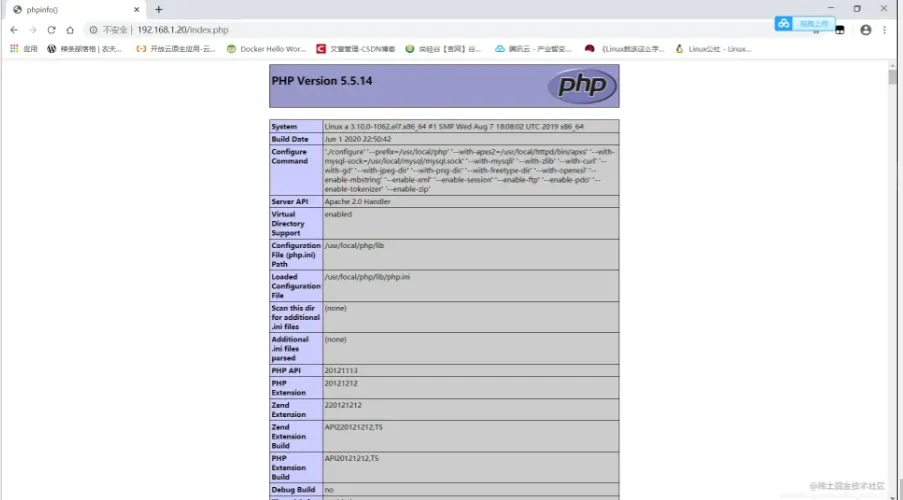
撒花完结^^)
