
问题
线上问题遇到一个接口第一次访问特别慢的问题,后来说是因为该接口加了某注解,所以第一次请求比较慢,初步解决办法就是启动后先请求一次就好了。
代码
模拟测试接口
  @RequestMapping("/hello")
  public String hello() {
    return LocalDateTime.now().toString();
  }
核心接口CommandLineRunner
package com.example.autorequest;
import lombok.extern.slf4j.Slf4j;
import org.springframework.boot.CommandLineRunner;
import org.springframework.stereotype.Component;
import java.io.BufferedReader;
import java.io.IOException;
import java.io.InputStream;
import java.io.InputStreamReader;
import java.net.HttpURLConnection;
import java.net.URL;
/**
 * @author chaird
 * @create 2020-07-31 22:43
 */
@Component
@Slf4j
public class StartAutoRequestService implements CommandLineRunner {
  @Override
  public void run(String... args) throws Exception {
    String httpUrl = "http://localhost:8082/hello";
    // 链接
    HttpURLConnection connection = null;
    InputStream is = null;
    BufferedReader br = null;
    StringBuffer result = new StringBuffer();
    try {
      // 创建连接
      URL url = new URL(httpUrl);
      connection = (HttpURLConnection) url.openConnection();
      // 设置请求方式
      connection.setRequestMethod("GET");
      // 设置连接超时时间
      connection.setReadTimeout(15000);
      // 开始连接
      connection.connect();
      // 获取响应数据
      if (connection.getResponseCode() == 200) {
        // 获取返回的数据
        is = connection.getInputStream();
        if (null != is) {
          br = new BufferedReader(new InputStreamReader(is, "UTF-8"));
          String temp = null;
          while (null != (temp = br.readLine())) {
            result.append(temp);
          }
        }
      }
    } catch (IOException e) {
      e.printStackTrace();
    } finally {
      if (null != br) {
        try {
          br.close();
        } catch (IOException e) {
          e.printStackTrace();
        }
      }
      if (null != is) {
        try {
          is.close();
        } catch (IOException e) {
          e.printStackTrace();
        }
      }
      // 关闭远程连接
      connection.disconnect();
    }
    System.out.println(result.toString());
  }
}
原理
首先在自己实现CommandLineRunner接口的类的run方法里打个断点,看一下调用栈,这样好知道在哪打断点
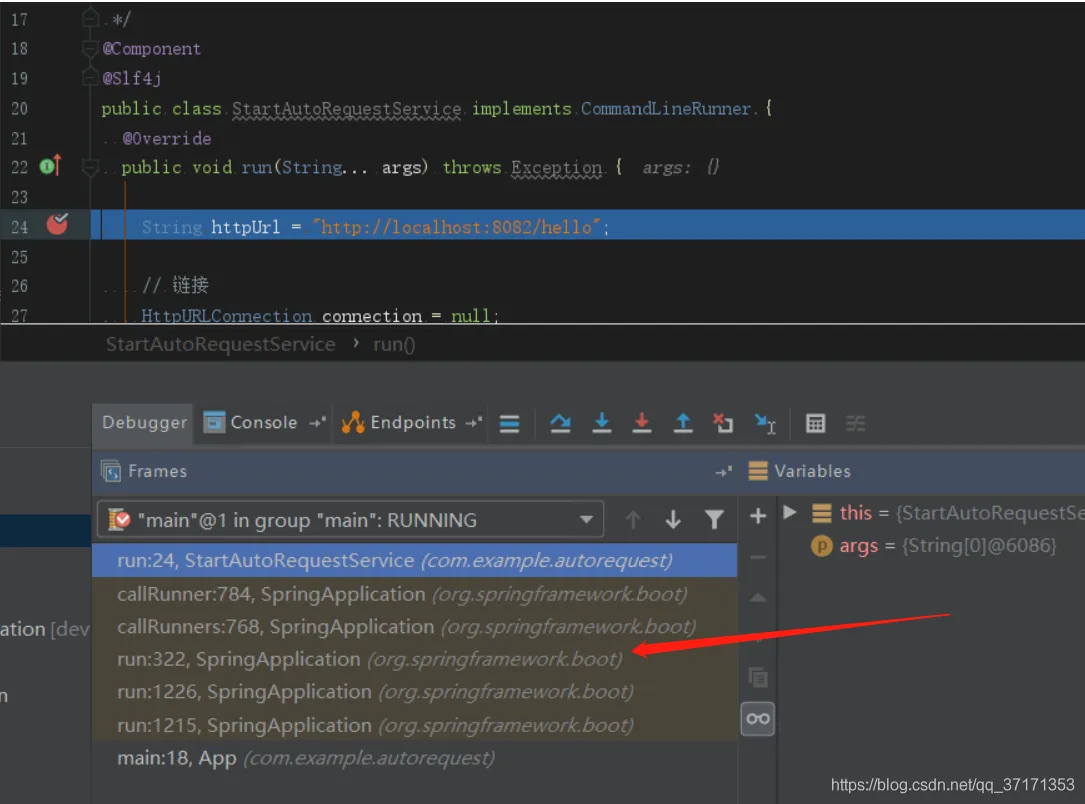
在上图箭头处的方法的第一行打断点
public ConfigurableApplicationContext run(String... args) {
    StopWatch stopWatch = new StopWatch();
    stopWatch.start();
    ConfigurableApplicationContext context = null;
    Collection<SpringBootExceptionReporter> exceptionReporters = new ArrayList<>();
    configureHeadlessProperty();
    SpringApplicationRunListeners listeners = getRunListeners(args);
    listeners.starting();
    try {
      ApplicationArguments applicationArguments = new DefaultApplicationArguments(args);
      ConfigurableEnvironment environment = prepareEnvironment(listeners, applicationArguments);
      configureIgnoreBeanInfo(environment);
      Banner printedBanner = printBanner(environment);
      context = createApplicationContext();
      exceptionReporters = getSpringFactoriesInstances(SpringBootExceptionReporter.class,
          new Class[] { ConfigurableApplicationContext.class }, context);
      prepareContext(context, environment, listeners, applicationArguments, printedBanner);
      refreshContext(context);
            //断点走到这,此时控制台已经打印出Tomcat started on port(s): 8082 (http) with context path ''
            //断点走到这,此时控制台已经打印出Tomcat started on port(s): 8082 (http) with context path ''
           //断点走到这,此时控制台已经打印出Tomcat started on port(s): 8082 (http) with context path ''
      afterRefresh(context, applicationArguments);
      stopWatch.stop();
      if (this.logStartupInfo) {
        new StartupInfoLogger(this.mainApplicationClass).logStarted(getApplicationLog(), stopWatch);
      }
      listeners.started(context);
            //开始调用实现CommandLineRunner接口的方法
            //开始调用实现CommandLineRunner接口的方法
            //开始调用实现CommandLineRunner接口的方法
      callRunners(context, applicationArguments);
    }
    catch (Throwable ex) {
    }
    try {
      listeners.running(context);
    }
    catch (Throwable ex) {
    }
    return context;
  }
进入上图的callRunners方法
  private void callRunners(ApplicationContext context, ApplicationArguments args) {
    List<Object> runners = new ArrayList<>();
    runners.addAll(context.getBeansOfType(ApplicationRunner.class).values());
    //拿到实现CommandLineRunner接口的实现类
    runners.addAll(context.getBeansOfType(CommandLineRunner.class).values());
    AnnotationAwareOrderComparator.sort(runners);
    for (Object runner : new LinkedHashSet<>(runners)) {
      if (runner instanceof ApplicationRunner) {
        callRunner((ApplicationRunner) runner, args);
      }
      if (runner instanceof CommandLineRunner) {
           //调用方法,此时在跟进去就进入自己写的方法里了
        callRunner((CommandLineRunner) runner, args);
      }
    }
  }

