前言:
如果不知道如何配置sentinel或者不知道如何打开文章中的一些网页,可以参考我前面的文章:
SpringCloud Alibaba学习(五):Sentinel的介绍与搭建
有关流控规则的讲解与实战:SpringCloud Alibaba学习(六):Sentinel的流控规则
有关降级规则的讲解与实战:SpringCloud Alibaba学习(七):Sentinel的降级规则
有关热点规则的讲解与实战:SpringCloud Alibaba学习(八):Sentinel的热点规则
一、准备工作
1、启动Nacos和Sentinel
2、准备两个服务提供者
准备服务提供者 cloudalibaba-provider-payment9003 和 cloudalibaba-provider-payment9004,用ribbon实现两者的负载均衡。
9003和9004的结构完全相同。
(1)新建模块
新建普通maven模块cloudalibaba-provider-payment9003
(2)修改pom文件
<?xml version="1.0" encoding="UTF-8"?>
<project xmlns="http://maven.apache.org/POM/4.0.0"
         xmlns:xsi="http://www.w3.org/2001/XMLSchema-instance"
         xsi:schemaLocation="http://maven.apache.org/POM/4.0.0 http://maven.apache.org/xsd/maven-4.0.0.xsd">
    <parent>
        <artifactId>cloud</artifactId>
        <groupId>com.shang.cloud</groupId>
        <version>1.0-SNAPSHOT</version>
    </parent>
    <modelVersion>4.0.0</modelVersion>
    <artifactId>cloudalibaba-provider-payment9003</artifactId>
    <dependencies>
        <!--SpringCloud ailibaba nacos -->
        <dependency>
            <groupId>com.alibaba.cloud</groupId>
            <artifactId>spring-cloud-starter-alibaba-nacos-discovery</artifactId>
        </dependency>
        <dependency><!-- 引入自己定义的api通用包,可以使用Payment支付Entity -->
            <groupId>com.shang.cloud</groupId>
            <artifactId>cloud-api-commons</artifactId>
            <version>1.0-SNAPSHOT</version>
        </dependency>
        <!-- SpringBoot整合Web组件 -->
        <dependency>
            <groupId>org.springframework.boot</groupId>
            <artifactId>spring-boot-starter-web</artifactId>
        </dependency>
        <dependency>
            <groupId>org.springframework.boot</groupId>
            <artifactId>spring-boot-starter-actuator</artifactId>
        </dependency>
        <!--日常通用jar包配置-->
        <dependency>
            <groupId>org.springframework.boot</groupId>
            <artifactId>spring-boot-devtools</artifactId>
            <scope>runtime</scope>
            <optional>true</optional>
        </dependency>
        <dependency>
            <groupId>org.projectlombok</groupId>
            <artifactId>lombok</artifactId>
            <optional>true</optional>
        </dependency>
        <dependency>
            <groupId>org.springframework.boot</groupId>
            <artifactId>spring-boot-starter-test</artifactId>
            <scope>test</scope>
        </dependency>
    </dependencies>
    <properties>
        <maven.compiler.source>8</maven.compiler.source>
        <maven.compiler.target>8</maven.compiler.target>
    </properties>
</project>
(3)修改yml文件
server:
  port: 9003
spring:
  application:
    name: nacos-payment-provider
  cloud:
    nacos:
      discovery:
        server-addr: localhost:8848 #配置Nacos地址
management:
  endpoints:
    web:
      exposure:
        include: '*'
这里要注意9003和9004的端口号是不一样的
(4)编写主启动类
@SpringBootApplication
@EnableDiscoveryClient
public class PaymentMain9003{
    public static void main(String[] args) {
        SpringApplication.run(PaymentMain9003.class, args);
    }
}
(5)编写业务代码
controller包下:
@RestController
public class PaymentController{
    @Value("${server.port}")
    private String serverPort;
    //模拟数据库中的数据
    public static HashMap<Long, Payment> hashMap = new HashMap<>();
    static{
        hashMap.put(1L,new Payment(1L,"28a8c1e3bc2742d8848569891fb42181"));
        hashMap.put(2L,new Payment(2L,"bba8c1e3bc2742d8848569891ac32182"));
        hashMap.put(3L,new Payment(3L,"6ua8c1e3bc2742d8848569891xt92183"));
    }
    @GetMapping(value = "/paymentSQL/{id}")
    public CommonResult<Payment> paymentSQL(@PathVariable("id") Long id){
        Payment payment = hashMap.get(id);
        CommonResult<Payment> result = new CommonResult(200,"from mysql,serverPort:  "+serverPort,payment);
        return result;
    }
}
6)运行测试
浏览器访问
http://localhost:9003/paymentSQL/1
http://localhost:9004/paymentSQL/1
看看是不是能正常访问。能正常访问就说明搭建过程没问题。
3、准备一个消费者
(1)新建模块
新建普通maven工程新建cloudalibaba-consumer-nacos-order84
(2)修改pom文件
<?xml version="1.0" encoding="UTF-8"?>
<project xmlns="http://maven.apache.org/POM/4.0.0"
         xmlns:xsi="http://www.w3.org/2001/XMLSchema-instance"
         xsi:schemaLocation="http://maven.apache.org/POM/4.0.0 http://maven.apache.org/xsd/maven-4.0.0.xsd">
    <parent>
        <artifactId>cloud</artifactId>
        <groupId>com.shang.cloud</groupId>
        <version>1.0-SNAPSHOT</version>
    </parent>
    <modelVersion>4.0.0</modelVersion>
    <artifactId>cloudalibaba-consumer-nacos-order84</artifactId>
    <dependencies>
        <!--SpringCloud ailibaba nacos -->
        <dependency>
            <groupId>com.alibaba.cloud</groupId>
            <artifactId>spring-cloud-starter-alibaba-nacos-discovery</artifactId>
        </dependency>
        <!--SpringCloud ailibaba sentinel -->
        <dependency>
            <groupId>com.alibaba.cloud</groupId>
            <artifactId>spring-cloud-starter-alibaba-sentinel</artifactId>
        </dependency>
        <!-- 引入自己定义的api通用包,可以使用Payment支付Entity -->
        <dependency>
            <groupId>com.shang.cloud</groupId>
            <artifactId>cloud-api-commons</artifactId>
            <version>1.0-SNAPSHOT</version>
        </dependency>
        <!-- SpringBoot整合Web组件 -->
        <dependency>
            <groupId>org.springframework.boot</groupId>
            <artifactId>spring-boot-starter-web</artifactId>
        </dependency>
        <dependency>
            <groupId>org.springframework.boot</groupId>
            <artifactId>spring-boot-starter-actuator</artifactId>
        </dependency>
        <!--日常通用jar包配置-->
        <dependency>
            <groupId>org.springframework.boot</groupId>
            <artifactId>spring-boot-devtools</artifactId>
            <scope>runtime</scope>
            <optional>true</optional>
        </dependency>
        <dependency>
            <groupId>org.projectlombok</groupId>
            <artifactId>lombok</artifactId>
            <optional>true</optional>
        </dependency>
        <dependency>
            <groupId>org.springframework.boot</groupId>
            <artifactId>spring-boot-starter-test</artifactId>
            <scope>test</scope>
        </dependency>
    </dependencies>
    <properties>
        <maven.compiler.source>8</maven.compiler.source>
        <maven.compiler.target>8</maven.compiler.target>
    </properties>
</project>
3)编写yml文件
server:
  port: 84
spring:
  application:
    name: nacos-order-consumer
  cloud:
    nacos:
      discovery:
        server-addr: localhost:8848
    sentinel:
      transport:
        #配置Sentinel dashboard地址
        dashboard: localhost:8080
        #默认8719端口,假如被占用会自动从8719开始依次+1扫描,直至找到未被占用的端口
        port: 8719
#消费者将要去访问的微服务名称(注册成功进nacos的微服务提供者)
service-url:
  nacos-user-service: http://nacos-payment-provider
(4)编写主启动类
@EnableDiscoveryClient
@SpringBootApplication
public class OrderNacosMain84{
    public static void main(String[] args) {
        SpringApplication.run(OrderNacosMain84.class, args);
    }
}
(5)编写业务代码
config包下,实现负载均衡:
@Configuration
public class ApplicationContextConfig
{
    @Bean
    @LoadBalanced
    public RestTemplate getRestTemplate()
    {
        return new RestTemplate();
    }
}
controller包下,处理服务熔断:
@RestController
@Slf4j
public class CircleBreakerController
{
    public static final String SERVICE_URL = "http://nacos-payment-provider";
    @Resource
    private RestTemplate restTemplate;
    @RequestMapping("/consumer/fallback/{id}")
    @SentinelResource(value = "fallback")
     public CommonResult<Payment> fallback(@PathVariable Long id)
    {
        CommonResult<Payment> result = restTemplate.getForObject(SERVICE_URL + "/paymentSQL/"+id,CommonResult.class,id);
        //如果传入的id为4,就模拟Java的运行异常
        if (id == 4) {
            throw new IllegalArgumentException ("IllegalArgumentException,非法参数异常....");
        }else if (result.getData() == null) {
            //如果传入的id是其他(非1、2、3、4,就模拟传入非法参数的异常)
            throw new NullPointerException ("NullPointerException,该ID没有对应记录,空指针异常");
        }
        return result;
    }
}
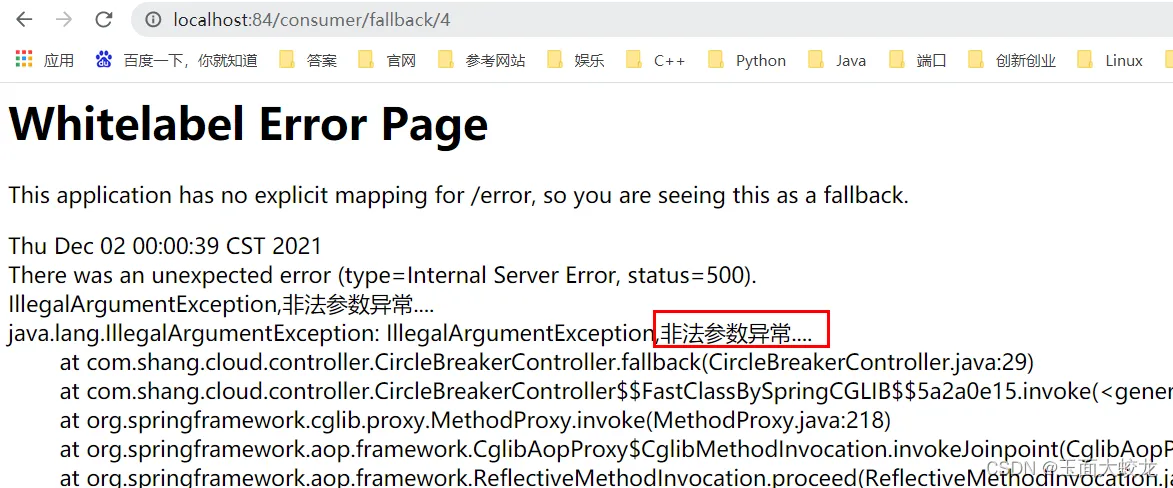
我们的逻辑是:假如传入的id为1、2或3,能够正常访问;传入4,将会报非法参数异常(模拟Java的运行异常);传入5,将会报空指针异常。
那么我们在此时访问 http://localhost:84/consumer/fallback/1

能够正常访问。
访问 http://localhost:84/consumer/fallback/4
访问 http://localhost:84/consumer/fallback/5
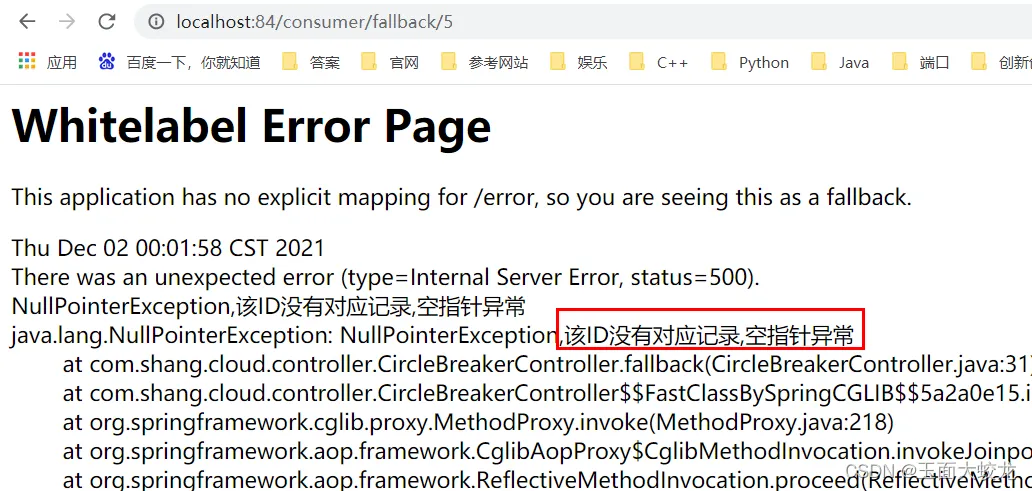
可以看到,直接显示了报错页面,用户体验非常不友好。
那么下面我们就来配置处理服务熔断的兜底方法。
二、Sentinel+Ribbon实现服务熔断
1、无任何配置
如上面所见,无论是传参异常还是空指针异常,都直接显示error页面,非常不友好。
2、只配置fallback
(1)代码
@RequestMapping("/consumer/fallback/{id}")
//    @SentinelResource(value = "fallback")  //没有配置
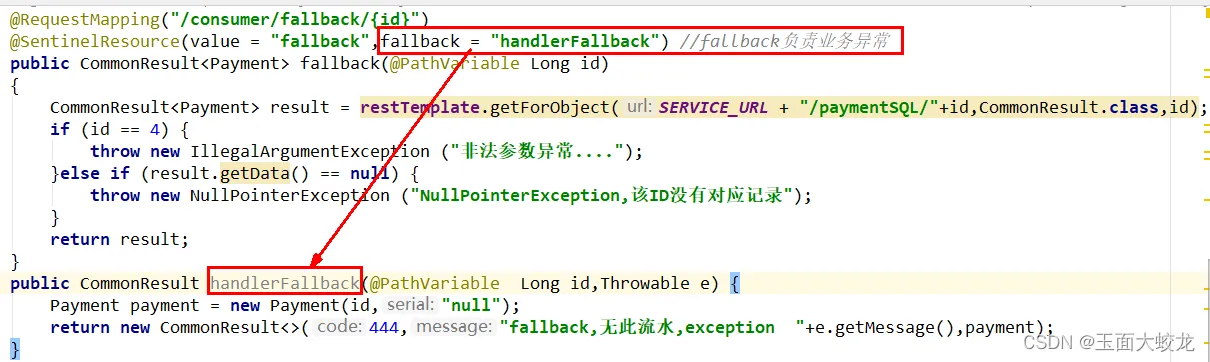
@SentinelResource(value = "fallback", fallback = "handlerFallback")  //fallback只负责处理业务异常
    public CommonResult<Payment> fallback(@PathVariable Long id) {
        CommonResult<Payment> result = restTemplate.getForObject(SERVICE_URL + "/paymentSQL/"+id, CommonResult.class,id);
        //如果传入的id为4,就模拟Java的运行异常
        if (id == 4) {
            throw new IllegalArgumentException ("IllegalArgumentException,非法参数异常....");
        }else if (result.getData() == null) {
            //如果传入的id是其他(非1、2、3、4,就模拟传入非法参数的异常)
            throw new NullPointerException ("NullPointerException,该ID没有对应记录,空指针异常");
        }
        return result;
    }
注意SentinelResource的配置,除了value之外,只写了fallback
(2)图解
(3)测试


可以看到,传入4和5时都显示了我们指定的熔断规则。
3、只配置blockHandler
(1)代码
@RequestMapping("/consumer/fallback/{id}")
//    @SentinelResource(value = "fallback")  //没有配置
//    @SentinelResource(value = "fallback", fallback = "handlerFallback")  //fallback只负责处理业务异常
    @SentinelResource(value = "fallback", blockHandler = "handlerFallback")  //blockHandler只负责sentinel控制台配置违规
    public CommonResult<Payment> fallback(@PathVariable Long id) {
        CommonResult<Payment> result = restTemplate.getForObject(SERVICE_URL + "/paymentSQL/"+id, CommonResult.class,id);
        //如果传入的id为4,就模拟Java的运行异常
        if (id == 4) {
            throw new IllegalArgumentException ("IllegalArgumentException,非法参数异常....");
        }else if (result.getData() == null) {
            //如果传入的id是其他(非1、2、3、4,就模拟传入非法参数的异常)
            throw new NullPointerException ("NullPointerException,该ID没有对应记录,空指针异常");
        }
        return result;
    }
    public CommonResult blockHandler(@PathVariable  Long id, BlockException blockException) {
        Payment payment = new Payment(id,"null");
        return new CommonResult<>(445,"blockHandler-sentinel限流,无此流水: blockException  "+blockException.getMessage(),payment);
    }
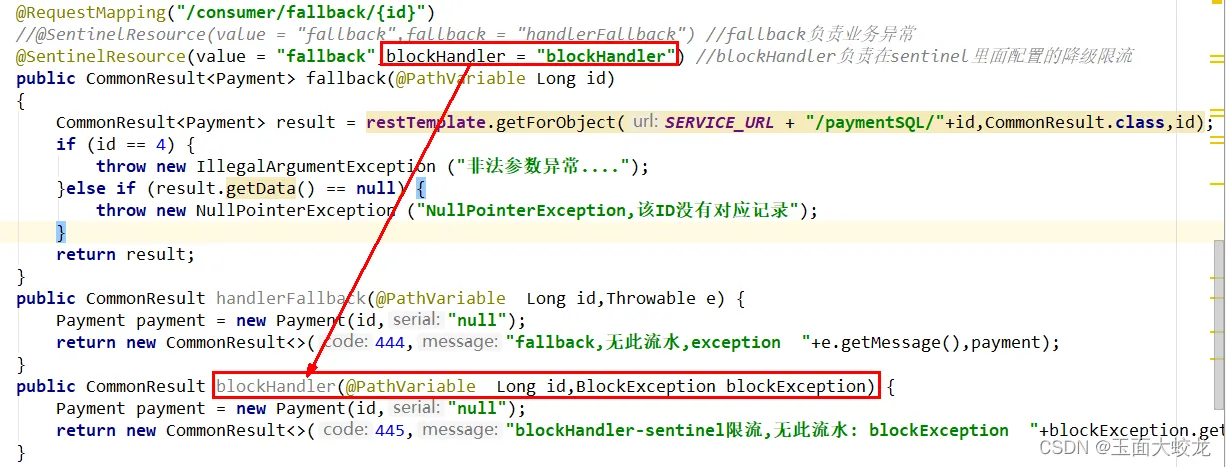
(2)图解
(3)sentinel配置
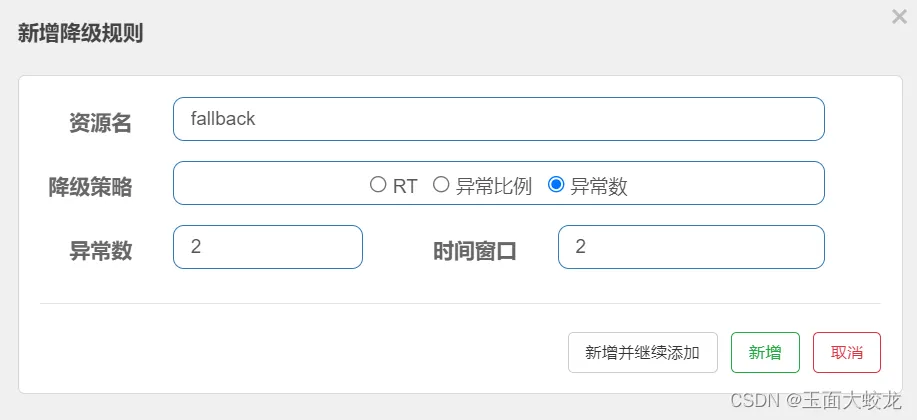
其实降级规则里设置哪一个都行,这次我就选用异常数吧。
(4)测试
传入4,直接报错……
传入5,直接报错……
为什么? 原因还是我们一直强调的:blockHandler只负责sentinel的配置错误,不负责Java的运行错误 。
而如果快速刷新页面多次(异常数大于2),就会触发降级,此时才是blockHandler的管辖范围。

4、fallback和blockHandler都配置
(1)代码
@RequestMapping("/consumer/fallback/{id}")
//    @SentinelResource(value = "fallback")  //没有配置
//    @SentinelResource(value = "fallback", fallback = "handlerFallback")  //fallback只负责处理业务异常
//    @SentinelResource(value = "fallback", blockHandler = "handlerFallback")  //blockHandler只负责sentinel控制台配置违规
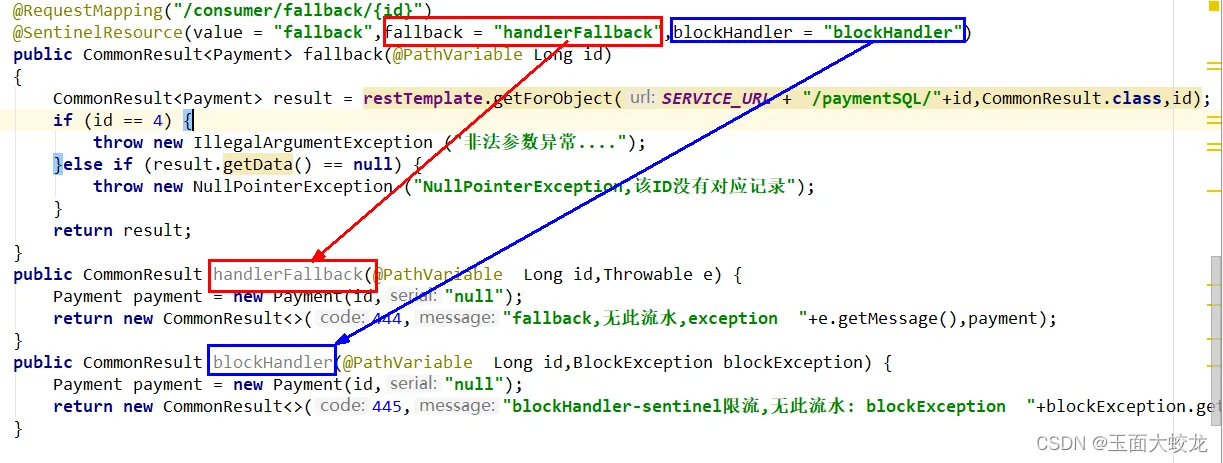
    @SentinelResource(value = "fallback", fallback = "handlerFallback", blockHandler = "blockHandler")
    public CommonResult<Payment> fallback(@PathVariable Long id) {
        CommonResult<Payment> result = restTemplate.getForObject(SERVICE_URL + "/paymentSQL/"+id, CommonResult.class,id);
        //如果传入的id为4,就模拟Java的运行异常
        if (id == 4) {
            throw new IllegalArgumentException ("IllegalArgumentException,非法参数异常....");
        }else if (result.getData() == null) {
            //如果传入的id是其他(非1、2、3、4,就模拟传入非法参数的异常)
            throw new NullPointerException ("NullPointerException,该ID没有对应记录,空指针异常");
        }
        return result;
    }
    public CommonResult handlerFallback(@PathVariable Long id, Throwable e){
        Payment payment = new Payment(id, "null");
        return new CommonResult<>(444, "兜底异常handlerFallback.exception内容  "+e.getMessage(),payment);
    }
    public CommonResult blockHandler(@PathVariable  Long id, BlockException blockException) {
        Payment payment = new Payment(id,"null");
        return new CommonResult<>(445,"blockHandler-sentinel限流,无此流水: blockException  "+blockException.getMessage(),payment);
    }
(2)图解
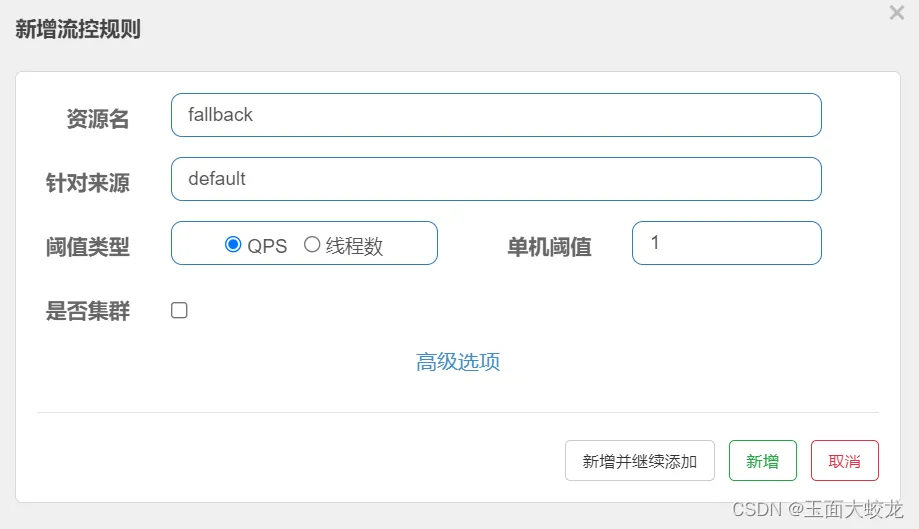
(3)sentinel配置
(4) 测试
因为配置了fallback,所以传入4和5后肯定是会出现兜底的熔断方法的。
那么这里就有一个问题了:
我们在传入4或5时,会触发java运行异常;而快速点击时,会触发sentinel配置的错误。而在这时我快速点击,究竟是fallback中的方法来处理,还是blockHandler中的方法来处理呢?
先上结果:

这说明:若 blockHandler 和 fallback 都进行了配置,则被限流降级而抛出 BlockException 时只会进入 blockHandler 处理逻辑。
为什么?
我们可以这么理解,当我们快速点击时发生降级,此时连服务的大门都没进去就被阻拦了,如何能够报java运行异常呢?所以是blockHandler来处理。
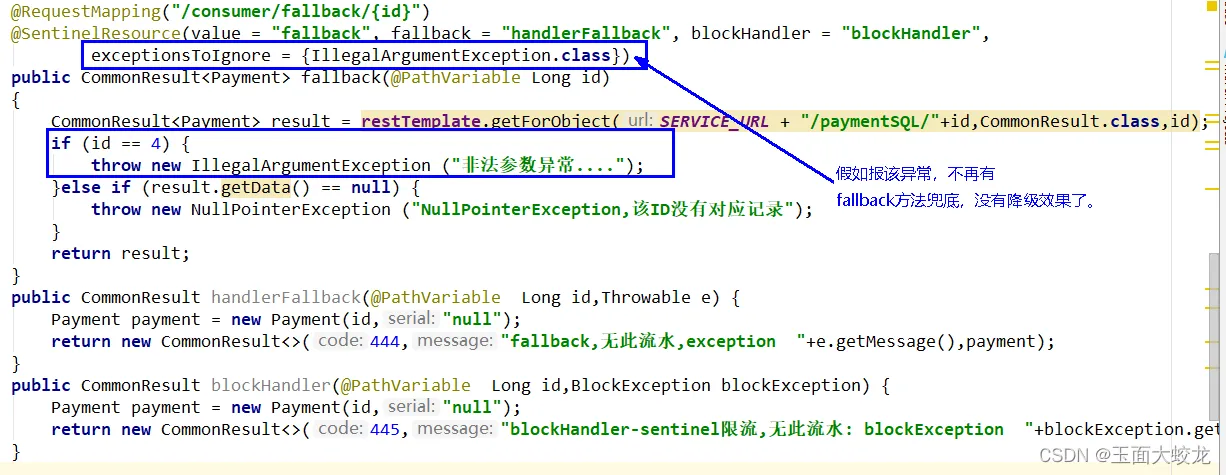
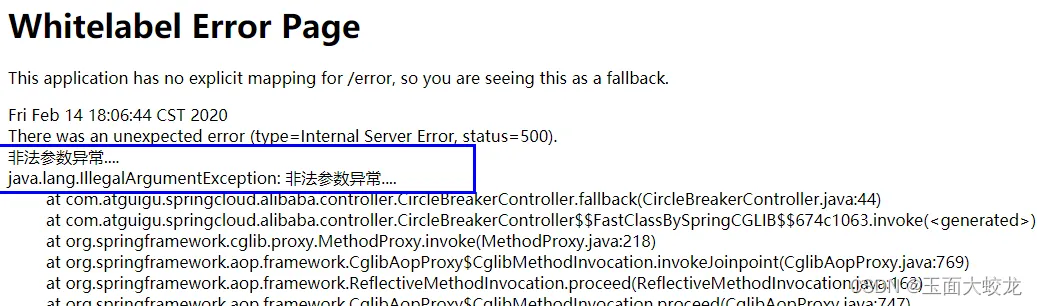
5、还可以配置忽略属性exceptionsToIgnore
(1)代码
@SentinelResource(value = "fallback",
                fallback = "handlerFallback", blockHandler = "blockHandler",
                exceptionsToIgnore = {IllegalArgumentException.class})
指定了哪个异常后就可以忽略,不进行限流
(2)图解
(3)测试
三 、Sentinel+OpenFeign实现服务熔断
1、修改84模块
(1)修改pom文件
加上对OpenFeign的支持
<!--SpringCloud openfeign -->
        <dependency>
            <groupId>org.springframework.cloud</groupId>
            <artifactId>spring-cloud-starter-openfeign</artifactId>
        </dependency>
(2)修改yml文件
激活Sentinel对Feign的支持
# 激活Sentinel对Feign的支持
feign:
  sentinel:
    enabled: true
(3)修改主启动类
主启动类上增加@EnableFeignClients,增加对Feign的支持
(4)编写业务代码
1.带@FeignClient注解的业务接口
@FeignClient(value = "nacos-payment-provider",fallback = PaymentFallbackService.class)//调用中关闭9003服务提供者
public interface PaymentService
{
    @GetMapping(value = "/paymentSQL/{id}")
    public CommonResult<Payment> paymentSQL(@PathVariable("id") Long id);
}
2.兜底的方法
@Component
public class PaymentFallbackService implements PaymentService
{
    @Override
    public CommonResult<Payment> paymentSQL(Long id)
    {
        return new CommonResult<>(444,"服务降级返回,没有该流水信息",new Payment(id, "errorSerial......"));
    }
}
3.修改controller类
@RestController
@Slf4j
public class CircleBreakerController
{
    public static final String SERVICE_URL = "http://nacos-payment-provider";
    @Resource
    private RestTemplate restTemplate;
    @RequestMapping("/consumer/fallback/{id}")
    //@SentinelResource(value = "fallback") //没有配置
    //@SentinelResource(value = "fallback",fallback = "handlerFallback") //fallback只负责业务异常
    //@SentinelResource(value = "fallback",blockHandler = "blockHandler") //blockHandler只负责sentinel控制台配置违规
    @SentinelResource(value = "fallback",fallback = "handlerFallback",blockHandler = "blockHandler",
            exceptionsToIgnore = {IllegalArgumentException.class})
    public CommonResult<Payment> fallback(@PathVariable Long id)
    {
        CommonResult<Payment> result = restTemplate.getForObject(SERVICE_URL + "/paymentSQL/"+id,CommonResult.class,id);
        if (id == 4) {
            throw new IllegalArgumentException ("IllegalArgumentException,非法参数异常....");
        }else if (result.getData() == null) {
            throw new NullPointerException ("NullPointerException,该ID没有对应记录,空指针异常");
        }
        return result;
    }
    //本例是fallback
    public CommonResult handlerFallback(@PathVariable  Long id,Throwable e) {
        Payment payment = new Payment(id,"null");
        return new CommonResult<>(444,"兜底异常handlerFallback,exception内容  "+e.getMessage(),payment);
    }
    //本例是blockHandler
    public CommonResult blockHandler(@PathVariable  Long id,BlockException blockException) {
        Payment payment = new Payment(id,"null");
        return new CommonResult<>(445,"blockHandler-sentinel限流,无此流水: blockException  "+blockException.getMessage(),payment);
    }
    //==================OpenFeign
    @Resource
    private PaymentService paymentService;
    @GetMapping(value = "/consumer/openfeign/{id}")
    public CommonResult<Payment> paymentSQL(@PathVariable("id") Long id)
    {
        if(id == 4)
        {
            throw new RuntimeException("没有该id");
        }
        return paymentService.paymentSQL(id);
    }
2、测试
启动Nacos、sentinel、84、9003,访问
http://localhost:84/consumer/paymentSQL/1

能够正常访问。
现在我们关掉9003,再次访问:
84消费侧主动降级,并不会直接显示错误页面。
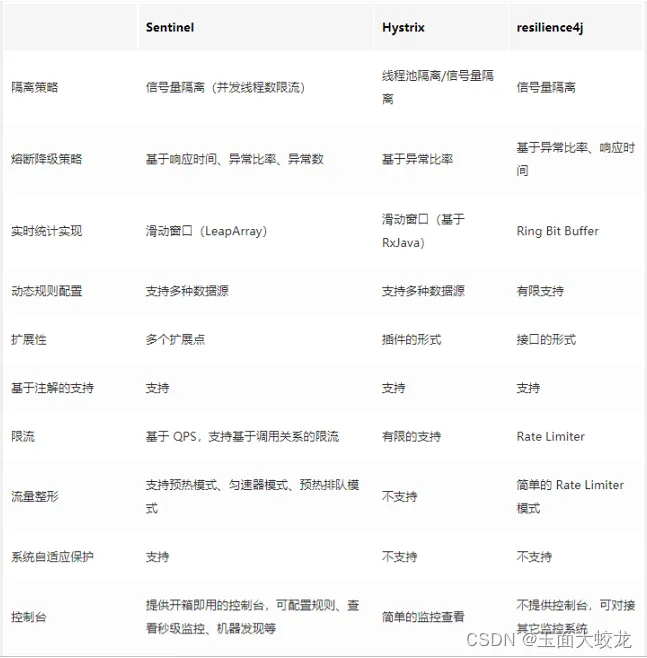
四、熔断框架比较