确切的说,是刚打开Activity时,页面中的View的onMeasure最少会被调用两次。这是为什么呢?接下来我们以LinearLayout为例进行分析。
系列文章:
从源码角度理解FrameLayout#onMeasure对child的measure调用次数
从源码角度理解LinearLayout#onMeasure对child的measure调用次数
从源码角度理解RelativeLayout#onMeasure对child的measure调用次数
从源码角度理解ConstraintLayout#onMeasure对child的measure调用次数
ViewGroup在调用onMeasure时,会先测量父View,还是会先测量子View?
自定义LinearLayout验证
先自定义一个LinearLayout:CustomLinearLayout,主要是添加了log打印:
CustomLinearLayout打印log
public class CustomLinearLayout extends LinearLayout {
    private static final String TAG = "CustomLayout-Linear";

    public CustomLinearLayout(Context context) {
        super(context);
    }

    public CustomLinearLayout(Context context, @Nullable AttributeSet attrs) {
        super(context, attrs);
    }

    public CustomLinearLayout(Context context, @Nullable AttributeSet attrs, int defStyleAttr) {
        super(context, attrs, defStyleAttr);
    }

    public CustomLinearLayout(Context context, AttributeSet attrs, int defStyleAttr, int defStyleRes) {
        super(context, attrs, defStyleAttr, defStyleRes);
    }

    @Override
    protected void onMeasure(int widthMeasureSpec, int heightMeasureSpec) {
        super.onMeasure(widthMeasureSpec, heightMeasureSpec);
        int widthSpecSize = MeasureSpec.getSize(widthMeasureSpec);
        int widthSpecMode = MeasureSpec.getMode(widthMeasureSpec);
        int heightSpecSize = MeasureSpec.getSize(heightMeasureSpec);
        int heightSpecMode = MeasureSpec.getMode(heightMeasureSpec);
        Log.e(TAG, String.format("onMeasure widthSpecSize:%s, widthSpecMode:%s, heightSpecSize:%s, heightSpecMode:%s",
                widthSpecSize, widthSpecMode, heightSpecSize, heightSpecMode));
    }

    @Override
    protected void onLayout(boolean changed, int l, int t, int r, int b) {
        super.onLayout(changed, l, t, r, b);
        Log.e(TAG, String.format("onLayout changed:%s, l:%s, t:%s, r:%s, b:%s",
                changed, l, t, r, b));
    }

    @Override
    protected void onDraw(Canvas canvas) {
        super.onDraw(canvas);
        Log.e(TAG, "onDraw");
    }
}
简单的xml文件,宽高都是match_parent
接着看下Activity对应的布局文件,布局文件很简单,就一个自定义LinearLayout:
<?xml version="1.0" encoding="utf-8"?>
<com.tinytongtong.androidstudy.measure.view.CustomLinearLayout xmlns:android="http://schemas.android.com/apk/res/android"
    xmlns:app="http://schemas.android.com/apk/res-auto"
    xmlns:tools="http://schemas.android.com/tools"
    android:layout_width="match_parent"
    android:layout_height="match_parent"
    tools:context=".measure.MeasureInvokeTestActivity">

</com.tinytongtong.androidstudy.measure.view.CustomLinearLayout>
查看log
最后启动Activity,我们看下对应的log:
E/CustomLayout-Linear: onMeasure widthSpecSize:1080, widthSpecMode:1073741824, heightSpecSize:1823, heightSpecMode:1073741824
E/CustomLayout-Linear: onMeasure widthSpecSize:1080, widthSpecMode:1073741824, heightSpecSize:1823, heightSpecMode:1073741824
E/CustomLayout-Linear: onLayout changed:true, l:0, t:0, r:1080, b:1823如上所示,自定义LinearLayout的onMeasure方法确实是调用了两次。
通过debug分析原理
我们在CustomLinearLayout#onMeasure方法中添加一个debug断点,看下实际的调用链。
debug结果:基于api30
第一次调用onMeasure: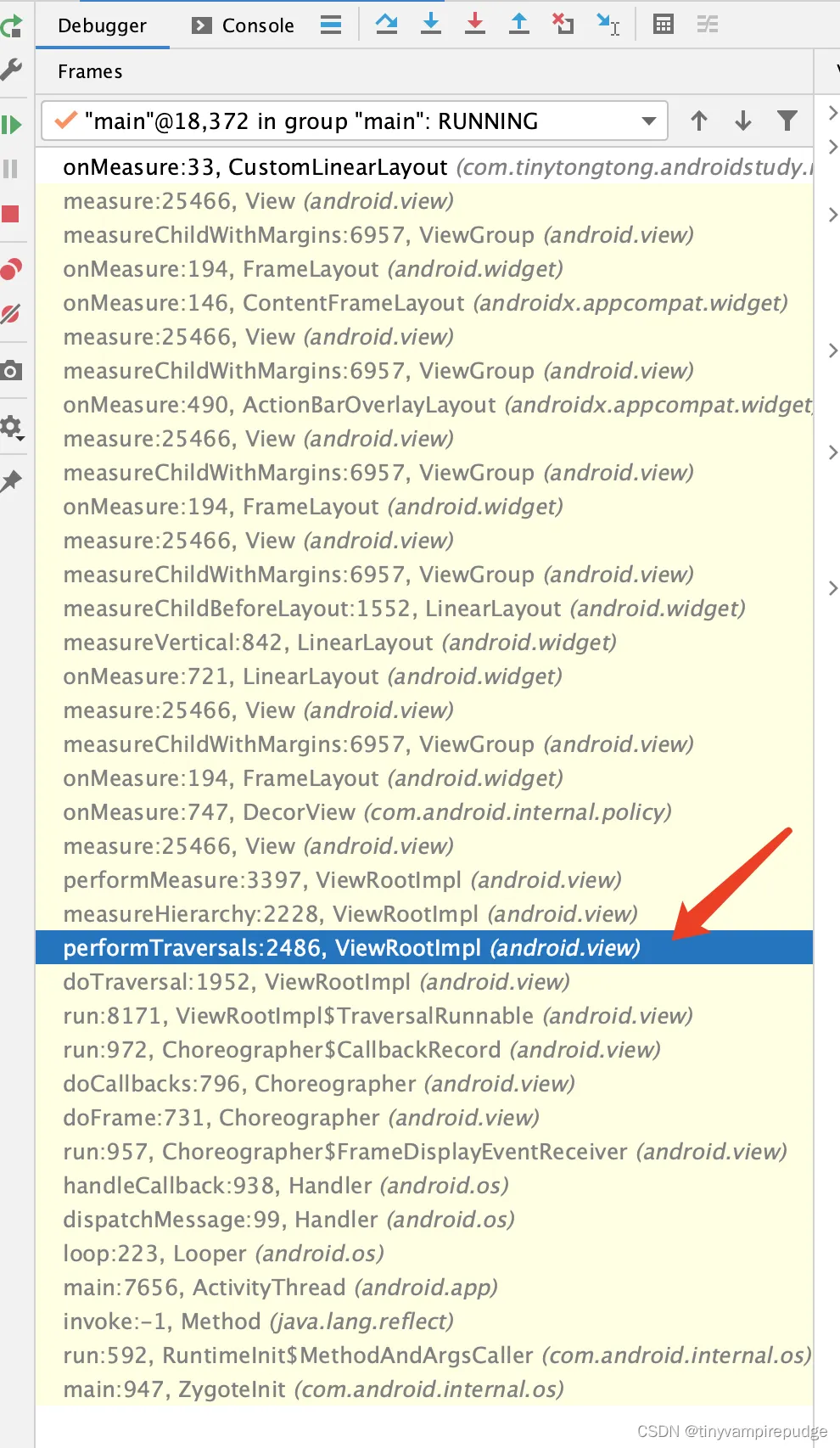
从图中可以清晰的看出,ViewRootImpl#performMeasure方法是在ViewRootImpl的2228行调用。调用链如下:
--> ViewRootImpl#performTraversals
--> ViewRootImpl#measureHierarchy; 2486行调用
--> ViewRootImpl#performMeasure(childWidthMeasureSpec, childHeightMeasureSpec); 2228行调用
--> View#measure; 开始执行页面绘制流程
--> View#onMeasure; 从根View开始,从上往下,依次执行依次measure流程。具体源码如下:ViewRootImpl#performTraversals方法中,2486行。
private void performTraversals() {
    ...
    // Ask host how big it wants to be
    windowSizeMayChange |= measureHierarchy(host, lp, res,
            desiredWindowWidth, desiredWindowHeight);
    ...
}4、第二次调用onMeasure: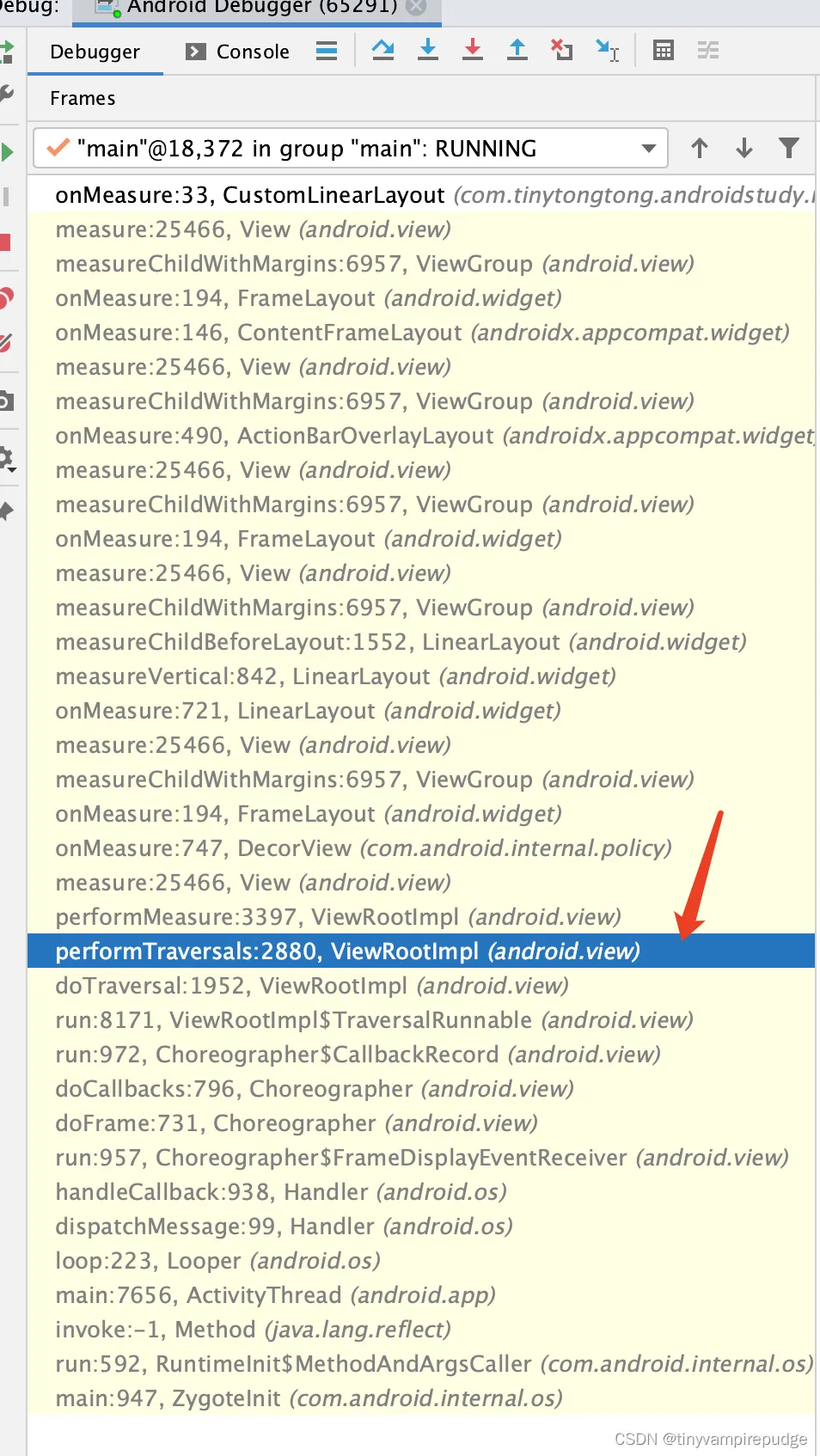
调用链如下:
--> ViewRootImpl#performTraversals
--> ViewRootImpl#performMeasure(childWidthMeasureSpec, childHeightMeasureSpec); 2280行调用
--> View#measure; 开始执行页面绘制流程
--> View#onMeasure; 从根View开始,从上往下,依次执行依次measure流程。
具体代码如下:
private void performTraversals() {
    ...
    // Ask host how big it wants to be
    performMeasure(childWidthMeasureSpec, childHeightMeasureSpec);
    ...
}总体来说,两次测量都是ViewRootImpl#performTraversals方法中触发的,第一次是在2486行调用ViewRootImpl#measureHierarchy方法,第二次是在2280行调用ViewRootImpl#performMeasure(childWidthMeasureSpec, childHeightMeasureSpec)。
这两次调用各自是什么意思呢?
第一次是在2486行调用ViewRootImpl#measureHierarchy方法,这一步骤的测量ViewTree是为了确定RootView的尺寸从而在此步骤确定Window尺寸。
第二次是在2280行调用ViewRootImpl#performMeasure(childWidthMeasureSpec, childHeightMeasureSpec)方法,是在确定了window尺寸的基础上,对RootView进行再次测量,本次就可确定ViewTree中各部分的尺寸。
细心的同学可能已经发现了,我们demo中Activity布局的宽高,写的都是match_parent,属于测量中最简单的场景,此时RootView的宽高是不会超出window尺寸的。如果我们修改一下我们布局的宽高,那么测量流程就不止两次了。感兴趣的同学可以研究下,具体参见Android 一个困惑很久的问题:onMeasure() 为什么会执行多次?。
总结
在一个简单的Activity中,写一个简单的布局,宽高都是match_parent。当打开Activity时,从RootView开始从上往下,绘制流程(onMeasure方法)最少执行两次。
相关资料
Android 一个困惑很久的问题:onMeasure() 为什么会执行多次?
系列文章:
从源码角度理解FrameLayout#onMeasure对child的measure调用次数
从源码角度理解LinearLayout#onMeasure对child的measure调用次数
从源码角度理解RelativeLayout#onMeasure对child的measure调用次数