新年到,祝福来
你还在用简简单的文字祝福语嘛?
你还在为新年祝福视频发愁嘛?
看到我你就不愁啦~~~
这里啥都有已经给你准备好啦~~~
一张图一段话,祝福视频来!
项目地址:https://aistudio.baidu.com/aistudio/projectdetail/3435736
视频参考:https://www.bilibili.com/video/BV1KT4y1y7JR/
项目说明
本项目使用了Parakeet套件对语音进行了合成处理,然后使用paddleGAN套件对图片和视频进行了处理
利用准备的10种语音模板可以较好的发出这10种类型的声音比较动听
然后对图像进行处理可以使用动漫化头像或者自己的头像进行唇语合成
参考项目
特色
可以合成男女多种音色,添加图片,文字即可出现语音!
自定义模块
| 自定义模块值 | 对应含义 | 数值类型 |
| lable | 对应音色 | int(1-11) |
| sentences | 需要合成的内容 | str |
| photo_patch | 图片地址 | 地址 |
| custom | 自定义语音地址 | 地址 |
音色选择
| lable 值 | 对应音色 |
| 1 | 台湾腔小姐姐 |
| 2 | 小姐姐 |
| 3 | 蜡笔小新 |
| 4 | 东北老铁 |
| 5 | 粤语小哥哥 |
| 6 | 小哥哥 |
| 7 | 低沉大叔 |
| 8 | 萌娃 |
| 9 | 御姐音 |
| 10 | 萝莉音 |
| 11 | 自定义 |
lable = 1  # 根据上面的选择器写入相应的值
sentences = "虎起生活的风帆,走向虎关通途。"  # 需要写入的祝福语
photo_patch = "./靓照.jpg"  # 照片地址
custom = "./" # 自定义语音地址
特别说明
如果需要使用自己的头像进行处理的,可以查看一下!!!要用自己头像的同学注意!!!!!
素材解压
!unzip  -d /home/aistudio/data /home/aistudio/data/data126388/素材.zip
# !unzip  -d /home/aistudio/work/ /home/aistudio/data/pretrained.zip
Archive:  /home/aistudio/data/data126388/素材.zip
  inflating: /home/aistudio/data/蜡笔小新.wav
  inflating: /home/aistudio/data/萝莉.wav
  inflating: /home/aistudio/data/台湾腔小姐姐.wav
  inflating: /home/aistudio/data/小宝宝.wav
  inflating: /home/aistudio/data/小哥哥.wav
  inflating: /home/aistudio/data/小姐姐.wav
  inflating: /home/aistudio/data/御姐.wav
  inflating: /home/aistudio/data/粤语小哥哥.wav
  inflating: /home/aistudio/data/pretrained.zip
  inflating: /home/aistudio/data/低沉大叔.wav
  inflating: /home/aistudio/data/东北老铁.wav
数据前期处理
tone_gather = {1:'data/台湾腔小姐姐.wav',
2:'data/小姐姐.wav',
3:'data/蜡笔小新.wav',
4:'data/东北老铁.wav',
5:'data/粤语小哥哥.wav',
6:'data/小哥哥.wav',
7:'data/低沉大叔.wav',
8:'data/小宝宝.wav',
9:'data/御姐.wav',
10:'data/萝莉.wav'}
tone_gather[11] = custom
if (custom == "./" and lable == 11) or (lable not in [i for i in range(1,12)]):
    lable = 1
symbol = [',', '.', ',', '。','!', '!', ';', ';', ':', ":"]
sentence = ''
for i in sentences:
    if i in symbol:
        sentence = sentence[:-1] + '$'
    else:
ce[:-1] + '$'
    else:
        sentence = sentence + i + '%'
语音合成
1、环境的生成与包的导入
#下载安装Parakeet--本项目中已帮大家安装好了,无需安装,如有安装需求,可执行以下代码:
# !git clone https://gitee.com/paddlepaddle/Parakeet.git -b release/v0.3 /home/aistudio/work/Parakeet
#安装parakeet包
!pip install -e /home/aistudio/work/Parakeet/
如果出现“No module named parakeet”的错误,可以重启项目解决
# 把必要的路径添加到 sys.path,避免找不到已安装的包的
import sys
sys.path.append("/home/aistudio/work/Parakeet")
sys.path.append("/home/aistudio/work/Parakeet/examples/tacotron2_aishell3")
import numpy as np
import os
import paddle
from matplotlib import pyplot as plt
from IPython import display as ipd
import soundfile as sf
import librosa.display
from parakeet.utils import display
paddle.set_device("gpu:0")
CUDAPlace(0)
%matplotlib inline
2. 加载语音克隆模型
from examples.ge2e.audio_processor import SpeakerVerificationPreprocessor
from parakeet.models.lstm_speaker_encoder import LSTMSpeakerEncoder
# speaker encoder
p = SpeakerVerificationPreprocessor(
    sampling_rate=16000,
    audio_norm_target_dBFS=-30,
    vad_window_length=30,
    vad_moving_average_width=8,
    vad_max_silence_length=6,
    mel_window_length=25,
    mel_window_step=10,
    n_mels=40,
    partial_n_frames=160,
    min_pad_coverage=0.75,
    partial_overlap_ratio=0.5)
speaker_encoder = LSTMSpeakerEncoder(n_mels=40, num_layers=3, hidden_size=256, output_size=256)
speaker_encoder_params_path = "/home/aistudio/work/pretrained/ge2e_ckpt_0.3/step-3000000.pdparams"
speaker_encoder.set_state_dict(paddle.load(speaker_encoder_params_path))
speaker_encoder.eval()
# synthesizer
from parakeet.models.tacotron2 import Tacotron2
from examples.tacotron2_aishell3.chinese_g2p import convert_sentence
from examples.tacotron2_aishell3.aishell3 import voc_phones, voc_tones
from yacs.config import CfgNode
synthesizer = Tacotron2(
    vocab_size=68,
    n_tones=10,
    d_mels= 80,
    d_encoder= 512,
    encoder_conv_layers = 3,
    encoder_kernel_size= 5,
    d_prenet= 256,
    d_attention_rnn= 1024,
    d_decoder_rnn = 1024,
    attention_filters = 32,
    attention_kernel_size = 31,
    d_attention= 128,
    d_postnet = 512,
    postnet_kernel_size = 5,
    postnet_conv_layers = 5,
    reduction_factor = 1,
    p_encoder_dropout = 0.5,
    p_prenet_dropout= 0.5,
    p_attention_dropout= 0.1,
    p_decoder_dropout= 0.1,
    p_postnet_dropout= 0.5,
    d_global_condition=256,
    use_stop_token=False
)
params_path = "/home/aistudio/work/pretrained/tacotron2_aishell3_ckpt_0.3/step-450000.pdparams"
synthesizer.set_state_dict(paddle.load(params_path))
synthesizer.eval()
# vocoder
from parakeet.models import ConditionalWaveFlow
vocoder = ConditionalWaveFlow(upsample_factors=[16, 16], n_flows=8, n_layers=8, n_group=16, channels=128, n_mels=80, kernel_size=[3, 3])
params_path = "/home/aistudio/work/pretrained/waveflow_ljspeech_ckpt_0.3/step-2000000.pdparams"
vocoder.set_state_dict(paddle.load(params_path))
vocoder.eval()
3. 提取目标音色的声音特征
注意:支持音频格式为wav和flac,如有其他格式音频,建议使用软件进行转换。
ref_audio_path = tone_gather[lable]
mel_sequences = p.extract_mel_partials(p.preprocess_wav(ref_audio_path))
# print("mel_sequences: ", mel_sequences.shape)
with paddle.no_grad():
    embed = speaker_encoder.embed_utterance(paddle.to_tensor(mel_sequences))
# print("embed shape: ", embed.shape)
phones, tones = convert_sentence(sentence)
# print(phones)
# print(tones)
phones = np.array([voc_phones.lookup(item) for item in phones], dtype=np.int64)
tones = np.array([voc_tones.lookup(item) for item in tones], dtype=np.int64)
phones = paddle.to_tensor(phones).unsqueeze(0)
tones = paddle.to_tensor(tones).unsqueeze(0)
utterance_embeds = paddle.unsqueeze(embed, 0)
/home/aistudio/work/Parakeet/examples/ge2e/audio_processor.py:96: DeprecationWarning: `np.bool` is a deprecated alias for the builtin `bool`. To silence this warning, use `bool` by itself. Doing this will not modify any behavior and is safe. If you specifically wanted the numpy scalar type, use `np.bool_` here.
Deprecated in NumPy 1.20; for more details and guidance: https://numpy.org/devdocs/release/1.20.0-notes.html#deprecations
  audio_mask = np.round(audio_mask).astype(np.bool)
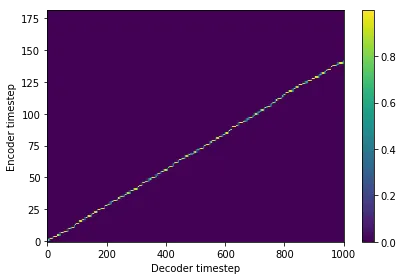
4. 合成频谱
提取到了参考语音的特征向量之后,给定需要合成的文本,通过 Tacotron2 模型生成频谱。
目前只支持汉字以及两个表示停顿的特殊符号,’%‘表示句中较短的停顿,’$'表示较长的停顿。这是和 AISHELL-3 数据集内的标注一致的。更通用的文本前端会在 parakeet 后续的版本中逐渐提供。
with paddle.no_grad():
    outputs = synthesizer.infer(phones, tones=tones, global_condition=utterance_embeds)
mel_input = paddle.transpose(outputs["mel_outputs_postnet"], [0, 2, 1])
fig = display.plot_alignment(outputs["alignments"][0].numpy().T)
os.system('mkdir -p /home/aistudio/syn_audio/')
with paddle.no_grad():
    wav = vocoder.infer(mel_input)
wav = wav.numpy()[0]
sf.write(f"/home/aistudio/syn_audio/generate.wav", wav, samplerate=22050)
# librosa.display.waveplot(wav)
 98%|█████████▊| 984/1000 [00:02<00:00, 332.07it/s]
Warning! Reached max decoder steps!!!
time: 1.586832046508789s
/opt/conda/envs/python35-paddle120-env/lib/python3.7/site-packages/matplotlib/image.py:425: DeprecationWarning: np.asscalar(a) is deprecated since NumPy v1.16, use a.item() instead
  a_min = np.asscalar(a_min.astype(scaled_dtype))
/opt/conda/envs/python35-paddle120-env/lib/python3.7/site-packages/matplotlib/image.py:426: DeprecationWarning: np.asscalar(a) is deprecated since NumPy v1.16, use a.item() instead
  a_max = np.asscalar(a_max.astype(scaled_dtype))
5. 合成最终语音
使用 waveflow 声码器,将生成的频谱转换为音频。
# 查看生成语音
ipd.Audio(wav, rate=22050)
图片与视频处理
1、环境生成与包的导入
# 当前目录在: /home/aistudio/, 这个目录也是左边文件和文件夹所在的目录
# 克隆最新的PaddleGAN仓库到当前目录
# !git clone https://github.com/PaddlePaddle/PaddleGAN.git
# 如果从github下载慢可以从gitee clone:
!git clone https://gitee.com/paddlepaddle/PaddleGAN.git
%cd /home/aistudio/PaddleGAN/
!pip install -v -e .
#安装PaddleGAN的pip包,即可使用api预测方式
!pip install --upgrade ppgan
!pip install dlib
2、头像处理
#生成动画头像
from ppgan.apps import Photo2CartoonPredictor
%cd /home/aistudio
p2c = Photo2CartoonPredictor(output_path='/home/aistudio/result/')
p2c.run(photo_patch)
/home/aistudio
Cartoon image has been saved at '/home/aistudio/result/p2c_cartoon.png'.
array([[[255, 255, 255],
        [255, 255, 255],
        [255, 255, 255],
        ...,
        [255, 255, 255],
        [255, 255, 255],
        [255, 255, 255]],
       [[255, 255, 255],
        [255, 255, 255],
        [255, 255, 255],
        ...,
        [255, 255, 255],
        [255, 255, 255],
        [255, 255, 255]],
       [[255, 255, 255],
        [255, 255, 255],
        [255, 255, 255],
        ...,
        [255, 255, 255],
        [255, 255, 255],
        [255, 255, 255]],
       ...,
       [[255, 255, 255],
        [255, 255, 255],
        [255, 255, 255],
        ...,
        [255, 255, 255],
        [255, 255, 255],
        [255, 255, 255]],
       [[255, 255, 255],
        [255, 255, 255],
        [255, 255, 255],
        ...,
        [255, 255, 255],
        [255, 255, 255],
        [255, 255, 255]],
       [[255, 255, 255],
        [255, 255, 255],
        [255, 255, 255],
        ...,
        [255, 255, 255],
        [255, 255, 255],
        [255, 255, 255]]], dtype=uint8)
!!!要用自己头像的同学注意!!!!!
下面的代码修改成
!export PYTHONPATH=$PYTHONPATH:/home/aistudio/PaddleGAN && python -u tools/first-order-de
#使用命令
#具体的各参数使用说明如下
#- driving_video: 驱动视频,视频中人物的表情动作作为待迁移的对象
#- source_image: 原始图片,视频中人物的表情动作将迁移到该原始图片中的人物上
#- relative: 指示程序中使用视频和图片中人物关键点的相对坐标还是绝对坐标,建议使用相对坐标,若使用绝对坐标,会导致迁移后人物扭曲变形
#- adapt_scale: 根据关键点凸包自适应运动尺度
%cd /home/aistudio/PaddleGAN/applications/
!export PYTHONPATH=$PYTHONPATH:/home/aistudio/PaddleGAN && python -u tools/first-order-demo.py  --driving_video ~/2.MOV  --source_image /home/aistudio/result/p2c_cartoon.png --relative --adapt_scale --output  ~/work
/home/aistudio/PaddleGAN/applications
[01/23 22:30:03] ppgan INFO: Found /home/aistudio/.cache/ppgan/vox-cpk.pdparams
W0123 22:30:03.200150  2496 device_context.cc:447] Please NOTE: device: 0, GPU Compute Capability: 7.0, Driver API Version: 10.1, Runtime API Version: 10.1
W0123 22:30:03.205381  2496 device_context.cc:465] device: 0, cuDNN Version: 7.6.
/opt/conda/envs/python35-paddle120-env/lib/python3.7/site-packages/paddle/tensor/creation.py:130: DeprecationWarning: `np.object` is a deprecated alias for the builtin `object`. To silence this warning, use `object` by itself. Doing this will not modify any behavior and is safe.
Deprecated in NumPy 1.20; for more details and guidance: https://numpy.org/devdocs/release/1.20.0-notes.html#deprecations
  if data.dtype == np.object:
100%|████████████████████████████████| 109119/109119 [00:03<00:00, 33939.25it/s]
1 persons have been detected
100%|█████████████████████████████████████████| 251/251 [00:08<00:00, 30.01it/s]
3、唇语合成
#使用命令行进行预测
#face: 原始视频,视频中的人物的唇形将根据音频进行唇形合成--通俗来说,想让谁说话
#audio:驱动唇形合成的音频,视频中的人物将根据此音频进行唇形合成--通俗来说,想让这个人说什么
%cd /home/aistudio/PaddleGAN/applications
!export PYTHONPATH=$PYTHONPATH:/home/aistudio/work/PaddleGAN && python tools/wav2lip.py --face /home/aistudio/work/result.mp4 --audio /home/aistudio/syn_audio/generate.wav --outfile /home/aistudio/result/target.mp4
/home/aistudio/PaddleGAN/applications
Reading video frames...
Number of frames available for inference: 251
/opt/conda/envs/python35-paddle120-env/lib/python3.7/site-packages/librosa/core/constantq.py:1059: DeprecationWarning: `np.complex` is a deprecated alias for the builtin `complex`. To silence this warning, use `complex` by itself. Doing this will not modify any behavior and is safe. If you specifically wanted the numpy scalar type, use `np.complex128` here.
Deprecated in NumPy 1.20; for more details and guidance: https://numpy.org/devdocs/release/1.20.0-notes.html#deprecations
  dtype=np.complex,
/opt/conda/envs/python35-paddle120-env/lib/python3.7/site-packages/librosa/util/utils.py:2099: DeprecationWarning: `np.float` is a deprecated alias for the builtin `float`. To silence this warning, use `float` by itself. Doing this will not modify any behavior and is safe. If you specifically wanted the numpy scalar type, use `np.float64` here.
Deprecated in NumPy 1.20; for more details and guidance: https://numpy.org/devdocs/release/1.20.0-notes.html#deprecations
  np.dtype(np.float): np.complex,
/opt/conda/envs/python35-paddle120-env/lib/python3.7/site-packages/librosa/util/utils.py:2099: DeprecationWarning: `np.complex` is a deprecated alias for the builtin `complex`. To silence this warning, use `complex` by itself. Doing this will not modify any behavior and is safe. If you specifically wanted the numpy scalar type, use `np.complex128` here.
Deprecated in NumPy 1.20; for more details and guidance: https://numpy.org/devdocs/release/1.20.0-notes.html#deprecations
  np.dtype(np.float): np.complex,
Length of mel chunks: 344
W0123 22:40:21.509095  3459 device_context.cc:447] Please NOTE: device: 0, GPU Compute Capability: 7.0, Driver API Version: 10.1, Runtime API Version: 10.1
W0123 22:40:21.513870  3459 device_context.cc:465] device: 0, cuDNN Version: 7.6.
Model loaded
  0%|                                                     | 0/3 [00:00<?, ?it/s]
  0%|                                                    | 0/16 [00:00<?, ?it/s][A/opt/conda/envs/python35-paddle120-env/lib/python3.7/site-packages/paddle/tensor/creation.py:130: DeprecationWarning: `np.object` is a deprecated alias for the builtin `object`. To silence this warning, use `object` by itself. Doing this will not modify any behavior and is safe.
Deprecated in NumPy 1.20; for more details and guidance: https://numpy.org/devdocs/release/1.20.0-notes.html#deprecations
  if data.dtype == np.object:
  6%|██▊                                         | 1/16 [00:00<00:05,  2.92it/s][A
 12%|█████▌                                      | 2/16 [00:00<00:04,  2.91it/s][A
 19%|████████▎                                   | 3/16 [00:01<00:04,  2.94it/s][A
 25%|███████████                                 | 4/16 [00:01<00:04,  2.96it/s][A
 31%|█████████████▊                              | 5/16 [00:01<00:03,  2.94it/s][A
 38%|████████████████▌                           | 6/16 [00:02<00:03,  2.96it/s][A
 44%|███████████████████▎                        | 7/16 [00:02<00:03,  2.88it/s][A
 50%|██████████████████████                      | 8/16 [00:02<00:02,  2.88it/s][A
 56%|████████████████████████▊                   | 9/16 [00:03<00:02,  2.90it/s][A
 62%|██████████████████████████▉                | 10/16 [00:03<00:02,  2.83it/s][A
 69%|█████████████████████████████▌             | 11/16 [00:03<00:01,  2.77it/s][A
 75%|████████████████████████████████▎          | 12/16 [00:04<00:01,  2.69it/s][A
 81%|██████████████████████████████████▉        | 13/16 [00:04<00:01,  2.64it/s][A
 88%|█████████████████████████████████████▋     | 14/16 [00:04<00:00,  2.67it/s][A
 94%|████████████████████████████████████████▎  | 15/16 [00:05<00:00,  2.70it/s][A
100%|███████████████████████████████████████████| 16/16 [00:05<00:00,  3.04it/s][A
100%|█████████████████████████████████████████████| 3/3 [00:07<00:00,  3.36s/it]
ffmpeg version 2.8.15-0ubuntu0.16.04.1 Copyright (c) 2000-2018 the FFmpeg developers
  built with gcc 5.4.0 (Ubuntu 5.4.0-6ubuntu1~16.04.10) 20160609
  configuration: --prefix=/usr --extra-version=0ubuntu0.16.04.1 --build-suffix=-ffmpeg --toolchain=hardened --libdir=/usr/lib/x86_64-linux-gnu --incdir=/usr/include/x86_64-linux-gnu --cc=cc --cxx=g++ --enable-gpl --enable-shared --disable-stripping --disable-decoder=libopenjpeg --disable-decoder=libschroedinger --enable-avresample --enable-avisynth --enable-gnutls --enable-ladspa --enable-libass --enable-libbluray --enable-libbs2b --enable-libcaca --enable-libcdio --enable-libflite --enable-libfontconfig --enable-libfreetype --enable-libfribidi --enable-libgme --enable-libgsm --enable-libmodplug --enable-libmp3lame --enable-libopenjpeg --enable-libopus --enable-libpulse --enable-librtmp --enable-libschroedinger --enable-libshine --enable-libsnappy --enable-libsoxr --enable-libspeex --enable-libssh --enable-libtheora --enable-libtwolame --enable-libvorbis --enable-libvpx --enable-libwavpack --enable-libwebp --enable-libx265 --enable-libxvid --enable-libzvbi --enable-openal --enable-opengl --enable-x11grab --enable-libdc1394 --enable-libiec61883 --enable-libzmq --enable-frei0r --enable-libx264 --enable-libopencv
  libavutil      54. 31.100 / 54. 31.100
  libavcodec     56. 60.100 / 56. 60.100
  libavformat    56. 40.101 / 56. 40.101
  libavdevice    56.  4.100 / 56.  4.100
  libavfilter     5. 40.101 /  5. 40.101
  libavresample   2.  1.  0 /  2.  1.  0
  libswscale      3.  1.101 /  3.  1.101
  libswresample   1.  2.101 /  1.  2.101
  libpostproc    53.  3.100 / 53.  3.100
[0;33mGuessed Channel Layout for  Input Stream #0.0 : mono
[0mInput #0, wav, from '/home/aistudio/syn_audio/generate.wav':
  Duration: 00:00:11.60, bitrate: 352 kb/s
    Stream #0:0: Audio: pcm_s16le ([1][0][0][0] / 0x0001), 22050 Hz, 1 channels, s16, 352 kb/s
Input #1, avi, from 'temp/result.avi':
  Metadata:
    encoder         : Lavf58.31.101
  Duration: 00:00:11.47, start: 0.000000, bitrate: 522 kb/s
    Stream #1:0: Video: mpeg4 (Simple Profile) (DIVX / 0x58564944), yuv420p, 256x256 [SAR 1:1 DAR 1:1], 514 kb/s, 30 fps, 30 tbr, 30 tbn, 30 tbc
[1;36m[libx264 @ 0x128e080] [0m[0;33m-qscale is ignored, -crf is recommended.
[0m[1;36m[libx264 @ 0x128e080] [0musing SAR=1/1
[1;36m[libx264 @ 0x128e080] [0musing cpu capabilities: MMX2 SSE2Fast SSSE3 SSE4.2 AVX FMA3 AVX2 LZCNT BMI2
[1;36m[libx264 @ 0x128e080] [0mprofile High, level 1.3
[1;36m[libx264 @ 0x128e080] [0m264 - core 148 r2643 5c65704 - H.264/MPEG-4 AVC codec - Copyleft 2003-2015 - http://www.videolan.org/x264.html - options: cabac=1 ref=3 deblock=1:0:0 analyse=0x3:0x113 me=hex subme=7 psy=1 psy_rd=1.00:0.00 mixed_ref=1 me_range=16 chroma_me=1 trellis=1 8x8dct=1 cqm=0 deadzone=21,11 fast_pskip=1 chroma_qp_offset=-2 threads=8 lookahead_threads=1 sliced_threads=0 nr=0 decimate=1 interlaced=0 bluray_compat=0 constrained_intra=0 bframes=3 b_pyramid=2 b_adapt=1 b_bias=0 direct=1 weightb=1 open_gop=0 weightp=2 keyint=250 keyint_min=25 scenecut=40 intra_refresh=0 rc_lookahead=40 rc=crf mbtree=1 crf=23.0 qcomp=0.60 qpmin=0 qpmax=69 qpstep=4 ip_ratio=1.40 aq=1:1.00
4、清晰化视频!
#对成品视频再次进行超分,这次选用的是针对视频超分的EDVR模型
%cd /home/aistudio/PaddleGAN/applications/
!python tools/video-enhance.py --input /home/aistudio/result/target.mp4 \
                               --process_order EDVR \
                               --output output_dir
/home/aistudio/PaddleGAN/applications
Model EDVR process start..
W0123 22:40:49.740236  3580 device_context.cc:447] Please NOTE: device: 0, GPU Compute Capability: 7.0, Driver API Version: 10.1, Runtime API Version: 10.1
W0123 22:40:49.745282  3580 device_context.cc:465] device: 0, cuDNN Version: 7.6.
[01/23 22:40:54] ppgan INFO: Found /home/aistudio/.cache/ppgan/EDVR_L_w_tsa_SRx4.pdparams
100%|█████████████████████████████████████████| 345/345 [01:52<00:00,  3.09it/s]
Model EDVR output frames path: output_dir/EDVR/target/frames_pred/%08d.png
Model EDVR output video path: output_dir/EDVR/target_edvr_out.mp4
Model EDVR process done!
#给视频配上音乐
!ffmpeg -y -i /home/aistudio/syn_audio/generate.wav -i /home/aistudio/PaddleGAN/applications/output_dir/EDVR/target_edvr_out.mp4 -strict -2 -q:v 1 /home/aistudio/new_target.mp4
操作指南及疑难解答
使用指南:
对应的输入自定义模块的数据即可,推荐地址使用绝对路径(GAN里面会改变路径有些时候会出错)
最后的结果会出现在主目录中,文件名为new_target.mp4
疑难解答:
1、已经跑完一遍了,想要换一个音色,但是报错了!!!
解决方案:在数据处理下面添加一个Code里面写入
%cd /home/aistudio/
2、图像处理部分报错,没有识别到头像
更换您的头像,有可能是代码累了无法识别
3、dlib库无法加载
使用至尊版进行读取
4、语音只有11s左右
这个是由于准备的音频只有这么长,但是希望给智能小哥哥小姐姐一个休息的时间,一口气太长了,让他们喘口气吧~~~
数据文件地址
生成音频:/syn_audio/generate.wav
裁剪头像:/esult/p2c_photo.png
漫画风头像:result/p2c_cartoon.png
合成视频:result/target.mp4
超分后视频:new_target.mp4
传说中的飞桨社区最菜代码人,让我们一起努力!
记住:三岁出品必是精品 (不要脸系列)