前言:
学习一个新平台首先当然是能够有这么一个平台了,而kubernetes的部署安装无疑是提高了这一学习的门槛,不管是二进制安装还是kubeadm安装都还是需要比较多的运维技巧的,并且在搭建学习的时候,需要的硬件资源也是比较多的,至少都需要三台或者三台以上的服务器才能够完成部署安装。
那么,kind或者minikube这样的工具就是一个能够快速的搭建出学习平台的工具,特点是简单,易用,一台服务器的资源就可以搞定了(只是单机需要的内存大一些,建议至少8G内存吧),自动化程度高,基本什么都给你设置好了,并且支持多种虚拟化引擎,比如,docker,container,kvm这些常用的虚拟化引擎都支持。缺点是基本没有定制化。
minikube支持的虚拟化引擎:
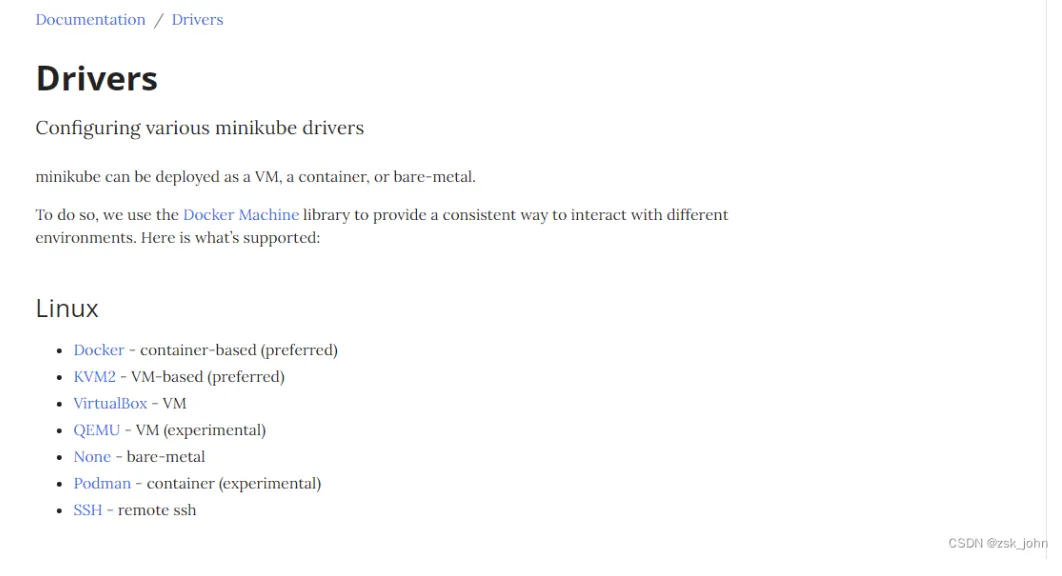
好了,本教程大部分资料都是从官网的docs里扒的,docs的网址是:Welcome! | minikube
相关安装部署文件(conntrack.tar.gz解压后,rpm -ivh * 安装就可以了,是相关依赖,minikube-images.tar.gz是镜像包,解压后倒入docker,三个可执行文件放入/root/.minikube/cache/linux/amd64/v1.18.8/目录下即可。):
链接:https://pan.baidu.com/s/14-r59VfpZRpfiVGj4IadxA?pwd=k8ss
提取码:k8ss
一,get started minikube(开始部署minkube)
安装部署前的先决条件:
至少两个CPU,2G内存,20G空余磁盘空间,可访问互联网,有一个虚拟化引擎, Docker, Hyperkit, Hyper-V, KVM, Parallels, Podman, VirtualBox, or VMware Fusion/Workstation其中的一个,那么,docker是比较容易安装的,就不说了,docker吧,操作系统是centos。
What you’ll need
2 CPUs or more
2GB of free memory
20GB of free disk space
Internet connection
Container or virtual machine manager, such as: Docker, Hyperkit, Hyper-V, KVM, Parallels, Podman, VirtualBox, or VMware Fusion/Workstation
docker的离线安装以及本地化配置_zsk_john的博客-CSDN博客离线安装docker环境的博文,照此做就可以了,请确保docker环境是安装好的。
docker版本至少是18.09到20.10
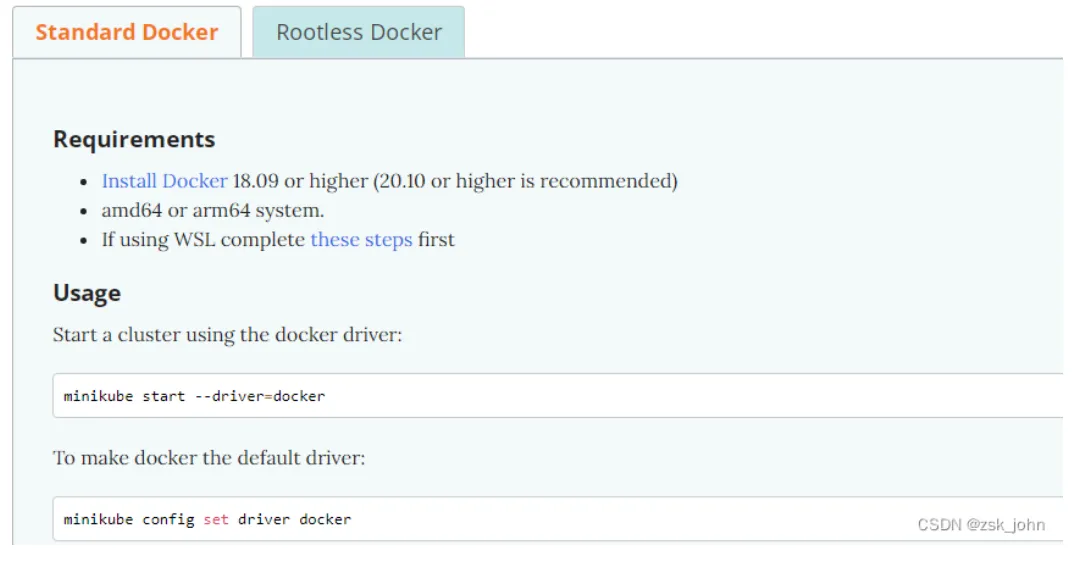
二,开始安装
下载minikube的执行程序
curl -LO https://storage.googleapis.com/minikube/releases/latest/minikube-linux-amd64
sudo install minikube-linux-amd64 /usr/local/bin/minikube
三,导入镜像
由于minikube在安装kubernetes的时候使用的镜像是从外网拉取的,国内由于被墙是无法拉取的,因此,制作了这个离线镜像包。
[root@slave3 ~]# tar zxf minikube-images.tar.gz
[root@slave3 ~]# cd minikube-images
[root@slave3 minikube-images]# for i in `ls ./*`;do docker load <$i;done
dfccba63d0cc: Loading layer [==================================================>]  80.82MB/80.82MB
Loaded image: gcr.io/k8s-minikube/storage-provisioner:v1.8.1
225df95e717c: Loading layer [==================================================>]  336.4kB/336.4kB
c965b38a6629: Loading layer [==================================================>]  43.58MB/43.58MB
。。。。。。。。。。。。。。。。。。。。。。。。。。。。。。。。略略略
四,初始化kubernetes集群的命令:
这里大概介绍一下,image-repostory是使用阿里云下载镜像,cni是指定网络插件就用flannel,如果不想用这个删掉这行就可以了,其它没什么要注意的。
minikube config set driver none
minikube start pod-network-cidr='10.244.0.0/16'\
    --extra-config=kubelet.pod-cidr=10.244.0.0/16 \
    --network-plugin=cni \
    --image-repository='registry.aliyuncs.com/google_containers' \
    --cni=flannel \
    --apiserver-ips=192.168.217.23 \
    --kubernetes-version=1.18.8 \
    --vm-driver=none
启动集群的日志
[root@slave3 conntrack]# minikube start --driver=none --kubernetes-version=1.18.8
* minikube v1.26.1 on Centos 7.4.1708
* Using the none driver based on user configuration
* Starting control plane node minikube in cluster minikube
* Running on localhost (CPUs=4, Memory=7983MB, Disk=51175MB) ...
* OS release is CentOS Linux 7 (Core)
E0911 11:23:25.121495   14039 docker.go:148] "Failed to enable" err=<
  sudo systemctl enable docker.socket: exit status 1
  stdout:
  stderr:
  Failed to execute operation: No such file or directory
 > service="docker.socket"
! This bare metal machine is having trouble accessing https://k8s.gcr.io
* To pull new external images, you may need to configure a proxy: https://minikube.sigs.k8s.io/docs/reference/networking/proxy/
    > kubectl.sha256:  65 B / 65 B [-------------------------] 100.00% ? p/s 0s
    > kubelet:  108.05 MiB / 108.05 MiB [--------] 100.00% 639.49 KiB p/s 2m53s
  - Generating certificates and keys ...
  - Booting up control plane ...
! initialization failed, will try again: wait: /bin/bash -c "sudo env PATH="/var/lib/minikube/binaries/v1.18.8:$PATH" kubeadm init --config /var/tmp/minikube/kubeadm.yaml  --ignore-preflight-errors=DirAvailable--etc-kubernetes-manifests,DirAvailable--var-lib-minikube,DirAvailable--var-lib-minikube-etcd,FileAvailable--etc-kubernetes-manifests-kube-scheduler.yaml,FileAvailable--etc-kubernetes-manifests-kube-apiserver.yaml,FileAvailable--etc-kubernetes-manifests-kube-controller-manager.yaml,FileAvailable--etc-kubernetes-manifests-etcd.yaml,Port-10250,Swap": exit status 1
stdout:
[init] Using Kubernetes version: v1.18.8
[preflight] Running pre-flight checks
[preflight] Pulling images required for setting up a Kubernetes cluster
[preflight] This might take a minute or two, depending on the speed of your internet connection
[preflight] You can also perform this action in beforehand using 'kubeadm config images pull'
[kubelet-start] Writing kubelet environment file with flags to file "/var/lib/kubelet/kubeadm-flags.env"
[kubelet-start] Writing kubelet configuration to file "/var/lib/kubelet/config.yaml"
[kubelet-start] Starting the kubelet
[certs] Using certificateDir folder "/var/lib/minikube/certs"
[certs] Using existing ca certificate authority
[certs] Using existing apiserver certificate and key on disk
[certs] Generating "apiserver-kubelet-client" certificate and key
[certs] Generating "front-proxy-ca" certificate and key
[certs] Generating "front-proxy-client" certificate and key
[certs] Generating "etcd/ca" certificate and key
[certs] Generating "etcd/server" certificate and key
[certs] etcd/server serving cert is signed for DNS names [slave3 localhost] and IPs [192.168.217.136 127.0.0.1 ::1]
[certs] Generating "etcd/peer" certificate and key
[certs] etcd/peer serving cert is signed for DNS names [slave3 localhost] and IPs [192.168.217.136 127.0.0.1 ::1]
[certs] Generating "etcd/healthcheck-client" certificate and key
[certs] Generating "apiserver-etcd-client" certificate and key
[certs] Generating "sa" key and public key
[kubeconfig] Using kubeconfig folder "/etc/kubernetes"
[kubeconfig] Writing "admin.conf" kubeconfig file
[kubeconfig] Writing "kubelet.conf" kubeconfig file
[kubeconfig] Writing "controller-manager.conf" kubeconfig file
[kubeconfig] Writing "scheduler.conf" kubeconfig file
[control-plane] Using manifest folder "/etc/kubernetes/manifests"
[control-plane] Creating static Pod manifest for "kube-apiserver"
[control-plane] Creating static Pod manifest for "kube-controller-manager"
[control-plane] Creating static Pod manifest for "kube-scheduler"
[etcd] Creating static Pod manifest for local etcd in "/etc/kubernetes/manifests"
[wait-control-plane] Waiting for the kubelet to boot up the control plane as static Pods from directory "/etc/kubernetes/manifests". This can take up to 4m0s
[kubelet-check] Initial timeout of 40s passed.
[kubelet-check] It seems like the kubelet isn't running or healthy.
[kubelet-check] The HTTP call equal to 'curl -sSL http://localhost:10248/healthz' failed with error: Get http://localhost:10248/healthz: dial tcp [::1]:10248: connect: connection refused.
[kubelet-check] It seems like the kubelet isn't running or healthy.
[kubelet-check] The HTTP call equal to 'curl -sSL http://localhost:10248/healthz' failed with error: Get http://localhost:10248/healthz: dial tcp [::1]:10248: connect: connection refused.
[kubelet-check] It seems like the kubelet isn't running or healthy.
[kubelet-check] The HTTP call equal to 'curl -sSL http://localhost:10248/healthz' failed with error: Get http://localhost:10248/healthz: dial tcp [::1]:10248: connect: connection refused.
[kubelet-check] It seems like the kubelet isn't running or healthy.
[kubelet-check] The HTTP call equal to 'curl -sSL http://localhost:10248/healthz' failed with error: Get http://localhost:10248/healthz: dial tcp [::1]:10248: connect: connection refused.
[kubelet-check] It seems like the kubelet isn't running or healthy.
[kubelet-check] The HTTP call equal to 'curl -sSL http://localhost:10248/healthz' failed with error: Get http://localhost:10248/healthz: dial tcp [::1]:10248: connect: connection refused.
  Unfortunately, an error has occurred:
    timed out waiting for the condition
  This error is likely caused by:
    - The kubelet is not running
    - The kubelet is unhealthy due to a misconfiguration of the node in some way (required cgroups disabled)
  If you are on a systemd-powered system, you can try to troubleshoot the error with the following commands:
    - 'systemctl status kubelet'
    - 'journalctl -xeu kubelet'
  Additionally, a control plane component may have crashed or exited when started by the container runtime.
  To troubleshoot, list all containers using your preferred container runtimes CLI.
  Here is one example how you may list all Kubernetes containers running in docker:
    - 'docker ps -a | grep kube | grep -v pause'
    Once you have found the failing container, you can inspect its logs with:
    - 'docker logs CONTAINERID'
stderr:
W0911 11:26:38.783101   14450 configset.go:202] WARNING: kubeadm cannot validate component configs for API groups [kubelet.config.k8s.io kubeproxy.config.k8s.io]
  [WARNING IsDockerSystemdCheck]: detected "cgroupfs" as the Docker cgroup driver. The recommended driver is "systemd". Please follow the guide at https://kubernetes.io/docs/setup/cri/
  [WARNING Swap]: running with swap on is not supported. Please disable swap
  [WARNING FileExisting-socat]: socat not found in system path
  [WARNING Service-Kubelet]: kubelet service is not enabled, please run 'systemctl enable kubelet.service'
W0911 11:26:48.464749   14450 manifests.go:225] the default kube-apiserver authorization-mode is "Node,RBAC"; using "Node,RBAC"
W0911 11:26:48.466754   14450 manifests.go:225] the default kube-apiserver authorization-mode is "Node,RBAC"; using "Node,RBAC"
error execution phase wait-control-plane: couldn't initialize a Kubernetes cluster
To see the stack trace of this error execute with --v=5 or higher
  - Generating certificates and keys ...
  - Booting up control plane ...
  - Configuring RBAC rules ...
* Configuring local host environment ...
*
! The 'none' driver is designed for experts who need to integrate with an existing VM
* Most users should use the newer 'docker' driver instead, which does not require root!
* For more information, see: https://minikube.sigs.k8s.io/docs/reference/drivers/none/
*
! kubectl and minikube configuration will be stored in /root
! To use kubectl or minikube commands as your own user, you may need to relocate them. For example, to overwrite your own settings, run:
*
  - sudo mv /root/.kube /root/.minikube $HOME
  - sudo chown -R $USER $HOME/.kube $HOME/.minikube
*
* This can also be done automatically by setting the env var CHANGE_MINIKUBE_NONE_USER=true
* Verifying Kubernetes components...
  - Using image gcr.io/k8s-minikube/storage-provisioner:v5
* Enabled addons: storage-provisioner, default-storageclass
* Done! kubectl is now configured to use "minikube" cluster and "default" namespace by default
minikube的停止和删除:
如果这个集群想停止的话,那么命令就非常简单了:
minkube stop
输出如下;
* Stopping "minikube" in none ...
* Node "minikube" stopped.
如果重启了服务器,那么,只需要参数换成start就可以再次启动minikube了。删除minkube也非常简单,参数换成 delete即可,这个删除会将配置文件什么的都给删除掉,前提这些文件是minikube自己建立的,否则不会删除。
start的输出:
[root@node3 manifests]# minikube start
* minikube v1.12.0 on Centos 7.4.1708
* Using the none driver based on existing profile
* Starting control plane node minikube in cluster minikube
* Restarting existing none bare metal machine for "minikube" ...
* OS release is CentOS Linux 7 (Core)
* Preparing Kubernetes v1.18.8 on Docker 19.03.9 ...
* Configuring local host environment ...
*
! The 'none' driver is designed for experts who need to integrate with an existing VM
* Most users should use the newer 'docker' driver instead, which does not require root!
* For more information, see: https://minikube.sigs.k8s.io/docs/reference/drivers/none/
*
! kubectl and minikube configuration will be stored in /root
! To use kubectl or minikube commands as your own user, you may need to relocate them. For example, to overwrite your own settings, run:
*
  - sudo mv /root/.kube /root/.minikube $HOME
  - sudo chown -R $USER $HOME/.kube $HOME/.minikube
*
* This can also be done automatically by setting the env var CHANGE_MINIKUBE_NONE_USER=true
* Verifying Kubernetes components...
* Enabled addons: default-storageclass, storage-provisioner
* Done! kubectl is now configured to use "minikube"
以上的输出表明kubernetes单节点集群已经安装成功了,但有一些警告需要处理: