文章目录
一、BitmapRegionDecoder 简介
二、图片信息
三、BitmapRegionDecoder 对象创建
四、解码图像
五、图像区域解码示例
六、源码及资源下载
一、BitmapRegionDecoder 简介
官方文档 API : BitmapRegionDecoder
BitmapRegionDecoder 简介 :
① 主要作用 : BitmapRegionDecoder 可以从图像中 解码一个矩形区域 ;
② 适用场景 : 当一张图片非常大 , 在手机中只需要显示其中一部分内容 , BitmapRegionDecoder 非常有用 ;
③ 基本使用流程 : 先创建 , 后解码 ;
流程 1 : 创建 BitmapRegionDecoder : 调用 newInstance 方法 , 创建 BitmapRegionDecoder 对象 ;
// 创建 BitmapRegionDecoder 对象方法
static BitmapRegionDecoder newInstance(InputStream is, boolean isShareable)
static BitmapRegionDecoder newInstance(FileDescriptor fd, boolean isShareable)
static BitmapRegionDecoder newInstance(String pathName, boolean isShareable)
static BitmapRegionDecoder newInstance(byte[] data, int offset, int length, boolean isShareable)
流程 2 : 解码图像区域内容 : 调用 decodeRegion 方法 , 获取指定 Rect 矩形区域的解码后的 Bitmap 对象 ;
Bitmap decodeRegion(Rect rect, BitmapFactory.Options options)
二、图片信息
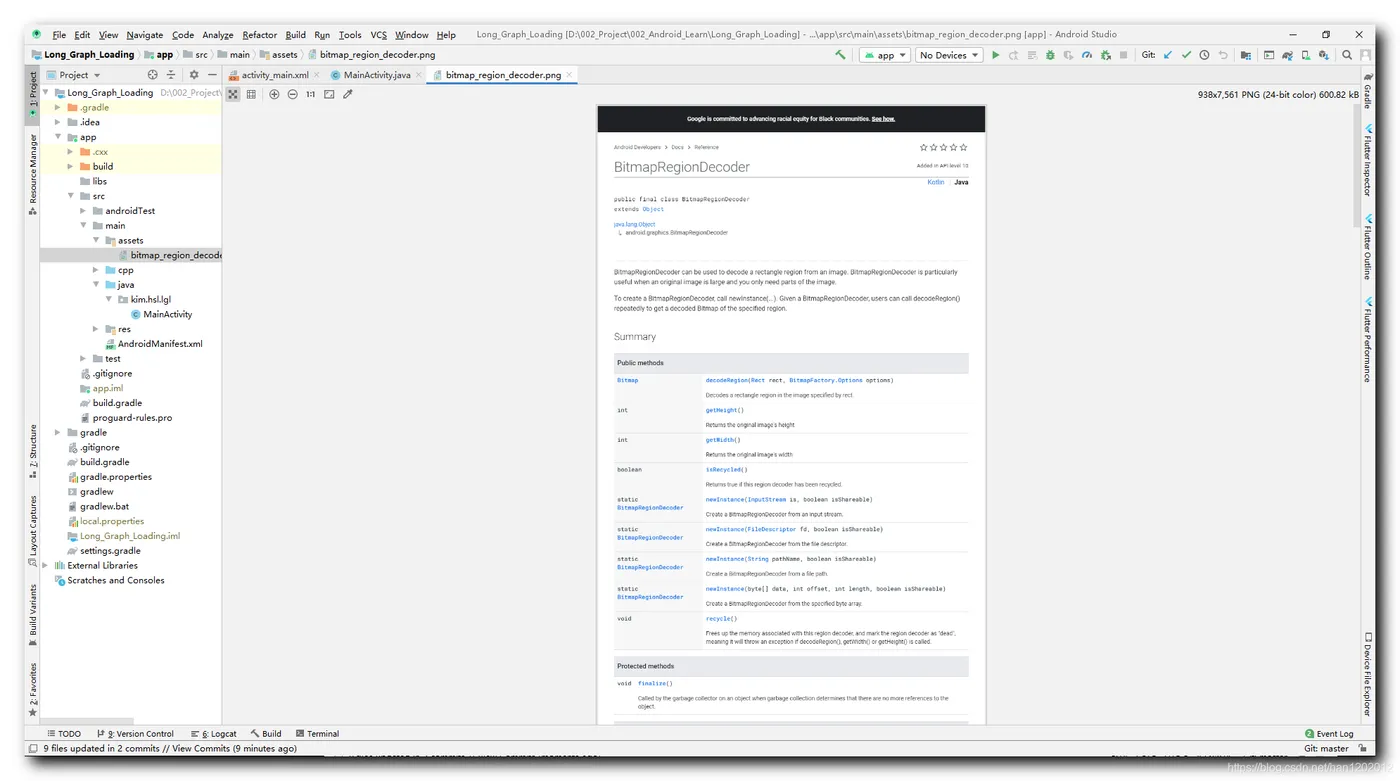
将一张图片存放在 assets 目录下 , 图片尺寸为 938 x 7561 , 这是 BitmapRegionDecoder 的文档截图 ;
该图片如果按照默认的 ARGB_8888 格式加载到内存中 , 会占用 28,368,872 字节的内存 , 大约 27 MB ;
内存大小计算过程如下 :
938 × 7561 × 4 = 28 , 368 , 872 938 \times 7561 \times 4 = 28,368,872
938×7561×4=28,368,872
三、BitmapRegionDecoder 对象创建
1 . BitmapRegionDecoder 对象创建 : 调用 newInstance 方法创建该对象 ;
① 函数作用 : 根据输入流创建 BitmapRegionDecoder 对象 ;
② 输入流的数据位置 : 输入流的当前读取位置就是在之前读取的的解码数据的后面一个字节位置 ;
③ 支持的图像格式 : 目前图像区域解码对象只支持 JPEG 和 PNG 两种图像格式 ;
2 . 函数原型 :
InputStream is 参数 : 图片的输入流 ;
boolean isShareable 参数 : 是否共享输入流 ; 如果设置了共享为 true , 如果将该输入流关闭 , 假如 BitmapRegionDecoder 对象中也在使用该输入流 , 那么关闭以后 , BitmapRegionDecoder 对象也无法使用该输入流了 ; 如果设置该参数为 false , 那么关闭该输入流 , 不影响 BitmapRegionDecoder 对象使用 , 一般都是该区域解码对象需要长时间使用 , 此处都要设置成 false ;
public static BitmapRegionDecoder newInstance(InputStream is,
            boolean isShareable) throws IOException {
        // 当前的输入流是 AssetInputStream 输入流的情况
        if (is instanceof AssetManager.AssetInputStream) {
            return nativeNewInstance(
                    ((AssetManager.AssetInputStream) is).getNativeAsset(),
                    isShareable);
        } else {
          // 当前的输入流是文件输入流
          // 传入临时缓存到 Native 代码中 ;
          // 创建一个足够大的临时缓存区 , 这样可以减少 is.read 方法的回调次数 ;
          // 应该避免 is.read 回调次数太多 , 同时每次读取很少数据的情况 ;
            byte [] tempStorage = new byte[16 * 1024];
            return nativeNewInstance(is, tempStorage, isShareable);
        }
    }
四、解码图像
函数原型 : 解码 JPEG 或 PNG 中指定的矩形区域 ;
Rect rect 参数 : 要解码的矩形区域 ;
BitmapFactory.Options options 参数 : 解码选项 ;
public Bitmap decodeRegion(Rect rect, BitmapFactory.Options options)
1
五、图像区域解码示例
1 . 主界面代码 : 先创建 BitmapRegionDecoder 对象 , 然后调用该对象的 decodeRegion 方法 , 进行图像剪切 ;
package kim.hsl.lgl;
import android.graphics.Bitmap;
import android.graphics.BitmapRegionDecoder;
import android.graphics.Rect;
import android.os.Bundle;
import android.widget.ImageView;
import android.widget.TextView;
import androidx.appcompat.app.AppCompatActivity;
import java.io.IOException;
import java.io.InputStream;
public class MainActivity extends AppCompatActivity {
    static {
        System.loadLibrary("native-lib");
    }
    @Override
    protected void onCreate(Bundle savedInstanceState) {
        super.onCreate(savedInstanceState);
        setContentView(R.layout.activity_main);
        TextView tv = findViewById(R.id.sample_text);
        tv.setText(stringFromJNI());
        // 显示剪切后的正方形图像
        showImage();
    }
    private void showImage(){
        InputStream inputStream = null;
        try {
            // 获取 Assets 文件的输入流
            inputStream = getAssets().open("bitmap_region_decoder.png");
            /*
                函数原型 :
                public static BitmapRegionDecoder newInstance(InputStream is,
                    boolean isShareable) throws IOException {
                InputStream is 参数 : 图片的输入流
                boolean isShareable 参数 : 是否共享输入流
                如果设置了共享为 true , 如果将该输入流关闭 ,
                假如 BitmapRegionDecoder 对象中也在使用该输入流 ,
                那么关闭以后 , BitmapRegionDecoder 对象也无法使用该输入流了 ;
                如果设置该参数为 false , 那么关闭该输入流 , 不影响 BitmapRegionDecoder 对象使用 ,
                一般都是该区域解码对象需要长时间使用 , 此处都要设置成 false ;
             */
            BitmapRegionDecoder bitmapRegionDecoder = BitmapRegionDecoder
                    .newInstance(inputStream, false);
            /*
                解码图片
                这里解析前面的一部分图片
             */
            Bitmap bitmap = bitmapRegionDecoder.decodeRegion(
                    new Rect(0, 0, 938, 938),   //解码区域
                    null);  //解码选项 BitmapFactory.Options 类型
            ImageView imageView = findViewById(R.id.imageView);
            imageView.setImageBitmap(bitmap);
        } catch (IOException e) {
            e.printStackTrace();
        } finally {
            if(inputStream != null){
                try {
                    inputStream.close();
                } catch (IOException e) {
                    e.printStackTrace();
                }
            }
        }
    }
    public native String stringFromJNI();
}
2 . 布局文件 : 在布局中放置一个正方形的 ImageView , 显示剪切后的 938 x 938 大小的 Bitmap 图片 ;
<?xml version="1.0" encoding="utf-8"?>
<androidx.constraintlayout.widget.ConstraintLayout
    xmlns:android="http://schemas.android.com/apk/res/android"
    xmlns:app="http://schemas.android.com/apk/res-auto"
    xmlns:tools="http://schemas.android.com/tools"
    android:layout_width="match_parent"
    android:layout_height="match_parent"
    tools:context=".MainActivity">
    <ImageView
        android:id="@+id/imageView"
        android:layout_width="match_parent"
        android:layout_height="0dip"
        android:scaleType="fitXY"
        app:layout_constraintDimensionRatio="1:1"
        app:layout_constraintVertical_bias="0"
        app:layout_constraintBottom_toBottomOf="parent"
        app:layout_constraintLeft_toLeftOf="parent"
        app:layout_constraintRight_toRightOf="parent"
        app:layout_constraintTop_toTopOf="parent" />
    <TextView
        android:id="@+id/sample_text"
        android:layout_width="wrap_content"
        android:layout_height="wrap_content"
        android:text="Hello World!"
        app:layout_constraintBottom_toBottomOf="parent"
        app:layout_constraintLeft_toLeftOf="parent"
        app:layout_constraintRight_toRightOf="parent"
        app:layout_constraintTop_toTopOf="parent" />
</androidx.constraintlayout.widget.ConstraintLayout>
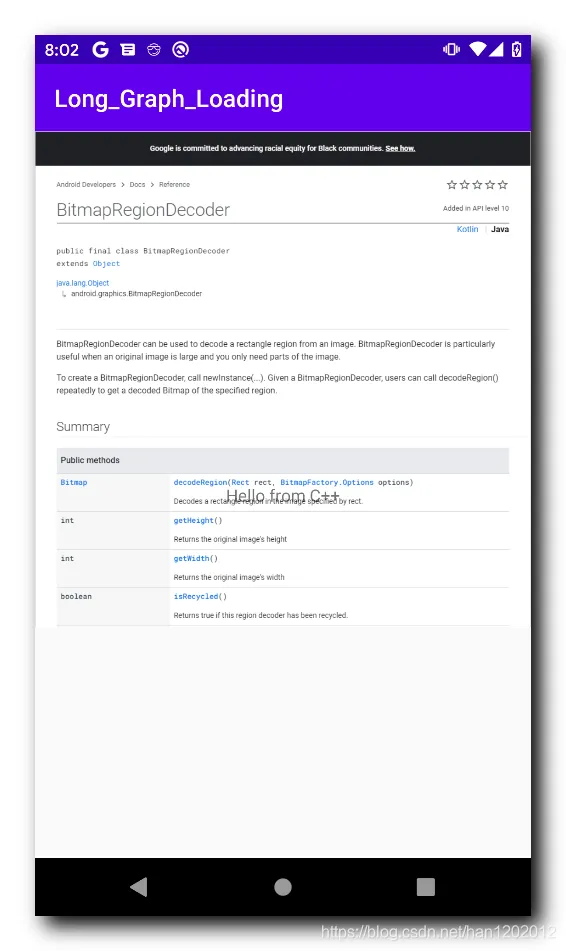
3 . 执行效果 : 正方形的 ImageView , 显示从 938 x 7561 大小的图片上剪切下来的 938 x 938 大小的图片 , 效果如下 ;
六、源码及资源下载
源码及资源下载地址 :
① GitHub 工程地址 : Long_Graph_Loading
② MainActivity.java 主界面代码地址 : MainActivity.java , 这是上述示例代码中的主界面代码 ;