案例
如下图所示,我们想通过canvas来绘制一个环形的进度条,且封装成组件,让进度条能自适应宽高包裹元素,进度条的进度依据百分比进行渲染
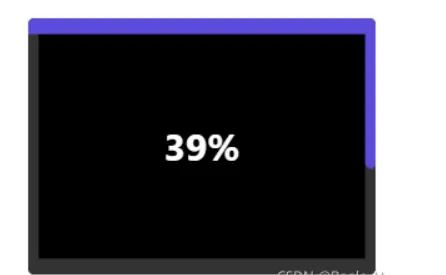
思路
- 父盒子设置相对定位
- canvas画布基于父盒子绝对定位,设置其宽高百分比为父盒子100%
- canvas画布首先绘制一个矩形边框,让其渲染出进度条底色
- 设置定时器,依据时间流速,先后绘制上边框进度条、右边框进度条、下边框进度条、左边框进度条,每个进度条所耗时间占总时间的1/4
- 进度条走完之后,清除定时器
- 进度条封装成组件,以插槽形式包裹需要包裹的元素
完整代码
进度条组件BorderProgress
importReact, { Component, createRef } from'react';
import'./BorderProgress.less';
typeStateType= {
// borderProgressDomWidth: number;// borderProgressDomHeight: number;percent: string;
  [propName: string]: any;
};
typePropType= {
time: number;
pauseProgress?: boolean;
isShowEndProgress?: boolean;
canvasId: string;
  [propName: string]: any;
};
interfaceBorderProgress {
state: StateType;
props: PropType;
borderProgressDom: any;
progressInterval: any;
}
classBorderProgressextendsComponent {
constructor(props: any) {
super(props);
this.state= {
// borderProgressDomWidth: 0,// borderProgressDomHeight: 0,percent: '0%',
    };
this.borderProgressDom=createRef();
this.progressInterval=null;
  }
componentDidMount() {
// this.setState({//   borderProgressDomWidth: this.borderProgressDom.current.offsetWidth,//   borderProgressDomHeight: this.borderProgressDom.current.offsetHeight,// })if (!this.props.isShowEndProgress) {
this.initBorderProgress();
    }
  }
componentWillUnmount() {
clearInterval(this.progressInterval);
  }
componentDidUpdate() {
if (this.props.pauseProgress===true) {
clearInterval(this.progressInterval);
    }
  }
privateinitBorderProgress= (): void=> {
letmyCanvas: any=document.getElementById(this.props.canvasId);
letctx=myCanvas.getContext("2d");
constmyCanvasWidth=myCanvas.width; // canvas画布中能准确设置像素的宽度(依据dom真实宽度设置画布像素并不准确,不能有效占满画布)constmyCanvasHeight=myCanvas.height; // canvas画布中能准确设置像素的高度(依据dom真实宽度设置画布像素并不准确,不能有效占满画布)console.log(myCanvasWidth, myCanvasHeight);
constborderWidth=10;
// 先绘制画布原始边框矩形ctx.lineWidth=borderWidth; // 设置边框的线条宽度为8个像素ctx.strokeStyle="#333"; // 设置线条颜色ctx.rect(5, 5, myCanvasWidth-borderWidth, myCanvasHeight-borderWidth); // 设置边框所在坐标,是因为线条宽度也占据了像素,所以坐标x,y设置为线条宽度的一半,且矩形宽高需要减去线条宽度,这样才能让矩形沿着画布边缘,铺满画布ctx.stroke();
this.startProgress(ctx, myCanvasWidth-borderWidth, myCanvasHeight-borderWidth, borderWidth);
  }
privatestartProgress= (ctx: any, canSetWidth: number, canSetHeight: number, borderWidth: number): void=> {
clearInterval(this.progressInterval);
lettime=this.props.time;
lettimeCount=0;
letpercent=`0%`;
lettopProgressBorderLength=0;
letrightProgressBorderLength=0;
letbottomProgressBorderLength=0;
letleftProgressBorderLength=0;
this.progressInterval=setInterval(() => {
if (topProgressBorderLength<canSetWidth) { // 如果上边框小于当前canvas画布可设置宽度// 绘制矩形进度条top边框ctx.beginPath(); // 起始一条路径ctx.lineWidth=borderWidth; // 设置边框的线条宽度为8个像素ctx.strokeStyle="#5A4CDB"; // 设置线条颜色ctx.lineCap="round"; // 向线条的每个末端添加圆形线帽topProgressBorderLength+=canSetWidth/ (time*1000/4/15);
if (topProgressBorderLength>=canSetWidth) {
topProgressBorderLength=canSetWidth;
        }
ctx.moveTo(0, borderWidth/2);
ctx.lineTo(topProgressBorderLength, borderWidth/2);
ctx.stroke();
      }
if (!(topProgressBorderLength<canSetWidth) && (rightProgressBorderLength<canSetHeight)) { // 如果上边框已经绘制完成,右边框小于当前canvas画布可设置高度// 绘制矩形进度条right边框ctx.beginPath(); // 起始一条路径ctx.lineWidth=borderWidth; // 设置边框的线条宽度为8个像素ctx.strokeStyle="#5A4CDB"; // 设置线条颜色ctx.lineCap="round"; // 向线条的每个末端添加圆形线帽rightProgressBorderLength+=canSetHeight/ (time*1000/4/15);
if (rightProgressBorderLength>=canSetHeight) {
rightProgressBorderLength=canSetHeight;
        }
ctx.moveTo(canSetWidth+(borderWidth/2), (borderWidth/2));
ctx.lineTo(canSetWidth+(borderWidth/2), rightProgressBorderLength);
ctx.stroke();
      }
if (!(rightProgressBorderLength<canSetHeight) && (bottomProgressBorderLength<canSetWidth)) { // 如果右边框已经绘制完成,下边框小于当前canvas画布可设置宽度// 绘制矩形进度条bottom边框ctx.beginPath(); // 起始一条路径ctx.lineWidth=borderWidth; // 设置边框的线条宽度为8个像素ctx.strokeStyle="#5A4CDB"; // 设置线条颜色ctx.lineCap="round"; // 向线条的每个末端添加圆形线帽bottomProgressBorderLength+=canSetWidth/ (time*1000/4/15);
if (bottomProgressBorderLength>=canSetWidth) {
bottomProgressBorderLength=canSetWidth;
        }
ctx.moveTo(canSetWidth+(borderWidth/2), canSetHeight+(borderWidth/2));
ctx.lineTo(canSetWidth+(borderWidth/2)-bottomProgressBorderLength, canSetHeight+(borderWidth/2));
ctx.stroke();
      }
if (!(bottomProgressBorderLength<canSetWidth) && (leftProgressBorderLength<canSetHeight)) { // 如果上边框已经绘制完成,右边框小于当前canvas画布可设置高度// 绘制矩形进度条right边框ctx.beginPath(); // 起始一条路径ctx.lineWidth=borderWidth; // 设置边框的线条宽度为8个像素ctx.strokeStyle="#5A4CDB"; // 设置线条颜色ctx.lineCap="round"; // 向线条的每个末端添加圆形线帽leftProgressBorderLength+=canSetHeight/ (time*1000/4/15);
if (leftProgressBorderLength>=canSetHeight) {
leftProgressBorderLength=canSetHeight;
        }
ctx.moveTo((borderWidth/2), canSetHeight+(borderWidth/2));
ctx.lineTo((borderWidth/2), canSetHeight-leftProgressBorderLength);
ctx.stroke();
      }
// 绘制百分比进度文字数值timeCount+=15;
percent=`${Math.floor(timeCount/(time*1000) *100)}%`;
if (Math.floor(timeCount/(time*1000) *100) >99) {
percent=`99%`;
      }
this.setState({
percent,
      });
// ctx.font="30px Arial";    // ctx.textAlign="center";     // ctx.fillText(`${percent}`,150,120);if (leftProgressBorderLength===canSetHeight) {
clearInterval(this.progressInterval);
      }
    }, 15);
  }
render() {
const { percent } =this.state;
const { canvasId } =this.props;
return (
<divclassName="border-progress"ref={this.borderProgressDom}>        {this.props.children}
<canvasid={canvasId} className="my-canvas"></canvas><divclassName="border-progress-percent">{percent}</div></div>    )
  }
}
exportdefaultBorderProgress;
进度条组件BorderProgress样式:
.border-progress {
display: inline-block;
position: relative;
  .my-canvas {
width: 100%;
height: 100%;
position: absolute;
opacity: 1;
top: 0;
left: 0;
  }
  .border-progress-percent {
width: 100%;
height: 100%;
position: absolute;
display: flex;
justify-content: center;
align-items: center;
font-size: 30px;
font-weight: 700;
color: #fff;top: 0;
left: 0;
  }
}
使用进度条组件BorderProgress:
<divclassName="draft-list-item draft-list-item-nodata"key={index}><BorderProgresstime={60} key={index} canvasId={ele.videoInfoNo}><divclassName="border-progress-content"></div></BorderProgress></div>